Key takeaways
- The best printers for large photos turn camera and phone shots into 13x19 enlargements for walls and frames, with tank, dye and pigment picks for home use.
Printing a photo big enough to hang changes what a home printer has to do. A 4×6 snapshot hides soft detail and uneven color; a 13×19 enlargement above the sofa shows everything. The good news is that you no longer need a print shop or a studio-grade machine to make wall-worthy enlargements at home. A group of desktop printers now handles 13×19-inch paper, and one model below goes up to 17×22, which covers the standard sizes used in ready-made frames and gallery walls.
If you want the short answer: the Epson EcoTank Photo ET-8550 is the best printer for large photos for most homes, because its six-color refillable tank system makes big prints cheap enough to produce regularly, and it scans and copies for everyday tasks. Households watching the budget should start with the Canon PIXMA iX6820, the lowest-cost route to a borderless 13×19 print. The other three picks cover a six-color cartridge model with excellent reds, an eight-color Canon built for glossy enlargements, and a 17-inch pigment printer for the biggest frames a living room can take.
As an Amazon Associate, we earn from qualifying purchases.
Table of Contents
-
- Epson EcoTank Photo ET-8550
-
- Canon PIXMA iX6820
-
- Epson Expression Photo HD XP-15000
-
- Canon PIXMA PRO-200S
-
- Epson SureColor P700
- How to Choose a Printer for Large Photos
- Frequently Asked Questions
- Final Verdict
- Product and ASIN Reference
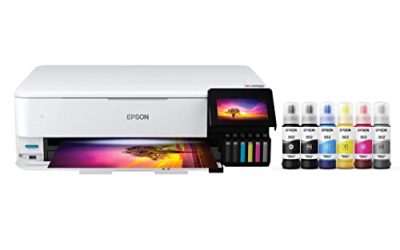
1. Epson EcoTank Photo ET-8550 — Best Overall for Home Enlargements

Tier: mid-range
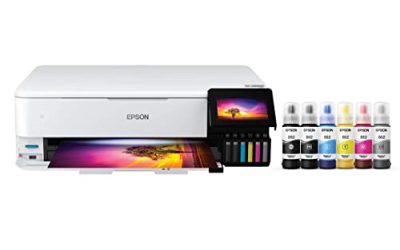
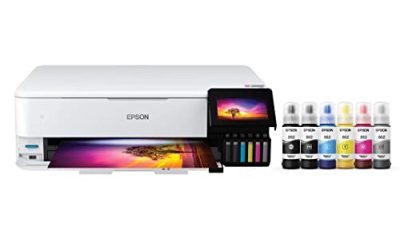
The ET-8550 removes the main reason home users ration big prints: ink cost per page. Instead of cartridges, it uses refillable tanks filled from bottles, and a single set of bottles produces a large volume of prints, so a failed 13×19 test print is a minor annoyance rather than a wasted splurge. That freedom changes behavior in a good way — you print the oversized family portrait, the vacation panorama crop, and the school project poster without doing mental arithmetic first.
Print quality holds up its end. The six-color Claria ET Premium dye set adds photo black and gray to the usual four colors, which smooths black-and-white enlargements and keeps shadow detail from blocking up in large dark areas. Borderless output runs to the full 13×19 sheet, the rear feed takes thick fine-art and matte papers that a front tray would bend, and the built-in scanner and copier handle the everyday side of home printing. A 4.3-inch touchscreen, an SD card slot, Wi-Fi and Ethernet round out a machine that behaves like a normal family all-in-one until you load the big paper.
Specs
- Max print size: 13 x 19 inches, borderless
- Ink system: 6-color Claria ET Premium dye ink, refillable EcoTank bottles
- Functions: print, scan, copy
- Display: 4.3-inch color touchscreen
- Paper handling: front paper tray plus rear feed for specialty media
- Connectivity: Wi-Fi, Ethernet, USB, SD card slot, AirPrint
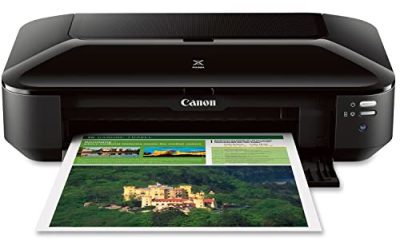
2. Canon PIXMA iX6820 — Best Budget Route to 13×19

Tier: budget
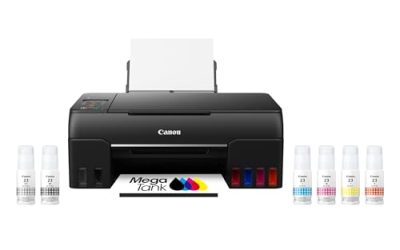
The iX6820 is the simplest answer to a specific question: what is the least complicated printer that still turns out a proper 13×19 enlargement? It is a print-only machine with a five-tank ink system — a pigment black for documents plus dye cyan, magenta, yellow and black for photos — and a maximum color resolution of 9600 x 2400 dpi. There is no scanner, no touchscreen and no display beyond status lights, which keeps the footprint compact at roughly 23 inches wide and keeps setup to a single tray that holds 150 sheets.
For wall prints, what matters is that it feeds 13×19 paper, prints borderless at that size, and produces color that holds together well at viewing distance. Skin tones and skies in family enlargements look natural, and the individual tanks mean you replace only the color that runs dry after a big print run. Wi-Fi, Ethernet and AirPrint cover printing from phones and laptops. It lacks the extra gray and photo inks of the pricier picks, so demanding black-and-white work is not its strength, but as a first large-format printer for a hallway gallery wall, it covers the brief at the lowest commitment in this group.
Specs
- Max print size: 13 x 19 inches, borderless
- Max resolution: 9600 x 2400 dpi color
- Ink system: 5 individual tanks (pigment black plus dye cyan, magenta, yellow, black)
- Functions: print only
- Paper capacity: 150 sheets
- Connectivity: Wi-Fi, Ethernet, USB, AirPrint
- Weight: 17.9 pounds
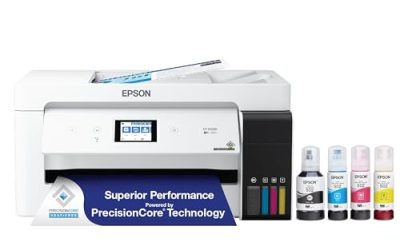
3. Epson Expression Photo HD XP-15000 — Best Cartridge Model for Color

Tier: mid-range
The XP-15000 is the wide-format printer for households that print big photos a few times a month rather than every week, and would rather not pay the tank premium up front. Its six-color Claria Photo HD cartridge set swaps the usual light cyan and light magenta for red and gray inks. The red expands the range of warm tones — sunsets, autumn foliage, terracotta and skin under warm light all gain depth — while the gray keeps black-and-white enlargements neutral instead of drifting green or magenta, a common cartridge-printer flaw at large sizes.
It prints borderless up to 13×19, handles two-sided documents automatically, and feeds specialty media through a 50-sheet rear tray on top of the 200-sheet front cassette, so glossy 13×19 paper travels a straighter path. A 2.4-inch color screen handles setup and maintenance without a computer. Running costs are the trade-off to accept: cartridges cost more per large print than the ET-8550’s bottles, so this model suits occasional enlargements rather than a weekly printing habit.
Specs
- Max print size: 13 x 19 inches, borderless
- Max resolution: 5760 x 1440 dpi
- Ink system: 6-color Claria Photo HD cartridges (black, cyan, magenta, yellow, gray, red)
- Paper handling: 200-sheet front tray plus 50-sheet rear specialty tray
- Duplex: automatic two-sided printing
- Display: 2.4-inch color LCD
- Connectivity: Wi-Fi, Ethernet, USB, AirPrint
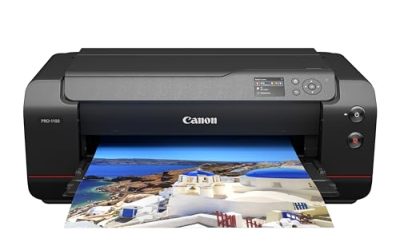
4. Canon PIXMA PRO-200S — Best for Glossy Enlargements

Tier: premium
The PRO-200S is where this list crosses from family printing into hobbyist territory. Its eight-color ChromaLife100 dye ink set adds gray, light gray, photo cyan and photo magenta to the standard colors, and dye ink sits slightly into glossy paper rather than on top of it, which is why glossy and luster enlargements from this machine have that smooth, lab-print look with deep, clean blacks. It prints borderless up to 13×19, and the manual feed slot accepts thick media and long sheets for panoramic crops that standard trays cannot take.
A 3.0-inch color LCD shows ink levels and walks through paper setup, and Canon’s Professional Print and Layout software simplifies the borderless and margin settings that trip up first-time large-print makers. There is no scanner, and it is a larger, heavier desk commitment than the all-in-ones above. Choose it when the goal is a framed glossy enlargement that looks like it came from a photo lab, and when most of your big prints are color work on glossy or semi-gloss stock.
Specs
- Max print size: 13 x 19 inches, borderless; manual feed for long and thick media
- Max resolution: 4800 x 2400 dpi
- Ink system: 8-color ChromaLife100 dye-based inks
- Functions: print only
- Display: 3.0-inch color LCD
- Paper feeds: top tray plus manual feed slot
- Connectivity: Wi-Fi, Ethernet, USB, AirPrint
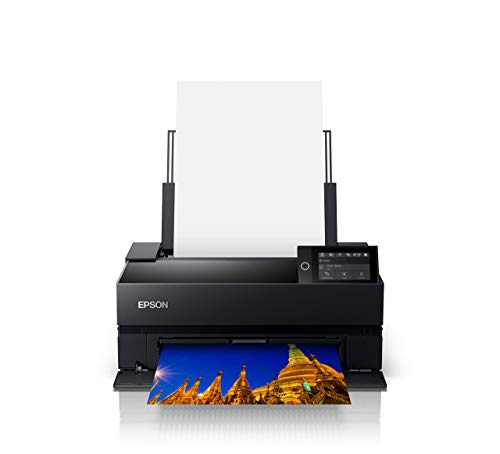
5. Epson SureColor P700 — Best for the Biggest Home Frames
Tier: premium
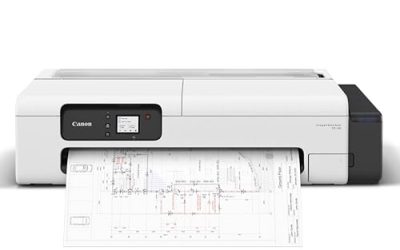
Every other pick here tops out at 13×19. The P700 prints on sheets up to 17 x 22 inches, which opens the standard 16×20 frame size with a proper border, and it supports roll paper for banners and long panoramas. For a home user whose wall space and ambitions have outgrown 13×19 — a statement piece over a mantel, a large wedding print, a triptych — this is the step up that stays on a desktop rather than moving to a floor-standing studio machine.
The ten-color UltraChrome PRO10 pigment ink set includes a violet channel that widens the blue and purple range, and pigment inks are the archival choice: framed enlargements resist fading far longer than dye prints, which matters for a print you expect to hang for years. Separate photo black and matte black channels are both plumbed in, so moving between glossy and matte paper does not waste ink on a switch-over flush. A Carbon Black mode deepens blacks on glossy media, and the 4.3-inch touchscreen makes paper-type selection — the setting that most affects large-print quality — hard to get wrong.
Specs
- Max print size: 17 x 22 inches; roll paper support for panoramas
- Max resolution: 5760 x 1440 dpi
- Ink system: 10-color UltraChrome PRO10 pigment inks, including violet
- Functions: print only
- Display: 4.3-inch color touchscreen
- Paper handling: front fine-art feed plus roll media support
- Connectivity: Wi-Fi, Ethernet, USB
How to Choose a Printer for Large Photos
Start with the largest size you will actually frame. In practice, home enlargements cluster at 11×14, 12×18 and 13×19, because those sizes fit standard frames and mats sold everywhere. A 13×19 printer covers all three with room to spare. Move to a 17-inch model like the P700 only if you specifically want 16×20 prints with a border or oversized statement pieces; the machine, paper and ink all grow with the format.
Match the ink system to your printing rhythm. Refillable tanks reward frequent printing: the ET-8550 makes a 13×19 test print feel free, which is exactly the mindset that produces good enlargements. Cartridge models cost less to buy and suit monthly printing. Within cartridges, count the colors — six inks with gray noticeably improve black-and-white prints, and eight dye inks maximize glossy color smoothness, while ten pigment inks maximize framed longevity.
Check the paper path, not just the headline size. Large photo paper is thick and stiff. A rear or straight-through feed keeps 13×19 glossy sheets from curling around tight rollers, which prevents head strikes and banding. Confirm the printer lists borderless printing at your target size, and check that 13×19 paper in your preferred finish — glossy, luster or matte — is easy to source, because you will standardize on one or two stocks.
Feed the printer enough image. A big print cannot invent detail. As a working rule, a photo with at least 3000 pixels on its long edge enlarges cleanly to 13×19 for normal wall viewing distances, and modern phone cameras clear that bar in good light. Print from the original file rather than a messaging-app copy, which is usually compressed down well below what a large print needs.
Plan the wall, then the printer. Frames, mats and hanging hardware are part of the real cost of printing big at home. Standardizing on 13×19 prints in 18×24 frames with a mat gives a gallery look with off-the-shelf supplies, and it is the combination the first four printers here are sized for.
Frequently Asked Questions
What is the largest photo I can print at home?
With the printers in this roundup, the ceiling is a 17 x 22 inch sheet from the Epson SureColor P700. The other four models print up to 13 x 19 inches, which fills an 18 x 24 inch frame with a standard mat and covers most home wall displays.
Is 13×19 big enough for a living room wall?
Yes, in most rooms. A 13×19 print matted inside an 18×24 frame reads as a substantial piece at normal sofa viewing distances, and a grid of four to six of them covers a large wall with a deliberate gallery effect. Go 17-inch only for a single statement print over a mantel or sofa.
Dye or pigment ink: which is better for framed photos?
Dye ink, as in the Canon PRO-200S and the Epson tank and cartridge models here, gives the smoothest glossy color. Pigment ink, as in the SureColor P700, is the longer-lasting choice under glass and handles matte and fine-art papers better. For a print you plan to keep on the wall for many years, pigment has the edge.
Can I print large photos from my phone?
Yes. Every printer here supports Wi-Fi printing and AirPrint, and the Epson and Canon apps let you pick the 13×19 paper size and borderless setting from the phone. For the sharpest result, print from the original photo in your camera roll rather than a copy saved from a chat or social app.
Final Verdict
For most homes, the Epson EcoTank Photo ET-8550 is the printer for large photos to buy: genuine 13×19 borderless output, six-color quality, tank running costs that encourage printing often, and a scanner for daily life. The Canon PIXMA iX6820 is the budget on-ramp to the same print size, the Epson XP-15000 serves occasional printers who want six-color cartridges, the Canon PIXMA PRO-200S makes the glossiest enlargements, and the Epson SureColor P700 is the premium step up to 17×22 archival prints for the biggest frames in the house.
Product and ASIN Reference
| Product | ASIN |
|---|---|
| Epson EcoTank Photo ET-8550 | B08R5M2HDH |
| Canon PIXMA iX6820 | B00HM0IVDY |
| Epson Expression Photo HD XP-15000 | B076PLTQQT |
| Canon PIXMA PRO-200S | B0DSR9KCG2 |
| Epson SureColor P700 | B0875QSCFW |
More from Amazon
Programs that pair well with the guide above. Offers and eligibility are set by Amazon and may change.
Free shipping on eligible items, Prime Video and more. Eligible new members can start with a free trial.
Start a Prime free trialAd-free music streaming. Eligible new subscribers can start with a free trial.
Try Music Unlimited freeA Prime membership for ages 18-24 with a trial period. Eligibility is set by Amazon.
See Prime for Young AdultsAudiobooks and podcasts to listen to on the go. Eligible new members can start with a free trial.
Try Audible freeAs an Amazon Associate we earn from qualifying purchases.