Key takeaways
- Compare the best fine art printers with pigment inks, cotton-rag and matte paper support, and archival ratings for gallery and edition printing work.
The best fine art printers are pigment-ink machines that feed thick cotton-rag and matte papers without bending them to death, hold a wide color gamut on uncoated media, and produce prints rated to last for generations. For most artists and photographers printing editions at home or in a small studio, the Epson SureColor P700 is the strongest all-around pick: a ten-color pigment system, a straight manual feed for heavy fine art sheets, and published permanence ratings that galleries and collectors take seriously. The Canon imagePROGRAF PRO-310 runs it close at the same 13-inch width, the PRO-1100 and SureColor P900 stretch the format to 17 inches, and the Epson EcoTank Photo ET-8550 covers the entry point for artists who print on fine art media at volume and want bottled ink instead of cartridges.
Fine art printing is a different discipline from photo printing on glossy stock. The papers are matte, textured, and often made from cotton rag or alpha-cellulose with no optical brighteners, and they drink ink differently than resin-coated photo paper. The printers below were chosen for that work: pigment ink sets with dedicated matte black channels, manual or rear feeds that keep heavy sheets flat, and manufacturer support for the fine art paper profiles that make color predictable on rough, absorbent surfaces.
As an Amazon Associate, we earn from qualifying purchases.
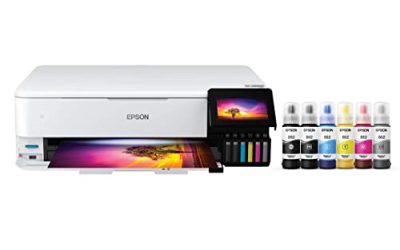
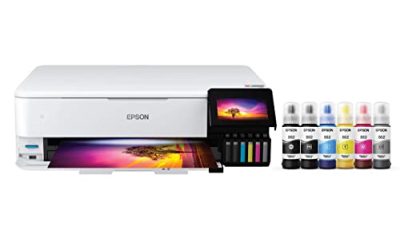
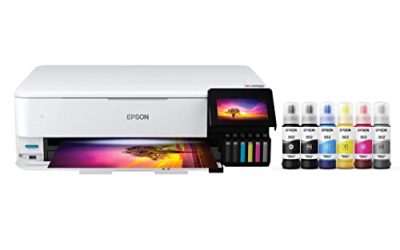
Epson EcoTank Photo ET-8550 — Best Budget Entry to Fine Art Media

The ET-8550 is the accessible way into printing on fine art paper at home. It is a six-color all-in-one built around refillable tanks rather than cartridges, so the ink arrives in bottles and a full set carries enough volume for sustained edition work, proofing, and the inevitable discarded test sheets that fine art printing involves. A rear specialty-media feed gives thick sheets a gentler path than the main cassette, which is the feature that matters most for cotton-rag and matte art papers in this price class.
The honest trade-off is the ink itself. The Claria ET Premium set is dye-based color with a pigment black, and dye inks sit on top of matte coatings differently than full pigment sets: colors are vivid, but display permanence on fine art media trails the pigment machines below, and the gray ink helps monochrome gradation without matching a dedicated multi-black pigment workflow. Treat the ET-8550 as the printer for learning fine art media, selling open-edition work at accessible sizes, and printing volume proofs — then step up to a pigment machine when archival ratings become part of the sale.
Specs
- Ink system: 6-color Claria ET Premium refillable tanks (dye colors plus pigment black and gray)
- Ink supply: 552 EcoTank bottles, 70 ml per color
- Maximum print size: 13 x 19 inches, borderless
- Resolution: 5760 x 1440 dpi
- Media handling: Rear specialty-media feed for thick sheets, plus scanner and copier
- Display: 4.3-inch color touchscreen
- Connectivity: Wi-Fi, Ethernet, USB
- Weight: 24.5 pounds
- Tier: budget
Canon imagePROGRAF PRO-310 — Best 13-Inch Canon for Matte Papers

The PRO-310 is Canon’s current 13-inch pigment printer and the natural pick for artists already working in Canon’s paper ecosystem. Its LUCIA PRO II ink set runs nine pigment colors plus a Chroma Optimizer clear coat, and the channel that matters most for fine art work is the matte black: it is formulated to deepen blacks on matte and fine art papers, where ordinary photo black ink tends to wash out. A dedicated gray keeps black-and-white gradations smooth on rag papers, which is where monochrome editions live or die.
Paper handling suits the medium. The manual feed slot takes heavy Canon fine art media, and the printer supports borderless output up to 13 x 19 inches plus long panorama formats for artists whose work does not fit standard sheet ratios. Canon’s Professional Print and Layout software handles paper profiles and soft proofing for Canon’s own fine art range, including its premium matte and fine art rough papers, so the path from screen to a textured sheet is well documented. The small 14.4 ml ink tanks are the running-cost caveat: edition printers who output daily will feel the per-milliliter difference against the larger PRO-1100 below.
Specs
- Ink system: 9-color LUCIA PRO II pigment inks plus Chroma Optimizer (10 tanks)
- Ink tanks: PFI-5100, 14.4 ml each
- Maximum print size: 13 x 19 inches borderless; panorama up to 13 x 39 inches
- Resolution: 4800 x 2400 dpi
- Media handling: Top tray plus manual feed slot for heavy fine art media up to 380 gsm (Canon genuine media)
- Display: 3.0-inch color LCD
- Connectivity: Wi-Fi, Ethernet, USB; AirPrint and Mopria
- Weight: 31.6 pounds
- Tier: mid-range
Epson SureColor P700 — Best Overall Fine Art Printer
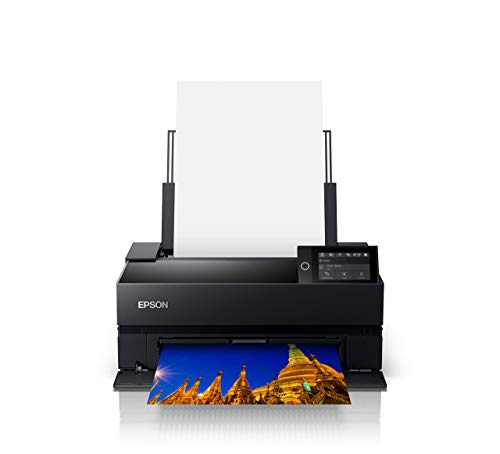
The P700 is the reference point for desktop fine art printing. Its UltraChrome PRO10 set carries ten pigment inks, including a violet channel that widens the gamut in blues and purples — colors that matte papers usually flatten — and both matte black and photo black are loaded full time on dedicated nozzles, so moving between a cotton-rag sheet and a baryta sheet never triggers an ink-wasting switch. Epson rates PRO10 prints on its archival media at up to 200 years for color and 400 years for black-and-white under Wilhelm Research display testing, the kind of figure that belongs in an edition’s documentation.
The media path is built for this work. A front manual feed accepts sheets up to 1.5 mm thick, which covers heavyweight cotton rag and even fine art boards, and a built-in roll feed handles 13-inch rolls for panoramas and long editions. Epson’s Signature Worthy and Legacy paper lines are profiled for the machine, and third-party rag papers from the major mills are widely supported through Epson Print Layout and standard ICC workflows. A Carbon Black driver mode pushes density further on glossy media for artists who split their output between matte and baryta surfaces. For a 13-inch ceiling, this is the complete fine art package.
Specs
- Ink system: UltraChrome PRO10, 10 pigment inks including violet, with dedicated matte black and photo black channels
- Ink cartridges: 25 ml per color
- Maximum print size: 13 x 19 inches borderless; 13-inch roll media support
- Resolution: 5760 x 1440 dpi
- Media handling: Front manual feed for media up to 1.5 mm thick
- Permanence: WIR ratings up to 200 years color and 400 years black-and-white on rated Epson media
- Display: 4.3-inch color touchscreen
- Connectivity: Wi-Fi, Ethernet, USB
- Tier: premium
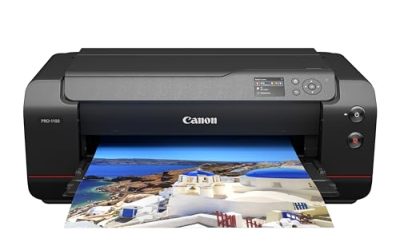
Canon imagePROGRAF PRO-1100 — Best 17-Inch Canon for Editions

The PRO-1100 is Canon’s flagship desktop machine and the step up when 13 inches stops fitting the work. It prints on sheets up to 17 x 22 inches, which opens full-bleed portfolio pages, larger gallery pieces, and editions that command more wall presence. The ink set expands to eleven LUCIA PRO II pigment colors plus Chroma Optimizer, adding photo cyan, photo magenta, red, and blue channels that smooth skin tones and extend the gamut at the edges where fine art reproductions of paintings tend to fail.
Canon developed the LUCIA PRO II set for this machine with improved light resistance, and rates prints for long-term preservation measured in generations on its fine art media. The practical upgrade over the PRO-310 is ink economics: the PFI-4100 tanks hold 80 ml each, so the cost per milliliter drops sharply for artists printing editions every week. Anti-clogging technology and skew correction protect expensive sheets mid-run, and the manual feed handles the thick matte and rag papers that define this category. It is a large, heavy, single-purpose machine, and it earns that footprint only in a working studio.
Specs
- Ink system: 11-color LUCIA PRO II pigment inks plus Chroma Optimizer (12 tanks)
- Ink tanks: PFI-4100, 80 ml each
- Maximum print size: 17 x 22 inches; borderless printing supported
- Resolution: 4800 x 2400 dpi
- Media handling: Top feed plus manual feed slot for heavy fine art media
- Display: 3.0-inch color LCD
- Connectivity: Wi-Fi, Ethernet, USB; AirPrint
- Weight: About 71 pounds
- Tier: premium
Epson SureColor P900 — Best 17-Inch Epson for Gallery Work
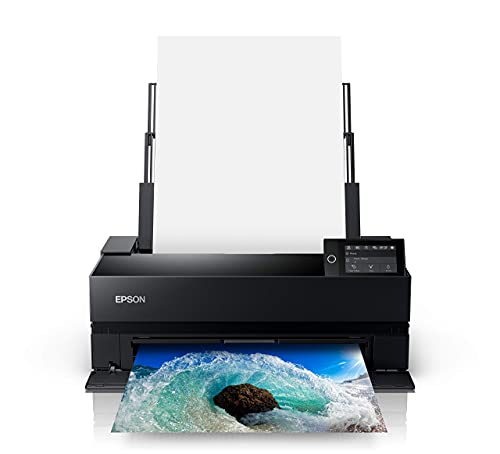
The P900 takes the P700 formula — the same UltraChrome PRO10 ten-ink set, the same dedicated black channels, the same Carbon Black mode — and stretches the carriage to 17 inches. Sheets up to 17 x 22 inches cover the standard gallery sizes, and an optional roll adapter adds 17-inch roll media for panoramic work and long print runs. Permanence ratings match the smaller machine: up to 200 years for color and 400 years for black-and-white on rated Epson archival media, figures an artist can state in edition paperwork with the testing body named.
For Epson-loyal studios, the attraction is workflow continuity: the same ink chemistry, the same paper profiles, and the same driver behavior as the P700, just wider. The 50 ml cartridges double the P700’s capacity, which suits the ink appetite of 17-inch sheets, and the front manual feed again takes media up to 1.5 mm thick for the heaviest cotton-rag and board stocks. Despite the width, the body stays comparatively compact for its class, though at just over 35 pounds it still wants a permanent stand rather than a desk corner.
Specs
- Ink system: UltraChrome PRO10, 10 pigment inks including violet, with dedicated matte black and photo black channels
- Ink cartridges: 50 ml per color
- Maximum print size: 17 x 22 inches; optional 17-inch roll media adapter
- Resolution: 5760 x 1440 dpi
- Media handling: Front manual feed for media up to 1.5 mm thick
- Permanence: WIR ratings up to 200 years color and 400 years black-and-white on rated Epson media
- Display: 4.3-inch color touchscreen
- Connectivity: Wi-Fi, Ethernet, USB
- Weight: 35.3 pounds
- Tier: premium
How to Choose a Fine Art Printer
Start with ink chemistry. Pigment ink is the foundation of fine art printing because the colorant sits on the paper surface as solid particles, which is what delivers both the matte-paper black density and the multi-decade permanence ratings. Four of the five printers here are full pigment machines. The ET-8550’s dye-based color set is the exception, and it belongs in a fine art guide only as a learning and proofing platform — if a print is being sold as archival, it should come off a pigment printer.
Match the printer to your largest sheet. Thirteen-inch machines print 13 x 19, which frames up to a generous portfolio size. Seventeen-inch machines print 17 x 22 and change what an edition can be, but they also consume more ink per sheet, need real furniture, and cost more to keep in cartridges. Buy for the largest size you will print regularly, not the largest you can imagine printing once.
Check the media path, not just the media list. Fine art papers run thick and stiff, and many weigh far more than photo paper. A straight or near-straight manual feed is what prevents head strikes, skew, and scuffed coatings on a costly sheet. Every printer above the budget tier here offers a manual feed rated for heavy fine art media; confirm the thickness and weight limits against the specific paper you plan to standardize on.
Think in ink volume, not cartridge count. Edition printing consumes ink in a way snapshot printing never does. Small tanks, like the PRO-310’s 14.4 ml set, are fine for weekly output; daily edition work belongs on the PRO-1100’s 80 ml tanks, the P900’s 50 ml cartridges, or the ET-8550’s bottles. Price your expected monthly sheet count against tank sizes before choosing.
Plan the paper workflow. A fine art printer only performs as well as its paper profiles. Both Canon and Epson publish ICC profiles and driver media settings for their own fine art papers, and the major independent mills publish profiles for these exact models. Standardize on two or three papers — a smooth cotton rag, a textured matte, and perhaps a baryta — and build your soft-proofing habits around them.
Frequently Asked Questions
What makes a printer a fine art printer?
Three things: a pigment ink set with a dedicated matte black channel, a media path that feeds thick matte and cotton-rag papers without a sharp bend, and manufacturer or paper-mill ICC profiles for fine art media. Permanence ratings from an independent testing body, stated for specific papers, separate genuine fine art machines from photo printers with a matte paper setting.
Is pigment ink always better than dye ink for art prints?
For prints that will be displayed or sold as lasting work, yes. Pigment particles rest on the paper surface, resist light and gas fading far longer, and hold density on matte coatings. Dye inks can look more saturated on glossy paper and cost less to run, which is why the ET-8550 works as a proofing and learning machine, but archival claims belong to pigment output.
What paper should beginners start with?
Start with a smooth matte cotton-rag or alpha-cellulose paper in the printer maker’s own fine art line, because its profile is built into the driver and removes one variable while you learn. Add a textured paper once your color management is consistent. Keep notes on every sheet: paper, profile, and driver settings are what make an edition repeatable months later.
How long do fine art prints from these printers last?
On rated media, the Epson PRO10 machines carry Wilhelm Research display ratings of up to 200 years for color and 400 years for black-and-white, and Canon rates its LUCIA PRO II output on the PRO-1100 for long-term preservation across generations. Ratings assume the specified papers, display under glass, and sensible conditions; unlisted third-party papers will differ, so edition documentation should name the exact paper used.
Final Verdict
For most artists and photographers building a fine art practice, the Epson SureColor P700 is the printer to buy: full pigment printing, a thick-media manual feed, roll support, and the strongest published permanence story at 13 inches. Canon loyalists at the same size should take the imagePROGRAF PRO-310 for its matte black performance on rag papers. When the work outgrows 13 inches, the Canon PRO-1100 brings the better ink economics for heavy edition schedules, while the Epson P900 keeps PRO10 behavior and profiles intact at 17 inches. The EcoTank Photo ET-8550 remains the sensible first step for artists learning fine art media on a budget, with a clear upgrade path to pigment when the work starts to sell as archival.
Product and ASIN Reference
| Product | ASIN |
|---|---|
| Epson EcoTank Photo ET-8550 | B08R5M2HDH |
| Canon imagePROGRAF PRO-310 | B0DSQP2FX6 |
| Epson SureColor P700 | B0875QSCFW |
| Canon imagePROGRAF PRO-1100 | B0DDVMX94H |
| Epson SureColor P900 | B0875K6D4H |
More from Amazon
Programs that pair well with the guide above. Offers and eligibility are set by Amazon and may change.
Free shipping on eligible items, Prime Video and more. Eligible new members can start with a free trial.
Start a Prime free trialAd-free music streaming. Eligible new subscribers can start with a free trial.
Try Music Unlimited freeA Prime membership for ages 18-24 with a trial period. Eligibility is set by Amazon.
See Prime for Young AdultsAudiobooks and podcasts to listen to on the go. Eligible new members can start with a free trial.
Try Audible freeAs an Amazon Associate we earn from qualifying purchases.