Key takeaways
- Compare the best poster printers for 18x24 to 24x36 prints, from desktop 24-inch models to a 36-inch floor model, with roll and sheet media picks.
A poster printer is a wide-format inkjet machine built to output full-size posters, typically 18×24 inches and up, on roll or sheet media. The sweet spot for most schools, retailers, churches, event venues and small print corners is the 24-inch class: it prints 18×24 and 24×36 posters natively, runs on affordable pigment ink, and still fits on a desk or a compact stand. If you regularly need full 24×36 output with borders handled cleanly, a 36-inch model removes the trimming and tiling workarounds.
The five printers below cover that poster and signage use case end to end. The Canon imagePROGRAF TC-20 is the most poster-focused desktop pick thanks to bottle-fed pigment ink and free design software. The HP DesignJet T210 is the simplest budget route onto a desk. Epson’s SureColor T2170 adds all-pigment durability and fast draft output, the cartridge-free SureColor T3170x suits steady weekly volume, and the 36-inch SureColor T5170 handles the biggest display work without breaking a sweat.
As an Amazon Associate, we earn from qualifying purchases.
Canon imagePROGRAF TC-20

Tier: Mid-range
Canon designed the TC-20 specifically for people who print posters where they work: classrooms, retail floors, offices and community spaces. It is a 24-inch, four-color pigment inkjet that feeds both rolls and cut sheets, and it ships with a full set of 70 ml ink bottles rather than small starter cartridges, so the first run of posters does not immediately trigger a supply order. The automatic sheet feeder holds up to 100 letter-size sheets or 50 sheets of 11×17 paper, which makes it easy to mix everyday documents with poster runs.
Poster output is the headline feature. On coated paper, an A1-size poster takes a little over three minutes in fast mode, and Canon’s free PosterArtist software walks non-designers through templates for sales signs, classroom displays and event boards. All four inks are pigment, so finished posters resist water splashes and highlighter smears, and colors stay put on windows and notice boards. Everything is operated from the front, including ink refills and maintenance cartridge swaps, so the printer can sit against a wall.
Specs
- Max print width: 24 inches (roll and cut sheet)
- Print resolution: 2,400 x 1,200 dpi
- Ink system: 4-color pigment ink in 70 ml bottles (PFI-050), 280 ml of starter ink included
- Print head: Canon PF-08 with 4,352 nozzles
- Media handling: roll feed plus automatic sheet feeder (100 letter sheets or 50 sheets of 11×17)
- Poster speed: A1 poster on coated paper in about 3 minutes 10 seconds (fast mode)
- Connectivity: Wi-Fi, Ethernet, USB, USB memory direct print for PDF and JPEG
- Footprint: desktop design, about 38.1 x 20.7 x 9.6 inches with the sheet feeder closed
Choose the TC-20 if posters are the main job and design help matters as much as hardware. The bottle system keeps running costs predictable for a school or shop printing every week.
HP DesignJet T210
Tier: Budget
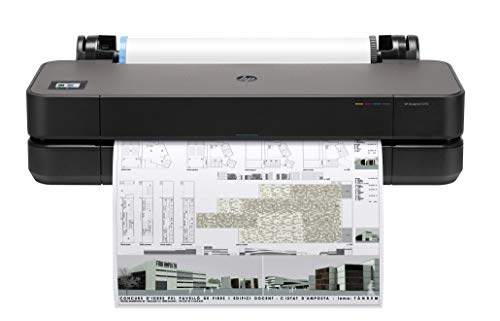
The DesignJet T210 is HP’s entry point into 24-inch printing and the easiest machine on this list to live with in a small office. It prints a D-size sheet in 45 seconds, so a run of 18×24 posters for a hallway display or a week of retail signage moves quickly. HP Click software simplifies sending poster files, and the HP Smart app lets staff print from phones and tablets without walking back to a desk.
Ink is a four-cartridge HP 712 set with dye-based color and a pigment black. Dye color inks produce vivid poster graphics on coated media, while the pigment black keeps text and line work crisp. Media handling covers rolls up to 24 inches wide and single sheets, with an automatic horizontal cutter trimming roll output to size. An optional automatic sheet feeder accessory adds multi-sheet jobs up to 13×19 inches. The T210 is also one of the most compact 24-inch printers made, and it can run on an optional stand if desk space is tight.
Specs
- Max print width: 24 inches (roll and cut sheet)
- Print resolution: up to 2,400 x 1,200 optimized dpi
- Ink system: 4 HP 712 cartridges, dye-based color and pigment black (black up to 80 ml, color 29 ml)
- Print speed: 45 seconds per D-size page, up to 59 D-size prints per hour
- Media handling: roll feed, sheet feed, automatic horizontal cutter; optional sheet feeder for sheets up to 13×19 inches
- Memory: 512 MB
- Connectivity: Wi-Fi, Wi-Fi Direct, Gigabit Ethernet, Hi-Speed USB 2.0, HP Smart app and AirPrint
- Weight: 47.4 lb
Pick the T210 when the poster workload is occasional and ease of use matters more than the lowest possible ink cost per print.
Epson SureColor T2170
Tier: Mid-range
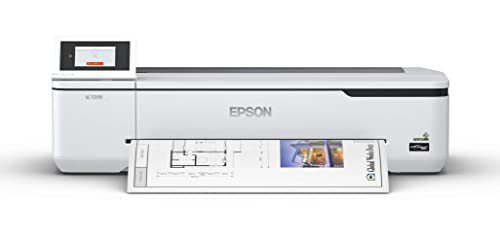
The SureColor T2170 is Epson’s value desktop model in the T-Series line, and it leans into durability. All four channels use UltraChrome XD2 pigment ink, so posters come out instant-dry and water resistant, a practical advantage for signage that gets handled, posted outdoors under cover, or wiped down. A D-size print takes 43 seconds, and PrecisionCore printhead technology with nozzle verification keeps output consistent across a long run of identical posters.
Operation centers on a 4.3-inch color touchscreen, and the printer connects over Wi-Fi, Wi-Fi Direct, Ethernet and USB, so a front desk, classroom or studio can share it without extra hardware. Media handling is flexible: rolls from 13 to 24 inches wide, plus an auto sheet feeder for sheets up to 11×17 inches. Cartridges run up to 50 ml for color and 80 ml for black, which stretches the interval between swaps for moderate poster volume.
Specs
- Max print width: 24 inches (roll and cut sheet)
- Print resolution: 2,400 x 1,200 dpi
- Ink system: 4-color UltraChrome XD2 pigment ink, cartridges up to 50 ml color and 80 ml black
- Print head: PrecisionCore MicroTFP with Nozzle Verification Technology
- Print speed: A1/D-size print in 43 seconds
- Media handling: roll feed plus auto sheet feeder for sheets up to 11×17 inches
- Display: 4.3-inch LCD color touchscreen
- Connectivity: Wi-Fi, Wi-Fi Direct, Ethernet, SuperSpeed USB
The T2170 fits buyers who want pigment durability and quick turnaround on a desktop, especially for posters that will be displayed for months rather than days.
Epson SureColor T3170x

Tier: Premium
The T3170x takes the same 24-inch T-Series platform and removes cartridges from the equation. Instead of cartridges, it uses refillable ink tanks filled from high-capacity UltraChrome XD2 bottles, which suits poster-heavy environments like schools, churches and print corners that run the machine every day. Epson rates it for A1/D-size prints in 34 seconds, the fastest poster cycle on this list, and the all-pigment ink keeps signage water resistant and instant-dry.
Because the ink supply is visible in the front-facing tanks, staff can see at a glance whether a big run will finish, and topping up is a bottle pour rather than a cartridge swap. Wireless and Wi-Fi Direct printing are built in, the 4.3-inch touchscreen handles walk-up jobs, and the compact desktop footprint matches the other 24-inch models here. For a venue printing seasonal displays, wayfinding signs and event posters on a weekly rhythm, the tank system is the main reason to step up.
Specs
- Max print width: 24 inches (roll and cut sheet)
- Print resolution: 2,400 x 1,200 dpi
- Ink system: cartridge-free refillable tanks with high-capacity UltraChrome XD2 pigment ink bottles
- Print head: PrecisionCore MicroTFP with Precision Droplet Control
- Print speed: A1/D-size print in 34 seconds
- Media handling: roll feed plus sheet feed, automatic sheet feeder support
- Display: 4.3-inch LCD color touchscreen
- Connectivity: Wi-Fi, Wi-Fi Direct, Ethernet, USB
Choose the T3170x when poster volume is steady enough that cartridge swaps have become a chore and per-print ink cost is a real line item.
Epson SureColor T5170

Tier: Premium
The T5170 is the step up in physical size: a 36-inch printer on an included stand that prints a full 24×36 poster with room to spare, plus 36-inch-wide banners and display boards in a single pass. If your poster work regularly hits the ceiling of a 24-inch machine, or you print presentation boards and trade show graphics, this is the model that removes the workaround. It still produces an A1/D-size print in 31 seconds, so speed does not suffer for the extra width.
Under the hood it shares the T-Series formula: UltraChrome XD2 pigment inks for durable, instant-dry output, a PrecisionCore MicroTFP printhead with nozzle verification, and a 4.3-inch touchscreen. Cartridges go up to 50 ml for color and 80 ml for black. The included stand holds the printer at working height and catches finished posters, and connectivity covers Wi-Fi, Wi-Fi Direct, Ethernet and USB for shared studio or office use.
Specs
- Max print width: 36 inches (roll and cut sheet)
- Print resolution: 2,400 x 1,200 dpi
- Ink system: 4-color UltraChrome XD2 pigment ink, cartridges up to 50 ml color and 80 ml black
- Print head: PrecisionCore MicroTFP with Nozzle Verification Technology
- Print speed: A1/D-size print in 31 seconds
- Media handling: roll feed and sheet feed, printer stand included
- Display: 4.3-inch LCD color touchscreen
- Connectivity: Wi-Fi, Wi-Fi Direct, Ethernet, USB
Pick the T5170 if 24×36 posters and wider display pieces are routine and you have the floor space for a stand-mounted machine.
How to Choose
Start with the largest poster you print regularly. If 18×24 covers nearly everything and 24×36 is rare, a 24-inch desktop model is the right size and costs far less to run than oversizing. If 24×36 posters, foam-board displays or banners are weekly work, go straight to the 36-inch T5170 and skip the tiling and trimming.
Next, think about ink. Pigment ink in all four channels, as on the Canon and Epson models, produces posters that tolerate handling, moisture and sunlight near windows. The HP T210 pairs dye color with pigment black, which looks vivid on coated poster paper but is better suited to indoor display. For volume, the delivery format matters: the TC-20’s bottles and the T3170x’s refillable tanks cut the cost and hassle of frequent printing, while cartridge models are simpler for light, occasional use.
Media handling decides day-to-day convenience. Roll media is the economical way to print posters, and every model here cuts roll output to length. Sheet feeders help when you mix posters with letter or tabloid documents. Finally, plan the footprint: the four 24-inch models sit on a desk or an optional stand, while the T5170 needs dedicated floor space, and connectivity should match how your team sends files, whether that is Wi-Fi from laptops, phones over Wi-Fi Direct, or a wired office network.
Frequently Asked Questions
What size posters can a 24-inch printer make?
A 24-inch printer produces 18×24 posters at full size and 24×36 posters by printing on 24-inch roll media and cutting to length. It also handles A1 sheets, which are close to 24×33 inches. Anything wider, such as a 36-inch banner, needs a 36-inch model like the SureColor T5170.
Is pigment or dye ink better for posters?
Pigment ink is the safer choice for posters that will be handled, posted near windows or displayed for months, because it resists water and fading better. Dye ink can look slightly more vivid on glossy coated paper, which suits short-run indoor promotions. Most dedicated poster printers use pigment ink in every channel.
Can these printers print on poster board and cardstock?
They print on roll and sheet media within their rated thickness range, including heavyweight coated poster papers. Thick rigid poster board generally will not feed through a roll-fed wide-format printer, so the common workflow is to print on heavyweight paper and mount it to board afterward.
Do I need special software to design posters?
No, but it helps. Canon bundles access to PosterArtist, a template-driven design tool aimed at signs and classroom posters. The Epson and HP models work with standard design software and their own print utilities, and all five accept files from phones and tablets over wireless connections.
Final Verdict
For most poster work, the Canon imagePROGRAF TC-20 is the strongest all-round choice: pigment bottle ink, a sheet feeder for mixed jobs and design software that helps non-designers produce clean signs. The HP DesignJet T210 is the budget-friendly way to start printing 24-inch posters in a small office. Epson’s SureColor T2170 adds all-pigment durability at a mid-range tier, the T3170x removes cartridge costs for high-volume poster programs, and the 36-inch SureColor T5170 is the pick when full 24×36 posters and wide displays are the everyday job.
Product and ASIN Reference
| Product | ASIN |
|---|---|
| Canon imagePROGRAF TC-20 | B0BSTTZR1Y |
| HP DesignJet T210 (8AG32A) | B08F6T1CJ7 |
| Epson SureColor T2170 | B0877BBHLP |
| Epson SureColor T3170x | B082G46NLB |
| Epson SureColor T5170 | B07HNYPKFN |
More from Amazon
Programs that pair well with the guide above. Offers and eligibility are set by Amazon and may change.
Free shipping on eligible items, Prime Video and more. Eligible new members can start with a free trial.
Start a Prime free trialAd-free music streaming. Eligible new subscribers can start with a free trial.
Try Music Unlimited freeA Prime membership for ages 18-24 with a trial period. Eligibility is set by Amazon.
See Prime for Young AdultsAudiobooks and podcasts to listen to on the go. Eligible new members can start with a free trial.
Try Audible freeAs an Amazon Associate we earn from qualifying purchases.