Key takeaways
- Compare the best professional photo printers with wide pigment ink sets, 13x19 and larger output, roll media support, and gallery-grade color accuracy.
A professional photo printer is defined by three things: a wide pigment ink set with dedicated black channels, output of at least 13×19 inches, and media handling that covers heavyweight fine art papers and roll stock. The Canon imagePROGRAF PRO-1100 is the strongest all-round pick in this class, pairing an 11-color pigment system plus a chroma optimizer with 17-inch borderless output. The Epson SureColor P900 answers with a 10-color set, violet ink for deeper blues, and no black-ink switching. Below those two flagships sit two 13-inch machines for smaller studios and one 44-inch roll-fed production printer for high-volume work.
Every machine in this roundup prints with pigment inks rather than the dye inks used in consumer photo printers. Pigment particles rest on the paper surface instead of soaking into it, which is why these printers carry archival ratings measured in decades and why they handle matte and textured fine art media without the color shift dyes can show on uncoated stock. The segment splits cleanly by format: 13-inch desktop models for portfolio and small gallery work, 17-inch desktop models for standard exhibition sizes, and roll-fed floor models for production. The five picks below cover each tier.
As an Amazon Associate, we earn from qualifying purchases.
1. Canon imagePROGRAF PRO-1100 — Premium

The PRO-1100 is Canon’s flagship desktop machine and the natural starting point for photographers selling gallery work. Its LUCIA PRO II system runs eleven pigment inks plus a chroma optimizer that levels the surface of glossy prints, evening out gloss differential and bronzing on reflective papers. Red and blue channels are separate inks rather than mixes, which widens the gamut in exactly the saturated regions where landscape and product work tends to clip on narrower ink sets.
Media handling matches the ink set. The printer produces borderless output up to 17×22 inches, feeds thick fine art stock through a manual feed path, and supports extended panoramic lengths from long sheet media. Canon rates the LUCIA PRO II set for improved light resistance over the previous generation, which matters for prints sold as long-term wall pieces. The 80 mL cartridges are the largest in Canon’s desktop photo line, so per-print ink cost and changeover frequency both improve over the 13-inch models.
Specs
- Max print size: 17 x 22 inches, borderless
- Ink system: 11 LUCIA PRO II pigment inks plus Chroma Optimizer
- Cartridge size: 80 mL (PFI-4100)
- Max resolution: 2400 x 1200 dpi
- Media handling: top feed, manual feed for thick media, panoramic lengths
- Display: 3.0-inch color LCD
- Connectivity: Wi-Fi, Ethernet, USB
2. Epson SureColor P900 — Premium
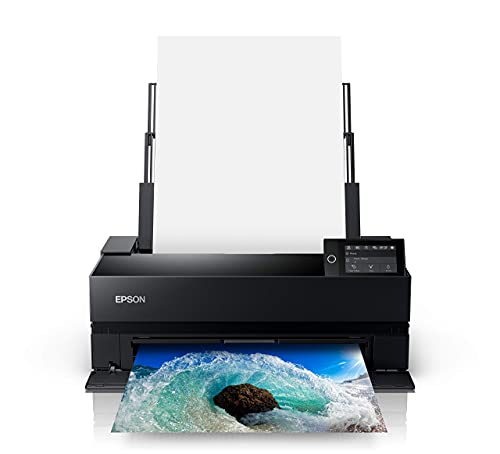
The P900 is Epson’s 17-inch answer, built around the UltraChrome PRO10 ink set. Ten inks include a violet channel that extends the blue and purple gamut, a region where the previous Epson generation visibly compressed deep sky and twilight tones. Both photo black and matte black have dedicated nozzles in the 10-channel printhead, so moving between glossy and matte papers never triggers a purge cycle or wastes ink on a switchover.
Epson’s Carbon Black mode increases black density on glossy media, and the 4.3-inch touchscreen makes media setup and profile selection straightforward at the machine. Sheet feeding covers borderless prints up to 17×22 inches, a front manual path takes thicker stock, and an optional roll paper holder opens up long panoramic work. The 50 mL cartridges sit between the P700 and true production machines in capacity, suiting a steady studio workload without the footprint of a stand-mounted printer.
Specs
- Max print size: 17 x 22 inches, borderless
- Ink system: 10 UltraChrome PRO10 pigment inks including violet
- Cartridge size: 50 mL
- Max resolution: 5760 x 1440 dpi
- Media handling: sheet feed, front manual feed, optional roll paper holder
- Display: 4.3-inch color touchscreen
- Connectivity: Wi-Fi, Ethernet, USB
3. Canon imagePROGRAF PRO-310 — Mid-Range

The PRO-310 brings Canon’s current pigment system down to a 13-inch chassis. It uses nine LUCIA PRO II pigment inks plus the chroma optimizer, so the glossy-print surface treatment and the expanded red and blue gamut of the PRO-1100 carry over in smaller format. Borderless output tops out at 13×19 inches, the standard portfolio and small-gallery size.
Two paper paths cover the media range: a top feed for everyday photo papers and a manual feed tray that accepts thicker fine art sheets without bending them through a tight curve. Canon’s anti-clogging system and skew correction address the two most common failure modes on pigment machines that sit idle between jobs, recirculating ink and checking sheet alignment before a print starts. The trade-off against the PRO-1100 is cartridge capacity: the PFI-5100 cartridges are small, so heavy users will swap them often.
Specs
- Max print size: 13 x 19 inches, borderless
- Ink system: 9 LUCIA PRO II pigment inks plus Chroma Optimizer
- Cartridge size: 14.3 mL (PFI-5100)
- Max resolution: 4800 x 2400 dpi
- Media handling: top feed, manual feed tray for thick fine art media
- Display: 3.0-inch color LCD
- Connectivity: Wi-Fi, Ethernet, USB
4. Epson SureColor P700 — Budget
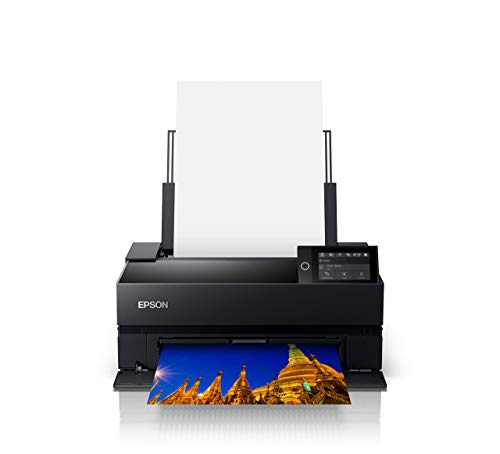
The P700 is the entry point into the professional class, and it gives up less than the price gap suggests. It runs the same UltraChrome PRO10 ink set as the P900, violet channel included, with the same dedicated photo black and matte black nozzles and the same Carbon Black mode for glossy work. Output quality per print is effectively the flagship’s; what shrinks is the format and the ink supply.
Maximum size is 13×19 inches borderless, and cartridges hold 25 mL, half the P900’s capacity. In return, the P700 builds roll paper support into the machine rather than selling it as an accessory, so panoramic prints are available from day one, and a CD and DVD tray covers disc labeling work. For photographers whose largest saleable print is 13×19, this is the most direct route into a wide-gamut pigment workflow.
Specs
- Max print size: 13 x 19 inches, borderless
- Ink system: 10 UltraChrome PRO10 pigment inks including violet
- Cartridge size: 25 mL
- Max resolution: 5760 x 1440 dpi
- Media handling: sheet feed, front manual feed, built-in roll paper support, CD/DVD tray
- Display: 4.3-inch color touchscreen
- Connectivity: Wi-Fi, Ethernet, USB
5. HP DesignJet Z9+ 44-Inch PostScript Printer — Premium

The Z9+ is a different class of machine: a floor-standing, roll-fed production printer for studios and print shops selling large work. It prints up to 44 inches wide from roll media, with cut-sheet support for proofs and one-offs, and an optional dual-roll configuration for shops that switch media families during the day.
Its defining feature for photographic work is color control. The PostScript configuration embeds an X-Rite i1 spectrophotometer in the printer, enabling closed-loop calibration and profile creation at the machine instead of relying on an external device and a separate workstation step. HP’s Pixel Control processing manages the transition between ink channels to keep gradients smooth at large sizes, where banding and contouring are far more visible than at desktop formats. This is the pick when the deliverable is a 40-inch gallery piece or a run of exhibition panels rather than a portfolio print.
Specs
- Max print width: 44 inches, roll fed
- Ink system: HP Vivid Photo pigment inks
- Max resolution: 2400 x 1200 dpi
- Calibration: embedded X-Rite i1 spectrophotometer
- Media handling: roll feed and cut sheet, optional dual roll
- Connectivity: Ethernet, USB
How to Choose a Professional Photo Printer
Start with print width. Width decides the largest saleable print you can offer. A 13-inch machine covers portfolio work and small framed pieces; 17 inches reaches standard gallery sizes; 24 inches and above is production territory for exhibition and commercial display work.
Count the inks, then check the blacks. Wide ink sets with extra red, blue, violet, and gray channels render saturated color and neutral black-and-white tones more accurately. Just as important is how the printer handles its two blacks: machines with dedicated photo black and matte black nozzles switch between glossy and matte media instantly, while single-channel designs purge ink on every change.
Match media handling to your paper. Fine art work means thick, textured, sometimes delicate sheets. Look for a straight manual feed path for heavy stock, and decide whether you need roll support for panoramas or long runs. Roll machines also lower media cost per print compared with cut sheets.
Weigh cartridge capacity against volume. Small cartridges are cheaper to replace one at a time but cost more per milliliter and interrupt long runs. Studios printing daily should weight capacity heavily; occasional printers can accept smaller cartridges and lower running totals between jobs.
Plan for color management. Professional output assumes ICC profiles for each paper and a calibrated monitor. Printers with onboard calibration tools or manufacturer profiles for third-party fine art papers shorten the path from file to predictable print considerably.
Frequently Asked Questions
What makes a photo printer professional grade?
A professional photo printer combines a pigment ink set of nine or more colors, dedicated photo and matte black channels, output of at least 13×19 inches, and media handling for thick fine art papers. Consumer photo printers typically use four to six dye inks, top out at smaller sizes, and lack the roll and heavy-media paths that gallery and client work requires.
Is pigment ink better than dye ink for selling prints?
For work that is sold and displayed, yes. Pigment particles sit on the paper surface and resist light, ozone, and humidity far longer than dye colorants, and both Canon and Epson publish archival ratings for their pigment sets measured in decades under glass. Dye inks can produce slightly deeper blacks on glossy paper, but their shorter display life makes them a poor fit for prints a buyer expects to keep.
Do professional photo printers need roll media support?
Only if panoramas or long production runs are part of the work. Roll support lets a printer produce images far longer than any cut sheet and lowers media cost on repeated sizes. Photographers who print standard sizes from sheet stock can skip it, though on some models, such as the P700 above, roll support is built in rather than sold separately.
Can a 13-inch professional printer handle gallery work?
Yes, within its size ceiling. A 13×19-inch print mats and frames up to a common gallery format, and the 13-inch models in this roundup use the same ink systems as their 17-inch counterparts, so color and longevity do not drop with size. The limit is purely physical: work destined for larger walls needs a 17-inch or roll-fed machine.
Final Verdict
The Canon imagePROGRAF PRO-1100 is the professional pick for most photographers: the widest desktop ink set here, large cartridges, and 17-inch borderless output in a machine that still fits a studio desk. The Epson SureColor P900 is the equal alternative for Epson workflows, with violet ink, no black switching, and optional roll support. On a tighter budget, the Epson SureColor P700 delivers the same ink system at 13 inches, while the Canon imagePROGRAF PRO-310 suits Canon shooters at the same size. When the work outgrows the desktop entirely, the HP DesignJet Z9+ covers 44-inch roll production with onboard calibration.
Product and ASIN Reference
| Product | ASIN |
|---|---|
| Canon imagePROGRAF PRO-1100 | B0DDVMX94H |
| Epson SureColor P900 | B0875K6D4H |
| Canon imagePROGRAF PRO-310 | B0DSQP2FX6 |
| Epson SureColor P700 | B0875QSCFW |
| HP DesignJet Z9+ 44-Inch PostScript Printer | B07D7R3QNY |
More from Amazon
Programs that pair well with the guide above. Offers and eligibility are set by Amazon and may change.
Free shipping on eligible items, Prime Video and more. Eligible new members can start with a free trial.
Start a Prime free trialAd-free music streaming. Eligible new subscribers can start with a free trial.
Try Music Unlimited freeA Prime membership for ages 18-24 with a trial period. Eligibility is set by Amazon.
See Prime for Young AdultsAudiobooks and podcasts to listen to on the go. Eligible new members can start with a free trial.
Try Audible freeAs an Amazon Associate we earn from qualifying purchases.