Key takeaways
- Compare the best portable printers for travel, with battery life, weight, carry-on size and voltage details for printing in hotels, rentals and RVs.
The best portable printer for travel is the Epson WorkForce WF-110: it is the lightest full-page inkjet here at 3.5 pounds with its built-in battery, it prints over Wi-Fi Direct without needing a network, and it slips into a carry-on next to a laptop. Travel printing is a narrow job. You need letter-size pages for contracts, boarding documents, permits, labels and forms, produced in a hotel room, a rental apartment, an RV or the passenger seat of a car, usually with no desk, no spare outlet and no reliable network. The five printers below are the models that fit that job, and they split by one main question: how much weight and bulk you are willing to give them in your bag.
Every pick here is a true document printer that handles plain letter paper, not a photo-only mini printer. Four of them run on internal or attachable batteries, all five connect wirelessly to a phone or laptop without a router, and all five ship with power supplies that accept the voltage ranges used in North America, Europe and most of Asia, so a plug adapter is the only extra most international travelers need to carry.
As an Amazon Associate, we earn from qualifying purchases.
Epson WorkForce WF-110 — Best Overall for Carry-On Travel

Tier: mid-range
The WF-110 is the printer to beat for travel because Epson built the battery into the body instead of treating it as an accessory. At 3.5 pounds with the battery installed and a footprint smaller than a hardcover novel, it is the only full-page inkjet in this roundup that disappears into a personal item rather than competing with your clothes for carry-on space. It prints in color at up to 5760 x 1440 dpi, which is sharp enough for client-facing documents, charts and the occasional photo in a report.
For hotel and Airbnb use, the practical details matter more than resolution. The built-in battery means you can print on a nightstand, a kitchen counter or an RV dinette without hunting for a free outlet, and Wi-Fi Direct lets a phone or laptop connect straight to the printer when the property Wi-Fi is slow, captive-portal locked or simply not worth joining. The rear tray holds 20 sheets, which suits document work in short runs. An optional add-on external battery extends untethered printing on long field days. Print speeds of 6.7 pages per minute in black are modest, so this is a printer for contracts and forms, not for producing a fifty-page deck minutes before a meeting.
Specs
- Print technology: Inkjet, color
- Maximum resolution: 5760 x 1440 dpi
- Print speed: Up to 6.7 ppm black, 3.8 ppm color
- Weight: 3.5 lb with built-in battery
- Dimensions: 12.2 x 6.1 x 2.4 in
- Battery: Built-in rechargeable lithium-ion, optional external battery pack
- Paper handling: 20-sheet rear tray, up to 8.5 x 14 in
- Connectivity: Wi-Fi, Wi-Fi Direct, USB
- Display: 1.4-inch color LCD
- Ink: Epson 215-series cartridges
Canon PIXMA TR160 — Best for Fast Top-Ups Between Stops

Tier: premium
The TR160 is Canon’s current-generation travel printer, and its headline feature is charging flexibility. The removable battery recharges through the printer’s AC adapter or over USB, so it can top up from the same laptop or power bank setup you already carry, and Canon rates a 10-minute quick charge as enough for up to 36 pages. For a traveler who prints a few pages at a time — a visa form here, a shipping label there — that boost-charge behavior fits real itineraries better than a bigger battery does.
Output quality is strong, with a 4800 x 1200 dpi ceiling, a five-color hybrid ink system and a 50-sheet rear tray that handles everything from letter paper to envelopes and 8 x 10 photo sheets. The 1.44-inch OLED screen makes it easy to check ink and connection status without opening a laptop. At about 4.4 pounds with the battery, it is heavier than the Epson but still carry-on friendly, and a built-in lock slot lets you cable it to furniture in shared workspaces and coworking lounges. Print speeds of 9 pages per minute in black are the quickest here alongside the HP models.
Specs
- Print technology: Inkjet, color, five-color hybrid ink system
- Maximum resolution: 4800 x 1200 dpi
- Print speed: Up to 9.0 ipm black, 5.5 ipm color
- Weight: About 4.4 lb with battery installed
- Dimensions: 12.7 x 7.3 x 2.6 in
- Battery: Removable lithium-ion, AC or USB charging, 10-minute quick charge
- Paper handling: 50-sheet rear tray, up to 8.5 x 14 in
- Connectivity: Wi-Fi, Wireless Direct, USB; AirPrint and Mopria support
- Display: 1.44-inch OLED
- Ink: Canon PGI-35 black, CLI-36 color
HP OfficeJet 200 — Best Battery Endurance in a Slim Body

Tier: mid-range
The OfficeJet 200 is the workhorse pick for road warriors who print every day of a trip. The battery is included in the box, and HP designed it to recharge quickly — a full charge in about 90 minutes with the printer switched off — while delivering the fastest rated speeds in this group alongside the TR160, at up to 10 pages per minute in black and 7 in color on AC power. The 50-sheet tray and support for paper up to legal size suit itineraries built around contracts, invoices and signed forms.
At 4.85 pounds with the battery, it is not the lightest option here, but the slim, briefcase-style body slides into a laptop bag without a fight, and the two-inch mono display handles setup and status checks on the printer itself. Wi-Fi Direct covers hotel rooms where the network is unusable, and the HP Smart app makes phone printing straightforward. One travel note: the OfficeJet 200 prints only, so if your trips involve scanning signed pages back to the office, the OfficeJet 250 below is the HP to look at instead.
Specs
- Print technology: Inkjet, color
- Maximum resolution: Up to 1200 x 1200 dpi black, 4800 x 1200 optimized dpi color
- Print speed: Up to 10 ppm black, 7 ppm color
- Weight: 4.85 lb with battery (battery included)
- Dimensions: 14.3 x 7.3 x 2.7 in
- Battery: Included rechargeable battery, fast charge in about 90 minutes while off
- Paper handling: 50-sheet tray, up to 8.5 x 14 in
- Connectivity: Wi-Fi, Wi-Fi Direct, USB; HP Smart app
- Display: 2.0-inch mono graphic display
- Ink: HP 62 black and tri-color cartridges
Canon PIXMA TR150 — Best Value Route to Canon Travel Printing

Tier: budget
The TR150 is the previous Canon generation and shares most of the TR160’s hardware: the same 4800 x 1200 dpi print engine, the same 50-sheet rear tray, the same 1.44-inch OLED and the same compact shell. What it gives up is the newer model’s USB charging convenience. Its battery, the Canon LK-33 pack, is an optional add-on rather than a standard inclusion, which is exactly why the printer itself sits in the budget tier: buy it without the battery for rental apartments and hotel desks where an outlet is always within reach, and add the battery later only if your travel style actually demands untethered printing.
With the battery fitted, Canon rates the TR150 at up to 330 pages per charge, the strongest per-charge figure in this roundup, which makes the combined package a smart pick for multi-day events, trade shows and field assignments where charging chances are scarce. A distinctive travel feature is template storage: the printer can hold up to five custom forms in its own memory — think mileage logs, delivery notes or checklists — and print them from the control panel with no phone or laptop involved. Weight is about 4.5 pounds before the battery goes on, so plan the bag space accordingly.
Specs
- Print technology: Inkjet, color, five-color hybrid ink system
- Maximum resolution: 4800 x 1200 dpi
- Print speed: Up to 9.0 ipm black, 5.5 ipm color
- Weight: About 4.5 lb without battery, about 5.1 lb with battery
- Dimensions: 12.7 x 7.3 x 2.6 in
- Battery: Optional Canon LK-33 pack, up to 330 pages per charge
- Paper handling: 50-sheet rear tray, up to 8.5 x 14 in
- Connectivity: Wi-Fi, Wireless Direct, USB; AirPrint and Mopria support
- Display: 1.44-inch OLED
- Ink: Canon PGI-35 black, CLI-36 color
HP OfficeJet 250 — Best for Travelers Who Also Scan

Tier: premium
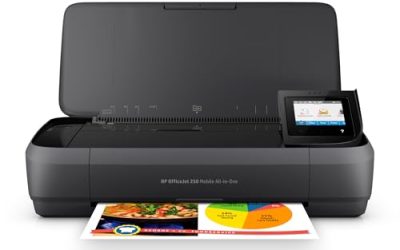
The OfficeJet 250 takes the OfficeJet 200 platform and adds the two functions business travelers most often end up needing mid-trip: scanning and copying. A sheet-fed scanner with a 10-sheet automatic document feeder turns signed contracts, receipts and ID pages into files you can send from a hotel room, which removes the classic end-of-trip scramble at a copy shop. The 2.65-inch color touchscreen makes standalone copying and scan setup manageable without a laptop.
The trade is size. At about 6.5 pounds with its included battery and a noticeably deeper body, the 250 is a checked-bag or car-trunk printer more than a personal-item printer, and it makes the most sense for RV travel, long rentals, mobile offices and sales reps who drive between clients. Print performance matches the 200 at up to 10 pages per minute in black, the tray holds 50 sheets, and the battery is in the box. If your travel printing is documents out and documents back in, this is the most complete mobile office in the group.
Specs
- Print technology: Inkjet, color, print, scan and copy
- Maximum resolution: Up to 1200 x 1200 dpi black, 4800 x 1200 optimized dpi color
- Print speed: Up to 10 ppm black, 7 ppm color
- Weight: About 6.5 lb with battery (battery included)
- Dimensions: 15.0 x 7.8 x 3.6 in
- Battery: Included rechargeable battery
- Paper handling: 50-sheet tray, 10-sheet ADF for scanning, up to 8.5 x 14 in
- Connectivity: Wi-Fi, Wi-Fi Direct, Bluetooth Low Energy, USB; HP Smart app
- Display: 2.65-inch color touchscreen
- Ink: HP 62 black and tri-color cartridges
How to Choose a Portable Printer for Travel
Start with the bag, not the spec sheet. Weight and dimensions decide whether a travel printer actually travels. Under 4 pounds, a printer rides in a carry-on without displacing much else; the WF-110 is the only pick here that manages that with its battery already inside. Between 4.5 and 5 pounds you are in laptop-bag territory, and above 6 pounds, as with the OfficeJet 250, the printer belongs in a car or checked luggage.
Decide how you will print without a network. Hotel and Airbnb Wi-Fi often hides devices from each other or hides behind a sign-in page a printer cannot complete. Every printer here offers a direct wireless mode — Wi-Fi Direct or Wireless Direct — that creates a private connection between your phone or laptop and the printer. Treat that feature as mandatory for travel, and confirm your phone printing path too: AirPrint for Apple devices, Mopria or the manufacturer app for Android.
Match the battery to your day. A built-in or included battery (WF-110, both HP models) means one less purchase and one less thing to forget. An optional battery (TR150) lowers the starting cost if most of your printing happens near an outlet. Check how the battery charges: the TR160 can sip power over USB from a laptop or power bank, while the others rely on their AC adapters. All of the batteries here are lithium-ion and sit far below the 100 watt-hour ceiling airlines apply to cabin batteries, so they are carry-on legal in the printer or as a spare.
Check voltage before an international trip. All five printers ship with auto-ranging power supplies rated for 100 to 240 volts, which covers North America, Europe and most of Asia and South America; for most destinations you need only a passive plug adapter for the outlet shape, not a voltage converter. The exception to plan around is charging the printer battery from a vehicle or a small inverter in an RV — use the manufacturer’s adapter rather than a modified sine-wave inverter where possible.
Budget for ink and paper, not just the printer. Travel printers use small cartridges, so cost per page runs higher than a home office machine. Carry one spare black cartridge on any trip where a deadline matters, and pack paper in a rigid folder or document wallet; a printer that fits in a carry-on is only useful if the letter paper feeding it arrives flat and dry.
Frequently Asked Questions
Can you bring a portable printer in carry-on luggage?
Yes. Portable printers are ordinary electronics for screening purposes, and the lithium-ion batteries in the models here are well under the 100 watt-hour limit airlines set for batteries in the cabin. Pack the printer as you would a laptop, keep spare batteries in your carry-on rather than checked baggage, and expect security to treat it like any other electronic device at the checkpoint.
Do portable printers work on hotel Wi-Fi?
They can, but direct wireless printing is the more reliable route. Many hotel networks use a browser sign-in page that a printer cannot open, and some block devices from seeing each other entirely. Wi-Fi Direct and Wireless Direct modes, offered by every printer in this roundup, let your phone or laptop connect straight to the printer with no hotel network involved, which is the setup worth practicing at home before a trip.
How many pages can a travel printer produce on one battery charge?
It depends on the model and the mix of text and graphics. Canon rates the TR150 with its optional battery at up to 330 pages per charge, the highest figure here, while smaller built-in batteries are sized for shorter daily runs of forms and documents. Dense color pages drain a battery much faster than plain text, so treat headline figures as best-case text numbers and recharge nightly on multi-day trips.
Will these printers work on 220-volt power overseas?
Yes. All five printers use auto-ranging power supplies rated from 100 to 240 volts, so they run on the 220 to 240 volt systems used across Europe, most of Asia and Australia without a voltage converter. What changes by country is the plug shape, so pack the appropriate passive plug adapter for your destination and the printer’s adapter handles the rest.
Final Verdict
For most travelers, the Epson WorkForce WF-110 is the right answer: the lightest body here, a battery that is built in rather than bought later, and direct wireless printing that ignores hotel network quirks. Choose the Canon PIXMA TR160 if quick USB top-ups between stops match how you move, or the TR150 if you want Canon output for less and can live without USB charging. The HP OfficeJet 200 suits daily document printing on the road, and the OfficeJet 250 is the pick when scanning signed pages matters as much as printing them. Whichever you choose, weigh it against your bag first — the best travel printer is the one that is actually with you when a form needs printing.
Product and ASIN Reference
| Product | ASIN |
|---|---|
| Epson WorkForce WF-110 Wireless Mobile Printer | B07X6WFH4B |
| Canon PIXMA TR160 Wireless Portable Printer | B0F1Z1VLV6 |
| HP OfficeJet 200 Mobile Printer (CZ993A) | B01HGD8T9M |
| Canon PIXMA TR150 Wireless Portable Printer | B085VMW9YD |
| HP OfficeJet 250 Mobile All-in-One Printer (CZ992A) | B01HGD8R5S |
More from Amazon
Programs that pair well with the guide above. Offers and eligibility are set by Amazon and may change.
Free shipping on eligible items, Prime Video and more. Eligible new members can start with a free trial.
Start a Prime free trialAd-free music streaming. Eligible new subscribers can start with a free trial.
Try Music Unlimited freeA Prime membership for ages 18-24 with a trial period. Eligibility is set by Amazon.
See Prime for Young AdultsAudiobooks and podcasts to listen to on the go. Eligible new members can start with a free trial.
Try Audible freeAs an Amazon Associate we earn from qualifying purchases.