Key takeaways
- The best canvas printers compared: pigment and dye models from Epson and Canon that feed canvas rolls and sheets for gallery wraps and textured wall art.
The best canvas printers are wide-format inkjets with a straight, thick-media feed path and inks that sit well on coated canvas: the Epson SureColor P900 and Canon imagePROGRAF PRO-310 lead for pigment-ink gallery wraps, the Epson SureColor P700 covers 13-inch canvas rolls and sheets, and the Epson EcoTank ET-8550 and Expression Photo HD XP-15000 handle canvas sheets at lower running cost with dye inks. Canvas is not photo paper with a weave pattern. It is a thick, textured, flexible medium, and the printer has to feed it flat, lay down enough ink to fill the texture, and hold color as the ink settles into the coating.
As an Amazon Associate, we earn from qualifying purchases.
This guide is organized around the medium itself: how canvas feeds, how its texture drinks ink, and what that means for gallery wraps and wall art. Every pick below is a printer whose spec sheet supports canvas media or thick fine-art stock through a manual or rear feed, and each section explains where that model fits in a canvas workflow.
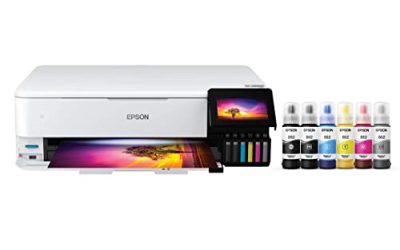
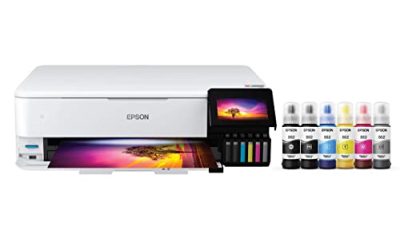
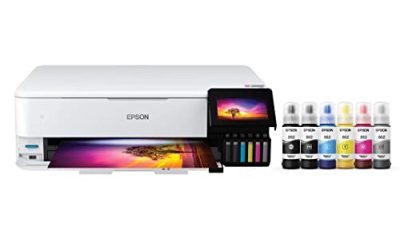
Epson EcoTank Photo ET-8550

Tier: budget
The ET-8550 is the entry point for canvas sheets. Its rear specialty feed accepts media up to 1.3 mm thick, which covers the common inkjet canvas sheets sold in 13 by 19 inch packs, and the straight-through path keeps stiff canvas from bending around rollers the way tray-fed paper does. Prints come out borderless up to 13 by 19 inches, a useful size for small gallery wraps on shallow stretcher bars once the wrap margins are folded in.
The six-color Claria ET Premium dye ink set includes gray and photo black alongside the standard four colors, which helps tonal gradation across the canvas weave. Dye ink soaks into the canvas coating rather than sitting on top, so colors look rich but the surface stays vulnerable to moisture and UV until it is sealed with a canvas varnish or spray. Because the EcoTank uses refill bottles instead of cartridges, the cost of test strips and reprints stays low, and canvas printing involves plenty of both while you dial in a profile.
Specs
- Ink: 6-color Claria ET Premium dye (black, photo black, cyan, magenta, yellow, gray), refillable EcoTank bottles
- Maximum print size: 13 x 19 inches borderless
- Resolution: 5760 x 1440 dpi
- Media handling: rear specialty feed for media up to 1.3 mm thick, front tray for standard paper
- Connectivity: Wi-Fi, Ethernet, USB, Wi-Fi Direct
- Display: 4.3-inch color touchscreen
- Extra features: scanner and copier, SD card slot, voice-activated printing
Epson Expression Photo HD XP-15000

Tier: mid-range
The XP-15000 is a dedicated photo printer that treats canvas as a specialty sheet rather than an afterthought. Its rear specialty media tray feeds stock up to 1.3 mm thick one sheet at a time, and the 13 by 19 inch borderless output matches standard canvas sheet sizes exactly, so you are not trimming down larger sheets before printing.
Six Claria Photo HD dye inks, including red and gray, widen the color gamut in the warm tones that dominate portrait and landscape canvas work. On textured canvas, the red ink helps skin tones and sunsets stay saturated where the weave would otherwise mute them. The trade-off is the same as any dye system: prints need a protective coating before they are stretched and hung, because dye on canvas fades faster under light than pigment and smudges if it gets damp. Cartridge capacity is modest, so heavy canvas coverage, which drinks more ink than glossy paper, means more frequent swaps than on the tank-based ET-8550.
Specs
- Ink: 6-color Claria Photo HD dye (black, cyan, magenta, yellow, red, gray), 312 and 314 series cartridges
- Maximum print size: 13 x 19 inches borderless
- Resolution: 5760 x 1440 dpi
- Media handling: 200-sheet front tray, 50-sheet rear tray, specialty media tray for stock up to 1.3 mm thick
- Connectivity: Wi-Fi, Ethernet, USB, Wi-Fi Direct
- Display: 2.4-inch color LCD
- Extra features: auto 2-sided printing, CD and DVD printing
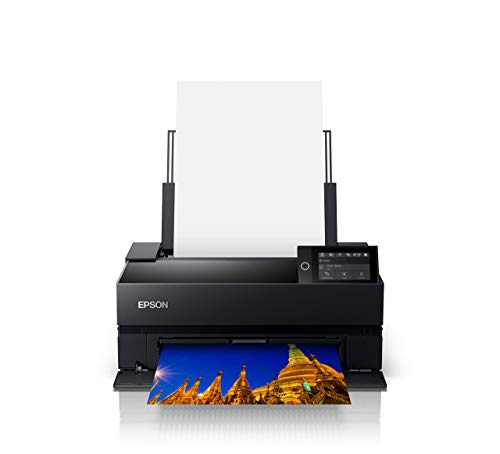
Epson SureColor P700
Tier: mid-range
The P700 is where canvas printing gets serious, because it handles canvas two ways: single sheets through the front fine-art feed, which takes media up to 1.5 mm thick, and rolls up to 13 inches wide using the built-in roll holder. Roll support matters for canvas more than for any other medium. Canvas is sold most economically on rolls, and roll feeding lets you print long pieces for wide gallery wraps without being limited to pre-cut sheet sizes.
UltraChrome PRO10 pigment ink sits on the canvas surface instead of soaking in, which keeps the weave texture visible in the finished print and gives the scratch and water resistance that stretched canvas needs, since a wrapped print has no glass in front of it. The ten-ink set adds violet for a wider gamut and uses dedicated matte black and photo black channels, so switching between matte canvas and glossy paper never wastes ink on a swap. The 4.3-inch touchscreen includes a media setup flow that walks through thickness and platen gap settings, the two adjustments that decide whether canvas feeds cleanly or head-strikes.
Specs
- Ink: 10-color UltraChrome PRO10 pigment, 25 ml cartridges
- Maximum print size: 13 x 19 inches sheets, 13-inch-wide rolls up to 10 feet long
- Resolution: 5760 x 1440 dpi
- Media handling: front fine-art feed up to 1.5 mm thick, built-in roll holder, sheet feeder
- Connectivity: Wi-Fi, Ethernet, USB
- Display: 4.3-inch color touchscreen
- Extra features: dedicated matte and photo black channels, Carbon Black mode for deep matte blacks
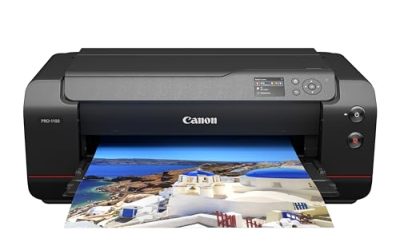
Canon imagePROGRAF PRO-310

Tier: premium
Canon’s PRO-310 is the 13-inch pigment alternative, built around the LUCIA PRO II ink system with nine colors plus a Chroma Optimizer. Canvas is an officially supported medium on this printer, and the manual feed slot accepts media from 0.1 mm up to 1.5 mm thick, which spans the full range of inkjet canvas sheets on the market. The feed mechanism includes skew correction, a detail that matters when a slightly crooked canvas sheet would otherwise produce a wrap with uneven edges.
Pigment ink on canvas behaves the same way here as on the Epson pigment models: it rests on the coating, holds the texture, and resists the handling that stretching and framing involve. The Chroma Optimizer adds a clear coat layer that evens out gloss, which is less relevant on matte canvas but helps when you print on satin-finish canvas stocks. Canon’s Professional Print and Layout software includes soft proofing and layout tools that suit canvas work, where you need to add mirror-edge borders for gallery wraps so the image continues around the stretcher frame.
Specs
- Ink: LUCIA PRO II pigment, 9 colors plus Chroma Optimizer, PFI-5100 cartridges
- Maximum print size: 13 x 19 inches (A3+)
- Resolution: 4800 x 2400 dpi
- Media handling: top tray, manual feed for media up to 1.5 mm thick with skew correction
- Connectivity: Wi-Fi, Ethernet, USB
- Display: 3.0-inch color LCD
- Extra features: anti-clogging system, Chroma Optimizer clear coat, Professional Print and Layout software
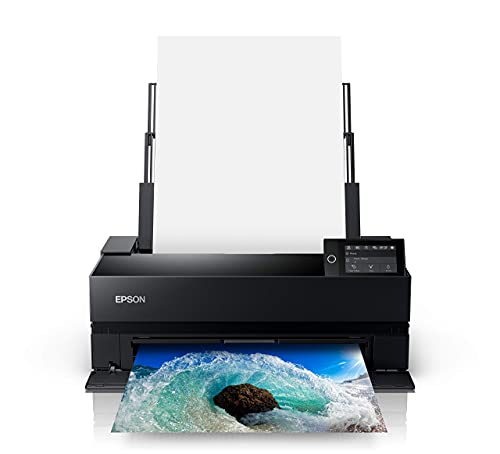
Epson SureColor P900
Tier: premium
The P900 scales the P700 formula up to 17 inches wide, and that width is the main reason to buy it for canvas. A 17-inch printer can produce a 16 by 20 inch gallery wrap with full wrap margins from roll stock, or print 17 by 22 inch canvas sheets, sizes that sit in the sweet spot for sellable wall art. Roll support covers media up to 17 inches wide and 10 feet long with the included roll holders, so long panoramic canvas pieces are possible without seams.
It uses the same UltraChrome PRO10 pigment ink family as the P700, in larger 50 ml cartridges that suit the heavier ink laydown canvas demands, and the same front fine-art path for sheets up to 1.5 mm thick. The 4.3-inch touchscreen can be customized with presets for your regular media, so a canvas profile with the right thickness, platen gap and ink density is one tap instead of a fresh setup each session. For anyone printing canvas regularly rather than occasionally, the combination of width, roll feeding and pigment durability makes this the most complete canvas printer in the group.
Specs
- Ink: 10-color UltraChrome PRO10 pigment, 50 ml cartridges
- Maximum print size: 17 x 22 inches sheets, 17-inch-wide rolls up to 10 feet long
- Resolution: 5760 x 1440 dpi
- Media handling: front fine-art feed up to 1.5 mm thick, roll media support, sheet feeder
- Connectivity: Wi-Fi, Ethernet, USB
- Display: 4.3-inch color touchscreen
- Extra features: dedicated matte and photo black channels, Carbon Black mode, customizable touchscreen presets
How to Choose
Start with the feed path. Canvas is thick and does not like tight turns. Every printer here has a rear, manual or front feed that keeps the sheet nearly straight, and that is the feature to verify before anything else. Standard inkjet canvas sheets run about 0.4 to 0.5 mm thick, but premium poly-cotton canvas and some fine-art stocks approach the 1.3 to 1.5 mm limits listed above, so match the printer’s stated maximum thickness to the canvas you actually plan to buy.
Decide sheets or rolls. Sheets are simpler: buy a pack, print one piece at a time, stretch it. Rolls are cheaper per print and unlock long formats, but only the P700 and P900 in this group feed them. If you plan to sell canvas prints or wrap large pieces, roll support pays for itself in media savings; if you print a few pieces a year, sheets on a dye printer cost far less to start.
Pick an ink for how the print will live. Pigment ink (P700, PRO-310, P900) sits on the canvas coating, resists water and scratching, and holds color for decades, which is what an unglazed stretched canvas needs. Dye ink (ET-8550, XP-15000) soaks in, can look slightly richer on the day it is printed, and costs less per print, but it should be sealed with a canvas varnish before stretching and will fade sooner in bright rooms.
Respect the texture. Canvas weave hides fine detail and eats ink. Use the canvas media setting in the driver, not a matte paper setting: it widens the platen gap so the head clears the textured surface and increases ink density to fill the weave. Expect to print a test strip first, because colors dry darker on canvas than they appear on screen, and soft proofing with the canvas profile loaded is the only reliable way to predict the result.
Plan the wrap before you print. A gallery wrap needs extra image on every side to fold around the stretcher bars, usually handled with a mirrored edge generated by the print software. Check that your printer’s maximum size still leaves room for those margins at the finished size you want: a 13-inch printer wraps roughly an 11 by 14 inch face on standard bars, while the 17-inch P900 wraps a 16 by 20 inch face comfortably.
Frequently Asked Questions
Can any inkjet printer print on canvas?
No. The printer needs a feed path rated for thick media and a driver setting for canvas or fine-art stock. Standard office inkjets bend paper sharply around rollers and their trays cannot take canvas thickness, so sheets jam or the head strikes the surface. Every printer in this guide has a rear, manual or front feed rated for media at least 1.3 mm thick, which is what makes canvas feeding reliable.
Is pigment or dye ink better for canvas prints?
Pigment ink is better for canvas that will be stretched and hung without glass, because it sits on the coating, resists moisture and scratching, and lasts far longer under light. Dye ink soaks into the coating and can look slightly more saturated at first, but it needs a protective varnish before stretching and fades sooner. For prints you sell or hang in bright rooms, choose pigment; for casual home pieces, dye plus varnish is a workable budget route.
Do canvas prints need to be sealed after printing?
Pigment prints on canvas are durable enough to hang unsealed, though a varnish still adds UV and scuff protection. Dye prints should always be sealed with a canvas-specific spray or liquid varnish before stretching, because the ink remains water-sensitive in the coating. Let any canvas print dry fully, typically overnight, before coating or stretching so the ink and coating do not smear under tension.
What size printer do I need for gallery wraps?
Work backward from the finished face size. The print must cover the face plus the wrap depth on all four sides, so a 16 by 20 inch wrap on standard bars needs a print roughly 20 by 24 inches including margins, which means roll stock on a 17-inch printer like the P900. A 13-inch printer handles faces up to about 11 by 14 inches from sheets. If your target sizes are larger, roll support matters more than any other feature.
Final Verdict
For most people printing canvas at home, the Epson SureColor P700 is the sweet spot: pigment ink that survives stretching, both sheet and roll feeding, and a front path thick enough for any canvas stock. The Epson SureColor P900 is the step up for wider wraps and regular production, and the Canon imagePROGRAF PRO-310 is the 13-inch alternative if you prefer Canon’s ink set and software. On a tighter budget, the Epson EcoTank ET-8550 keeps test prints cheap while you learn, and the Expression Photo HD XP-15000 is the dedicated photo printer for occasional canvas sheets, as long as you budget time for varnishing dye prints before they go on the wall.
Product and ASIN Reference
| Product | ASIN |
|---|---|
| Epson EcoTank Photo ET-8550 | B08R5M2HDH |
| Epson Expression Photo HD XP-15000 | B076PLTQQT |
| Epson SureColor P700 | B0875QSCFW |
| Canon imagePROGRAF PRO-310 | B0DSQP2FX6 |
| Epson SureColor P900 | B0875K6D4H |
More from Amazon
Programs that pair well with the guide above. Offers and eligibility are set by Amazon and may change.
Free shipping on eligible items, Prime Video and more. Eligible new members can start with a free trial.
Start a Prime free trialAd-free music streaming. Eligible new subscribers can start with a free trial.
Try Music Unlimited freeA Prime membership for ages 18-24 with a trial period. Eligibility is set by Amazon.
See Prime for Young AdultsAudiobooks and podcasts to listen to on the go. Eligible new members can start with a free trial.
Try Audible freeAs an Amazon Associate we earn from qualifying purchases.