Key takeaways
- Compare the best smartphone photo printers for iOS and Android, from pocket ZINK models to 4x6 dye-sub picks, with app features, print sizes and costs.
The best smartphone photo printers are the ones whose apps work just as well on an iPhone as they do on an Android phone, because the printer itself is only half of the product. The editing tools, collage layouts, filters, and augmented reality extras all live in the companion app, and that app experience decides how often the printer actually leaves its drawer. For most people, the Fujifilm Instax Mini Link 3 is the strongest all-round pick thanks to its polished cross-platform app and credit-card-sized instant prints, while the Canon SELPHY CP1500 is the better choice when you want full 4×6 prints with dye-sublimation quality. The Canon IVY 2, Polaroid Hi-Print, and HP Sprocket round out the list for smaller budgets and sticker-style prints.


As an Amazon Associate, we earn from qualifying purchases.
Fujifilm Instax Mini Link 3
Tier: mid-range
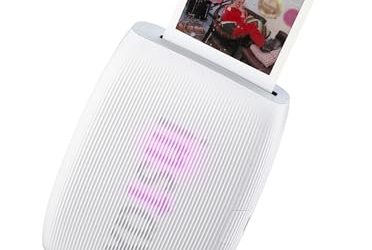
The Instax Mini Link 3 prints the photos on your phone onto real instax mini film, so every print develops in front of you with the soft, slightly dreamy look the format is known for. It connects over Bluetooth and is driven entirely by the instax mini Link app, which is available on both iOS and Android with the same feature set on each platform. That parity matters for mixed households where one person carries an iPhone and another carries a Galaxy or Pixel.
The app is where this printer pulls ahead of the field. The instax AiR Studio mode uses augmented reality so you can draw shapes, add effects, and place decorations in the air around your subject before printing the still frame. Click to Collage lets several people fire shots in sequence and merges them into a single print, which turns the printer into a small party game. There are also frame templates, filters, brightness and contrast controls, and a match test feature for friends. The printer itself is small enough for a jacket pocket, charges over USB-C, and produces roughly one hundred prints per charge.
Specs
- Print technology: instax mini instant film
- Print size: 2.13 x 3.4 inch film, 1.8 x 2.4 inch image area
- Resolution: 318 dpi (800 x 600 dots)
- Connectivity: Bluetooth 5.1
- App: instax mini Link for iOS and Android
- Charging: USB-C, built-in rechargeable battery
- Print speed: about 15 seconds, plus roughly 90 seconds development time
- Weight: about 7.4 ounces without a film pack
Canon IVY 2 Mini Photo Printer
Tier: budget
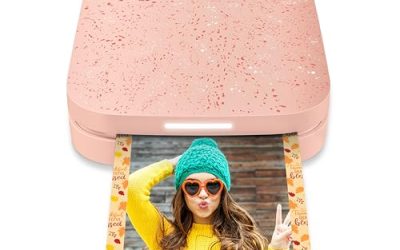
The Canon IVY 2 is a pocket printer built around ZINK paper, a zero-ink medium with the color crystals embedded in the sheet itself. There are no cartridges to buy or replace, and the 2×3 prints come out with a peel-off backing so they double as stickers for journals, laptops, phone cases, and lockers. It pairs over Bluetooth and runs through the Canon Mini Print app on both iOS and Android.
Inside the app you get the editing toolkit most people actually use: filters, frames, stickers, text, doodles, and brightness and contrast sliders, plus tile printing that splits one image across several sheets and collage layouts that combine up to four photos. The printer charges over USB-C, which keeps it on the same cable as most modern phones, and it is small and light enough to disappear into a purse or daypack. Print resolution is modest compared with dye-sublimation models, so fine detail and subtle skin tones are not its strength, but for casual snapshots and sticker projects it is a tidy, low-fuss package.
Specs
- Print technology: ZINK zero-ink thermal printing
- Print size: 2 x 3 inches, sticky-back
- Resolution: 313 x 512 dpi
- Connectivity: Bluetooth 5.0
- App: Canon Mini Print for iOS and Android
- Charging: USB-C, built-in rechargeable battery
- Weight: about 5.6 ounces
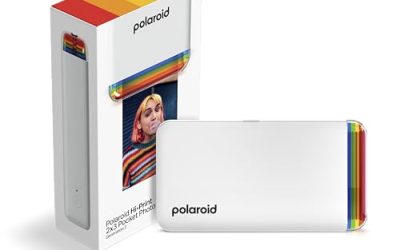
Polaroid Hi-Print 2×3 (2nd Generation)

Tier: mid-range
The Polaroid Hi-Print takes a different route from the ZINK models above. It uses dye-sublimation printing with an all-in-one cartridge that combines the ribbon and the paper, laying down color in passes and finishing with a protective overcoat layer. The result is a 2×3 print with smoother gradients and better water and fingerprint resistance than zero-ink output, and the sheets are sticky-backed for scrapbooking and journaling.
Everything runs through the Polaroid app, which supports both iOS and Android and includes filters, frames, stickers, and text tools for dressing up a photo before it prints. The second-generation hardware connects over Bluetooth, charges with USB-C, and keeps the flat, pocketable shape of the original with the brand’s familiar rainbow stripe. Because the cartridge format bundles ink and paper together, refills are simple to swap, though you should factor the ongoing cartridge supply into your running costs. If you like the sticker format of the IVY 2 but want richer color, this is the natural step up.
Specs
- Print technology: dye-sublimation, all-in-one ink and paper cartridge
- Print size: 2 x 3 inches, sticky-back
- Connectivity: Bluetooth
- App: Polaroid app for iOS and Android
- Charging: USB-C, built-in rechargeable battery
- Finish: protective overcoat layer on every print
- Weight: about 9 ounces
Canon SELPHY CP1500
Tier: premium
The SELPHY CP1500 is the printer on this list for people who want prints that look like they came from a photo lab. It is a dye-sublimation model that produces borderless 4×6 postcard prints at 300 x 300 dpi with a protective coating Canon rates for album storage of up to one hundred years. Instead of Bluetooth alone, it connects over Wi-Fi, which opens up printing from phones, tablets, and computers on the same network.
The SELPHY Photo Layout app runs on iOS and Android and offers collage layouts, ID photo templates, bookmarks, and stamps, and the printer also supports AirPrint on Apple devices and Mopria on Android, so you can send a photo straight from your gallery without opening the Canon app at all. A tilting 3.6-inch screen on the printer handles setup and previews, and there are slots and USB ports for printing from memory cards and flash drives. An optional battery pack makes it portable for events, though at roughly 1.9 pounds with the paper cassette fitted, it is a carry-to-the-party printer rather than a pocket one. For family albums, gifts, and framing, its output is a clear step above the wallet-size models.
Specs
- Print technology: dye-sublimation thermal transfer
- Print size: 4 x 6 inches (postcard), plus card and square sizes with optional trays
- Resolution: 300 x 300 dpi
- Connectivity: Wi-Fi, USB-C, SD card slot, AirPrint and Mopria support
- App: SELPHY Photo Layout for iOS and Android
- Display: 3.6-inch tilting color LCD
- Print speed: about 41 seconds for a 4×6 print
- Weight: about 1.9 pounds
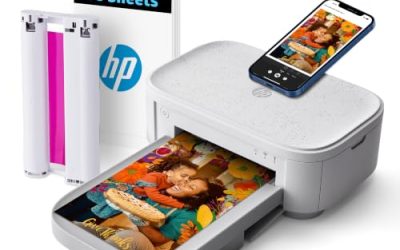
HP Sprocket Portable 2×3
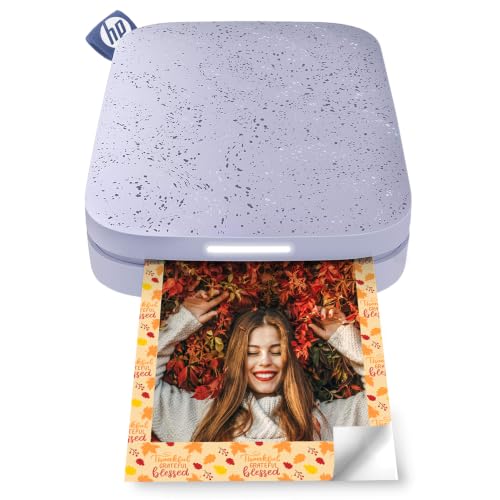
Tier: budget
The HP Sprocket is one of the longest-running names in phone printing, and the current portable model keeps the formula simple: ZINK sticky-back paper, a Bluetooth link, and the HP Sprocket app on your phone. The app is published for both iOS and Android and leans into the social side of printing, with templates, frames, stickers, and the ability to pull images from your camera roll and connected photo accounts.
One of its more playful features is an augmented reality mode that can attach a video to a printed photo, so scanning the print in the app plays the moment back on screen. The app also supports shared albums and a shared print queue, which suits families where several phones send jobs to one printer. Output is standard ZINK quality at 2×3 inches, best suited to snapshots, planners, and locker doors rather than detailed enlargements. The printer is rechargeable, pocket-sized, and easy to hand to a teenager without a long explanation, which is exactly the job it is built for.
Specs
- Print technology: ZINK zero-ink thermal printing
- Print size: 2 x 3 inches, sticky-back
- Resolution: 313 x 400 dpi
- Connectivity: Bluetooth 5.0
- App: HP Sprocket for iOS and Android
- Charging: built-in rechargeable battery
- Weight: about 6.1 ounces
How to Choose
Start with the app, because it is the part you will touch every time you print. Every printer here has an iOS and an Android app, but the depth of the editing tools differs. The instax mini Link and HP Sprocket apps lean into creative extras such as augmented reality effects, collages, and social sharing, while the Canon and Polaroid apps focus more on straightforward editing, frames, and layouts. If your household mixes iPhones and Android phones, confirm the features you care about exist on both versions, since a few extras arrive on one platform first.
Next, pick a print technology. ZINK models like the IVY 2 and Sprocket need no ink and make sticky-back prints, which keeps running costs predictable and the hardware tiny. Dye-sublimation models like the Hi-Print and SELPHY CP1500 use cartridges that pair ink with paper and produce smoother, longer-lasting images. Instant film, in the Instax Mini Link 3, gives you the classic develop-in-your-hand experience with its own look. Then match the print size to the job: 2×3 prints suit wallets, journals, and stickers, while 4×6 prints are the standard size for albums and frames.
Finally, think about connectivity and power. Bluetooth printers pair with one phone at a time and are built for personal use, while the Wi-Fi SELPHY can serve a whole household and accept jobs from computers too. All of the pocket models recharge over USB and run on internal batteries, so check the prints-per-charge figure if you plan to use one at a party or on a trip away from outlets.
Frequently Asked Questions
Do these printers work with both iPhone and Android phones?
Yes. Every printer in this roundup has a companion app published for both iOS and Android, and the core printing and editing features are available on both platforms. The Canon SELPHY CP1500 also supports AirPrint for Apple devices and Mopria for Android, so it can accept prints directly from your photo gallery without the Canon app.
What is the difference between ZINK and dye-sublimation printing?
ZINK paper contains its own color crystals, so the printer needs no ink cartridges and can be very small, but resolution and color depth are limited. Dye-sublimation transfers dye from a ribbon in layers and adds a protective coat, which produces smoother gradients and prints that resist water and fading better, at the cost of bulkier hardware and cartridge refills.
How much do the prints cost to make?
Running costs depend on the medium rather than the printer. ZINK sheets, instax mini film, dye-sub cartridges, and SELPHY ink-and-paper sets are all sold in packs, and the per-print cost rises with print size. The 4×6 SELPHY sets generally work out cheapest per print among these formats, while instant film is usually the most expensive way to print a single photo.
Can I print photos from social media accounts with these apps?
In most cases, yes. The companion apps can open your camera roll, and several of them, including the HP Sprocket and instax mini Link apps, can also pull images from connected cloud and social accounts once you sign in. The exact list of supported services changes as the apps are updated, so check the current app listing for the services you use.
Final Verdict
If you want one smartphone photo printer that does a bit of everything, buy the Fujifilm Instax Mini Link 3. Its app is the most entertaining of the group on both iOS and Android, the augmented reality and collage features genuinely get used at gatherings, and the instant-film prints have a character that screen-shared photos cannot match. Choose the Canon SELPHY CP1500 instead if your goal is a stack of proper 4×6 prints for albums and frames, since its dye-sublimation output is in a different league from the wallet-size models. The Canon IVY 2 and HP Sprocket are the sensible budget routes into sticky-back ZINK printing, and the Polaroid Hi-Print splits the difference with dye-sub quality in the same small format. Whichever direction you go, decide by the app and the print size first, because those are the two things you will live with long after the unboxing.
Product and ASIN Reference
| Product | ASIN |
|---|---|
| Fujifilm Instax Mini Link 3 (Clay White) | B0D826GXQ3 |
| Canon IVY 2 Mini Photo Printer (Pure White) | B0BGM5WRQ1 |
| Polaroid Hi-Print 2×3 Pocket Photo Printer, 2nd Generation (White) | B0CVMW3M1B |
| Canon SELPHY CP1500 Wireless Compact Photo Printer (Black) | B0BF6T86WD |
| HP Sprocket Portable 2×3 Instant Photo Printer (Lilac) | B07JM42QDX |
More from Amazon
Programs that pair well with the guide above. Offers and eligibility are set by Amazon and may change.
Free shipping on eligible items, Prime Video and more. Eligible new members can start with a free trial.
Start a Prime free trialAd-free music streaming. Eligible new subscribers can start with a free trial.
Try Music Unlimited freeA Prime membership for ages 18-24 with a trial period. Eligibility is set by Amazon.
See Prime for Young AdultsAudiobooks and podcasts to listen to on the go. Eligible new members can start with a free trial.
Try Audible freeAs an Amazon Associate we earn from qualifying purchases.