Key takeaways
- The best printers for photographers for proofing, portfolios and studio prints, from a compact dye-sub to 17-inch pigment models, with ink and media specs.
The best printers for photographers are the ones that cover the whole studio workflow: a small dye-sublimation unit for quick proofs and client handouts, a photo all-in-one for everyday prints and scanning, and a pigment inkjet for portfolio and exhibition work. Our top all-round pick is the Epson EcoTank Photo ET-8550 for its refillable ink and 13 x 19 inch output, while the Canon imagePROGRAF PRO-310 and Epson SureColor P900 lead for fine-art pigment printing, the Canon PIXMA PRO-200S shines on glossy portfolio pages, and the Canon SELPHY CP1500 handles pocketable proofing.


As an Amazon Associate, we earn from qualifying purchases.
1. Canon SELPHY CP1500 — Budget Pick for Fast Proofs and Client Handouts
Every studio workflow starts with the quick check print: is the exposure right, does the crop work, will the client like the edit? The SELPHY CP1500 is built for exactly that moment. It is a dye-sublimation printer, so each 4 x 6 inch print comes out dry, smudge-resistant and finished with a protective overcoat layer, with no ink cartridges to swap mid-session. It runs over Wi-Fi from the Canon SELPHY Photo Layout app, a camera, an SD card or a USB flash drive, which makes it easy to hand a client a finished proof before they leave the studio.
Because dye-sub media comes as matched ink-and-paper sets, output stays consistent from the first print to the last, and the prints suit proof books, event handouts and wedding-day sneak peeks. An optional battery pack turns it into a location tool for on-site events. It will not replace a large-format inkjet, but as the first step in a photographer’s printing toolkit it earns its desk space.
Tier: Budget
Specs
- Print technology: Dye-sublimation thermal transfer
- Maximum print size: 4 x 6 inches (postcard), plus credit card and square formats
- Resolution: 300 x 300 dpi with 256 shades per color
- Print speed: Approx. 41 seconds per postcard print
- Connectivity: Wi-Fi, AirPrint, Mopria, SD card slot, USB flash drive, USB-C
- Ink and media: Combined ink and paper sets (KP-108IN and related packs)
- Power: AC adapter included; optional rechargeable battery pack for portable use
2. Epson EcoTank Photo ET-8550 — Mid-Range Pick for Everyday Studio Printing
If one machine has to carry the daily load of a working studio, the ET-8550 is the strongest candidate here. It is a photo all-in-one with a flatbed scanner and copier alongside the printer, so reference prints, signed contracts and model releases can be scanned and filed from the same unit. The six-color Claria ET Premium ink set adds a gray and a photo black to the usual four colors, which smooths black-and-white gradations and keeps skin tones natural.
The EcoTank system replaces cartridges with refillable tanks filled from ink bottles, so high-volume proofing runs and contact sheets cost far less per page than cartridge printing. It prints borderless up to 13 x 19 inches, feeds thick media through a rear path, and connects over Wi-Fi, Ethernet or USB. For photographers who print proofs every week and portfolio pages every month, it balances running cost, size range and convenience better than anything else in this roundup.
Tier: Mid-range
Specs
- Print technology: 6-color inkjet (Claria ET Premium dye ink) with refillable EcoTank reservoirs
- Ink colors: Black, photo black, cyan, magenta, yellow, gray
- Maximum print size: 13 x 19 inches borderless
- Resolution: Up to 5760 x 1440 dpi
- Extra functions: Flatbed scanner and copier, auto 2-sided printing
- Display: 4.3-inch color touchscreen
- Connectivity: Wi-Fi, Ethernet, USB, SD card slot, voice-activated printing support
- Media handling: Front cassette, rear feed for thick media up to 1.3 mm, borderless on supported sizes
3. Canon PIXMA PRO-200S — Mid-Range Pick for Glossy Portfolio Prints
The PIXMA PRO-200S is a dedicated 13-inch photo printer built around Canon’s 8-color ChromaLife100+ dye ink system. Dye inks sit inside the paper surface, which is why this printer produces the deep gloss and saturated color that portfolio books and client presentation prints call for. It prints borderless up to 13 x 19 inches and can run long panoramic sheets up to 39 inches, a format landscape photographers use for gallery walls and album spreads.
A 3.0-inch color LCD handles setup and ink checks without a computer, and the skew correction feature keeps fine-art sheets feeding straight. It offers a top feed for everyday papers and a manual feed tray for thicker stock. Photographers whose deliverables are glossy, vivid and framed behind glass will find the PRO-200S the most direct route to that look in this group.
Tier: Mid-range
Specs
- Print technology: 8-color dye-based inkjet (ChromaLife100+)
- Ink system: Eight CLI-65 cartridges
- Maximum print size: 13 x 19 inches (A3+) borderless; panoramic prints up to 13 x 39 inches
- Resolution: Up to 4800 x 2400 dpi
- Print speed: Approx. 1 minute 30 seconds for a bordered A3+ print
- Display: 3.0-inch color LCD
- Connectivity: Wi-Fi, Ethernet, USB, Canon PRINT app and AirPrint support
- Media handling: Top feed tray plus manual feed tray for thicker fine-art media
4. Canon imagePROGRAF PRO-310 — Premium Pick for 13-Inch Fine-Art Pigment Prints

When prints need to last, pigment ink is the professional answer, and the PRO-310 is Canon’s current 13-inch flagship for that work. Its LUCIA PRO II pigment system runs nine colors plus a Chroma Optimizer cartridge that evens out gloss on resin-coated papers and deepens perceived blacks. Canon rates the ink set for improved light resistance, which matters for prints that will hang in galleries or be sold as editions.
Both matte black and photo black stay loaded, so switching between matte fine-art paper and glossy stock does not waste ink on a changeover. The printer accepts sheets up to 13 x 19 inches, feeds thick media through a manual path, and uses an anti-clogging system that monitors nozzles between jobs. For a photographer building a portfolio or selling prints at a desktop-friendly size, the PRO-310 is the centerpiece machine.
Tier: Premium
Specs
- Print technology: 10-cartridge pigment inkjet (LUCIA PRO II)
- Ink system: Nine colors plus Chroma Optimizer, PFI-5100 cartridges; matte black and photo black loaded simultaneously
- Maximum print size: 13 x 19 inches (A3+) borderless
- Resolution: Up to 4800 x 2400 dpi
- Display: 3.0-inch color LCD
- Connectivity: Wi-Fi, Ethernet, USB
- Media handling: Top feed plus manual feed tray for thick fine-art media; vacuum paper feeding
- Workflow features: Canon Professional Print and Layout software, anti-clogging nozzle monitoring
5. Epson SureColor P900 — Premium Pick for 17-Inch Exhibition Prints
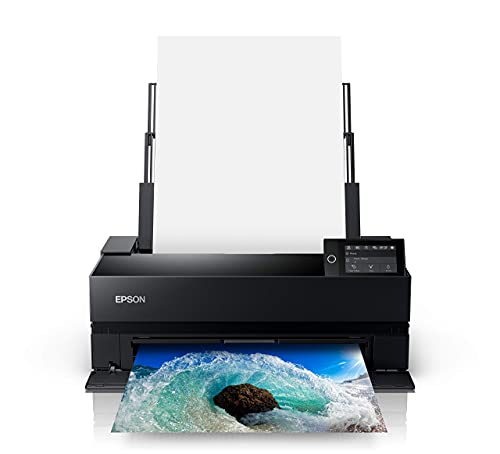
The SureColor P900 steps the studio up to 17-inch output, the size where portfolio prints become wall prints. It uses Epson’s UltraChrome PRO10 pigment ink in ten channels, including a violet channel that widens the blue and purple gamut for seascapes, stage lighting and twilight work. A dedicated Carbon Black mode increases black density on glossy media, and, like the PRO-310, it keeps both black inks installed so media changes stay painless.
It accepts cut sheets up to 17 x 22 inches and thick boards up to 1.5 mm through the front manual feed, with an optional roll adapter for long panoramas. The 4.3-inch touchscreen can be customized with the controls a studio uses most, and the interior light lets you watch a large print emerge without opening the cover. If exhibition and client wall work is the goal, the P900 is the printer the rest of the toolkit supports.
Tier: Premium
Specs
- Print technology: 10-channel pigment inkjet (UltraChrome PRO10) with MicroPiezo AMC print head
- Ink system: Ten cartridges including violet; photo black and matte black loaded simultaneously
- Maximum print size: 17 x 22 inches cut sheet; optional roll adapter for longer prints
- Resolution: Up to 5760 x 1440 dpi
- Display: 4.3-inch customizable color touchscreen with interior print light
- Connectivity: Wi-Fi, Ethernet, USB
- Media handling: Front manual feed for media up to 1.5 mm thick, rear feed, optional roll paper adapter
- Workflow features: Carbon Black mode for higher glossy black density, Epson Print Layout software
How to Choose
Start with the job, not the spec sheet. Photographers print three kinds of work: proofs, portfolios and finished pieces. A dye-sublimation compact like the SELPHY CP1500 covers proofs and handouts cheaply and consistently, but its 4 x 6 inch ceiling means it can never be the only printer in a studio.
Next, decide between dye and pigment ink. Dye ink, as in the PRO-200S and the ET-8550, delivers the richest gloss and vivid color and suits portfolio books and framed-behind-glass work. Pigment ink, as in the PRO-310 and P900, trades a little of that surface shine for far better light resistance and a wider range of matte and fine-art papers, which is what editioned and gallery work demands.
Size is the third decision. A 13-inch printer handles portfolio pages and most client orders; a 17-inch machine like the P900 only pays off if wall prints are a regular part of the business, since it also needs more desk space and larger media stock. Running cost matters too: refillable tanks make the ET-8550 the sensible high-volume proofing engine, while cartridge pigment printers are better reserved for final prints. Finally, check the unglamorous details: both-blacks-loaded designs save ink at media changes, rear and manual feeds protect thick fine-art sheets, and a built-in scanner, as on the ET-8550, quietly removes a second device from the desk.
Frequently Asked Questions
Do photographers need pigment ink, or is dye ink good enough?
Dye ink is good enough for portfolio books, client proofs and prints displayed behind glass, and it produces glossier, more saturated color. Pigment ink is the better choice for prints that will be sold, exhibited or hung unprotected, because it resists fading far longer and works on a wider range of matte and fine-art papers.
What print size should a photographer’s main printer support?
A 13 x 19 inch printer covers portfolio pages, proof enlargements and most client orders, which is why most of the picks here are 13-inch models. Move to a 17-inch printer only when wall-sized work is a regular part of your output, since media, ink and desk space costs all rise with the larger format.
Can one printer handle proofing, portfolios and studio paperwork?
Yes, within limits. A photo all-in-one such as the EcoTank Photo ET-8550 prints borderless up to 13 x 19 inches, scans and copies documents, and keeps running costs low with refillable tanks. Dedicated pigment printers still produce better fine-art output, so busy studios often pair an all-in-one for daily work with a pigment machine for final prints.
How do I keep prints consistent with what I see on screen?
Use the printer maker’s own layout software, select the paper profile that matches the exact media loaded, and let the application or the printer manage color consistently rather than mixing the two. Soft-proof the image in your editor first, keep one paper type for proofs and finals, and replace ink before a channel runs dry so test prints stay comparable.
Final Verdict
For most photographers, the Epson EcoTank Photo ET-8550 is the smartest center of the toolkit: it proofs, scans and prints up to 13 x 19 inches with low running costs. Add the Canon PIXMA PRO-200S when glossy portfolio work dominates, step up to the Canon imagePROGRAF PRO-310 for archival 13-inch pigment prints, or the Epson SureColor P900 when 17-inch exhibition pieces are the goal. Keep the Canon SELPHY CP1500 beside them for instant proofs and client handouts, and every stage of the studio printing workflow is covered.
Product and ASIN Reference
| Product | ASIN |
|---|---|
| Canon SELPHY CP1500 Wireless Compact Photo Printer (Black) | B0BF6T86WD |
| Epson EcoTank Photo ET-8550 Wireless Wide-Format All-in-One Supertank Printer | B08R5M2HDH |
| Canon PIXMA PRO-200S Professional 13-Inch Wireless Inkjet Photo Printer | B0DSR9KCG2 |
| Canon imagePROGRAF PRO-310 Professional 13-Inch Wireless Inkjet Photo Printer | B0DSQP2FX6 |
| Epson SureColor P900 17-Inch Photo Printer | B0875K6D4H |
More from Amazon
Programs that pair well with the guide above. Offers and eligibility are set by Amazon and may change.
Free shipping on eligible items, Prime Video and more. Eligible new members can start with a free trial.
Start a Prime free trialAd-free music streaming. Eligible new subscribers can start with a free trial.
Try Music Unlimited freeA Prime membership for ages 18-24 with a trial period. Eligibility is set by Amazon.
See Prime for Young AdultsAudiobooks and podcasts to listen to on the go. Eligible new members can start with a free trial.
Try Audible freeAs an Amazon Associate we earn from qualifying purchases.