Key takeaways
- Compare the best phone printers for notes, labels and photos, from pocket thermal printers to 4x6 photo models, with specs, apps and paper types explained.
The best phone printers are compact Bluetooth or Wi-Fi printers that pair with an iOS or Android app and print straight from your handset, covering far more than photos: pocket thermal printers handle study notes, lists and journal stickers, label makers organize a home, and small photo printers turn camera-roll shots into prints you can hold. The five picks below span all three jobs, so the right choice depends on what you actually want coming out of the slot.


As an Amazon Associate, we earn from qualifying purchases.
Unlike a desktop printer, a phone printer is built around an app. Templates, fonts, editing tools and paper settings all live on the phone, and the hardware itself stays simple: a print head, a battery and a slot for paper or tape. That makes print technology the first real decision. Thermal printers need no ink but print in black only, ZINK printers embed color crystals in the paper for small sticky-back photos, and dye-sublimation models use a ribbon cartridge to produce full-size 4×6 photos with a protective coating. The picks below are ordered from the smallest everyday carry to the largest prints.
1. Phomemo M02 Mini Printer — Best for Notes and Journal Stickers
Tier: budget
The Phomemo M02 is the printer that defines the pocket category: a palm-size thermal printer that connects to a phone over Bluetooth and prints notes, to-do lists, study diagrams, memo strips and black-and-white photo stickers onto rolls of thermal paper. Because it is thermal, there is no ink to buy or dry out, and the Phomemo app supplies templates for planners, journals, labels and flashcards, plus a web-page printing mode for saving articles as paper strips.
Output is monochrome, so this is a tool for text, line art and stylized stickers rather than true photographs. Paper comes in plain, colored and adhesive-backed rolls, and the sticky rolls are what make the M02 a journaling favorite: print a checklist or a small image, peel it, and stick it straight into a notebook. The rechargeable battery and pocket footprint mean it travels in a bag or coat pocket without a second thought.
Specs
- Print technology: direct thermal (inkless, monochrome)
- Resolution: 203 DPI
- Paper width: up to 57 mm rolls (plain, colored and adhesive-backed)
- Connectivity: Bluetooth to the Phomemo app (iOS and Android)
- Battery: built-in rechargeable, USB charging
- Best for: study notes, planners, journals, sticker making
2. Nelko P21 Label Maker — Best Phone Printer for Labels
Tier: budget
Where the M02 prints free-form strips, the Nelko P21 is a dedicated label printer that connects to a phone by Bluetooth and prints neat adhesive labels for jars, storage bins, cables, file folders and lunch boxes. The Nelko app includes hundreds of templates, fonts, icons and borders, and the machine cuts each label to length with its built-in cutter, so every label comes out the same tidy size instead of being torn by hand.
The P21 prints on laminated tape, which resists water, oil and fading better than plain thermal paper, and the standard tape size suits the short text labels most homes need. It is still a thermal printer, so output is black print on the tape color you load, and the narrow format is deliberate: this is the pick for organizing, not for photos or documents.
Specs
- Print technology: direct thermal (inkless)
- Resolution: 203 DPI
- Label size: 14 x 40 mm laminated tape (other tape widths supported)
- Connectivity: Bluetooth to the Nelko app (iOS and Android)
- Features: built-in cutter, template and icon library
- Charging: USB-C, built-in rechargeable battery
- Best for: home organizing, kitchen jars, cables, office files
3. Canon Ivy 2 Mini Photo Printer — Best for Sticky-Back Photos

Tier: mid-range
The Canon Ivy 2 moves the roundup into color. It is a pocket photo printer that uses ZINK technology, where the color lives inside the paper itself, so there are no cartridges and every 2×3 print comes out with a peel-off sticky back ready for a journal, laptop lid or locker door. It pairs over Bluetooth with the Canon Mini Print app, which adds frames, filters, collage layouts and augmented-reality face effects before you print.
Print quality is the step up over the earlier generation: resolution is rated at 313 x 512 dpi, and the printer charges over USB-C, which keeps it on the same cable as most current phones. The trade-offs are the small print size and the running format: ZINK paper is the only media it takes, and each sheet is a single 2×3 photo, so it suits stickers and snapshots rather than framed prints.
Specs
- Print technology: ZINK Zero Ink (color crystals in the paper)
- Resolution: 313 x 512 dpi
- Print size: 2 x 3 inches, sticky-back
- Connectivity: Bluetooth to the Canon Mini Print app (iOS and Android)
- Charging: USB-C, built-in rechargeable battery
- Model number: 5452C018 (Pure White)
- Best for: photo stickers, scrapbooks, travel journals
4. KODAK Step Instant Smartphone Photo Printer — Best Simple Photo Printer

Tier: mid-range
The KODAK Step takes the same ZINK approach as the Ivy 2 and wraps it in a slimmer, more pocketable body with one extra connection trick: alongside Bluetooth it supports NFC tap-to-pair on Android phones, so connecting can be as quick as touching the phone to the printer. The KODAK Step Prints app handles editing, borders, stickers and collage prints, and the printer works with both iOS and Android.
Prints are the same 2×3 sticky-back format, and the Step shares the category strengths and limits: no ink, smudge-proof prints that are ready to stick the moment they emerge, balanced against small output and per-sheet paper costs that reward printing favorites rather than the whole camera roll. Choose it over the Canon if the slimmer shape and NFC pairing matter more than the Ivy app extras.
Specs
- Print technology: ZINK Zero Ink
- Print size: 2 x 3 inches, sticky-back
- Connectivity: Bluetooth and NFC, KODAK Step Prints app (iOS and Android)
- Model number: RODMP20AMZW (White)
- Battery: built-in rechargeable, USB charging
- Best for: instant photo stickers, party and event prints
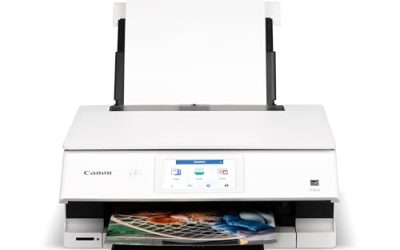
5. Canon SELPHY CP1500 — Best Phone Printer for Real 4×6 Photos
Tier: premium
The SELPHY CP1500 is the one pick here that prints photographs at the size photo paper has always meant. It is a dye-sublimation printer: a ribbon cartridge lays down color in passes and finishes each print with a protective overcoat, producing borderless 4×6 photos that resist water, fingerprints and fading. It connects to a phone over Wi-Fi through the SELPHY Photo Layout app, and it also supports AirPrint and Mopria, so printing does not depend on one app.
Because it handles postcard-size prints plus smaller card and square formats with the right cassettes, the CP1500 covers the photo jobs the pocket printers cannot: prints for frames, albums and gifts. It is still compact enough for a shelf or a tote bag, and an optional battery pack lets it run away from an outlet. The running format is a combined ink-and-paper set, so each print uses a matched portion of ribbon and paper.
Specs
- Print technology: dye-sublimation thermal transfer with protective overcoat
- Resolution: 300 x 300 dpi
- Print sizes: 4 x 6 inches (postcard), plus card and square sizes with optional cassettes
- Connectivity: Wi-Fi, AirPrint, Mopria, USB-C, SD card slot
- Display: color LCD for standalone printing
- Power: AC adapter included, optional rechargeable battery pack
- Model number: 5539C001 (Black)
- Best for: framed photos, albums, event printing at home
How to Choose a Phone Printer
Start with the output, not the hardware. If most of what you print is words — notes, lists, flashcards, labels — a thermal printer is the cheapest format to run because the paper is the only consumable and there is no ink at all. If you want color photos small enough to stick into a journal, ZINK is the format, and the choice between models comes down to app features and shape. If the photos are the point and they are headed for frames or albums, only the dye-sublimation pick prints at 4×6.
Second, look at the paper, because paper is the long-term commitment. Thermal rolls and label tapes are inexpensive and widely available in colors and adhesive versions. ZINK sheets cost more per print and only come in the 2×3 size. SELPHY ink-and-paper sets price out per finished photo but deliver the largest, longest-lasting prints. Matching the paper format to your habit matters more than small differences in printer hardware.
Third, check the connection and the app. Bluetooth models pair with one phone at a time and are the simplest for personal use; the KODAK Step adds NFC pairing for Android, and the Wi-Fi SELPHY can serve several phones in a household and accept prints through AirPrint or Mopria without opening the maker app. Since every editing tool, template and collage layout lives in the app, spend a moment on which app environment you prefer: Phomemo and Nelko lean into templates and organizing, Canon Mini Print leans into photo effects, and the SELPHY app focuses on layouts for standard photo sizes.
Finally, think about where the printer will live. The M02, P21, Ivy 2 and Step are battery-powered pocket devices that charge from a phone-style USB cable and are meant to be carried. The SELPHY is a stay-at-home printer that happens to be small, with an optional battery for occasional outings. Buying the portable one for a desk job, or the desk one for a travel journal, is the most common way to end up disappointed with an otherwise good printer.
Frequently Asked Questions
Do phone printers need ink?
It depends on the technology. Thermal printers like the Phomemo M02 and Nelko P21 use heat on coated paper or tape, so they need no ink at all. ZINK printers like the Canon Ivy 2 and KODAK Step also skip cartridges because the color crystals are inside the paper. The Canon SELPHY CP1500 is the exception: it uses a ribbon cartridge that ships in combined ink-and-paper sets matched to the number of prints.
Can a phone printer print documents?
Not full pages. Every printer in this roundup prints small formats: thermal strips up to 57 mm wide, labels, 2×3 photos, or photos up to 4×6 inches. They can print lists, notes, web pages saved through an app, and photos, but a letter-size or A4 document still calls for a conventional home or office printer.
How long do prints from a phone printer last?
Thermal prints are the most temporary and can fade over time, especially in heat and sunlight, so they suit notes and labels rather than archives. ZINK prints are smudge-proof and water resistant and hold up well in journals and albums. Dye-sublimation prints from the SELPHY CP1500 carry a protective overcoat and are rated by Canon for album storage lasting up to 100 years.
Do these printers work with both iPhone and Android?
Yes. All five picks pair with companion apps available for both iOS and Android, and they connect over Bluetooth, with the SELPHY CP1500 adding Wi-Fi, AirPrint and Mopria. The KODAK Step also offers NFC tap-to-pair, which is an Android-only convenience.
Final Verdict
For everyday phone printing beyond photos, the Phomemo M02 is the most useful single buy: it turns a phone into a pocket print shop for notes, lists and stickers with nothing to refill but paper rolls. If your real goal is an organized home, the Nelko P21 does one job and does it neatly. For color, the Canon Ivy 2 and KODAK Step deliver instant sticky-back photos in two slightly different shapes, and the Canon SELPHY CP1500 stands apart as the pick when prints need to be real 4×6 photographs. Pick by the paper you want in your hand, and any of the five will feel like the right tool.
Product and ASIN Reference
| Product | ASIN |
|---|---|
| Phomemo M02 Mini Printer (Pink) | B08X4352YN |
| Nelko P21 Label Maker (White) | B0C3L93F2Q |
| Canon Ivy 2 Mini Photo Printer (Pure White) | B0BGM5WRQ1 |
| KODAK Step Instant Smartphone Photo Printer (White) | B08C72V1LB |
| Canon SELPHY CP1500 Wireless Compact Photo Printer (Black) | B0BF6T86WD |
More from Amazon
Programs that pair well with the guide above. Offers and eligibility are set by Amazon and may change.
Free shipping on eligible items, Prime Video and more. Eligible new members can start with a free trial.
Start a Prime free trialAd-free music streaming. Eligible new subscribers can start with a free trial.
Try Music Unlimited freeA Prime membership for ages 18-24 with a trial period. Eligibility is set by Amazon.
See Prime for Young AdultsAudiobooks and podcasts to listen to on the go. Eligible new members can start with a free trial.
Try Audible freeAs an Amazon Associate we earn from qualifying purchases.