
For a home media server, a two- to four-bay NAS with an Intel processor that supports hardware video transcoding is the best starting point, and buyers who want the easiest setup usually land on Synology, while those who want more hardware flexibility look at QNAP, UGREEN or Asustor. If most of your viewing happens on devices that play your files directly, you can get by with a simpler, cheaper model, because transcoding only matters when a device cannot play the original format.
Our top picks
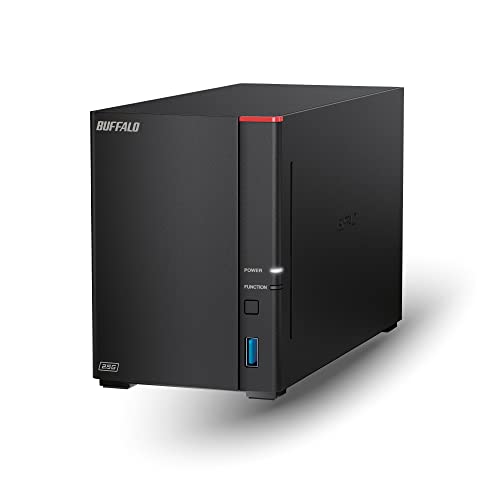 BUFFALO LinkStation 720 8TB 2-Bay Home Office
- Get enhanced features, cloud capabilities, MacOS 26 compatibility,…
- Connect the LinkStation to your router and enjoy…
- Subscription-Free Personal Cloud


As an Amazon Associate we earn from qualifying purchases at no extra cost to you.
What a Media-Server NAS Needs
A NAS (network-attached storage) box is a small computer with drive bays that stores your movies, music, photos and backups and serves them to TVs, phones and computers. For media use, four things matter most: the processor, the number of bays, network speed and software.
Processor and Transcoding
Plex, Jellyfin and Emby can convert video on the fly when a device cannot play a file in its native format. This transcoding is demanding. Many Intel processors include Quick Sync hardware video encoding, which Plex lists as a supported hardware acceleration method, though Plex generally requires a paid Plex Pass for hardware transcoding. Many entry-level ARM-based NAS units lack this feature, so reviewers commonly steer media-server buyers toward Intel-based models. If you mostly use “direct play” on a modern TV or streaming box, transcoding matters far less.
Bays and Capacity
Two bays offer simple mirroring, where a copy of the data lives on both drives. Four bays offer more capacity and options such as RAID 5, which tolerates one drive failure. Whichever you choose, remember that RAID is not a backup. Keep an additional copy of anything irreplaceable on an external drive or off-site.
Networking
Gigabit Ethernet handles most streaming. Several current models add 2.5 GbE ports, which help with large file transfers and multiple simultaneous users if your router and switch support it.
Software
Synology DSM, QNAP QTS or QuTS hero, UGREEN UGOS, and Asustor ADM each include a package center with media server apps, backup tools and photo management. Users often cite Synology DSM as the most polished and beginner-friendly, while QNAP and UGREEN offer more raw hardware for the money.
At a Glance: Popular Home Media NAS Options
| Model family | Best for | Key stated specs | Limits |
|---|---|---|---|
| Synology DS224+ (2-bay) | Simple, reliable media and backup for a small household | Maker lists an Intel Celeron processor with hardware transcoding support and 2 bays | Gigabit Ethernet; only 2 bays |
| Synology DS423+ / DS425+ class (4-bay) | Larger libraries, more users | Intel-based 4-bay designs from the plus series; the newer plus models add 2.5 GbE according to the maker | Hardware compatibility rules may favor Synology-branded or listed drives on some newer models |
| QNAP TS-464 / TS-433 class | Power users who want expansion and PCIe options | QNAP lists Intel processors, 2.5 GbE and expansion slots on the TS-464 | Interface is busier; security updates need attention |
| UGREEN NASync DXP series | Buyers who want strong hardware at a lower tier | Maker lists 2.5 GbE or 10 GbE options and Intel processors in the Plus models | Newer software and ecosystem than Synology and QNAP |
| Asustor Lockerstor / Drivestor lines | Flexible hardware with multiple network options | Several models list 2.5 GbE and Intel processors | Smaller user community |
| TerraMaster F2 / F4 series | Budget-minded buyers | Maker lists Intel-based models with 2.5 GbE | Software less refined than the big names |
Choosing Drives
NAS-rated hard drives are designed for continuous operation and multi-drive vibration. Common choices include Western Digital Red Plus, Seagate IronWolf and Toshiba N300. Avoid shingled-magnetic-recording (SMR) drives in RAID arrays, since reviewers and the NAS makers have flagged slow rebuilds. Capacity matters less for the speed of streaming than for how long your library will last, so buy for the library you expect in two to three years.
Buy drives from more than one batch where practical, and keep spare capacity in the NAS so that a rebuild after a drive failure does not push it to the limit. Some makers publish compatibility lists, and recent Synology units have drawn reviewer attention for how they treat third-party drives, so read the maker’s current compatibility page before buying.
Budget Tiers
Budget tier
Two-bay models from TerraMaster, UGREEN, Asustor or entry-level Synology suit direct-play households and cheap backup. They are enough for a handful of local streams, but weaker processors may struggle with transcoding.
Mid-range tier
Four-bay Intel-based models such as the Synology plus series, the QNAP TS-464 class and UGREEN’s Plus lineup give hardware transcoding, 2.5 GbE and room to grow. This tier fits most media server buyers.
Premium tier
High-end units with 10 GbE, more bays and stronger processors suit large 4K libraries, multi-user households, virtual machines and photo backup for several people. Reviewers often point out that they exceed what a family movie library needs.
Pick X If You…
| Pick this | If you… |
|---|---|
| Synology 2-bay plus model | Want a simple setup, solid software and mainly direct-play viewing |
| Synology 4-bay plus model | Want a polished system with room to grow and Plex or Jellyfin |
| QNAP TS-464 class | Want more ports, expansion options and tinkering freedom |
| UGREEN NASync Plus | Want strong hardware value and can accept newer software |
| Asustor or TerraMaster | Want a lower-cost alternative with 2.5 GbE |
Setup and Safety Notes
- Ventilation: Place the NAS in an open, ventilated spot and follow the maker’s temperature guidance.
- Power protection: A small uninterruptible power supply protects drives from sudden power loss.
- Security: Keep the NAS software updated, use strong unique passwords and enable two-factor authentication. Avoid exposing the admin interface directly to the internet, and use the maker’s secure remote-access tools or a VPN instead.
- Backup: Follow a 3-2-1 approach: three copies, on two types of media, with one off-site.
- Noise: Drives in a living room can be audible. Look at the maker’s stated noise levels and consider placing the NAS in a closet or office.
Alternatives to Consider
- Mini PC with external drives: A small Intel mini PC running Plex or Jellyfin offers strong transcoding at low cost, though it lacks built-in RAID features.
- Old PC running TrueNAS or Unraid: Flexible and powerful, but it needs more technical skill and uses more electricity.
- Dedicated streaming box with USB storage: Enough for a small library with one TV, though it has no redundancy.
Planning Your Library and Network
Before buying, estimate how much storage your library needs. A collection of high-bitrate 4K remuxes grows far faster than a library of standard-definition or compressed files, so work out your average file size and multiply by the titles you plan to keep. Leave headroom for photos, phone backups and growth. Many owners start with two drives and move to larger ones later, which is easier on a four-bay model.
Your network matters as much as the NAS. A wired Ethernet connection from the NAS to the router is the most reliable route, and powerline or weak Wi-Fi bridges can cause buffering with large files. If your TVs connect through Wi-Fi, a good mesh or router placement helps. A 2.5 GbE port only pays off when the other end of the link also supports it.
Software Choices for Playback
Plex, Jellyfin and Emby are the three most common servers. Plex offers the widest app support and a polished interface, with some features behind a paid plan. Jellyfin is free and open source, with hardware acceleration available without a subscription according to the project, though app polish varies by device. Emby sits between the two. Synology also offers its own video and photo apps, and QNAP offers a similar suite, which may be enough for simple needs. Pick the server first, then confirm your TVs and streaming players have apps for it.
Frequently Asked Questions
Do I need a NAS for Plex?
No, Plex can run on a PC, mini PC or other server. A NAS is convenient because it stores your files with drive redundancy and runs quietly around the clock, but it is not required.
How many bays do I need for a home media server?
Two bays suit small libraries and simple mirroring, while four bays give more capacity and options such as RAID 5. Pick the number of bays based on how large your library is likely to grow.
Is hardware transcoding important?
It matters if you stream to devices that cannot play your files directly, such as when watching away from home or on older phones. If your TVs and streaming boxes play your formats natively, you can skip it. Plex also requires a paid plan for hardware transcoding.
Is RAID the same as a backup?
No. RAID keeps the NAS running if a drive fails, but it does not protect against deletion, ransomware, theft or fire. Keep another copy of important files elsewhere.
Can I use any hard drive in a NAS?
Many NAS units accept standard drives, but NAS-rated drives are built for continuous use and multi-drive enclosures. Read the maker’s compatibility list, since some newer models restrict or warn about unlisted drives.
Is 2.5 GbE worth having?
It helps if your router, switch and computer also support it, mainly for faster file transfers. For streaming video alone, gigabit Ethernet is usually enough.
More from Amazon
Programs that pair well with the guide above. Offers and eligibility are set by Amazon and may change.
Free shipping on eligible items, Prime Video and more. Eligible new members can start with a free trial.
Start a Prime free trialAd-free music streaming. Eligible new subscribers can start with a free trial.
Try Music Unlimited freeA Prime membership for ages 18-24 with a trial period. Eligibility is set by Amazon.
See Prime for Young AdultsAudiobooks and podcasts to listen to on the go. Eligible new members can start with a free trial.
Try Audible freeAs an Amazon Associate we earn from qualifying purchases.


