Key takeaways
- Compare the best wireless photo printers for Wi-Fi, AirPrint and app-based printing, from compact dye-sub models to wide-format ink tanks for home use.
The best wireless photo printers are the Canon PIXMA TS8820 for most homes, the Epson EcoTank Photo ET-8550 for high-volume and wide-format printing, the Canon SELPHY CP1500 for compact 4×6 prints, the Epson Expression Photo XP-8800 for cartridge-based photo quality, and the Canon PIXMA PRO-200S for serious photographers who print up to 13×19. What separates them is not raw print quality alone. It is how each one connects: dual-band Wi-Fi versus single-band, AirPrint and Mopria support, Wi-Fi Direct for router-free printing, and how capable the companion app is. This guide ranks five wireless photo printers by the strength of that wireless experience first, then by the prints they produce.


As an Amazon Associate, we earn from qualifying purchases.
What Wireless Printing Actually Involves
A wireless photo printer can receive jobs in several distinct ways, and the mix matters more than most spec sheets suggest. Standard Wi-Fi printing puts the printer on your home network so any phone, tablet, or computer on that network can print. AirPrint covers Apple devices with no driver or app install, while Mopria does the same job for Android and Chromebooks. Wi-Fi Direct lets the printer broadcast its own network, so a phone can connect straight to it in a dorm room, at an event, or anywhere a router is unavailable or unreliable. Finally, the manufacturer app — Canon PRINT, Epson Smart Panel, Canon’s SELPHY Photo Layout — is where borderless layouts, collage tools, paper selection, and ink checks usually live. A printer with every one of these paths covered is simply easier to live with than one that only ticks the Wi-Fi box.
Canon PIXMA TS8820
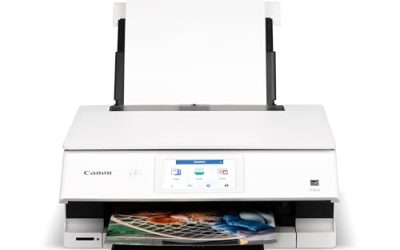
The PIXMA TS8820 is the most complete wireless package in a mainstream home photo printer. It connects over Wi-Fi and supports AirPrint and Mopria, so iPhones, Android phones, and Chromebooks can all send photos without installing anything first. For everything beyond a quick print — borderless layouts, scanning to a phone, checking ink — the Canon PRINT app handles setup and day-to-day jobs, and the printer walks through network connection on its 4.3-inch touchscreen. Photo output comes from a six-ink system that pairs a pigment black for documents with dye inks including gray, which keeps black-and-white prints neutral and skin tones smooth. It also scans and copies, making it the natural single-printer answer for a household that prints photos often and documents occasionally.
Specs
- Print technology: Inkjet, 6 individual inks (PGI-230 pigment black, CLI-231 dye inks including gray)
- Maximum print size: 8.5 x 11 inches, borderless
- Print resolution: Up to 4800 x 1200 dpi
- Connectivity: Wi-Fi, AirPrint, Mopria, Canon PRINT app, USB
- Display: 4.3-inch color touchscreen
- Functions: Print, scan, copy, auto two-sided printing
Tier: mid-range
Canon SELPHY CP1500
The SELPHY CP1500 takes the opposite approach to wireless: instead of anchoring a home office, it is built to be carried to wherever the photos are. It supports Wi-Fi and Wi-Fi Direct, so a phone can connect through a home network or straight to the printer with no router involved, and it works with AirPrint and Mopria for driver-free printing. The SELPHY Photo Layout app is a genuine part of the product — it builds collages, adds stamps and overlays, and can print QR codes that link to online albums or videos. The dye-sublimation process lays down color in passes and finishes each print with a protective overcoat, so 4×6 photos come out dry, smudge-resistant, and rated to last up to 100 years in an album. An optional battery pack turns it into a fully untethered printer for parties and events.
Specs
- Print technology: Dye-sublimation thermal transfer with protective overcoat
- Maximum print size: 4 x 6 inches (postcard), plus credit-card and square formats with the right paper cassettes
- Print resolution: 300 x 300 dpi
- Connectivity: Wi-Fi, Wi-Fi Direct, AirPrint, Mopria, SELPHY Photo Layout app, USB-C, SD card slot
- Print speed: About 41 seconds per 4 x 6 print
- Power: AC adapter included, optional rechargeable battery pack
Tier: budget
Epson Expression Photo XP-8800
The XP-8800 is Epson’s cartridge-based photo all-in-one, and its wireless setup is one of the smoothest in this group. Wi-Fi and Wi-Fi Direct are both built in, AirPrint covers Apple devices, and the Epson Smart Panel app turns a phone into the printer’s control panel for setup, printing, scanning, and ink monitoring. It even accepts voice-activated printing through common smart assistants. The six-color Claria Photo HD ink set adds light cyan and light magenta to the standard four colors, which produces smoother gradients in skies and skin than a four-ink machine can manage. Borderless printing runs up to 8.5 x 11, a dedicated rear tray handles specialty media, and the built-in scanner and copier make it a complete home photo station rather than a single-purpose printer.
Specs
- Print technology: Inkjet, 6-color Claria Photo HD ink (individual cartridges)
- Maximum print size: 8.5 x 11 inches, borderless
- Print resolution: Up to 5760 x 1440 dpi
- Connectivity: Wi-Fi, Wi-Fi Direct, AirPrint, Epson Smart Panel app, voice-activated printing, USB
- Display: 4.3-inch color touchscreen
- Functions: Print, scan, copy, auto two-sided printing
Tier: mid-range
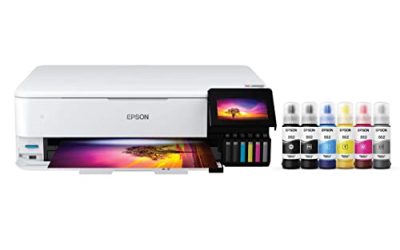
Epson EcoTank Photo ET-8550

The ET-8550 is the pick when wireless printing has to serve a whole household at volume. It offers the widest connection set here: Wi-Fi, Wi-Fi Direct, Ethernet for a wired network anchor, and AirPrint, with the Epson Smart Panel app for phone-based setup and printing. Because it is an EcoTank model, the six-color Claria ET Premium ink comes in refill bottles rather than cartridges, so the per-print ink cost drops sharply and the wireless convenience does not come with a cartridge-ordering habit attached. It prints borderless up to 13 x 19, handles specialty media through a rear feed, and scans and copies as well. For a family that prints photos from several phones every week, or a seller printing product photos and art at home, this is the machine that keeps up.
Specs
- Print technology: Inkjet, 6-color Claria ET Premium refillable ink tanks (552 ink bottles)
- Maximum print size: 13 x 19 inches, borderless
- Print resolution: Up to 5760 x 1440 dpi
- Connectivity: Wi-Fi, Wi-Fi Direct, Ethernet, AirPrint, Epson Smart Panel app, USB, SD card slot
- Display: 4.3-inch color touchscreen
- Functions: Print, scan, copy, auto two-sided printing
Tier: premium
Canon PIXMA PRO-200S

The PRO-200S is a dedicated photo printer for photographers who sell prints or exhibit work, and its wireless support matches that role. Wi-Fi and Ethernet are built in alongside AirPrint, the Canon PRINT app handles phone and tablet printing, and Wireless PictBridge can pull images directly from a compatible camera without a computer in between. The eight-color dye-based ink system produces a wide color gamut on glossy and fine art media up to 13 x 19, with a top feed for everyday paper and a manual feed tray for thicker stock. Canon’s Professional Print and Layout software integrates with photo editing workflows on a computer, while the 3.0-inch LCD handles ink checks and maintenance at the machine. There is no scanner — this is a single-purpose printer, and the wireless design assumes it sits on a studio network serving one serious user.
Specs
- Print technology: Inkjet, 8-color dye-based ink (ChromaLife 100+)
- Maximum print size: 13 x 19 inches (A3+), borderless
- Connectivity: Wi-Fi, Ethernet, AirPrint, Canon PRINT app, Wireless PictBridge, USB
- Display: 3.0-inch color LCD
- Paper handling: Top feed plus manual feed tray for thick media
- Functions: Print only
Tier: premium
How to Choose
Start with the connection paths your household actually uses. An Apple-heavy home should treat AirPrint as non-negotiable, and every printer here supports it. Android and Chromebook users should look for Mopria, which the two smaller Canons include. If the printer will travel, work in a dorm, or print at events where the network is locked down or absent, Wi-Fi Direct is the feature that matters most — the SELPHY CP1500, XP-8800, and ET-8550 all offer it.
Next, decide how the printer joins your network. Dual-band Wi-Fi support keeps the printer reachable on modern mesh networks, while Ethernet, offered by the ET-8550 and PRO-200S, removes wireless dropouts entirely for a fixed installation. Then look at the app. The app is where you will choose paper types, build collages, and check ink, so a printer whose app covers setup, printing, and maintenance in one place saves repeated small frustrations.
Finally, match the wireless choice to print volume and size. A SELPHY CP1500 covers casual 4×6 printing from a phone with almost no setup friction. The TS8820 and XP-8800 add scanning and letter-size borderless prints for general home use. The ET-8550 and PRO-200S print up to 13 x 19 — the ET-8550 for volume and low ink costs across a family, the PRO-200S for maximum color quality on a photographer’s own network.
Frequently Asked Questions
Can a wireless photo printer work without a router?
Yes, if it supports Wi-Fi Direct. The printer creates its own wireless network and your phone connects to it directly, so no router or internet connection is involved. The Canon SELPHY CP1500, Epson Expression Photo XP-8800, and Epson EcoTank Photo ET-8550 all include Wi-Fi Direct, which makes them usable in dorms, at events, and anywhere a shared network is restricted.
What is the difference between AirPrint and a printer app?
AirPrint is built into Apple devices and sends a photo to the printer with no extra software, but the options are basic. A manufacturer app such as Canon PRINT, Epson Smart Panel, or SELPHY Photo Layout adds paper and quality selection, borderless layouts, collages, scanning to the phone, and ink monitoring. Most owners use AirPrint for quick prints and the app for everything else.
Why does my wireless photo printer keep dropping off the network?
The usual causes are distance from the router, interference on a crowded 2.4 GHz band, and the printer’s power-saving sleep state hiding it from phones. Moving the printer closer to the router, keeping it on the same network band as your phone, and updating its firmware resolves most cases. For a fixed desk setup, an Ethernet connection — available on the ET-8550 and PIXMA PRO-200S — removes the problem entirely.
Do wireless photo printers print more slowly than USB-connected ones?
For photos, effectively no. A photo file is small compared with the time the print engine spends laying down ink, and modern Wi-Fi transfers it faster than the printer can use it. The first print of a session can pause briefly while the printer wakes and reconnects, but per-page speed after that is set by the print mechanism, not the connection.
Final Verdict
For most households, the Canon PIXMA TS8820 is the wireless photo printer to buy: AirPrint and Mopria cover every phone, the Canon PRINT app is complete, and the six-ink output is strong for both photos and documents. Choose the Canon SELPHY CP1500 if your printing is all 4×6 photos from a phone and portability matters, or the Epson Expression Photo XP-8800 if you prefer Epson’s app and six-color cartridge system in a home all-in-one. Step up to the Epson EcoTank Photo ET-8550 for wide-format prints, Ethernet reliability, and low ink costs at family volume, and pick the Canon PIXMA PRO-200S when print quality for display or sale matters more than scanning and all-in-one convenience.
Product and ASIN Reference
| Product | ASIN |
|---|---|
| Canon PIXMA TS8820 Wireless All-in-One Photo Printer (White) | B0DF4GZ99M |
| Canon SELPHY CP1500 Compact Photo Printer (White) | B0BF65S5J5 |
| Epson Expression Photo XP-8800 Wireless All-in-One Printer | B0DC2DYHRF |
| Epson EcoTank Photo ET-8550 Wireless Wide-Format All-in-One Printer | B08R5M2HDH |
| Canon PIXMA PRO-200S Professional 13-Inch Wireless Photo Printer | B0DSR9KCG2 |
More from Amazon
Programs that pair well with the guide above. Offers and eligibility are set by Amazon and may change.
Free shipping on eligible items, Prime Video and more. Eligible new members can start with a free trial.
Start a Prime free trialAd-free music streaming. Eligible new subscribers can start with a free trial.
Try Music Unlimited freeA Prime membership for ages 18-24 with a trial period. Eligibility is set by Amazon.
See Prime for Young AdultsAudiobooks and podcasts to listen to on the go. Eligible new members can start with a free trial.
Try Audible freeAs an Amazon Associate we earn from qualifying purchases.