Key takeaways
- Compare the best home photo printers for family photos, school projects and everyday printing, with budget, tank and premium picks for every household.
A home photo printer has to do two jobs at once: turn phone photos into prints worth framing, and handle the everyday printing a household generates, from school projects and permission slips to shipping labels and homework. The good news is that the current crop of home all-in-ones does both well. Six-ink models produce smooth, accurate color for family photos, refillable tank printers have slashed the cost of printing a stack of 4×6 prints, and even the simplest budget models now print borderless photos straight from a phone.


If you want one answer up front: the Canon PIXMA TS8820 is the best home photo printer for most households, because its six-ink system delivers the strongest photo quality in this group while still scanning, copying and duplexing documents. Families who print photos every week should look at the Epson EcoTank ET-2850 instead, since its refillable tanks make heavy photo printing far cheaper to run. The other three picks below cover a tighter budget, a phone-first HP with a dedicated photo tray, and a premium wide-format tank model for homes that print big.
As an Amazon Associate, we earn from qualifying purchases.
Table of Contents
- How to Choose a Home Photo Printer
-
- Canon PIXMA TS8820
-
- Epson EcoTank ET-2850
-
- HP Envy Inspire 7955e
-
- Canon PIXMA TS3720
-
- Epson EcoTank Photo ET-8550
- Frequently Asked Questions
- Final Verdict
- Product and ASIN Reference
How to Choose a Home Photo Printer
Start with the ink system, because it decides your running costs. Cartridge printers cost less to buy and more to feed. That trade suits households that print a photo batch once a month and documents in between. Refillable tank printers reverse the math: the machine costs more, the ink bottles cost very little per page, and printing fifty photos for a school project or a family album stops being a decision you have to budget for. If your household prints photos weekly, a tank model pays for itself; if you print a handful of photos a month, a cartridge model is simpler and cheaper overall.
Count the ink colors for photo quality. Four-ink printers mix every shade from cyan, magenta, yellow and black, and they do a respectable job on snapshots. Six-ink systems add colors such as gray and photo blue, and the difference shows in skin tones, evening skies and black-and-white prints, which come out neutral instead of tinted. For typical family photos viewed at arm’s length, a good four-ink printer is fine; for prints you plan to frame and keep, six inks are worth it.
Check the paper handling, not just the headline resolution. Resolution figures are nearly identical across this category, so they separate models far less than paper handling does. Look for borderless printing at the sizes you actually use, a rear tray or dedicated photo tray that feeds thick glossy paper without bending it, and enough capacity in the main tray that the printer is not constantly running dry mid-project. A scanner on top matters more than most buyers expect: it copies documents, digitizes old prints and handles the school forms that still arrive on paper.
Make sure the whole household can print to it. A home printer serves phones, tablets, school Chromebooks and laptops at the same time. Wi-Fi is standard on every pick here, but confirm the printer supports your devices: AirPrint covers Apple hardware without an app, Mopria covers most Android phones and Chromebooks, and each brand’s app adds photo layout tools, collage printing and scan-to-phone features that kids and grandparents tend to use most.
1. Canon PIXMA TS8820
Tier: Mid-range — Best Overall
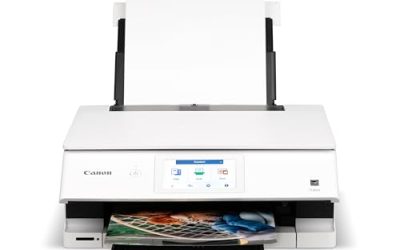
The PIXMA TS8820 is built around the thing home buyers actually care about: photos that look like the moment felt. Its six individual inks add gray and photo blue to the usual four dye colors, with a separate pigment black keeping text on documents crisp. Faces hold natural warmth, skies shade smoothly from horizon to zenith, and black-and-white prints stay neutral. Borderless output runs up to 8.5×11 inches, which covers every standard frame size a family is likely to hang.
Daily life is handled just as well. A 35-sheet auto document feeder makes copying a multi-page school packet a one-touch job, auto duplex printing saves paper on homework drafts, and two paper feeds let you keep plain paper in the cassette and photo paper in the rear tray at the same time. The 4.3-inch touchscreen is large enough for a grandparent to navigate without help, and the Canon PRINT app handles printing straight from a phone’s camera roll. Individual ink tanks mean a heavy month of birthday photos only drains the colors you actually used.
Specs
- Ink system: 6 individual inks, dye color with pigment black
- Maximum print size: 8.5 x 11 inches, borderless
- Maximum resolution: 4800 x 1200 dpi
- Print speed: Up to 15 ipm black, 10 ipm color
- Display: 4.3-inch color touchscreen
- Connectivity: Wi-Fi, USB, AirPrint and Mopria
- Extra functions: Scan, copy, 35-sheet document feeder, auto duplex
- Model: PIXMA TS8820 (White), 6793C022
Best for: Most households — the strongest photo quality here in a printer that still handles every everyday job.
2. Epson EcoTank ET-2850
Tier: Mid-range — Best for Low Running Costs
The EcoTank ET-2850 replaces cartridges with refillable tanks, and for a family that prints photos often, that changes the economics of the whole hobby. A replacement set of Epson 502 ink bottles is rated for up to 7,500 black pages and 6,000 color pages, so a summer of vacation photos, birthday banners and school projects barely dents the supply. Refilling is a keyed-bottle, no-squeeze process that older kids can manage without making a mess of the kitchen table.
Print quality is a step below the six-ink Canon above — the ET-2850 uses four colors, so subtle gradients and skin tones are good rather than exceptional — but for 4×6 and 5×7 family prints it is entirely convincing, and it prints borderless photos as well as everyday documents. Auto two-sided printing, a 100-sheet tray and the Epson Smart Panel app round out a machine designed to be forgotten about until someone needs a print. Households that currently ration photo printing because of cartridge costs will simply stop rationing.
Specs
- Ink system: Refillable EcoTank, Epson 502 ink bottles
- Ink yield: Up to 7,500 pages black and 6,000 pages color per bottle set
- Maximum print size: 8.5 x 14 inches, borderless photo printing supported
- Maximum resolution: 5760 x 1440 dpi
- Print speed: Up to 10.5 ppm black, 5 ppm color (ISO)
- Display: 1.44-inch color LCD
- Connectivity: Wi-Fi, USB, Epson Smart Panel app
- Extra functions: Scan, copy, auto 2-sided printing
- Model: EcoTank ET-2850 (Black)
Best for: Families who print photos every week and want running costs low enough that nobody thinks twice before printing.
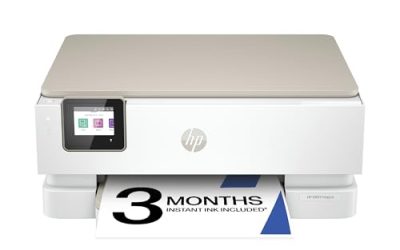
3. HP Envy Inspire 7955e

Tier: Mid-range — Best for Phone-First Printing
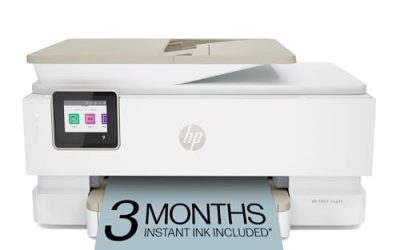
The Envy Inspire 7955e is designed for households where nearly every photo starts on a phone. HP’s app walks through setup in minutes, and the printer includes a separate 15-sheet photo tray alongside the 125-sheet main tray, so 4×6 and 5×7 photo paper is always loaded and ready without swapping out the plain paper. HP also builds in true-to-phone color handling, which aims to match the screen’s colors on paper — a small thing that removes the most common disappointment with home photo printing.
As an everyday machine it covers the bases: print speeds up to 15 pages per minute in black and 10 in color, auto duplex printing, and a flatbed scanner for copies and digitizing old prints. It runs on two HP 64 cartridges, one black and one tri-color, and it is built for HP’s Instant Ink subscription, which ships replacement ink automatically before you run out. That subscription model suits steady, predictable home use; households that print in big occasional bursts may prefer the tank model above. The 2.7-inch touchscreen keeps walk-up copying simple for everyone in the house.
Specs
- Ink system: 2 cartridges, HP 64 Black and HP 64 Tri-color
- Maximum print size: 8.5 x 11 inches, borderless
- Maximum resolution: 4800 x 1200 dpi
- Print speed: Up to 15 ppm black, 10 ppm color
- Paper handling: 125-sheet main tray plus 15-sheet dedicated photo tray
- Display: 2.7-inch color touchscreen
- Connectivity: Wi-Fi, USB, HP Smart app, AirPrint
- Extra functions: Scan, copy, auto duplex, Instant Ink ready
- Model: ENVY Inspire 7955e, 1W2Y8A
Best for: Phone-first families who want photo paper always loaded and the option of ink arriving automatically.
4. Canon PIXMA TS3720
Tier: Budget — Best Low-Cost Starter
The PIXMA TS3720 is the entry point for a household that wants photo printing at home without committing much money or desk space. It uses two FINE cartridges — a black and a tri-color — and prints borderless photos up to letter size, so a phone snapshot can go from camera roll to fridge door in one step. Print speeds of 7.7 ipm in black and 4 ipm in color are modest, and photo quality from a two-cartridge system will not match the six-ink TS8820 above, but for casual snapshots, party photos and school projects the output is bright and perfectly presentable.
Everything else is kept deliberately simple: a 60-sheet rear tray, Wi-Fi with AirPrint and Mopria support, and basic scan and copy functions for documents. The honest trade-off is running cost. Small cartridges empty quickly if the household starts printing photos in volume, and per-print costs are the highest in this roundup. As a first family printer, a dorm-room step up, or a second machine for a kids’ homework corner, it makes sense; as the main printer for a photo-happy household, the EcoTank above is the smarter spend.
Specs
- Ink system: 2 FINE cartridges, Canon PG-275 Black and CL-276 Color
- Maximum print size: 8.5 x 14 inches, borderless up to 8.5 x 11 inches
- Maximum resolution: 4800 x 1200 dpi
- Print speed: Up to 7.7 ipm black, 4 ipm color
- Paper handling: 60-sheet rear tray
- Display: 1.5-inch mono LCD
- Connectivity: Wi-Fi, USB, AirPrint and Mopria
- Extra functions: Scan and copy
- Model: PIXMA TS3720 (White)
Best for: Budget buyers and light-use households that want simple, occasional photo printing from a compact machine.
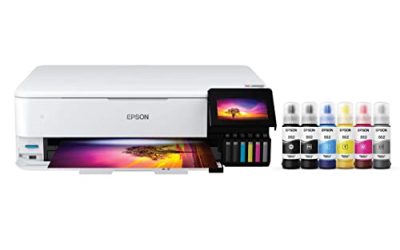
5. Epson EcoTank Photo ET-8550

Tier: Premium — Best for Big Prints
The EcoTank Photo ET-8550 is the pick for the household that has outgrown 4×6 prints. It prints borderless up to 13×19 inches, so family portraits, school art projects and photo-club entries can go straight onto the wall, and its six-color Claria ET Premium ink set adds photo black and gray to the standard colors for smooth skin tones and genuinely neutral black-and-white prints. Because it is an EcoTank, all that output comes from refillable 552 ink bottles rather than cartridges, keeping the cost of large prints far below what a cartridge machine would charge for the same page.
A dedicated photo tray, a rear feed for thick specialty media, Ethernet alongside Wi-Fi, and a 4.3-inch touchscreen make it feel like a small studio machine that also happens to scan, copy and duplex everyday documents. It is physically large and it is the most expensive printer here by a wide margin, so it only makes sense where big prints are a regular event — a photography hobbyist in the family, a home business printing its own marketing pieces, or parents who print their kids’ artwork at poster size. For those homes, nothing else in this roundup does what it does.
Specs
- Ink system: 6-color Claria ET Premium refillable tanks, Epson 552 ink bottles
- Maximum print size: 13 x 19 inches, borderless
- Maximum resolution: 5760 x 1440 dpi
- Print speed: Up to 16 ppm black, 12 ppm color
- Paper handling: Front photo tray, main cassette, rear specialty-media feed
- Display: 4.3-inch color touchscreen
- Connectivity: Wi-Fi, Ethernet, USB, SD card slot
- Extra functions: Scan, copy, auto duplex up to letter size
- Model: EcoTank Photo ET-8550
Best for: Photo-enthusiast households that print 8×10 and larger, and want tank running costs at the same time.
Frequently Asked Questions
What makes a home photo printer different from a regular home printer?
A home photo printer is still an all-in-one that scans, copies and prints documents, but it is built to a higher color standard. Photo-focused models use more ink colors, support borderless printing at photo sizes, and feed glossy and thick media through a rear or dedicated tray without bending it. A basic document printer can print a photo, but skin tones, gradients and shadow detail will look flatter, and borderless output is often limited or missing entirely.
Are tank printers cheaper to run for photos than cartridge printers?
Yes, by a wide margin once printing volume is moderate or higher. Tank printers such as the EcoTank models here refill from bottles rated for thousands of pages, so the ink cost of a 4×6 photo is a small fraction of the same print from cartridges. Cartridge printers still make sense for light use, because the machine itself costs less and there is no large ink supply sitting unused if the household only prints occasionally.
What photo sizes can a home photo printer make?
Most home all-in-ones print borderless photos from 4×6 up to 8.5×11 inches, which covers standard frames, albums and school displays. Compact dedicated models specialize in 4×6 only, while wide-format machines such as the EcoTank Photo ET-8550 reach 13×19 inches for posters and wall art. Check the borderless sizes specifically, since a printer’s maximum paper size and its maximum borderless size are not always the same figure.
Do I need special paper to print photos at home?
For photos that look and feel like lab prints, yes — glossy or luster photo paper is coated to hold ink at the surface, which produces the sharp detail and rich color that plain paper cannot. Plain paper absorbs ink and yields dull, soft images, though it is fine for drafts, coloring pages and school worksheets. Keep a pack of 4×6 photo paper loaded or nearby and the printer becomes something the whole family actually uses.
Final Verdict
For most households, the Canon PIXMA TS8820 is the right home photo printer: six inks for the best family photos in this group, a document feeder and duplexing for everyday work, and individual tanks that keep waste down. If your family prints photos constantly, the Epson EcoTank ET-2850 trades a little photo finesse for running costs so low that printing becomes an afterthought. The HP Envy Inspire 7955e suits phone-first homes that want photo paper always loaded, the Canon PIXMA TS3720 keeps the entry price as low as possible, and the Epson EcoTank Photo ET-8550 stands alone for big, frame-worthy prints. Match the ink system to how much your household really prints, and any of the five will serve well.
Product and ASIN Reference
| Product | ASIN |
|---|---|
| Canon PIXMA TS8820 Wireless All-in-One Printer (White) | B0DF4GZ99M |
| Epson EcoTank ET-2850 Wireless All-in-One Supertank Printer (Black) | B096N828X5 |
| HP Envy Inspire 7955e Wireless All-in-One Printer | B09BBLN72F |
| Canon PIXMA TS3720 Wireless All-in-One Printer (White) | B0D1DV6FV5 |
| Epson EcoTank Photo ET-8550 Wireless Wide-Format All-in-One Printer | B08R5M2HDH |
More from Amazon
Programs that pair well with the guide above. Offers and eligibility are set by Amazon and may change.
Free shipping on eligible items, Prime Video and more. Eligible new members can start with a free trial.
Start a Prime free trialAd-free music streaming. Eligible new subscribers can start with a free trial.
Try Music Unlimited freeA Prime membership for ages 18-24 with a trial period. Eligibility is set by Amazon.
See Prime for Young AdultsAudiobooks and podcasts to listen to on the go. Eligible new members can start with a free trial.
Try Audible freeAs an Amazon Associate we earn from qualifying purchases.