
Key takeaways
- Burn-in: Use screen-saver or auto-dim options in the software and avoid leaving static images on for long hours.
- Software dependence: Custom screens and system stats usually require the maker’s app to run on your PC.
- Charging and batteries: For wireless models, use the supplied cable, follow the maker’s charging instructions and stop using a battery that swells or overheats.
- Warranty: Premium keyboards carry warranty terms that vary by brand and region, so read them before buying.
- Compatibility: Some features, such as OLED widgets, may work only on Windows, so consider this if you use macOS or Linux.
If you want a gaming keyboard with a built-in OLED screen, the realistic choices are the ASUS ROG Azoth family for enthusiasts who want hot-swappable switches and a customizable display, the SteelSeries Apex Pro line for players who want an adjustable-actuation keyboard with a small status display, and a handful of niche or modular options for buyers who want more display room. The screen is a convenience feature rather than a performance feature, so choose the keyboard first and treat the OLED as a bonus.
Our top picks


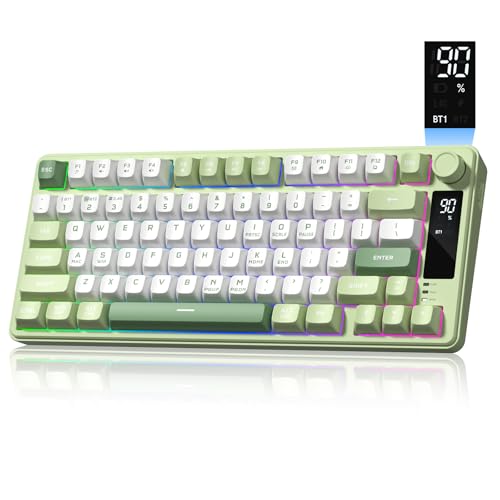
As an Amazon Associate we earn from qualifying purchases at no extra cost to you.
What an OLED Screen on a Keyboard Does
A keyboard OLED is a small display, usually on the top edge or corner, that shows information without needing a separate window. Makers list uses such as profile names, volume and media controls, system stats like CPU load, in-game alerts, Discord notifications and custom images or animations. It is helpful if you switch between games and work profiles, but it does not change how the keys respond. The screen also adds cost, and OLED panels can in theory suffer burn-in when displaying static images for long periods, so makers generally provide screen-saver or auto-dim settings.
At a Glance: Gaming Keyboards with OLED Displays
| Model family | Best for | Key stated features | Limits |
|---|---|---|---|
| ASUS ROG Azoth | Enthusiasts who want customization | ASUS lists a 2.0-inch OLED panel, a multifunction control knob, hot-swap switch sockets, and wireless modes on the Azoth | Premium tier; 75 percent layout means no number pad |
| ASUS ROG Azoth Extreme | Highest-end ROG build | ASUS lists upgraded materials and features beyond the Azoth, with an OLED display | Premium tier and limited availability |
| SteelSeries Apex Pro Gen 3 and TKL Gen 3 | Competitive players who want adjustable actuation | SteelSeries lists OmniPoint 3.0 adjustable switches, rapid trigger options and a small OLED smart display | Display is smaller than the Azoth screen; wired in most Gen 3 versions |
| SteelSeries Apex Pro TKL Wireless (2023) | Wireless play with an OLED | SteelSeries lists 2.4 GHz and Bluetooth with the OLED smart display | Premium tier |
| Mountain Everest Max | Modular layouts and a dock-style display | Mountain lists a modular design with an optional display dock | Niche brand and complex setup |
What to Look For
Display Size and Usefulness
A larger OLED can show album art or detailed system monitoring, whereas a smaller one handles simple text and icons. Read maker descriptions to see which functions are supported in the official software, and whether it requires background software running on your PC.
Switch Choices
Hot-swap sockets, as on the ROG Azoth, allow switches to be changed without soldering. Adjustable-actuation switches, as on SteelSeries OmniPoint boards, let you set how far a key must travel before registering. Which you prefer depends on whether you value tuning or customization.
Wired or Wireless
Wireless keyboards with OLEDs use the screen’s power budget, so battery life is shorter than on similar boards without a display. Makers list battery estimates that depend on lighting and display use, so expect to charge regularly or use the cable.
Software
Armoury Crate from ASUS and SteelSeries GG manage the OLED content. If you dislike background software, look at how much of the configuration is stored on the board.
Layout and Size
The ROG Azoth is a 75 percent layout, compact yet with function row and arrow keys. The Apex Pro line includes full-size and TKL versions, so you can pick the one that fits your desk and mouse space.
Build and Sound
Premium OLED boards often include metal top plates, sound-dampening foam and pre-lubricated switches, which makers advertise as part of the typing feel. Reviewers often comment on acoustics, so listen to sound tests if that matters to you.
Budget Tiers
Budget tier
OLED keyboards are rare at the budget tier. If you want a display on a tighter budget, consider a regular gaming keyboard and a small stand-alone USB or desktop monitoring display instead.
Mid-range tier
Mid-range options with small displays or dials exist from several makers, though many have LCD or LED indicators rather than true OLEDs. Check the product page for the display type before buying.
Premium tier
Most true OLED gaming keyboards, including the ASUS ROG Azoth, Azoth Extreme and SteelSeries Apex Pro generations, sit here. They give top-tier build quality and features, but the price reflects it.
Pick X If You…
| Pick this | If you… |
|---|---|
| ASUS ROG Azoth | Want a compact, customizable 75 percent board with a prominent OLED and knob |
| SteelSeries Apex Pro TKL Gen 3 | Want adjustable actuation and rapid trigger with a smaller OLED |
| SteelSeries Apex Pro TKL Wireless | Want an OLED without a cable |
| SteelSeries Apex Pro full-size | Need a number pad and OLED together |
| Mountain Everest Max | Want a modular layout and are comfortable with a niche brand |
Practical Notes
- Burn-in: Use screen-saver or auto-dim options in the software and avoid leaving static images on for long hours.
- Software dependence: Custom screens and system stats usually require the maker’s app to run on your PC.
- Charging and batteries: For wireless models, use the supplied cable, follow the maker’s charging instructions and stop using a battery that swells or overheats.
- Warranty: Premium keyboards carry warranty terms that vary by brand and region, so read them before buying.
- Compatibility: Some features, such as OLED widgets, may work only on Windows, so consider this if you use macOS or Linux.
Alternatives to Consider
- Keyboard with a volume dial and no screen: Several gaming boards offer a dial or media keys for lower cost, including Razer and Corsair models.
- Separate desk display: A small USB monitor or desktop info display can show stats with more flexibility than a keyboard OLED.
- Stream deck style controller: A key pad with small screens offers better macro control than most keyboard OLEDs.
How to Decide Between the Main Options
The ROG Azoth and the Apex Pro boards solve different problems. The Azoth is built around customization: hot-swap sockets, a knob, a larger display and a compact frame that enthusiasts can tune and mod. The Apex Pro line is built around gameplay tuning: adjustable actuation, per-key settings and, on recent versions, rapid trigger options. If you rarely change switches but often change games, the SteelSeries approach tends to suit you. If you enjoy changing switches, keycaps and lubricants, the ROG approach has more room to explore.
Think also about the room your hands need. A 75 percent board keeps the function row but removes the number pad, so anyone who enters figures all day may prefer a full-size Apex Pro. A TKL leaves the most mouse space for low-sensitivity shooters. Wireless freedom helps on a tidy desk, but the display and lighting draw power, so plan for regular charging or leave the cable attached.
Using the Display Well
Many owners find the screen most useful for a few simple jobs: showing which profile is active, adjusting volume, reading system temperature or showing a clock. Elaborate animations look good in photos but add little in play. Set the screen to dim after a short idle period, choose a plain layout for daily use and keep custom images for special occasions. Makers’ software also lets you assign the display to game-specific information in supported titles, though support differs between games and can change with updates.
If your work involves long hours at the keyboard, remember that the display competes with your monitor for attention. A subtle brightness setting and a quiet layout keep it useful without being distracting.
Frequently Asked Questions
Does an OLED screen improve gaming performance?
No. It provides information and customization, but key response depends on the switches and connection. Choose the board for its feel and features first.
Which keyboards actually have OLED displays?
The ASUS ROG Azoth family and SteelSeries Apex Pro boards are the best-known examples, plus a few modular or niche options. Many boards with small screens use other display types, so read the product page.
Can OLED screens burn in?
OLED panels can in principle retain static images after long periods, which is why makers offer dimming and screen-saver settings. Using those settings reduces the risk.
Do I need software running for the screen to work?
Often yes. System stats, notifications and custom images usually rely on the maker’s software, though basic functions like volume or profile names may work from the keyboard itself.
Are OLED keyboards wireless?
Some are. The ROG Azoth and SteelSeries Apex Pro TKL Wireless offer wireless modes, while many Apex Pro Gen 3 boards are wired. Battery life is shorter when the display is active.
Are these keyboards worth the extra cost?
That depends on how much you value the display and customization. If you want a clean desk setup with built-in stats and profile switching, they can be worthwhile, while competitive players focused on response may prefer to spend on switches.
More from Amazon
Programs that pair well with the guide above. Offers and eligibility are set by Amazon and may change.
Free shipping on eligible items, Prime Video and more. Eligible new members can start with a free trial.
Start a Prime free trialAd-free music streaming. Eligible new subscribers can start with a free trial.
Try Music Unlimited freeA Prime membership for ages 18-24 with a trial period. Eligibility is set by Amazon.
See Prime for Young AdultsAudiobooks and podcasts to listen to on the go. Eligible new members can start with a free trial.
Try Audible freeAs an Amazon Associate we earn from qualifying purchases.


