
For editing laptops, a large cooling pad with several fans and adjustable height, such as the Cooler Master NotePal X3 or the IETS GT500 turbo-style pad, helps most under sustained export and rendering loads, while slimmer pads like the KLIM Wind or Havit models suit lighter editing and travel. A pad only helps if it moves air to where your laptop actually draws it in, so matching the pad to the intake layout matters more than fan count.
Our top picks
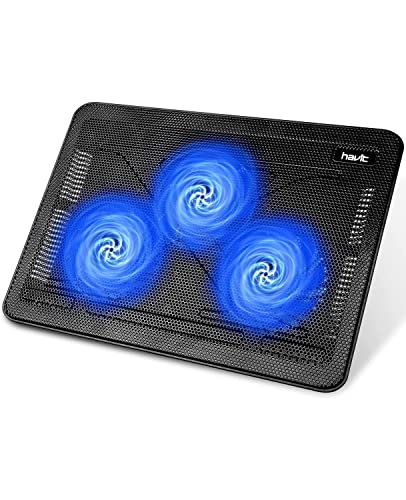 havit HV-F2056 Laptop Cooling Pad for 15.6-17
- Ultra-Portable: Slim, portable, and light weight allowing you…
- Ergonomic Comfort: Doubles as an ergonomic stand with…
- Optimized for Laptop Carrying: The metal mesh provides…
 ChillCore Laptop Cooling Pad
- 9 Super Cooling Fans: The 9-core laptop cooling…
- Ergonomic comfort: The gaming laptop cooling pad provides…
- LCD Display: The LCD of cooler pad readout…
| Product | Key specs | |
|---|---|---|
 Kootek Laptop Cooling Pad Cooler Stand with | Check price | |
| havit HV-F2056 Laptop Cooling Pad for 15.6-17 | Ultra-Portable: Slim, portable, and light weight allowing you… Ergonomic Comfort: Doubles as an ergonomic stand with… Optimized for Laptop Carrying: The metal mesh provides… | Check price |
| ChillCore Laptop Cooling Pad | 9 Super Cooling Fans: The 9-core laptop cooling… Ergonomic comfort: The gaming laptop cooling pad provides… LCD Display: The LCD of cooler pad readout… | Check price |
 Razer Laptop Cooling Pad Adaptive Smart | Check price |
As an Amazon Associate we earn from qualifying purchases at no extra cost to you.
Do cooling pads help video and photo editing?
Editing software pushes both the CPU and GPU hard during exports, effects rendering and long timelines. Laptops respond to heat by lowering clock speeds, which is called thermal throttling, and that stretches export times. Reviewers who have measured cooling pads, such as those at Notebookcheck and Tom’s Hardware, generally report temperature drops that vary from small to moderate depending on the laptop and pad. They also note that a pad cannot fix a laptop with poor internal cooling, and that gains are largest on thin laptops with bottom intake vents.
In other words, a cooling pad is a helpful accessory, not a cure for a laptop that is too small for your workload. If your machine throttles quickly even with good airflow, a different cooling approach, such as a laptop stand, cleaning the vents or reapplying thermal paste through the maker’s service, may help more.
At a glance: pads compared
| Pad | Style | Best for | Key stated details | Limits |
|---|---|---|---|---|
| Cooler Master NotePal X3 | Large single-fan pad with height adjustment | Large laptops, quieter operation | The maker lists a single large fan, adjustable height and USB power | One fan cannot cover every intake layout |
| IETS GT500 | Turbo fan that seals against the laptop base | Heavy GPU loads on gaming and creator laptops | The maker lists a high-speed external turbo fan and a foam seal | Louder; needs an external power source and good intake alignment |
| KLIM Wind | Large pad with multiple fans | General editing on big laptops | The maker lists several fans, an adjustable stand and USB passthrough | Fan speed range and noise vary; check the stated fan layout |
| Havit multi-fan pads | Slim and mid-size pads | Light editing and travel | Makers list multiple fans, mesh tops and adjustable stands | Smaller fans may be noisier at high speeds |
| Thermaltake Massive series | Large pads for big laptops | Large gaming and workstation laptops | Makers list large fans and compatibility with big screen sizes | Bulky; check weight and compatibility with your laptop size |
What to check before buying
Where your laptop takes in air
Look at the underside of the laptop. If intake vents are near the centre or rear, a pad with a large central fan or a turbo fan is more likely to help. If the underside is mostly solid with vents at the sides or back, a pad can have less effect, and a laptop stand that lifts the machine for airflow may be a better use of money. Many laptop makers publish diagrams of airflow in their service or support documents.
Size and weight rating
Choose a pad that is large enough to support the laptop’s footprint, and check the maker’s stated screen size range. Editing laptops are often 15 to 17 inches, and some pads are only suited to smaller sizes. Also consider the weight of the laptop and its charger, since a flimsy pad can flex.
Noise
Fans can be loud, and editors often work with audio. Pads with a large fan at lower RPM tend to be quieter than small fans spinning fast, according to reviewer measurements, but the exact figures vary by model and are not always published by makers. A speed controller is helpful, so you can reduce noise during editing and raise speed for exports.
Power and ports
Most pads draw power from a USB port. A USB passthrough helps if the pad uses one of your limited ports. Turbo-style pads may need more power than a laptop’s USB port can provide, so check how the maker says the pad is powered. Do not use cables or adapters not suited to the stated voltage.
Ergonomics
Height adjustment lets you raise the keyboard angle for comfort, but a steep angle can strain wrists during long editing sessions. Pair the pad with an external keyboard and mouse if you edit for hours.
Budget tiers
- Budget: Slim multi-fan pads from brands such as Havit. They give modest airflow and extra height for light editing and photo work.
- Mid-range: Larger pads such as the KLIM Wind and Cooler Master NotePal X3, which offer better build quality, more adjustment and stronger airflow.
- Premium: Turbo or specialist pads such as the IETS GT500 and large Thermaltake models, aimed at heavy GPU loads. They are louder and bulkier but can reduce temperatures more on suitable laptops.
Safety and care
Keep the laptop and pad on a hard, stable surface, and do not block vents with soft materials such as bedding. Follow the laptop maker’s guidance on operating temperature and cleaning. Dust builds up in fans and vents over time; clean pad fans with a soft brush or compressed air as the maker advises, and disconnect power first. If your laptop becomes very hot, shuts down or the battery swells, stop using it and contact the maker or a qualified technician.
Pick X if you…
| If you… | Pick | Why |
|---|---|---|
| Export long 4K timelines | IETS GT500 or similar turbo pad | Targeted airflow into intake vents |
| Want quieter operation | Cooler Master NotePal X3 | Large fan at lower speeds |
| Edit on a 17-inch laptop | KLIM Wind or Thermaltake Massive | Larger platform and multi-fan coverage |
| Travel often | Slim Havit pad | Lighter and thinner |
| Work mostly on photos | Budget multi-fan pad | Photo editing is typically less demanding than long video exports |
| Have a thin ultrabook | Laptop stand plus light pad | Gains are modest; airflow clearance matters |
Alternatives to consider
- Aluminium laptop stand: Lifts the machine for natural airflow and improves ergonomics without noise.
- Software tuning: The maker’s utilities may offer performance profiles or fan curves that reduce temperatures.
- Vent cleaning and service: Dust removal and fresh thermal paste, done by the maker or a qualified technician, can lower temperatures noticeably on older laptops.
Frequently Asked Questions
Will a cooling pad make my video exports faster?
It can if your laptop is throttling because of heat, since lower temperatures let the processor hold higher speeds. If the laptop is limited by power or by its own cooling design, the pad will make a smaller difference.
Are cooling pads safe for laptops?
Yes, when used as the maker describes. They are passive stands with fans that draw power from USB, and they do not alter the laptop internally. Do not block vents and do not use damaged cables.
Is a turbo fan better than multiple small fans?
A turbo fan pushes concentrated air into specific vents and can work well on laptops with matching intake placement. Multiple small fans spread airflow across the base and tend to be more universal. Reviewers say the best choice depends on the laptop.
Do cooling pads work on MacBooks?
MacBooks have different cooling designs, often with vents at the hinge or hidden intake, and many models have fanless or limited airflow. Reviewers generally report smaller gains from pads on these machines, so a stand may be the more effective choice.
How loud are cooling pads?
It varies by model and speed. Larger fans at low speed are generally quieter, while turbo fans are louder. Choose a pad with speed control, and keep it off the highest setting unless needed.
How often should I clean a cooling pad?
Dust can reduce airflow, so check the fans every few months and clean them gently with a soft brush or compressed air as the maker advises, with the pad unplugged.
More from Amazon
Programs that pair well with the guide above. Offers and eligibility are set by Amazon and may change.
Free shipping on eligible items, Prime Video and more. Eligible new members can start with a free trial.
Start a Prime free trialAd-free music streaming. Eligible new subscribers can start with a free trial.
Try Music Unlimited freeA Prime membership for ages 18-24 with a trial period. Eligibility is set by Amazon.
See Prime for Young AdultsAudiobooks and podcasts to listen to on the go. Eligible new members can start with a free trial.
Try Audible freeAs an Amazon Associate we earn from qualifying purchases.


