Key takeaways
- The best photo printers for photographers ranked by color accuracy, ICC profile support, black and white modes, and paper handling for serious work.
The best photo printers for photographers are the Epson SureColor P900 and Canon imagePROGRAF PRO-300 for pigment-ink accuracy and dedicated black and white modes, the Epson EcoTank Photo ET-8550 for low running costs at 13×19 inches, the Canon PIXMA PRO-200S for vivid dye-ink color on glossy paper, and the Canon PIXMA iX6820 as the entry point to large prints. What separates a photographer’s printer from a home photo printer is not resolution on a spec sheet. It is how the machine handles color management, whether it loads the ICC profile for the exact paper in the tray, how it renders neutral grays in monochrome work, and whether its feed path can take the fine art media your portfolio actually uses. The five printers below are ranked through that workflow lens.

As an Amazon Associate, we earn from qualifying purchases.
1. Epson SureColor P900 — Premium
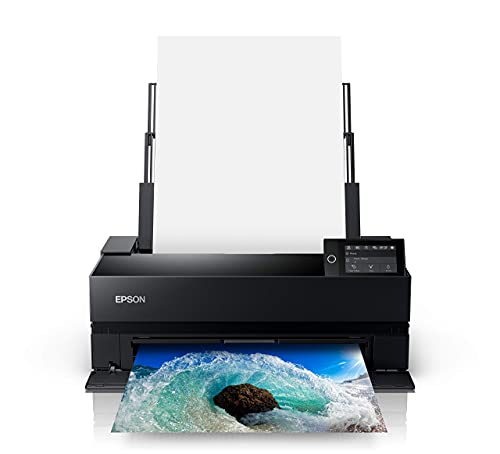
The P900 is the printer most working photographers end up measuring everything else against, because it removes the two frictions that slow a print workflow down. Its UltraChrome PRO10 ink set carries both Photo Black and Matte Black on dedicated nozzles, so moving from a glossy portrait to a matte fine art sheet never triggers a black ink switch or a purge cycle. The ten-color set adds Violet, which widens the gamut in blues and purples that landscape and twilight work depends on, and the Carbon Black mode raises black density on glossy media for the kind of deep, clean shadows that make a night image hold together on paper.
Color management is where the P900 earns its place in a photographer’s studio. Epson Print Layout works as a plug-in or standalone tool, applies the ICC profile for the selected paper, and offers a proper Advanced Black and White mode with tone controls, so monochrome files print as neutrals rather than as color images with the saturation removed. The 17-inch carriage takes sheets up to 17×22 inches, and an optional roll adapter extends that to long panoramas. A 4.3-inch touchscreen handles media setup at the machine, which matters when you change papers often.
Specs
- Ink system: Epson UltraChrome PRO10, 10 pigment inks including Violet, with dedicated Photo Black and Matte Black nozzles
- Maximum print size: 17×22 inches sheet; panoramas up to 17×129 inches with optional roll adapter
- Resolution: 5760 x 1440 dpi
- Black and white: Advanced Black and White mode with Carbon Black mode for glossy media
- Color management: Epson Print Layout with ICC profile support
- Display: 4.3-inch color touchscreen
- Connectivity: Wi-Fi, Ethernet, USB
- Media handling: front manual feed for fine art media, disc tray included
2. Canon imagePROGRAF PRO-300 — Premium
Canon’s PRO-300 is the 13-inch answer to the same workflow problem. Its LUCIA PRO pigment set runs ten inks, nine colors plus a Chroma Optimizer that evens out gloss differential and deepens blacks on glossy and luster papers, which is exactly where bronzing and uneven sheen usually betray a print under gallery lighting. Like the P900, it keeps Matte Black and Photo Black ready on separate nozzles, so paper changes stay painless, and the dedicated gray ink helps monochrome gradations stay smooth and neutral.
Canon’s Professional Print and Layout software is a genuine workflow advantage for photographers who print from Lightroom or Photoshop: it applies paper ICC profiles, offers soft proofing against the selected media, and includes a black and white photo mode with tone adjustments. The PRO-300 handles fine art media through a manual feed slot rated for thicker sheets, prints panoramas up to 13×39 inches, and its 3-inch LCD walks through media settings at the printer. For photographers whose finished work tops out at 13×19 inches, it delivers the pigment permanence and profile discipline of a larger machine in a smaller footprint.
Specs
- Ink system: Canon LUCIA PRO, 10 pigment inks (9 colors plus Chroma Optimizer)
- Maximum print size: 13×19 inches; panoramas up to 13×39 inches
- Resolution: 4800 x 2400 dpi
- Black and white: dedicated Black and White Photo mode, separate Matte Black and Photo Black
- Color management: Canon Professional Print and Layout with ICC profile support
- Display: 3.0-inch color LCD
- Connectivity: Wi-Fi, Ethernet, USB
- Media handling: top tray plus manual feed for fine art media up to 0.6 mm thick
3. Epson EcoTank Photo ET-8550 — Mid-Range

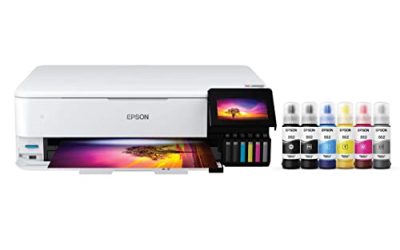
The ET-8550 approaches the photographer’s workflow from the cost side. Instead of cartridges, its six-color Claria ET Premium dye ink set refills from bottles, which changes how you print: proofing a contact sheet, reprinting a frame at a second size, or running a full test strip on the actual paper stops feeling like a budget decision. The sixth ink is a gray, and it does real work in monochrome and in the shadow transitions of color prints, where four-color machines tend to posterize.
Output runs to borderless 13×19 inches, and the rear feed takes thicker specialty media that would jam a standard tray. The ET-8550 supports ICC profile printing through the Epson driver, so a calibrated monitor-to-print pipeline still applies; what you give up versus the pigment machines above is the dedicated black and white mode and the archival rating of pigment ink. Dye prints on quality photo paper look superb, but photographers selling work or printing for exhibition should weigh pigment permanence. As a studio proofing and portfolio machine that also scans and copies, it fills a role the others do not.
Specs
- Ink system: Epson Claria ET Premium, 6 dye inks (including Gray and Photo Black), refillable EcoTank bottles
- Maximum print size: 13×19 inches borderless
- Resolution: 5760 x 1440 dpi
- Black and white: gray ink assisted monochrome through driver settings
- Color management: ICC profile support in the Epson driver
- Display: 4.3-inch color touchscreen
- Connectivity: Wi-Fi, Ethernet, USB, SD card slot
- Media handling: main tray, rear feed for specialty media, built-in scanner and copier
4. Canon PIXMA PRO-200S — Mid-Range

The PRO-200S is built around one strength: saturated, glossy color. Its eight-color ChromaLife 100+ dye ink set produces the kind of vivid output that suits travel, event, and landscape work printed on glossy or luster stock, and dye ink lays down smoothly on those surfaces without the texture pigment can leave. The 3-inch color LCD, refreshed in this S revision, makes standalone setup and media selection straightforward, and Canon’s Professional Print and Layout software brings the same ICC profile workflow and soft proofing found on the PRO-300.
The trade-offs are the ones dye ink always carries. There is a single black ink, so matte fine art paper and serious monochrome work are not its home ground, and dye prints have a shorter display life than pigment under light. Within its lane, though, the PRO-200S is a complete photographer’s tool: borderless output to 13×19 inches, panoramas to 13×39 inches, a manual feed path for thicker media, and quiet, fast output that suits a home studio producing prints for clients, competitions, and camera club nights.
Specs
- Ink system: Canon ChromaLife 100+, 8 dye inks (CLI-65)
- Maximum print size: 13×19 inches borderless; panoramas up to 13×39 inches
- Resolution: 4800 x 2400 dpi
- Black and white: monochrome printing through driver and Professional Print and Layout
- Color management: Canon Professional Print and Layout with ICC profile support
- Display: 3.0-inch color LCD
- Connectivity: Wi-Fi, Ethernet, USB
- Media handling: top tray plus manual feed for thicker fine art media
5. Canon PIXMA iX6820 — Budget

The iX6820 is the simplest route into printing your own work at meaningful sizes. It is a single-function printer with a five-ink system: a pigment black for documents and four dye inks for photographs. Borderless output reaches 13×19 inches, the 150-sheet auto feeder keeps a stack of photo paper loaded and ready, and resolution is high enough that the limiting factor at normal viewing distances is the file, not the machine.
What you do not get is the photographer’s toolkit. There is no gray ink, no dedicated black and white mode, no fine art manual feed rated for heavy media, and color management depends on application-level ICC profiles through the standard driver. For a photographer learning to print, though, that constraint can be instructive: the iX6820 teaches paper choice, profile selection, and viewing-light discipline on inexpensive hardware, and its prints on good glossy or luster paper are genuinely satisfying. It is the right first printer for someone whose alternative is not printing at all.
Specs
- Ink system: Canon 5-ink system, pigment black (PGI-250) plus dye cyan, magenta, yellow, and black (CLI-251)
- Maximum print size: 13×19 inches borderless
- Resolution: 9600 x 2400 dpi
- Black and white: standard driver monochrome, no dedicated mode
- Color management: application and driver ICC profile support
- Display: none, button controls
- Connectivity: Wi-Fi, Ethernet, USB, AirPrint
- Media handling: 150-sheet automatic sheet feeder
How to Choose
Start with ink, not size. Pigment ink (P900, PRO-300) is the default for photographers who sell prints, exhibit, or print on matte and fine art papers, because it resists fading and handles textured media. Dye ink (ET-8550, PRO-200S, iX6820) wins on glossy vibrancy and, in the EcoTank’s case, on running cost. Decide which failure you would regret more: a print that fades early, or color that never quite pops on glossy stock.
Check the black ink arrangement. If your paper rotation includes both glossy and matte stocks, a printer with dedicated Photo Black and Matte Black nozzles saves ink and time on every switch. For monochrome shooters, a real black and white mode with tone control matters more than any headline resolution figure.
Match the carriage to your largest honest print. Most photographers print at 13×19 inches or below far more often than they expect to go bigger. Buy the 17-inch P900 if you frame at 16×20 or sell large work; otherwise the 13-inch machines cover the realistic workload and cost less to feed.
Plan the color pipeline. A photographer’s printer only performs as well as its profiles. Confirm the manufacturer or your paper supplier publishes an ICC profile for your exact printer and paper combination, and use the vendor’s print layout software or your editor’s print module consistently rather than mixing paths.
Budget for media handling. Fine art papers are thick and often must feed flat. A manual or rear feed path is not a luxury feature for photographers; it is the difference between printing on the paper you chose and the paper the tray tolerates.
Frequently Asked Questions
Do photographers need pigment ink, or is dye ink good enough?
Pigment ink is the safer default for work that will be displayed, sold, or stored for years, and it performs better on matte and fine art papers. Dye ink produces more saturated glossy prints and can cost less to run, which makes it a reasonable choice for proofing, portfolios, and prints that will live in albums or be replaced over time.
What does an ICC profile actually do for my prints?
An ICC profile tells the printing software exactly how a specific printer, ink, and paper combination renders color, so the tones and hues on your calibrated monitor translate to paper with minimal shift. Printing without the correct profile for the loaded paper is the most common cause of prints that come out darker or off-color compared with the screen.
How large should a photographer’s first printer be?
A 13×19-inch printer covers the majority of portfolio, competition, and wall work, and it is the size class where running costs stay manageable. Step up to a 17-inch model only if you regularly frame at 16×20 inches or larger, since the bigger machine also commits you to larger, more expensive media and ink.
Can these printers produce true black and white prints?
The Epson P900 and Canon PRO-300 can, through dedicated black and white modes that use their gray and black inks to hold neutral tones without color casts. Dye-based models can print attractive monochrome, but without a dedicated mode they are more prone to subtle color shifts under different lighting, a flaw called metamerism.
Final Verdict
For the photographer who prints to finish the image, the Epson SureColor P900 is the complete package: 17-inch output, a ten-color pigment set with violet, dedicated black inks, and a black and white workflow that respects monochrome work. The Canon imagePROGRAF PRO-300 delivers the same pigment discipline at 13 inches and is the better buy if that is your ceiling. Choose the Epson EcoTank Photo ET-8550 when proofing volume and running cost drive your practice, the Canon PIXMA PRO-200S when glossy color is the priority, and the Canon PIXMA iX6820 when you want to start printing your own photographs at 13×19 inches without overspending on the hardware.
Product and ASIN Reference
| Product | ASIN |
|---|---|
| Epson SureColor P900 17-Inch Printer | B0875K6D4H |
| Canon imagePROGRAF PRO-300 | B08C5J34T5 |
| Epson EcoTank Photo ET-8550 | B08R5M2HDH |
| Canon PIXMA PRO-200S | B0DSR9KCG2 |
| Canon PIXMA iX6820 | B00HM0IVDY |
More from Amazon
Programs that pair well with the guide above. Offers and eligibility are set by Amazon and may change.
Free shipping on eligible items, Prime Video and more. Eligible new members can start with a free trial.
Start a Prime free trialAd-free music streaming. Eligible new subscribers can start with a free trial.
Try Music Unlimited freeA Prime membership for ages 18-24 with a trial period. Eligibility is set by Amazon.
See Prime for Young AdultsAudiobooks and podcasts to listen to on the go. Eligible new members can start with a free trial.
Try Audible freeAs an Amazon Associate we earn from qualifying purchases.