Key takeaways
- Compare the best WiFi range extenders for smart homes, with Wi-Fi 6 picks that keep doorbell cameras, smart plugs and hubs connected in every room.
A smart home fails in the rooms the router cannot reach. The video doorbell on the front wall, the smart plug in the garage, the camera over the driveway, and the voice assistant in a back bedroom all sit at the edge of coverage, and most connect on the crowded 2.4 GHz band. When that signal fades, devices drop offline, cameras miss motion events, and automations fire late.
The five extenders below were chosen for that job rather than for raw speed alone. Each is a current Wi-Fi 6 model with published ratings for coverage and device count, and each takes a different approach: tri-band backhaul for device-heavy homes, mesh ecosystems that keep one network name, or placement tools that put coverage exactly where a doorbell or camera needs it.
As an Amazon Associate, we earn from qualifying purchases.
Quick Answer
For most smart homes, the TP-Link RE815X is the strongest pick, with tri-band Wi-Fi 6 capacity for up to 96 devices and a dedicated backhaul band. The NETGEAR EAX12 is the simpler budget-tier wall plug, the ASUS RP-AX56 suits AiMesh homes, the TP-Link RE705X balances speed and size, and the Linksys RE7310 helps place coverage for doorbell cameras.
Table of Contents
- TP-Link RE815X AX5400 Tri-Band Wi-Fi 6 Range Extender
- TP-Link RE705X AX3000 Wi-Fi 6 Range Extender
- NETGEAR EAX12 AX1600 Wi-Fi 6 Mesh Extender
- ASUS RP-AX56 AX1800 Wi-Fi 6 Range Extender
- Linksys RE7310 AX1800 Wi-Fi 6 Range Extender
- How to Choose
- Who Should Skip
- FAQ
- Final Verdict
TP-Link RE815X AX5400 Tri-Band Wi-Fi 6 Range Extender

The RE815X is the premium-tier pick for homes running dozens of connected devices. It is a tri-band AX5400 extender rated by TP-Link for up to 2,800 square feet of added coverage and up to 96 connected devices, the highest device ceiling in this roundup. The third band works as a dedicated backhaul link to the router, so the bands your phones, plugs, bulbs, and cameras use are not competing with the extender’s own connection back to the router.
That separation is what a device-heavy smart home needs. A doorbell camera uploading motion clips and a wall of smart bulbs checking in do not slow each other down the way they can on a dual-band extender that repeats everything on the same channels. The RE815X also supports 160 MHz channel width, OneMesh roaming, and a Gigabit Ethernet port that can wire a hub or streaming box in the room it serves.
Specs
- Wi-Fi standard: Wi-Fi 6, tri-band, AX5400 class (up to 5.4 Gbps combined)
- Rated coverage: up to 2,800 sq ft
- Rated device count: up to 96
- Channel width: up to 160 MHz
- Ethernet: 1 Gigabit port
- Mesh support: OneMesh with TP-Link routers
- Setup: Tether app or WPS button
TP-Link RE705X AX3000 Wi-Fi 6 Range Extender
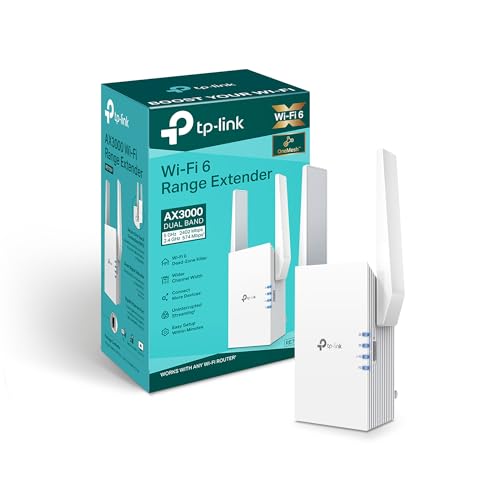
The RE705X is the mid-range TP-Link option and the better fit when the RE815X is more extender than your floor plan needs. It is a dual-band AX3000 model with rated speeds of up to 2,402 Mbps on the 5 GHz band and 574 Mbps on the 2.4 GHz band, in a compact wall-plug body. A signal indicator on the unit shows whether the spot you picked is too far from the router, which matters when the target is a specific room full of devices rather than general coverage.
For smart home use, the useful extras are OneMesh support for single-name roaming with a TP-Link router, OFDMA and MU-MIMO for handling many small IoT connections at once, and a Gigabit Ethernet port that doubles as an access point input on a wired run, or as a wired home for a hub far from the router closet.
Specs
- Wi-Fi standard: Wi-Fi 6, dual-band, AX3000 class
- Band speeds: up to 2,402 Mbps (5 GHz) and 574 Mbps (2.4 GHz)
- Ethernet: 1 Gigabit port, access point mode
- Mesh support: OneMesh with TP-Link routers
- Features: OFDMA, 2×2 MU-MIMO, beamforming, signal indicator
- Dimensions: 2.9 x 1.8 x 4.9 in
- Setup: Tether app or WPS button
NETGEAR EAX12 AX1600 Wi-Fi 6 Mesh Extender

The EAX12 is the budget-tier pick and the simplest way to add one room of smart home coverage. NETGEAR rates this wall-plug extender for up to 1,200 square feet of added coverage and up to 15 devices, with AX1600 dual-band speeds split as up to 1.2 Gbps on 5 GHz and 0.4 Gbps on 2.4 GHz across four streams. That is enough for a garage with a smart opener and a camera, or a basement corner with plugs and leak sensors.
Its smart home advantage is Smart Roaming: it creates a mesh network with a single network name that works with any router brand, so devices stay on one SSID instead of clinging to a separate extender network. Setup runs through the Nighthawk app, security includes WPA3, and the Gigabit port can wire one device, such as a hub, in the room it covers.
Specs
- Wi-Fi standard: Wi-Fi 6, dual-band, AX1600 class, 4 streams
- Band speeds: up to 1.2 Gbps (5 GHz) and 0.4 Gbps (2.4 GHz)
- Rated coverage: up to 1,200 sq ft added
- Rated device count: up to 15
- Ethernet: 1 Gigabit port
- Mesh support: Smart Roaming, one network name, any router
- Security: WPA2 and WPA3
- Dimensions: 5.9 x 2.7 x 2.1 in; weight 0.49 lb
- Setup: Nighthawk app or WPS button
ASUS RP-AX56 AX1800 Wi-Fi 6 Range Extender

The RP-AX56 is the pick for ASUS households. As an AiMesh node it joins an AiMesh router under one network name with the router’s features carried across the mesh, and as a plain repeater it works with any brand of router. ASUS rates it for coverage up to 2,200 square feet, with AX1800 speeds of up to 1,201 Mbps on 5 GHz and 574 Mbps on 2.4 GHz using 80 MHz channels and two internal antennas.
The flexible part is its three operating modes. Beyond range extender mode, it can run as an access point on a wired connection or as a media bridge, using its Gigabit LAN port to bring wired devices onto the network. That bridge mode is handy for an entertainment unit with a streaming box, console, and smart TV in a weak-signal corner. Setup is through the ASUS Extender app, the Router app for AiMesh, or the pair button.
Specs
- Wi-Fi standard: Wi-Fi 6, dual-band, AX1800 class
- Band speeds: up to 1,201 Mbps (5 GHz) and 574 Mbps (2.4 GHz)
- Rated coverage: up to 2,200 sq ft
- Antennas: 2 internal, 2×2 on both bands
- Ethernet: 1 Gigabit LAN port
- Modes: range extender, access point, media bridge
- Mesh support: AiMesh node with ASUS routers
- Dimensions: 5.91 x 2.83 x 3.43 in; weight 0.42 lb
- Setup: ASUS Extender app, Router app, or pair button
Linksys RE7310 AX1800 Wi-Fi 6 Range Extender
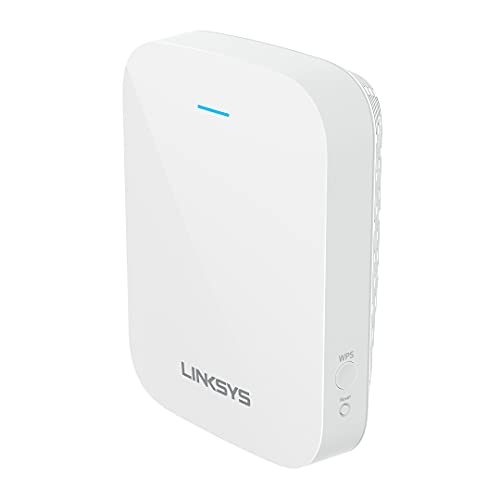
The RE7310 is built around placement, which is often the real problem behind a flaky doorbell camera or a front-of-house smart lock. Its Spot Finder technology guides you to an outlet where the extender still hears the router clearly while reaching the devices at the front of the home. Linksys rates it for up to 2,000 square feet and up to 20 connected devices, with AX1800 speeds of up to 1.2 Gbps on 5 GHz and 600 Mbps on 2.4 GHz.
It works with any router, including provider gateways, and sets up through Push Button Connect or a browser-based wizard. The trade-off is hardware simplicity: there is no Ethernet port, so it cannot wire a hub or run as a wired access point. Choose it when one specific edge-of-home device needs help and you want setup to confirm the extender is in the right spot.
Specs
- Wi-Fi standard: Wi-Fi 6, dual-band, AX1800 class
- Band speeds: up to 1.2 Gbps (5 GHz) and 600 Mbps (2.4 GHz)
- Rated coverage: up to 2,000 sq ft
- Rated device count: up to 20 devices
- Features: Spot Finder placement guidance, MU-MIMO, beamforming
- Ethernet: none
- Security: WPA2 and WPA3
- Dimensions: 5.1 x 3.9 x 2 in; 10.7 oz
- Setup: Push Button Connect or browser
How to Choose
Start with the problem device, not the speed class. Most smart home gear connects on 2.4 GHz and needs little bandwidth, so a stable signal at the device matters far more than the headline rate. Place the extender roughly halfway between the router and the dead zone, where it still receives a strong signal itself; an extender placed inside the dead zone has nothing good to repeat.
Next, decide whether you need one network name. Mesh-style extenders and ecosystem models such as the EAX12, the OneMesh TP-Link picks, and the AiMesh RP-AX56 keep a single SSID, which helps devices set up on the main network name. Count your devices honestly: a home with forty bulbs, plugs, and sensors should look at the RE815X’s 96-device rating rather than a 15-device wall plug. Finally, check for an Ethernet port if you want to wire a hub in the extended room; four of the five picks have one, and the RE7310 is the exception.
Who Should Skip
Skip an extender entirely if your router predates Wi-Fi 5; replacing the router or moving to a mesh system will fix more than repeating a weak, dated signal. Skip these plug-in models if the dead zone is a detached building or a far yard corner, where an outdoor access point or a mesh node with a wired backhaul is the honest answer. And skip the premium tri-band tier if you only need one garage or basement room covered; the budget and mid-range picks handle a single room of smart devices.
FAQ
Will a range extender keep my smart devices on one network name?
It depends on the model. Mesh-style extenders such as the NETGEAR EAX12, and ecosystem models like the TP-Link OneMesh picks or the ASUS RP-AX56 on AiMesh, extend your existing network name so devices stay on one SSID. A basic repeater setup can create a separate extended name instead, which means some devices must be joined manually.
Do smart home devices need a fast extender?
Most do not. Bulbs, plugs, switches, and sensors use the 2.4 GHz band and very little data, so signal strength and a high rated device count matter more than peak speed. Cameras are the exception: a doorbell or security camera uploading video benefits from a strong 5 GHz link or a tri-band extender with dedicated backhaul, such as the RE815X.
Where should I place an extender for a doorbell camera?
Place it inside the home, roughly halfway between the router and the front door. The extender needs a solid signal from the router first. Models with placement guidance, such as the Linksys RE7310 with Spot Finder or the TP-Link RE705X with its signal indicator, help confirm the outlet you chose is in range.
Can an extender’s Ethernet port connect a smart home hub?
Yes, on the models that have one. The RE815X, RE705X, EAX12, and RP-AX56 each include a Gigabit Ethernet port that can wire a hub or camera recorder in the room the extender covers. The Linksys RE7310 has no Ethernet port, so it is wireless-only.
Final Verdict
For a smart home with dozens of devices spread across several weak rooms, the TP-Link RE815X is the most capable extender here, thanks to its tri-band backhaul and 96-device rating. The RE705X covers the same ecosystem ground in a smaller, mid-range body, the NETGEAR EAX12 is the straightforward budget-tier wall plug for one extra room, the ASUS RP-AX56 is the natural choice for AiMesh households, and the Linksys RE7310 earns its place when careful placement for a doorbell camera is the whole point.
Product and ASIN Reference
| Product | ASIN |
|---|---|
| TP-Link RE815X AX5400 Tri-Band Wi-Fi 6 Range Extender | B0C7RRYFH3 |
| TP-Link RE705X AX3000 Wi-Fi 6 Range Extender | B0B1PBBT56 |
| NETGEAR EAX12 AX1600 Wi-Fi 6 Mesh Extender | B099GLVBGP |
| ASUS RP-AX56 AX1800 Wi-Fi 6 Range Extender | B08Y3RHZ97 |
| Linksys RE7310 AX1800 Wi-Fi 6 Range Extender | B096WHR16K |
More from Amazon
Programs that pair well with the guide above. Offers and eligibility are set by Amazon and may change.
Free shipping on eligible items, Prime Video and more. Eligible new members can start with a free trial.
Start a Prime free trialAd-free music streaming. Eligible new subscribers can start with a free trial.
Try Music Unlimited freeA Prime membership for ages 18-24 with a trial period. Eligibility is set by Amazon.
See Prime for Young AdultsAudiobooks and podcasts to listen to on the go. Eligible new members can start with a free trial.
Try Audible freeAs an Amazon Associate we earn from qualifying purchases.