Key takeaways
- Best smart notebooks pair reusable erasable pages or smart pens with cloud sync. Compare Rocketbook, Moleskine, and Boogie Board picks for work and study.
A smart notebook keeps the feel of pen on paper while giving your handwriting a digital home. Most models use erasable pages that you scan with a phone app before wiping them clean, so one notebook can replace a stack of paper pads. A second group pairs real paper with a smart pen that captures every stroke as you write. Either way, the goal is the same: notes that are searchable, backed up to the cloud, and easy to share. This guide compares five app-connected notebooks for work, study, and planning, and explains the trade-offs to weigh first.
As an Amazon Associate, we earn from qualifying purchases.
Quick Answer
For most people, the Rocketbook Core is the best smart notebook: its reusable letter-size pages wipe clean with water, and the free app sends scans to Google Drive, Dropbox, Evernote, or OneNote with searchable text. Planners should pick the Rocketbook Fusion, while handwriting purists who want real paper should choose the Moleskine Smart Writing Set.
How to Choose
Start with the capture method, because it shapes everything else. Scan-based notebooks from Rocketbook and Boogie Board ask you to photograph each finished page with an app, which takes a few seconds but keeps the hardware simple and affordable. Smart pen systems like the Moleskine set digitize in real time as you write, so there is no scanning step, but the pen needs charging and only works with its own coded paper.
Next, look at how erasing works. Rocketbook pages use Pilot FriXion pens, markers, and highlighters; the ink bonds to the page after a short drying wait, then wipes away with a damp cloth. Ordinary ballpoint ink will not erase, so the pen requirement is strict. LCD writing boards need no ink at all and clear with a button, but they hold a single screen of writing at a time.
Size and page layout matter more than brand. Letter-size pages suit desk notes and printed handouts, executive and pocket sizes travel better, and template pages for calendars, task lists, and goals can replace a separate planner. Check the cloud destinations each app supports, whether handwriting converts to typed text, and whether scans stay searchable. Finally, weigh running costs: a reusable notebook is a one-time purchase, while smart pen systems need proprietary refill notebooks over time.
Rocketbook Core Reusable Notebook (Letter, Lined)

The Core is the notebook that defined this category, and it remains the easiest recommendation. It holds 36 reusable lined pages in a full letter size, giving you room for lecture notes, meeting minutes, and long drafts. You write with the included Pilot FriXion pen, let the ink set briefly, and then scan the page with the Rocketbook app. Small symbols printed at the bottom of each page route the scan to a destination you assign, such as a Google Drive folder, a Dropbox account, Evernote, OneNote, iCloud, or an email address.
The app straightens and enhances each scan, and its optical character recognition makes your handwriting searchable and can transcribe a page into typed text. When the notebook fills up, you wipe the pages with the included microfiber cloth and a little water, and it is ready to use again. The spiral binding and durable cover stand up to daily bag carry. If you fill paper notebooks quickly and want a permanent, organized archive without the clutter, this is the model to get.
Specs
| Feature | Detail |
|---|---|
| Page size | Letter, 8.5 x 11 inches |
| Pages | 36 reusable pages |
| Page style | Lined |
| Pen | 1 Pilot FriXion pen included |
| Erasing | Wipe clean with damp microfiber cloth |
| App | Rocketbook app for iOS and Android |
| Cloud services | Google Drive, Dropbox, Evernote, OneNote, iCloud, email |
| Extras | OCR transcription, smart search, scan routing symbols |
Rocketbook Fusion Reusable Planner Notebook (Letter)

The Fusion takes the same reusable system and builds a planner around it. Its 42 pages cover seven templates: a monthly calendar, a weekly planner, a task list, an OKR goal tracker, an idea list, plus dot-grid and lined pages for free-form notes. Because the calendars are undated, the planner never expires; you fill in the dates and wipe the pages clean when the month or project ends.
Everything else matches the Core experience. Notes go in with the included Pilot FriXion pen, scans leave through the Rocketbook app to the same list of cloud services, and handwriting stays searchable through OCR. At 11.7 ounces it is light for a full-size planner, and the spiral binding lets it lie flat on a desk. Choose the Fusion if your notebook doubles as your scheduling system and you are tired of buying a new paper planner every year. If you only ever write linear notes, the simpler Core is the better fit.
Specs
| Feature | Detail |
|---|---|
| Page size | Letter, 8.5 x 11 inches |
| Pages | 42 reusable pages |
| Page types | 7 templates: monthly calendar, weekly planner, task list, OKR goals, idea list, dot grid, lined |
| Model number | EVRF-L-K-CIG |
| Weight | 11.7 ounces |
| Pen | 1 Pilot FriXion pen included |
| Erasing | Wipe clean with damp microfiber cloth |
| App | Rocketbook app for iOS and Android |
Moleskine Pen+ Ellipse Smart Writing Set
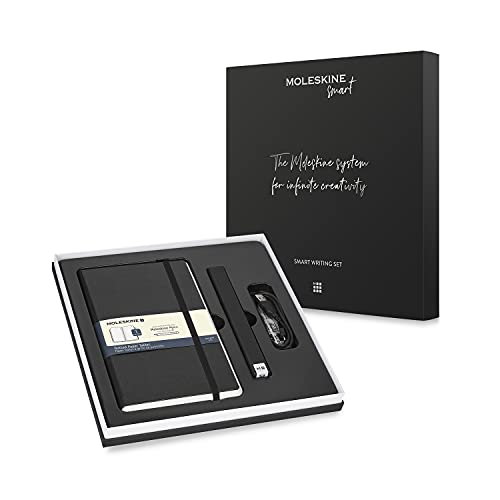
The Moleskine set takes the opposite approach: real paper, captured live. The kit pairs the Pen+ Ellipse smart pen with a large Paper Tablet smart notebook. A tiny camera near the pen tip reads the Ncoded pattern printed on the pages, so every stroke appears in the Moleskine Notes app in real time over Bluetooth. There is nothing to scan and nothing to erase; you simply write, and a digital copy follows along.
The app can convert handwriting into typed text, and pages can be edited, tagged, and shared from your phone. The notebook itself keeps the classic Moleskine format, with ivory-colored, acid-free ruled paper, rounded corners, an elastic closure, and a ribbon bookmark. The trade-offs are ongoing ones: pages are not reusable, replacement notebooks must be Moleskine Smart notebooks with the coded paper, and the pen needs charging. For writers who refuse to give up real paper but want a searchable digital archive, this is the most polished option here.
Specs
| Feature | Detail |
|---|---|
| Contents | Pen+ Ellipse smart pen and large Paper Tablet smart notebook |
| Notebook size | Large, 5 x 8.25 inches |
| Paper | Ncoded smart paper, ivory, acid-free, ruled |
| Capture method | Pen camera reads page codes, real-time digitizing |
| Connectivity | Bluetooth to phone or tablet |
| App | Moleskine Notes app for iOS and Android |
| Features | Handwriting-to-text conversion, editing, tagging, sharing |
| Compatibility | Works only with Moleskine Smart notebooks |
Boogie Board Blackboard Reusable Smart Notebook

The Blackboard is not paper at all. It is a Liquid Crystal Paper writing surface that behaves like an endless single page. You write with the included stylus, and the semi-transparent screen lets you slide one of four templates behind it: lined, grid, dotted, or blank. You can even place a document underneath and mark it up without touching the original.
A press of the QuickClear button wipes the whole surface, while the Exact-Erase tip on the stylus removes only the parts you rub over, and a lock switch prevents accidental clearing. To save your work, the Blackboard app for iOS and Android photographs the surface, enhances the image, and can send it to OneNote, Google Drive, Dropbox, or Evernote. There is no ink to buy and no daily charging; a replaceable CR2 battery powers the erase function. It suits desks, drafting, and quick temporary notes best, since it holds one screen of writing at a time.
Specs
| Feature | Detail |
|---|---|
| Writing area | 5.5 x 7.25 inches |
| Overall size | 9 x 6 x 0.25 inches |
| Weight | 8.8 ounces |
| Model number | BN0110001 |
| Templates | 4 included: lined, grid, dotted, blank |
| Erasing | QuickClear full erase and Exact-Erase stylus eraser |
| Battery | 1 CR2 battery |
| App | Blackboard app for iOS and Android, with cloud saving |
Rocketbook Mini Reusable Pocket Notebook

The Mini shrinks the Rocketbook formula down to pocket size. At 3.5 by 5.5 inches with 48 reusable pages, it disappears into a jacket pocket, a small bag, or a car’s center console, ready for lists, sketches, measurements, and ideas that strike away from your desk. This Beacon Orange version is easy to spot at the bottom of a bag.
It works exactly like its bigger siblings: write with the included Pilot FriXion pen, scan the page with the Rocketbook app to send it to your cloud folders, then wipe the page clean with a damp cloth and reuse it. The spiral binding holds up well for something this small, and the pages accept the same OCR search and transcription as the letter-size models. The obvious compromise is writing room; long-form notes feel cramped. Treat the Mini as a capture tool that feeds your main archive, and it earns its place.
Specs
| Feature | Detail |
|---|---|
| Page size | 3.5 x 5.5 inches |
| Pages | 48 reusable pages |
| Model number | EVR-M-K-CLF |
| Color | Beacon Orange |
| Pen | 1 Pilot FriXion pen included |
| Erasing | Wipe clean with damp microfiber cloth |
| App | Rocketbook app for iOS and Android |
| Binding | Spiral |
Who Should Skip It
Skip smart notebooks if your notes must exist permanently on paper, such as signed records or lab books an institution requires you to keep. The scan-then-erase workflow also frustrates anyone who will not realistically open an app before wiping a page; one forgotten scan means a lost page. Artists who need pressure-sensitive brushes, color, and layers should look at a drawing tablet instead, and anyone who wants email, apps, and a screen in one device is better served by an e-ink tablet or a standard tablet with a stylus. Finally, if you dislike being locked into special pens or proprietary refill notebooks, a plain paper pad and a scanner app on your phone remain a perfectly good system.
FAQ
Do smart notebooks need a subscription or Wi-Fi?
No. Scanning and writing happen offline, and the core features of the Rocketbook, Moleskine Notes, and Blackboard apps are free. You only need an internet connection when you want pages uploaded to a cloud service or shared with someone else, and your phone handles that part.
Which pens work with Rocketbook notebooks?
Only the Pilot FriXion line: FriXion pens, markers, and highlighters. The heat-sensitive ink bonds to the reusable pages and wipes away with water. Give the ink about 15 seconds to dry before closing the notebook, and never use a regular ballpoint, since standard ink will not erase from these pages.
Can a smart notebook turn handwriting into typed text?
Yes, within limits. The Rocketbook app offers OCR transcription that converts a scanned page into editable text, and the Moleskine Notes app converts handwriting captured by the Pen+ Ellipse. Neat, consistent handwriting converts far more reliably than rushed cursive, so treat transcription as a helpful draft rather than a finished document.
How long do reusable notebook pages last?
Rocketbook pages are designed to be written on, scanned, and wiped clean over and over for years of regular use, provided you stick to FriXion ink and a soft damp cloth. Smart pen systems are different: the Moleskine Paper Tablet is real paper, so when it fills up you archive it and buy another coded refill notebook.
Final Verdict
Most buyers should start with the Rocketbook Core. It is affordable, forgiving, and genuinely replaces a shelf of paper notebooks once scanning becomes a habit. Add the Fusion instead if planning templates will earn their keep, and keep the Mini as a pocket companion to either one. Choose the Moleskine Smart Writing Set if real paper and live digital capture matter more than reusability, and pick the Boogie Board Blackboard for a desk surface devoted to drafts and temporary thinking. Whichever route you take, the winning feature is the same: handwriting you can find again.
Product and ASIN Reference
| Product | ASIN |
|---|---|
| Rocketbook Core Reusable Notebook (Letter, Lined) | B07WFVVCLX |
| Rocketbook Fusion Reusable Planner Notebook (Letter) | B07ZHZ9VJT |
| Moleskine Pen+ Ellipse Smart Writing Set | B07HSJQNVD |
| Boogie Board Blackboard Reusable Smart Notebook | B07H8L7K2D |
| Rocketbook Mini Reusable Pocket Notebook | B07ZHYZ3K7 |
More from Amazon
Programs that pair well with the guide above. Offers and eligibility are set by Amazon and may change.
Free shipping on eligible items, Prime Video and more. Eligible new members can start with a free trial.
Start a Prime free trialAd-free music streaming. Eligible new subscribers can start with a free trial.
Try Music Unlimited freeA Prime membership for ages 18-24 with a trial period. Eligibility is set by Amazon.
See Prime for Young AdultsAudiobooks and podcasts to listen to on the go. Eligible new members can start with a free trial.
Try Audible freeAs an Amazon Associate we earn from qualifying purchases.