Key takeaways
- Compare smart heated seat cushions with app control, pressure sensors, timers and thermostats for car seats, office chairs and home seating comfort.
A heated seat cushion sounds simple until you shop for a smart one. Most listings are not app-connected at all: they are plug-in pads with a wired controller, a few heat levels, and a timer. A smaller group adds something responsive: a pressure sensor, a regulating temperature sensor, or a phone app.
Here is the honest count for this guide: 2 of 5 picks are genuinely smart under a strict definition. The KINGLETING cushion uses a human body pressure sensor plus a temperature sensor and thermostat, and the COMFIER cushion offers app control over heat and massage settings. The other three picks are soft fits, labeled as such in their sections. They are strong heated cushions with timer and overheat controls, but they have no app, no voice control, and no occupancy sensing.
Power source is the other big split. Some cushions run from a car 12V outlet, some plug into a wall outlet at home or in an office, and a few include adapters for both. Each pick below states plainly where it gets its power.
As an Amazon Associate, we earn from qualifying purchases.
Quick Answer
For genuine smart features, choose the KINGLETING for its pressure and temperature sensors or the COMFIER for app control. That is 2 of 5 here. The STONECREST, HotCalyto, and CARSHION picks are soft fits with timers and overheat protection only, suited to car or desk use where simple wired control is enough.
How to Choose
Start with what smart should mean for you. If you want the cushion to react on its own, look for a seat-occupancy or pressure sensor that turns heat on when you sit and off after you leave, and a temperature sensor or thermostat that holds a chosen level. If you prefer adjusting settings from your phone, app control is the feature to insist on, and it is rare in this category. If neither matters, a timer and overheat cutoff are the practical safety baseline, and you should not pay a smart premium for them.
Next, match the power source to the seat. Car cushions draw from a 12V outlet and suit drivers whose vehicles lack built-in seat heating. Home and office cushions use a wall adapter, and a few models include both a travel adapter and a home adapter so one cushion can move between car and desk. Confirm the adapter type in the listing, because similar-looking models often ship with different plugs.
Then compare heat control: heat levels, stated temperature range, and timer span. Short timers suit car trips and desk sessions, while longer timers suit extended office use, provided overheat protection is also described. Finally, check coverage, dimensions against your seat, and straps that stop sliding, and read the safety directions on unattended use and skin contact.
KINGLETING Heated Seat Cushion with Pressure-Sensitive Sensor
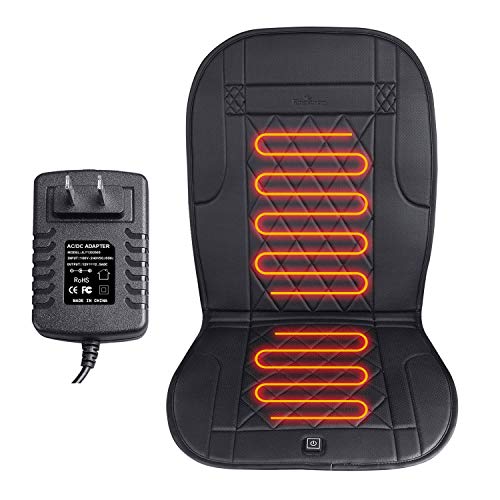
This is the most genuinely sensor-driven pick in the guide, and it is a home and office cushion rather than a car model. The listing describes a built-in thermostat for overheat protection, a temperature sensor covering 86 to 140 degrees Fahrenheit for intelligent temperature control, and a human body pressure sensor that detects whether someone is sitting on the cushion. In automatic mode, that sensor supports automatic power on and off and temperature adjustment, and when you leave, the light flashes and power switches off automatically after one minute.
Manual control is also provided, heat is described as arriving within one minute, and the adapter is described as having short circuit protection alongside the automatic high-temperature cutoff.
The sensors are real and described in the listing itself, which is why this pick counts as genuinely smart, but there is no app and no voice control. Buy it for a home office chair where automatic on and off removes the worry of a pad running in an empty chair.
Specs
| Item | Detail |
|---|---|
| Brand | KINGLETING |
| Use | Home and office plug-in |
| Smart features | Pressure sensor, temperature sensor, thermostat |
| Temperature range | 86 to 140 degrees Fahrenheit per listing |
| Auto off | About one minute after leaving in automatic mode |
| Material | Fabric |
| Color | Black |
| Weight | 800 grams per listing |
COMFIER Back Massager with Heat and App Control

The COMFIER is the one pick here with true app control, and it is a home and office massage cushion rather than a simple heated pad or a car cushion. The listing says the COMFIER app lets users choose massage areas, heat levels, and massage modes, which removes the limit imposed by a short controller wire. That phone control, described in the listing itself, is why this pick counts as genuinely smart.
Heat and vibration can work independently, according to the listing. It describes ten vibration motors, five programmed modes, and three adjustable massage intensities, with heat reaching a stated maximum of 140 degrees Fahrenheit. A thirty-minute auto-off function and overheat protection are also described. One detail deserves a plain note: the title and summary describe three heat levels, while one bullet in the same listing mentions two heat levels, so confirm the exact heat-step count on the product page before ordering.
Choose this model when heat is only part of what you want. The vibration targets the back, hips, and thighs, in an ultra-plush polyester pad. If you want warmth with no massage motors, a heat-only cushion below suits you better.
Specs
| Item | Detail |
|---|---|
| Brand | COMFIER |
| Use | Home and office plug-in |
| Smart features | App control for heat, areas, and modes |
| Motors | 10 vibration motors per listing |
| Heat | Independent heat, stated maximum 140 degrees Fahrenheit |
| Auto off | 30 minutes per listing, plus overheat protection |
| Modes | 5 programmed modes, 3 intensities per listing |
| Material | Polyester per listing |
STONECREST Heated Seat Cushion Pad

This pick is a soft fit, labeled plainly: it has no app, no occupancy sensor, and no voice control. What it offers instead is flexible power and a well-specified timer. The listing describes a heated seat cushion pad in velvet, in a navy finish, designed as a universal seat cover and protector.
Its standout feature is dual use. The listing explains that the mini controller has a DC port that can connect with a 12V home adapter or a 12V travel adapter, allowing use in the office, at home, and outdoors, and it says both home and travel adapters are enclosed. That makes this the easiest pick here to move between a car seat and a desk chair without buying two cushions.
The listing gives four heat settings and an auto shut off timer adjustable to thirty, sixty, ninety, and one hundred twenty minutes, with warm-up described as one to five minutes. Buy it for straightforward warmth in more than one place, not for smart-home integration, because there is none.
Specs
| Item | Detail |
|---|---|
| Brand | STONECREST |
| Use | Car 12V and home or office with included adapters |
| Smart features | Soft fit: timer control only, no app or sensor |
| Heat settings | 4 per listing |
| Timer | 30, 60, 90, and 120 minutes per listing |
| Warm-up | 1 to 5 minutes per listing |
| Finish | Velvet, navy per listing |
| Adapters | Home and travel adapters enclosed per listing |
HotCalyto Heated Seat Cushion for Office

This pick is also a soft fit, labeled plainly: it has no app, no occupancy sensor, and no voice control. Its appeal is granular heat control and a long timer for desk-based use. The listing describes a 12V heated seat cushion for office chairs, presented as a thick seat warmer covering the back and hips, with a thickness of 1.6 inches.
The listing gives seven temperature levels from 85 to 145 degrees Fahrenheit, plus a timer from one to twelve hours with auto shut off, and overheat protection. That suits long desk sessions at a lower, steadier warmth. Still follow the listing directions rather than treating a long timer as permission to leave a pad unattended, and confirm your 12V power setup before ordering.
Specs
| Item | Detail |
|---|---|
| Brand | HotCalyto |
| Use | Office chair, 12V per listing |
| Smart features | Soft fit: timer and overheat protection only |
| Heat levels | 7 per listing |
| Temperature range | 85 to 145 degrees Fahrenheit per listing |
| Timer | 1 to 12 hours with auto shut off per listing |
| Thickness | 1.6 inches per listing |
| Coverage | Back and hips per listing |
CARSHION Heated Seat Cover with Expanded Heating Area

The final pick is a soft fit as well, labeled plainly: it has no app, no occupancy sensor, and no voice control. It is a heat-only cover for people who want a larger heated area and simple handheld control. The listing describes a heated seat cushion for the full back and seat, with three levels of temperature control, for home, office, and more.
Size is its main distinction, at 38.5 by 17.5 by 2 inches. The brand comparison describes this line as heat only, with low, medium, and high settings, a stated maximum of 145 degrees Fahrenheit, and auto off at sixty minutes. Directions say to secure it with adjustable straps and select heat with the handheld controller. Check the supplied adapter before assuming car use.
The safety directions here are explicit. The listing says to use the cover on a chair only, never in direct contact with skin, to keep it away from children and individuals with health conditions, to avoid use for more than one hour at a time, and to unplug it when not in use. Choose this pick for a large, simple, heat-only pad, and skip it if you want massage, app control, or sensing.
Specs
| Item | Detail |
|---|---|
| Brand | CARSHION |
| Use | Home and office, handheld controller |
| Smart features | Soft fit: auto shut off and overheat protection only |
| Heat settings | 3, low medium and high per listing |
| Max temperature | 145 degrees Fahrenheit per brand comparison |
| Auto off | 60 minutes per brand comparison |
| Dimensions | 38.5 by 17.5 by 2 inches per listing |
| Material | Polyester per listing |
Who Should Skip It
Skip this category if your car already has built-in heated seats that work well, because an add-on cushion adds a cord, a controller, and a shifting pad for little gain. Skip it if you expected most of these products to connect to a smart home system. Only 2 of 5 picks here are genuinely smart, none of the five describes voice-assistant control, and the soft-fit models will not join a home automation routine.
Skip heated cushions if you cannot follow the safety directions, including avoiding unattended use. Skip a car-only 12V model for a desk chair, and a wall-powered model for a cold commute. Skip massage cushions like the COMFIER if you want heat alone.
FAQ
Are heated seat cushions actually smart home devices?
Mostly no. Here, 2 of 5 picks are genuinely smart: one uses pressure and temperature sensors, and one offers app control. The rest rely on wired controllers, timers, and overheat cutoffs, and none describes voice-assistant integration.
Can I use a car heated seat cushion at my desk?
Only if the listing supports it. The STONECREST includes both home and travel adapters. A car-only 12V cushion needs the correct adapter indoors, and a wall-powered cushion cannot run from a car outlet, so check the adapter described before moving a cushion between settings.
Is an auto shut off timer enough for safety?
A timer and overheat protection help, but neither replaces the listing directions. Follow session limits, avoid unattended use, keep the cushion on a chair rather than against skin, and unplug it when finished.
Which pick is best for an office chair?
For automatic behavior, the KINGLETING stands out for its pressure sensor. For manual control, the HotCalyto offers seven temperature levels and a long timer. For app control plus vibration massage, choose the COMFIER.
Final Verdict
Buy the KINGLETING if you want a heated cushion that genuinely reacts, with pressure sensing, temperature sensing, and automatic shutoff after you stand up, for home or office seating. Buy the COMFIER if app control matters and you also want vibration massage with independent heat. Those are the 2 of 5 genuinely smart picks here, and the guide does not pretend otherwise.
Choose the STONECREST for the most flexible power setup, with car and home adapters and a four-step timer, the HotCalyto for seven heat levels and a long office timer, or the CARSHION for a large heat-only cover with a sixty-minute auto off. Each is a soft fit with honest limits. Pick by power source, coverage, and control style first, and let the smart label come second.
Product and ASIN Reference
| Product | ASIN |
|---|---|
| KINGLETING Heated Seat Cushion with Pressure-Sensitive Sensor | B08QSBR18W |
| COMFIER Back Massager with Heat and App Control | B0BPHPR8NM |
| STONECREST Heated Seat Cushion Pad | B09LSJ7326 |
| HotCalyto Heated Seat Cushion for Office | B0FMR95L53 |
| CARSHION Heated Seat Cover with Expanded Heating Area | B0CCXL1WGG |
More from Amazon
Programs that pair well with the guide above. Offers and eligibility are set by Amazon and may change.
Free shipping on eligible items, Prime Video and more. Eligible new members can start with a free trial.
Start a Prime free trialAd-free music streaming. Eligible new subscribers can start with a free trial.
Try Music Unlimited freeA Prime membership for ages 18-24 with a trial period. Eligibility is set by Amazon.
See Prime for Young AdultsAudiobooks and podcasts to listen to on the go. Eligible new members can start with a free trial.
Try Audible freeAs an Amazon Associate we earn from qualifying purchases.