Key takeaways
- Compare the best smart NAS servers for home backup, photo storage and media streaming, with app access, automatic backup and fast multi-gig networking.
A smart NAS server is a small, always-on storage computer that sits on your home network and behaves like a private cloud you own. Phones back up their photos to it automatically, computers sync folders to it, and TVs and tablets stream movies and music from it, at home or over the internet through the maker’s app. Unlike a simple USB drive, a NAS runs its own operating system, manages user accounts, schedules backups, and can keep working even if one drive fails.
The word smart is easy to stretch, so here is the honest count for this guide: 5 of 5 picks are genuinely connected devices. Every unit below is app-managed, offers remote access from a phone, runs automatic backup jobs, and serves media to other devices on the network. That connected behavior is the entire point of the category, and none of these five is a passive enclosure with a smart label pasted on.
All five picks are diskless enclosures, which means the drives are bought separately and installed by you. That is normal for this class of product, and it lets you choose the capacity and redundancy level yourself. Shopping for the drives themselves is a separate decision from the server that holds them.
As an Amazon Associate, we earn from qualifying purchases.
Quick Answer
For most homes, the Synology DiskStation DS225+ is the easiest smart NAS to live with, thanks to its polished software and license-free backup tools. The UGREEN NASync DXP2800 adds faster hardware and HDMI output, the QNAP TS-264 suits tinkerers, and the TerraMaster F4-424 Pro and Asustor AS5402T cover bigger libraries and media-first setups.
How to Choose
Start with bay count, because it decides both capacity and protection. A 2-bay unit can mirror two drives so a single drive failure loses nothing, which is the sensible minimum for family photos and documents. A 4-bay unit costs more up front but lets you grow capacity over time and keep a mirror plus spare room for media libraries.
Next, look at the processor and memory. An Intel chip matters if you want the NAS to transcode video for phones and tablets, run containers, or host small services alongside file storage. More RAM makes the web interface and apps feel snappier when several people are connected at once, and expandable memory extends the useful life of the box.
Networking speed is the third checkpoint. A 2.5GbE port moves files noticeably faster than older gigabit when your router, switch, and computer also support it, and dual ports help when several users pull large files at the same time. Check what your existing network gear supports before paying for speed you cannot use yet.
Software is where these brands differ most. Compare the phone app, the automatic photo backup, the media server options, and how backups to an external drive or cloud service are scheduled. Also confirm which drive types the unit accepts, whether M.2 SSD slots are present for cache or a fast storage pool, and whether features you care about need a subscription or are included outright.
Finally, plan the whole purchase, not just the box. Budget for the drives and an off-site or cloud copy of anything irreplaceable. A NAS protects against drive failure and accidental deletion on one device; it is not, by itself, a complete backup strategy.
Synology DiskStation DS225+

The DS225+ is the pick for buyers who want the software to do the thinking. It runs Synology DiskStation Manager, a browser-based operating system with a deep library of included apps for file syncing, photo management, backup, and media streaming. Synology Drive turns the unit into a private cloud, so files stay reachable from phones and laptops away from home without handing them to a third-party service.
Hardware is modest but well matched to home duty. The listing specifies an Intel Celeron J4125 quad-core processor, 2 GB of DDR4 memory expandable to 6 GB, one 2.5GbE port alongside a gigabit port, and two M.2 NVMe slots for cache or an SSD pool. The two bays hold up to 40 TB of raw storage, and Synology Hybrid RAID lets you mix drive sizes and upgrade one drive at a time.
Backup is the strongest argument here. The listing highlights built-in, license-free backup and recovery tools for PCs, Macs, Linux systems, mobile devices, and cloud services, plus support for a surveillance setup if you later add cameras. Buyers who value a mature app ecosystem and low friction over raw hardware speed will be happiest with this one.
Specs
| Spec | Detail |
|---|---|
| Drive bays | 2 (diskless) |
| Processor | Intel Celeron J4125 quad-core |
| Memory | 2 GB DDR4, expandable to 6 GB |
| Networking | 1 x 2.5GbE, 1 x 1GbE |
| Extra storage | 2 x M.2 NVMe slots |
| Operating system | Synology DiskStation Manager (DSM) |
| Smart features | App remote access, automatic backup, media serving, private cloud sync |
UGREEN NASync DXP2800

The DXP2800 is the hardware-forward alternative in a 2-bay body. Its listing leads with an Intel N100 quad-core processor and 8 GB of DDR5 memory, which is generous for this class and gives the UGOS Pro operating system plenty of headroom for photo indexing, media streaming, and running extra services. A single 2.5GbE port handles networking, and two M.2 NVMe slots accept SSDs for cache or fast storage.
UGREEN positions the unit around automatic organization: phones and PCs back up to it, and photos are sorted on the device rather than in a rented cloud. Remote access runs through the UGREEN app, so the private-cloud behavior buyers expect from this category is present, including file sharing and media playback away from home.
The 4K HDMI output is a genuine differentiator. You can connect the NAS straight to a TV and play media without a separate streaming box in between, which suits a living-room setup. Choose the DXP2800 if you want stronger hardware and direct TV playback, and you are comfortable with a younger software platform that is still building out its app catalog.
Specs
| Spec | Detail |
|---|---|
| Drive bays | 2 (diskless) |
| Processor | Intel N100 quad-core |
| Memory | 8 GB DDR5 |
| Networking | 1 x 2.5GbE |
| Extra storage | 2 x M.2 NVMe slots |
| Video output | 4K HDMI |
| Operating system | UGOS Pro |
| Smart features | App remote access, automatic phone and PC backup, media serving |
QNAP TS-264

The TS-264 is the tinkerer’s 2-bay NAS. The US listing, model TS-264-8G-US, specifies an Intel Celeron quad-core processor with burst speeds up to 2.9 GHz, 8 GB of DDR4 memory, dual 2.5GbE ports, and two M.2 PCIe slots. QNAP’s QTS operating system leans into flexibility: containers, virtual machines, and a wide app center for buyers who like to adjust settings themselves.
That flexibility cuts both ways. QTS exposes more options than the other platforms here, which rewards experienced users and can overwhelm first-time NAS owners. The dual network ports support trunking for higher combined throughput, and HDMI output lets the unit double as a media player on a display.
Backup and sync tools cover the expected ground, including phone photo backup, scheduled jobs to external storage, and remote access through QNAP’s app and cloud link service. Pick the TS-264 if you want the most configurable 2-bay box in this group and you are willing to spend a little more time in the settings to get it.
Specs
| Spec | Detail |
|---|---|
| Drive bays | 2 (diskless) |
| Processor | Intel Celeron quad-core, burst up to 2.9 GHz |
| Memory | 8 GB DDR4 |
| Networking | 2 x 2.5GbE |
| Extra storage | 2 x M.2 PCIe slots |
| Video output | HDMI |
| Operating system | QTS |
| Smart features | App remote access, automatic backup, media serving, containers and virtual machines |
TerraMaster F4-424 Pro

The F4-424 Pro is the step up to four bays and serious processing power. Its listing specifies an Intel Core i3-N305 eight-core processor and 32 GB of DDR5 memory, a specification aimed at small teams and demanding home users who run several services at once. Dual 2.5GbE ports feed the four drive bays, and the TOS operating system provides the expected app access, backup scheduling, and media serving.
Four bays change the storage math. You can mirror a pair of drives for irreplaceable files and dedicate the remaining space to a growing media library, or run a larger single protected volume. That flexibility makes the F4-424 Pro the natural choice when a 2-bay unit would be outgrown within a couple of years.
The trade-offs are size, noise potential with four spinning drives, and a software ecosystem that is less polished than Synology’s. TerraMaster’s app and remote access cover the essentials, including automatic phone backup and media streaming, but expect a more utilitarian interface. Buy it for the hardware headroom and bay count rather than for the slickest software.
Specs
| Spec | Detail |
|---|---|
| Drive bays | 4 (diskless) |
| Processor | Intel Core i3-N305, 8 cores |
| Memory | 32 GB DDR5 |
| Networking | 2 x 2.5GbE |
| Operating system | TOS |
| Smart features | App remote access, automatic backup, media serving |
Asustor AS5402T
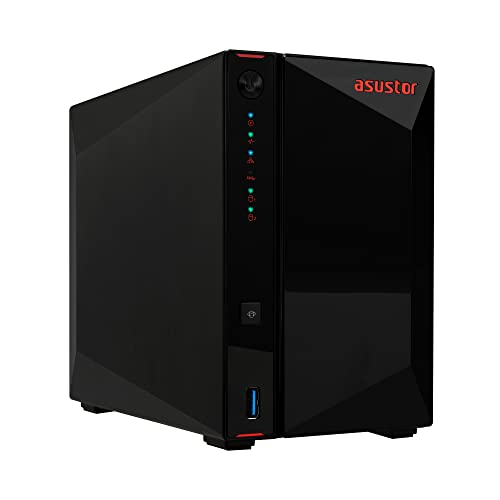
The AS5402T, sold under Asustor’s Nimbustor 2 Gen2 name, is the media enthusiast’s 2-bay pick. The listing specifies an Intel Celeron N5105 quad-core processor, 4 GB of DDR4 memory, dual 2.5GbE ports, and an unusual four M.2 NVMe SSD slots, so you can add a large fast tier alongside the two main drive bays. HDMI 2.0b output supports direct playback to a TV.
Asustor’s ADM operating system includes the apps this category needs: automatic photo backup from phones, media server software for streaming to TVs and tablets, download and file management tools, and remote access through Asustor’s app and cloud ID service. The platform is straightforward to navigate and the hardware is aimed squarely at streaming and live content workflows.
Choose the AS5402T if media serving is the main job and you like the idea of stacking several NVMe SSDs for fast libraries and cache. Buyers who mainly want set-and-forget family backup may prefer the Synology’s software polish, but for a home media hub the Asustor’s port and slot layout is hard to argue with.
Specs
| Spec | Detail |
|---|---|
| Drive bays | 2 (diskless) |
| Processor | Intel Celeron N5105 quad-core, 2.0 GHz |
| Memory | 4 GB DDR4 |
| Networking | 2 x 2.5GbE |
| Extra storage | 4 x M.2 NVMe SSD slots |
| Video output | HDMI 2.0b |
| Operating system | ADM |
| Smart features | App remote access, automatic photo backup, media serving |
Who Should Skip It
Skip a smart NAS if a single external drive already covers your needs and only one computer ever touches your files. The enclosure is only part of the cost: drives, and ideally a second copy of important data somewhere else, add up quickly, and a household that will not use remote access, shared folders, or automatic multi-device backup is paying for capability it will never switch on.
Also skip it if all you want is phone photo backup. A cloud photo plan is simpler to run than any NAS, with no hardware to maintain and no drives to replace. A NAS earns its place when several people and devices share storage, when media libraries are large, or when keeping data at home matters more than convenience.
FAQ
Do these NAS servers include hard drives?
No. All five picks are diskless enclosures, so you choose and install your own drives. That lets you pick the capacity and set up mirroring for protection, but remember to budget for the drives when comparing total cost against a preloaded storage appliance.
Can I access my files away from home?
Yes. Each platform here offers remote access through the maker’s phone app or a private cloud link, so photos, documents, and media stay reachable over the internet. You control the accounts and sharing settings, which is the main difference from a public cloud drive.
What happens if a drive fails inside the NAS?
If you set up mirroring or another redundant array, the NAS keeps running on the surviving drive and alerts you to replace the failed one. Without redundancy, a failed drive can mean lost data, which is why a mirrored setup plus a separate backup copy is the sensible baseline.
Is a NAS a good replacement for a streaming subscription?
It serves a different purpose. A NAS stores and streams your own media collection to your TVs, tablets, and phones, and it backs up your files. It does not provide a catalog of shows and movies, so most households use one alongside, not instead of, their streaming services.
Final Verdict
Every pick here earns the smart label honestly: 5 of 5 are app-managed, remotely accessible, and built around automatic backup and media serving. Start with the Synology DS225+ for the smoothest software, choose the UGREEN DXP2800 for stronger 2-bay hardware and HDMI playback, and look at the QNAP TS-264 for configurability. The TerraMaster F4-424 Pro is the four-bay power option, and the Asustor AS5402T suits media-first homes that want extra NVMe room. Match the bay count and software style to your household, add mirrored drives, and any of the five will quietly centralize your files for years.
Product and ASIN Reference
| Product | ASIN |
|---|---|
| Synology DiskStation DS225+ | B0FB7KQLR1 |
| UGREEN NASync DXP2800 | B0D22HBFK1 |
| QNAP TS-264 | B0BLJ97L82 |
| TerraMaster F4-424 Pro | B0CPPD51B9 |
| Asustor AS5402T | B0C5MB5MTS |
More from Amazon
Programs that pair well with the guide above. Offers and eligibility are set by Amazon and may change.
Free shipping on eligible items, Prime Video and more. Eligible new members can start with a free trial.
Start a Prime free trialAd-free music streaming. Eligible new subscribers can start with a free trial.
Try Music Unlimited freeA Prime membership for ages 18-24 with a trial period. Eligibility is set by Amazon.
See Prime for Young AdultsAudiobooks and podcasts to listen to on the go. Eligible new members can start with a free trial.
Try Audible freeAs an Amazon Associate we earn from qualifying purchases.