Key takeaways
- Best Overall: Schlage BE365 Keypad Deadbolt, a code-only deadbolt with a long track record and a 9V battery.
- Best Smart Pick: Yale Assure Lock 2 (Wi-Fi), remote app control and scheduled code sharing.
- Best Value Deadbolt: Yale Digital Keypad Deadbolt, 20 codes, auto-lock, backlit keypad.
- Best Budget Smart Lock: eufy Security Smart Lock C30, built-in Wi-Fi with no monthly fee listed.
- Best for Light-Duty Doors: Kwikset SmartCode 955 lever, a keypad lever for doors that need passage mode.
- Best Budget Knob: Signstek keyless entry door knob with keypad, for interior and secondary doors.
- Best Grade 3 Knob With Extra Codes: TEEHO TE004, 20 user codes and one-time codes.
The best keypad door lock for most front doors is the Schlage BE365 keypad deadbolt, a no-frills push-button deadbolt that keeps its codes in memory and has a mechanical key backup. If you want remote control, the Yale Assure Lock 2 with Wi-Fi is the stronger runner-up, and if you only need a keypad on an interior or secondary door, a keyless entry door knob such as the Signstek is the cheapest way in. This guide compares seven main keypad locks, from simple code-only deadbolts to Wi-Fi smart locks, and four alternatives. It also explains the words that matter when you shop: ANSI grade, backset, door thickness, auto-lock, and one-time codes.
A note on method. We did not personally install or use these locks. This guide is research-based, drawing on the manufacturer specifications, retailer listings, and independent buying guides such as Bob Vila and Consumer Reports. Where a detail is missing from the listing, we say “not listed”. A keypad lock does not make a home burglar-proof, and no lock does; the door, frame, strike plate, and screws matter as much as the lock body. Prices are shown as tier words only.
Our top picks


As an Amazon Associate we earn from qualifying purchases at no extra cost to you.
Top Picks at a Glance
- Best Overall: Schlage BE365 Keypad Deadbolt, a code-only deadbolt with a long track record and a 9V battery.
- Best Smart Pick: Yale Assure Lock 2 (Wi-Fi), remote app control and scheduled code sharing.
- Best Value Deadbolt: Yale Digital Keypad Deadbolt, 20 codes, auto-lock, backlit keypad.
- Best Budget Smart Lock: eufy Security Smart Lock C30, built-in Wi-Fi with no monthly fee listed.
- Best for Light-Duty Doors: Kwikset SmartCode 955 lever, a keypad lever for doors that need passage mode.
- Best Budget Knob: Signstek keyless entry door knob with keypad, for interior and secondary doors.
- Best Grade 3 Knob With Extra Codes: TEEHO TE004, 20 user codes and one-time codes.
Comparison Table
| Product | Type | Key specs (as listed) | Watch for | Price tier |
|---|---|---|---|---|
| Schlage BE365 | Keypad deadbolt | 9V battery, 19 user codes max (sources), key backup | No Wi-Fi or app | Mid-range to Premium |
| Kwikset SmartCode 955 | Keypad lever | Up to 30 codes, 9V battery, auto-lock and passage modes | A lever, not a deadbolt | Mid-range |
| Yale Digital Keypad Deadbolt | Keypad deadbolt | 20 codes, auto-lock, backlit keypad, backup key | No remote access | Mid-range |
| Yale Assure Lock 2 (Wi-Fi) | Smart deadbolt | Wi-Fi, app control (US and Canada), scheduled code sharing, backup key | Needs Wi-Fi, more setup | Premium |
| eufy Smart Lock C30 | Smart deadbolt | Built-in Wi-Fi, auto-lock, BHMA Grade 3, no bridge | Grade 3 only | Mid-range |
| Signstek keypad knob | Keypad knob | Mute mode, passage function, easy install | Grade and code count not listed | Budget |
| TEEHO TE004 | Keypad handle | 20 codes, ANSI Grade 3, one-time code, auto-lock | Grade 3 only | Budget to Mid-range |
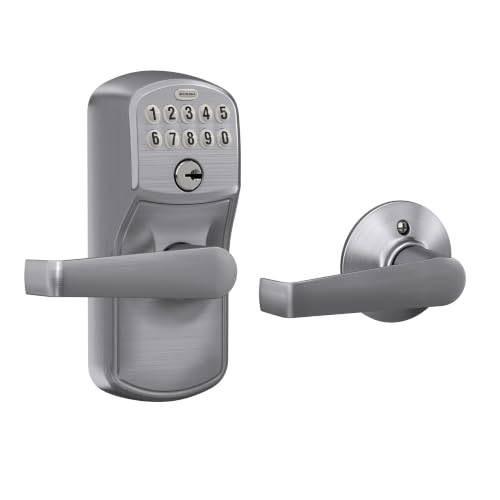
1. Schlage BE365 Keypad Deadbolt: Best Overall
- Type: electronic keypad deadbolt with a mechanical key override.
- Codes: two preset codes, and per retailer and manual sources up to 19 user codes in total.
- Power: one 9V battery; the manufacturer’s estimate is up to two years with typical use, though retailers quote different figures.
- Memory: settings and codes are kept in memory if the battery is removed.
- Lockout: after four wrong codes the keypad disables itself for a short time, commonly given as 30 seconds.
Best for: a front door where you want a simple, proven keypad and no app. Skip if: you want remote locking, guest schedules, or logs.
Schlage’s BE365 is the answer to “just give me a keypad that works”. The deadbolt is a standard residential type with a solid bolt and, per the listings, a one-inch throw. You enter a code, the motor retracts the bolt, and the lock does not need Wi-Fi or an app, so there is nothing to update. The mechanical key remains as a backup, which matters when the 9V battery runs flat. Because the lock keeps its settings in memory, replacing the battery does not erase your codes.
Sources disagree on the exact security grade, with Schlage materials commonly describing it as Grade 2 and some retailers describing it differently. If a grade matters to your insurer or landlord, confirm it on the Schlage product page for your trim before buying. The trim also comes in several finishes; the Camelot trim shown in the listing is one of the styles.
Pros: simple; no app or Wi-Fi; battery swaps do not erase codes; key backup.
Cons: no remote features; code count is lower than some rivals; battery life estimates vary.
2. Yale Assure Lock 2 (Wi-Fi): Best Smart Pick
- Type: smart deadbolt with a keypad.
- Remote: Wi-Fi app control, available in the US and Canada per the listing.
- Guest access: scheduled code sharing; the listing says it is compatible with short-term rental platforms.
- Backup: physical key.
Best for: households with guests, dog walkers, or rental stays. Skip if: your home Wi-Fi is weak near the door, or you want the simplest possible lock.
The Assure Lock 2 family is available in several variants: a keypad version, a touchscreen version, and Bluetooth or Wi-Fi modules. The listing for this pick names the Wi-Fi keypad version. The practical benefit is that you can create a code for a guest that works only on certain days and delete it afterward, instead of rekeying a lock or hiding a key. The Wi-Fi module also lets you check whether the door is locked.
The trade-offs are setup time and dependencies. A smart lock needs a stable Wi-Fi signal at the door, an account with the manufacturer’s app, and a plan for when the batteries run low. Read the listing for battery type and install requirements. It is also worth deciding whether you are comfortable with an account-based lock; some households prefer offline codes.
Pros: remote control; scheduled codes; physical key; broad finish choices.
Cons: higher cost; Wi-Fi dependency; setup effort.
3. Yale Digital Keypad Deadbolt: Best Value Deadbolt
- Codes: 20 user codes per the listing.
- Features: auto-lock and a backlit keypad.
- Backup: physical key.
- Finish shown: Black Suede.
Best for: homeowners who want more codes and auto-lock without Wi-Fi. Skip if: you want app logs.
This is the pick for people who find the Schlage a little basic and a smart lock too much. Twenty codes let you give each family member and regular helper their own, which also lets you remove one without changing everyone else’s. Auto-lock re-secures the door after you leave, which helps if you tend to forget. The backlit keypad is useful at night, and a physical key remains as a backup. Battery type, grade, and exact auto-lock timing are not given in the listing, so check the maker’s page.
Pros: 20 codes; auto-lock; backlit; key backup.
Cons: no remote access; some specs not listed.
4. eufy Security Smart Lock C30: Best Budget Smart Lock
- Connectivity: built-in Wi-Fi, no separate bridge required.
- Features: keypad deadbolt, auto-lock, app remote control.
- Cost model: no monthly fee listed.
- Grade: BHMA Grade 3 per the listing.
Best for: renters and first-time smart lock buyers. Skip if: you need a higher security grade for a main entrance.
The C30’s draw is that it brings Wi-Fi control to the lower end of the market. Having Wi-Fi built in matters because older smart locks needed a separate hub. For renters, this is important: you can often swap a deadbolt without changing the door, and take the lock with you when you move. The Grade 3 note is the compromise. Grade 3 is the lowest level accepted under the ANSI/BHMA system, intended for residential use, and the main entrance may benefit from a higher grade if your door and frame are strong enough to justify it.
Pros: Wi-Fi without a hub; no monthly fee listed; auto-lock; keypad.
Cons: Grade 3 only; battery details not in the listing.
5. Kwikset SmartCode 955: Best for Light-Duty Doors and Passage Mode
- Type: electronic lever, not a deadbolt.
- Codes: up to 30.
- Power: one 9V battery, up to three years depending on use.
- Grade: ANSI Grade 2 per the maker’s information.
- Door fit: 1-3/8 to 2 inches thick.
- Modes: auto-lock and passage, which leaves the door unlocked during the day.
Best for: offices, workshops, and shared spaces. Skip if: you want a deadbolt with a heavy bolt on an exterior door.
A lever is easier to use for people with limited hand strength and for anyone carrying things. It also pairs naturally with passage mode, useful for a shop or an office that needs an unlocked door during hours. The listing calls it light commercial, with a ten-button keypad and a three-year battery life. Remember that one source mentioned Z-Wave features, which conflicted with the maker’s page. If you rely on a smart home hub, verify directly with Kwikset.
Pros: 30 codes; lever convenience; long battery life listed; modes.
Cons: not a deadbolt; may be more than a home needs.
6. Signstek Keyless Entry Door Knob: Best Budget Knob
- Type: door knob with keypad.
- Features listed: mute mode, passage function, easy install.
- Finish shown: satin nickel.
- Number of codes, grade, and battery type: not listed in the title.
Best for: interior rooms, garages, or a back door that only needs convenience. Skip if: the door is a main entrance.
Keypad knobs install into a standard door bore and replace the existing knob, so they are cheap and quick. Mute mode silences key beeps, which is helpful in a bedroom or office. Passage function leaves the knob free during the day. For a front door, however, a knob without a stated grade is the weak link. Use it where convenience matters more than security.
Pros: low cost; easy install; mute mode.
Cons: missing grade and code count; knob form.
7. TEEHO TE004: Best Grade 3 Knob With Extra Codes
- Codes: 20 user codes per the listing.
- Grade: ANSI Grade 3.
- Features: one-time code, auto-lock, zinc alloy handle.
- Target doors: front door and bedroom.
Best for: people who want a keypad knob with more detail than the cheapest ones give. Skip if: you want a deadbolt.
The one-time code is the standout. You can give a delivery person or guest a code that works once, with no cleanup. Auto-lock means the door re-locks after use. The zinc alloy handle is listed as durable, though the finish wear is something only long-term owners can judge.
Pros: 20 codes; one-time code; stated grade.
Cons: Grade 3; knob style.
Also Consider
Kwikset SmartCode 260
A keypad deadbolt in matte black with auto-lock and custom user codes. A good alternative to the Schlage if you prefer Kwikset’s SmartKey rekeying.
Veise KS03 Keypad Door Knob
A backlit keypad knob with auto-lock, passage mode, one-time code, and low-battery alert for a front door or bedroom. The extras are similar to the TEEHO.
Kwikset SmartCode 917 With Handle
A keypad deadbolt that comes with a handle set, useful when you are replacing both the handle and the lock.
Level Smart Keypad
An add-on keypad for Level smart locks. Only relevant if you already own a compatible Level lock.
How We Chose
We started with the products that appear most often in independent roundups of keypad locks and smart locks, then checked each against the maker’s spec sheet or listing. We looked for the same few things in each: the type of lock body, the number of codes, the power source, the grade, and whether a physical key is included. We did not personally install or use these locks, so we make no claims about long-term durability. Where independent sources disagreed, for example on grade or battery life, we said so rather than pick one.
We also tried to cover the range a shopper actually faces: a simple deadbolt, a lever, a hub-free smart lock, and the budget knobs people find when they search for keypad door knob options. Each pick had to be a current model.
Buying Guide
Deadbolt, Lever, or Knob?
A deadbolt gives the strongest bolt and is the right choice for exterior doors. A lever is easier to use and works well for interior or commercial doors. A knob is the cheapest and easiest to install, but it relies on a latch, not a bolt, so it is better for interior use. If you replace a handle and a deadbolt together, a handle set may be convenient.
Understand ANSI Grades
Under ANSI/BHMA standards, Grade 1 is the highest and meant for commercial use, Grade 2 is a common residential grade, and Grade 3 is the lowest recognized grade. Keypad locks are graded on the mechanical body; the electronics are evaluated separately. For a main entrance, aim for Grade 2 or better when possible. A strong lock on a weak door frame is a poor trade.
Measure the Door Before You Buy
Check the door thickness, usually 1-3/8 to 2 inches, the bore hole diameter, commonly 2-1/8 inches, and the backset, the distance from the door edge to the bore center, usually 2-3/8 or 2-3/4 inches. Many locks adjust the backset, but not all. If your holes are non-standard, a plate may be needed.
Plan for Power and Failure
Choose a lock with a physical key or a way to jump-start it with a 9V battery, so a dead battery does not lock you out. Replace batteries when the low-battery warning appears. Do not leave a spare key in an obvious place near the door.
Decide Whether You Want a Smart Lock
Smart locks add remote access and code scheduling but depend on Wi-Fi and an app account. For households that mainly want a keyless entry door lock, a code-only deadbolt is simpler and has less to go wrong. For short-term rentals, scheduled codes save time.
Common Mistakes to Avoid
- Using an easy code such as a birthday or 1234.
- Skipping the longer screws in the strike plate, which strengthen the frame.
- Choosing a knob for an exterior door.
- Forgetting to remove old codes when someone leaves.
- Assuming a Wi-Fi lock works without good signal at the door.
More Picks Worth Considering
These additional options fit the same use case and are worth a look if the main picks above do not match your needs.
Keyless Entry Door Lock, Door Knob with Keypad, Smart Code Door Lock, Mute Mode,

Listed as Keyless Entry Door Lock, Door Knob with Keypad, Smart Code Door Lock, Mute Mode,. Compare size, material and compatibility with your own setup before choosing, and check the maker’s size or fit chart where relevant.
Kwikset SmartCode 955 Pembroke Light Commercial 10-Button Keypad Electronic Leve

Listed as Kwikset SmartCode 955 Pembroke Light Commercial 10-Button Keypad Electronic Leve. Compare size, material and compatibility with your own setup before choosing, and check the maker’s size or fit chart where relevant.
Frequently Asked Questions
What is the best keypad door lock overall?
For simplicity and reliability, the Schlage BE365 keypad deadbolt is a strong choice. If you want remote control, the Yale Assure Lock 2 Wi-Fi adds app features.
Is a keyless entry door lock safe?
No lock is a guarantee, but a keypad deadbolt with a good grade, a reinforced strike plate, and a strong frame can be a sound choice. Pick a code that is not easy to guess, and change it when people move out.
What is the difference between a keypad deadbolt and a keypad door knob?
A deadbolt uses a heavy bolt that extends into the frame, while a knob locks a latch. Deadbolts are better for exterior doors, and knobs are better for interior ones.
Do keypad locks need Wi-Fi?
No. Code-only locks such as the Schlage BE365 and Yale Digital deadbolt work without Wi-Fi. A smart code door lock adds Wi-Fi for remote use.
What happens when the battery dies?
Many locks warn you before the battery runs out. Most keep their codes in memory, and most offer a physical key or a 9V battery contact for emergencies. Check your specific model.
Can I install a keypad lock myself?
Many models are designed for basic tools and a standard door, but you must check door thickness and backset first. If your door has unusual holes or a damaged frame, ask a locksmith.
Are keypad locks good for rentals?
They can be, because you can change the code between tenants. Check your lease first and keep the original hardware so you can restore it if required.
Which One Should You Buy?
Choose the Schlage BE365 if you want a simple, proven keypad deadbolt for your front door. Choose the Yale Assure Lock 2 Wi-Fi if you want remote control and scheduled codes, and the eufy C30 if you want Wi-Fi at a lower cost and accept Grade 3. Choose the Yale Digital deadbolt for more codes without Wi-Fi. Choose the Kwikset 955 for an office or shop, and the Signstek or TEEHO knob for interior doors.
Sources
- Schlage BE365 product and manual pages
- Kwikset SmartCode 955 product page
- Yale Assure Lock 2 and Yale Digital Keypad Deadbolt product pages
- eufy Security Smart Lock C30 product page
- Bob Vila’s guide to the best keypad door locks
- ANSI/BHMA lock grade explainers from locksmith and home-improvement publications
Last updated: October 2026