Key takeaways
- Best video doorbell cameras for apartments: six wireless, no-wiring picks compared on battery, storage, chime, field of view and Wi-Fi needs.
For most renters, the Tapo D210 is the best video doorbell in this group: it runs on a rechargeable battery with no wiring, comes with an indoor chime, records 2K video and lets you keep clips on a microSD card instead of paying for a subscription. An apartment video doorbell is simply a wireless, battery-powered camera that mounts on or beside your door and alerts your phone when someone arrives, which matters because most apartments have no doorbell transformer or spare wiring to use. The six models below are all wireless, but they differ in storage, chime hardware and how much of the setup depends on a hub or subscription.
Quick List
- BOIFUN 2K Wireless Doorbell – best for a no-subscription 2K camera with a wide 166-degree view
- Orbitell 1080p Wi-Fi Doorbell – best for a basic 1080p camera with AI motion alerts
- Wyze Battery Video Doorbell – best for seeing packages with a square head-to-toe view
- VanaOrbi 1080p Battery Doorbell – best for a simple battery camera with human detection
- Tapo D210 2K Doorbell – best overall for chime included and subscription-free local storage
- Blink Battery Doorbell 2K+ – best for long AA battery life in the Blink ecosystem
Which One Is Right for You?
| If you… | Choose |
|---|---|
| want a chime in the box and no monthly plan | Tapo D210 2K Doorbell |
| worry about parcels left at the foot of the door | Wyze Battery Video Doorbell |
| already own Blink cameras or want replaceable AA cells | Blink Battery Doorbell 2K+ |
| want the widest field of view listed here | BOIFUN 2K Wireless Doorbell |
| want a cheaper-style 1080p unit with AI alerts | Orbitell 1080p Wi-Fi Doorbell |
| want a plain battery doorbell with human detection | VanaOrbi 1080p Battery Doorbell |
| need to keep video off the cloud | Tapo D210 2K Doorbell |
Start with the rules, not the camera: read your lease and ask the property manager what is allowed on or beside the door, because some buildings forbid adhesive or screws on the frame and others restrict cameras that capture the shared hallway. Next, check your Wi-Fi at the door, since every model here relies on a 2.4 GHz connection. After that, decide whether you can live with a subscription for cloud video or want to store clips locally.
All 6 Picks in Detail
1. BOIFUN 2K Wireless Doorbell – Best for a No-Subscription Wide-View Camera
As an Amazon Associate we earn from qualifying purchases at no extra cost to you.

The BOIFUN is listed as a wireless video doorbell with no subscription required, 2K HD video, a 166-degree wide view, HDR night vision, motion alerts and two-way audio. It suits a renter who wants 2K quality and a very wide angle that covers a narrow hallway, and who would rather avoid monthly fees.
The listing text we have is cut short, so several details need confirming on the product page: how the unit is powered, whether the battery is removable, whether a chime is included, how recordings are stored and whether a hub is required. Wide angles of this kind are useful in apartments because the camera sits close to the door, but they also capture more of the shared corridor, so consider your neighbors’ privacy.
- 2K video resolution
- 166-degree wide view
- HDR night vision and motion alerts
- Two-way audio
- Power source, chime and storage method: confirm on listing
Pros
- High resolution with a very wide angle
- Marketed as subscription-free
Cons
- Limited published detail to verify
- Wide view may capture hallway activity
Compared with the Tapo D210, the BOIFUN lists a wider angle, while the Tapo has clearer documentation of its chime and local storage.
2. Orbitell 1080p Wi-Fi Doorbell – Best for a Basic Camera with AI Motion Alerts

The Orbitell is a 1080p wireless Wi-Fi doorbell with two-way audio, night vision, cloud storage and smart AI motion detection, and the listing says it supports a 2.4 GHz network. It fits a renter who wants a straightforward doorbell and does not need 2K sharpness.
The mention of cloud storage suggests that saved clips depend on a service, and the listing text does not say whether the storage is free, how long clips are kept or whether a microSD slot exists. Check those details, along with the power source, chime options and mounting hardware, before buying. As with all Wi-Fi doorbells, you need a stable 2.4 GHz signal at the door.
- 1080p video
- Two-way audio and night vision
- Smart AI motion detection
- 2.4 GHz Wi-Fi named in the listing
- Cloud storage terms, battery and chime: confirm on listing
Pros
- Covers the basics
- AI alerts reduce pointless notifications
Cons
- Cloud reliance may mean ongoing costs
- Lower resolution than the 2K models
Next to the VanaOrbi, the Orbitell lists a similar feature set, so the deciding factors are the storage terms and the hardware included.
3. Wyze Battery Video Doorbell – Best for Package Visibility

The Wyze Battery Video Doorbell has a 1536 by 1536 HD+ camera with a square 1:1 view designed to show a visitor from head to toe, along with color night vision, two-way audio and person, vehicle and package detection. It is a good fit for apartment dwellers who mostly want to know when a parcel arrives on the mat.
Wyze’s technical pages describe a 6400 mAh rechargeable battery charged over USB-C, IP65 weather resistance and Wi-Fi on 2.4 GHz with Bluetooth. It does not ring indoors by itself: you need a separately sold chime controller or a Wi-Fi chime, or you can rely on phone notifications. A microSD slot is available, but Wyze states that continuous local recording needs wired power, so on battery power plan around event clips and the optional paid cloud plan.
- 1536 by 1536 square view with head-to-toe framing
- Rechargeable 6400 mAh battery over USB-C
- Person, vehicle and package detection
- IP65 weather resistance
- Chime sold separately; local recording needs wired power for continuous mode
Pros
- Square view captures packages
- Detailed maker documentation
Cons
- No indoor chime in the box
- Some features need extra purchases or a plan
Compared with the Blink, the Wyze offers local storage options and a package-friendly view, while the Blink offers replaceable AA batteries.
4. VanaOrbi 1080p Battery Doorbell – Best for a Plain Battery Camera
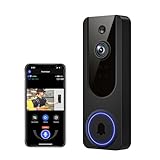
The VanaOrbi is a 1080p Wi-Fi video doorbell that is battery powered, with AI human and motion detection, two-way talk, night vision and cloud storage. It suits an apartment resident who wants a no-wiring camera that tells people from passing movement.
As with the Orbitell, the listing gives limited detail about the storage terms, battery capacity and chime. A battery doorbell lives or dies by its charging routine, so check the stated battery life, whether the battery is removable for swapping, and whether the unit needs a separate receiver. Confirm that your building allows the mounting method that the package includes.
- 1080p video
- Battery powered, Wi-Fi connected
- AI human and motion detection
- Two-way talk and night vision
- Battery capacity, chime and storage terms: confirm on listing
Pros
- Human detection helps in busy corridors
- No wiring
Cons
- Cloud storage details are unclear
- Resolution below the 2K picks
Against the Orbitell, it is very similar, with battery power stated more explicitly in the listing.
5. Tapo D210 2K Doorbell – Best Overall for Chime and Local Storage

The Tapo D210 is a battery-powered 2K doorbell with a 160-degree ultra-wide view, an included chime, person detection, a Ring Call feature and subscription-free local storage. It suits almost any renter, since it combines easy installation with sensible defaults.
TP-Link specifications describe 3-megapixel video at 2304 by 1296, a 160-degree diagonal view, full-color night vision, a 6400 mAh battery with a rating of up to 180 days under typical use, IP65 weather resistance and recognition of people, pets, vehicles and packages. Local storage uses a microSD card of up to 512 GB sold separately, and cloud storage is available through a paid plan. It connects over 2.4 GHz Wi-Fi directly to your router, so no hub is required, and works with Alexa and Google Assistant.
- 2K video, 2304 by 1296
- 160-degree view and full-color night vision
- Indoor chime included
- microSD local storage, card sold separately
- 6400 mAh battery rated up to 180 days under typical use
Pros
- Chime and local storage make it a complete package
- No hub needed
Cons
- 2.4 GHz only
- Real battery life varies with activity
Compared with the Wyze, the Tapo includes the chime and has the stronger subscription-free story, while the Wyze has a taller view.
6. Blink Battery Doorbell 2K+ – Best for Long AA Battery Life

The Blink Battery Doorbell 2K+ is a wireless 2K doorbell bundled with a Sync Module Core. It suits households that want the longest stated battery life and an inexpensive-to-run system with replaceable AA cells rather than a built-in battery.
Blink states that the doorbell runs on three AA lithium batteries for up to two years under default settings, offers 1920 by 1920 video with a 140-degree view, and connects over 2.4 GHz Wi-Fi through the Sync Module, which must be plugged in indoors. The doorbell can be wireless or connected to existing doorbell wiring. Local storage with a Sync Module Core is described inconsistently across sources, and cloud storage and smart detection require a Blink plan, so check how you want to store clips before buying.
- 1920 by 1920 video, 140-degree view per the maker
- Three AA lithium batteries, up to two years on default settings
- Requires the included Sync Module Core and a power outlet indoors
- IP65 weather resistance
- Local storage with the Core: confirm on listing
Pros
- Very long battery life
- Replaceable cells
Cons
- Needs an indoor Sync Module and outlet
- Cloud features typically need a plan
Next to the Tapo, the Blink wins on battery life and loses on built-in local storage and a bundled chime.
Specs Compared
| Doorbell | Resolution | Field of view | Power | Storage | Chime |
|---|---|---|---|---|---|
| BOIFUN 2K Wireless | 2K | 166 degrees | Confirm on listing | Confirm on listing | Confirm on listing |
| Orbitell 1080p | 1080p | Confirm on listing | Confirm on listing | Cloud named; confirm terms | Confirm on listing |
| Wyze Battery Video Doorbell | 1536 by 1536 | Square view; maker figures vary | 6400 mAh rechargeable | microSD; cloud optional | Sold separately |
| VanaOrbi 1080p | 1080p | Confirm on listing | Battery powered | Cloud named; confirm terms | Confirm on listing |
| Tapo D210 | 2K, 2304 by 1296 | 160 degrees | 6400 mAh rechargeable | microSD up to 512 GB; cloud optional | Included |
| Blink Battery Doorbell 2K+ | 1920 by 1920 per maker | 140 degrees per maker | 3 AA lithium batteries | Cloud plan; local needs compatible module | Confirm on listing |
How We Chose These
We started from the six doorbell listings and compared them against the manufacturers’ specification and support pages where those exist. Because the topic is apartments, we weighted the features that suit renters: no wiring, battery power, a chime or alternative alert, storage that does not force a subscription, and a stable 2.4 GHz connection. We did not install or run any of these devices, and where a listing leaves out a detail such as power or chime we say to confirm it. Differences between sources are noted rather than resolved by guessing.
What to Look For
Power and mounting without wiring
Apartments rarely have a doorbell transformer, so battery operation is the default. Look for a rechargeable cell of around 5,000 to 6,500 mAh or removable AA cells, and check whether the battery can be replaced without unmounting the whole doorbell. Mounting is the bigger question: most doorbells ship with screws and a wedge, but renters often prefer a no-drill option such as a strong adhesive mount, a door-frame clamp or a peephole-style bracket. Ask the property manager what is acceptable, and avoid anything that leaves holes in a brick or metal frame.
Resolution, field of view and night vision
Resolution of 1080p is adequate for identifying a face at close range, while 2K gives extra detail for zooming. Field of view matters more in a narrow hallway: a 160-degree view covers the whole doorway but also the corridor, while a 1:1 square view captures a person from head to toe and any parcel at their feet. Night vision comes in infrared (black and white) or color via a small light; either works for a few feet, which is the distance that counts at an apartment door.
Storage, subscriptions and privacy
Doorbells store video in the cloud, on a local microSD card or through a hub. Cloud plans keep video even if the camera is stolen, but they add a recurring fee. Local storage avoids the fee but loses the footage if the device is removed. Choose a card with a high-endurance rating, and confirm the maximum supported capacity. For privacy, set motion zones so the camera ignores the hallway, mute audio recording if your local rules limit it, and tell neighbors that a camera is present. Rules on recording audio and imagery vary by state, so check local regulations.
Wi-Fi reach and chimes
Almost every wireless doorbell uses 2.4 GHz Wi-Fi, which carries through walls better than 5 GHz but is also more crowded. Check the signal at the door by standing in the corridor with your phone. If it is weak, a mesh node or a plug-in repeater inside your apartment can help. For alerts, decide whether phone notifications are enough or whether you want a plug-in chime that rings inside, which matters if you do not always carry your phone.
Smart detection, notifications and who gets the alert
Basic motion detection fires whenever pixels change, which in a busy apartment corridor means constant alerts from neighbors walking past. Person detection, package detection and activity zones filter that noise, and a few seconds of pre-roll recording can capture the moment before the trigger. Check whether those filters run on the camera or in the cloud, because cloud-based filters often sit behind a paid plan while on-device detection does not. Also look at how alerts are shared: if you live with a partner or roommate, you want multiple users to receive notifications and to view the live feed without sharing one login. Quiet hours and per-zone sensitivity settings are worth having, since a doorbell that buzzes your phone all evening quickly gets muted.
Two-way audio deserves a quick check as well. Latency of more than a second or two makes conversation awkward, and echo from a hard hallway can garble speech. Features such as a call-style notification that rings like a phone can help you answer in time, and a quick-reply message is useful when you cannot talk.
Security of the device itself
A camera on your door is also a device on your network, so treat it like one. Turn on two-factor authentication in the app, use a unique password, and update the firmware when prompted. Battery doorbells are easy to remove, so choose a model with a mounting plate that locks with a security screw, and consider whether the maker offers a theft replacement policy. If the doorbell keeps clips only on a card that sits inside the unit, a thief takes the evidence with the device, so a cloud copy or a second camera inside the apartment may be worth considering.
When you move out, remove the doorbell, patch any screw holes if you used them, and wipe the device through the app before storing or reselling it.
Built-in rechargeable battery versus replaceable AA cells
The two battery designs suit different habits. A built-in rechargeable pack, such as the roughly 6400 mAh cells on several models here, means you take the doorbell off the wall every few months, charge it over USB-C and put it back, which takes a few hours and requires the mount to release easily. Replaceable lithium AA cells let you swap in fresh batteries in a minute, and they last longer in cold weather than most rechargeable packs, but they are a recurring purchase and the lithium type matters because ordinary alkaline cells can sag in the cold and shorten life. For a renter, the question is how awkward removal is: if the mount needs a tool or sticks to the frame, charging becomes a chore you will put off.
Whichever you choose, treat the quoted battery life as a best case. It assumes a small number of triggers per day and moderate temperatures. A doorway facing a busy walkway can trigger hundreds of events a day, so use activity zones and a shorter clip length to stretch the interval between charges. Set a reminder on your phone for the first time the low-battery alert appears, because a dead doorbell fails silently.
Rule of thumb: if the signal at the door shows less than two bars on your phone, fix the Wi-Fi first, because a doorbell with a weak connection will miss alerts no matter how good the camera is.
Questions
Can I install a video doorbell in an apartment without drilling?
Often yes, using an adhesive mount, a door-frame bracket or a peephole-style model. Confirm the option with your landlord, and read the instructions to avoid damage when removing it.
Will a video doorbell work without a subscription?
Many will send live alerts and let you view the live feed without paying. Cloud history and smart detection often require a plan, while models with microSD storage let you keep clips locally.
Do I need a chime?
Not necessarily, because your phone will notify you. A plug-in chime is useful if you sometimes leave your phone elsewhere, and some doorbells include one while others sell it separately.
How often do I need to recharge the battery?
Makers quote periods from months to a couple of years, but busy doorways with many motion events drain batteries faster. Cold weather also shortens the life.
Can neighbors object to my doorbell camera?
Possibly, if it records the shared hallway. Use motion zones, aim the camera at your own doorway, and check building rules.
What Wi-Fi band do these use?
They use 2.4 GHz. If your router combines both bands, your phone may need to be on 2.4 GHz during setup.
Update History
- October 20, 2026 – Initial publication; product set drawn from current catalog listings.
- Check the product page for current specifications and availability before buying.
Sources
- Manufacturer product and support pages for Wyze, TP-Link Tapo and Blink
- Retailer listing titles and specification fields for each doorbell in this group
- Wi-Fi band conventions for 2.4 GHz home networks