Key takeaways
- Looking for the best smart locks for rental properties? Six Wi-Fi and Bluetooth deadbolts compared on remote codes, fit, power and security grade.
For most landlords and short-term-rental hosts, the eufy Smart Lock C220 is the best all-round pick here: it has built-in Wi-Fi, so you can add and remove guest or tenant codes from your phone without buying a separate bridge, and it adds fingerprint entry for residents who do not want to type a code. A smart lock for a rental property is a keyless deadbolt or handleset that lets you issue, schedule and cancel entry credentials remotely, so you never have to re-key the door or hand over a spare key again. The six locks below range from Wi-Fi models to Bluetooth locks that rely on an optional gateway, so match the connection type to how often you need to manage access from far away.
Quick List
- eufy Smart Lock C220 – best for built-in Wi-Fi remote code management without extra hardware
- Philips Wi-Fi Smart Deadbolt – best for hosts who want code, fingerprint and app entry in one deadbolt
- Keypad Smart Lock with Handle and Knob – best for room rentals and interior doors as well as the front entrance
- Sifely Fingerprint Smart Deadbolt – best for long-term tenants who want a fingerprint reader plus a keypad
- Veise VE017 Fingerprint Smart Lock – best for multi-method entry and detailed user management
- Yamiry Fingerprint Smart Knob Lock – best for a simple knob-style retrofit with generated passcodes
Which One Is Right for You?
| If you… | Choose |
|---|---|
| manage a unit from another city and want Wi-Fi built in | eufy Smart Lock C220 |
| want to lock down several interior bedroom doors in a shared house | Keypad Smart Lock with Handle and Knob |
| need one-time and recurring codes for cleaners and guests | Philips Wi-Fi Smart Deadbolt |
| want an access-management app with scheduled sharing for tenants | Sifely Fingerprint Smart Deadbolt |
| care about the number of ways to unlock and a USB-C emergency power port | Veise VE017 Fingerprint Smart Lock |
| prefer a knob-style lock on an existing door | Yamiry Fingerprint Smart Knob Lock |
| live in the unit yourself and want fingerprint speed for the front door | eufy Smart Lock C220 |
Start with the connection type, because it decides how much of the lock you can control when you are not standing at the door. Then check whether the lock replaces your existing deadbolt or only part of it, since a rental usually requires you to keep the original hardware so it can be restored at move-out. Finally, think about who will use the door: a fingerprint reader is convenient for a resident, while a time-limited keypad code is what a guest or contractor needs.
All 6 Picks in Detail
1. eufy Smart Lock C220 – Best for Built-In Wi-Fi Code Management
As an Amazon Associate we earn from qualifying purchases at no extra cost to you.

The C220 is a fingerprint deadbolt with Wi-Fi inside the lock, and its listing highlights remote app control and an up-to-8-month battery. That combination is exactly what a remote landlord needs: you can create or delete a passcode from anywhere without installing a hub in the unit. It also suits a resident who wants to unlock with a fingertip when carrying groceries.
According to eufy’s published specifications, the lock stores up to 50 fingerprints and 100 passcodes, supports six ways to unlock including the physical key, and carries an IP53 rating on the exterior assembly and a BHMA Grade 3 certification. It runs on AA batteries and connects to a 2.4 GHz network, which is an important detail if the unit has a dual-band router. Installation is designed to use the existing door preparation without drilling, though you should confirm the bore and thickness against the listing.
- Built-in Wi-Fi, no separate bridge required
- Fingerprint, keypad, app and key entry
- Rated for up to 8 months of battery life on the listing
- 2.4 GHz Wi-Fi only
- Replaces the deadbolt hardware on a standard prepared door
Pros
- Remote management with no extra hardware
- Large stated capacity for fingerprints and codes
Cons
- Wi-Fi in the lock needs a strong signal at the door
- Swapping the deadbolt usually needs landlord approval and a plan to reinstall the original at move-out
Compared with the Philips deadbolt, the eufy leads on stated capacity and battery information, while the Philips adds more explicit code types.
2. Philips Wi-Fi Smart Deadbolt – Best for Code, Fingerprint and App Entry

This Philips deadbolt lists code, fingerprint and app unlock, remote access and voice assistant support. It suits an owner who wants a conventional-looking deadbolt that can serve both a long-term tenant and a rotating cast of visitors. In Philips-family listings, the app can create permanent, one-time, periodic and recurring codes, which maps neatly onto a cleaner who comes every Tuesday or a contractor who needs a single visit.
Spec details vary between Philips variants, so treat the following as the family pattern and confirm it on your exact listing: Wi-Fi at 2.4 GHz only, a stated 50-fingerprint and 100-code capacity on the Wi-Fi models, fit for doors roughly 1.38 to 2 inches thick, and an adjustable backset. Fingerprints are typically enrolled on the lock itself and then managed in the app.
- Code, fingerprint, key and app unlock
- Remote access and voice assistant compatibility named in the listing
- Permanent, one-time, periodic and recurring codes on this product family
- 2.4 GHz Wi-Fi only
- Door-thickness and backset fit should be confirmed on the listing
Pros
- Flexible code types suit mixed tenant and guest use
- Familiar deadbolt styling
Cons
- Variants differ in battery count, weather rating and gateway needs
- Voice control is generally better kept for indoor use
Next to the eufy, the Philips is the better fit when scheduled and recurring codes matter more than a published battery-life figure.
3. Keypad Smart Lock with Handle and Knob – Best for Room Rentals and Interior Doors
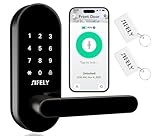
This unbranded digital deadbolt is sold for front, bedroom, office and interior doors, and its listing points to app control for short-term rental hosts. That breadth is the reason to consider it: if you rent out individual rooms in a shared house, each bedroom door can have its own code, and the front door can use the same style of hardware.
Because the brand is not named in the listing text, treat specifications as unverified until you read the product page: confirm the battery type, the weather rating of the exterior half, the maximum number of codes, and whether remote access needs a separate gateway. The handle-and-knob wording suggests the set can be configured for different door types, so check which hardware is actually in the box.
- Digital deadbolt with keypad entry
- Intended for front, bedroom, office and interior doors
- App control stated, with a vacation-rental use case in the listing
- Weather rating, battery type and code capacity: confirm on listing
- Handle and knob options: confirm what is included
Pros
- One style of lock can cover several door types
- Useful for room-by-room access control
Cons
- Less published detail than the branded locks
- Check carefully that the interior-door version is not exposed to weather
Compared with the Yamiry, this set is the more flexible choice for multi-door use, while the Yamiry concentrates on a fingerprint knob.
4. Sifely Fingerprint Smart Deadbolt – Best for Fingerprint Plus Keypad and Scheduled Sharing

The Sifely deadbolt pairs a fingerprint reader with a keypad and Bluetooth app control. It is a sensible choice for a long-term tenant or an owner-occupant who will mostly use fingerprint and code entry at the door, and who does not need to manage the lock from another time zone every day.
Sifely’s Bluetooth locks generally work within phone range, and remote locking, remote code changes and voice assistants require the separately sold Sifely Wi-Fi gateway; Sifely also sells built-in Wi-Fi models, so confirm which one this listing is. The company’s app and web portal can share electronic keys, set schedules and show access logs. Published capacity figures vary by model, running to well over a hundred codes and fingerprints, and the lock supports features such as auto-lock, a one-touch lock key and an anti-peep code.
- Fingerprint reader plus keypad
- Bluetooth app control on this listing; gateway needed for remote use on Bluetooth models
- Scheduled eKey sharing and access logs through the app and web portal
- Auto-lock and privacy features named by the maker
- Battery life and exact capacity: confirm on listing
Pros
- Mature app with scheduling and logs
- Several credentials per user
Cons
- Remote control may need an extra gateway
- Code changes are limited to Bluetooth range without it
Against the Veise, the Sifely is the more familiar app ecosystem, while the Veise offers a longer list of stated unlock methods.
5. Veise VE017 Fingerprint Smart Lock – Best for Multi-Method Entry and User Management

The VE017 in matte black is marketed as 8-in-1, meaning it counts fingerprint, app, authorized access, fob card, code, code sharing, voice assistant and mechanical key as separate ways in. It suits an owner who wants a tidy way to give different residents different credentials and to remove one without affecting the others.
Veise’s published details describe a 508 DPI fingerprint sensor, an auto-lock timer you can set between zero and 180 seconds, AES-128 encrypted passwords, a USB-C emergency power port and an IP55 weather rating, and the lock is described as detecting left- or right-hand doors automatically. It fits doors from about 1-3/8 to 2 inches thick. The KK Home app handles setup, and remote control and voice assistants depend on the separate Veise G1 gateway, so budget for that if you manage the door remotely.
- Eight listed unlock methods, including fob and mechanical key
- Auto-lock timer adjustable in the app
- USB-C emergency power port for dead-battery situations
- Door-handing detection and DIY screwdriver install
- Remote and voice control need the G1 gateway
Pros
- Emergency power port reduces lockout risk
- Detailed user management
Cons
- Remote features need extra hardware
- Listings differ by handle style, so match the exact variant
Compared with the Sifely, the Veise gives the longer feature list, while the Sifely gives the more established scheduling tools.
6. Yamiry Fingerprint Smart Knob Lock – Best for a Simple Knob-Style Retrofit

The Yamiry combines a keypad, fingerprint reader and deadbolt in a knob-style design with app control and a passcode generator. It suits a straightforward setup where the existing door already uses a knob and you want a single product for keypad and fingerprint entry.
The listing mentions generating passcodes through the app, which is the key rental feature, but the product text provided is short, so confirm the specifics on the page: how many fingerprints and codes it stores, whether the app works over Bluetooth only or through Wi-Fi, the battery type, and whether the exterior is weather rated. Knob-style locks can be less convenient for people carrying bags, so consider the door’s real daily use.
- Keypad, fingerprint and app entry on a knob-style body
- Passcode generation through the app
- Deadbolt included in the listing name
- Storage capacity, battery and weather rating: confirm on listing
- Remote-access method: confirm on listing
Pros
- Simple, compact styling
- Passcode generation suits guest access
Cons
- Limited published detail to compare
- Knob shape is harder to operate with full hands
Next to the generic handle-and-knob set, the Yamiry is narrower in scope but easier to understand as a single front-door knob replacement.
Specs Compared
| Lock | Connectivity | Unlock methods | Form | Power | Weather rating |
|---|---|---|---|---|---|
| eufy Smart Lock C220 | Built-in Wi-Fi (2.4 GHz) | Fingerprint, keypad, app, key | Deadbolt | AA batteries, up to 8 months per listing | IP53 per maker |
| Philips Wi-Fi Smart Deadbolt | Wi-Fi (2.4 GHz) | Code, fingerprint, app, key | Deadbolt | Confirm on listing | Varies by variant |
| Keypad Smart Lock with Handle and Knob | App control; confirm on listing | Keypad, app | Deadbolt with handle or knob | Confirm on listing | Confirm on listing |
| Sifely Fingerprint Smart Deadbolt | Bluetooth; gateway for remote | Fingerprint, keypad, app | Deadbolt | Confirm on listing | Confirm on listing |
| Veise VE017 | Bluetooth; G1 gateway for remote | Eight methods including fingerprint, code, fob, key | Deadbolt with handle options | Batteries plus USB-C emergency port | IP55 per maker |
| Yamiry Fingerprint Knob | App control; confirm on listing | Fingerprint, keypad, app | Knob with deadbolt | Confirm on listing | Confirm on listing |
How We Chose These
We started from the six lock listings in this group and compared what each listing and, where available, the manufacturer’s own specification pages say about connectivity, unlock methods, power and fit. Our priorities were the features that matter specifically to rental use: remote code management, scheduled or one-time credentials, a path to restore the original hardware, and a way to get in when the battery dies. We did not run any performance measurements, and where a listing did not state a value we say so instead of guessing. Locks with less published detail are described conservatively and flagged for confirmation on the product page.
What to Look For
Remote access: Wi-Fi inside versus a gateway
The biggest practical split in rental locks is how they reach the internet. A lock with Wi-Fi built in connects directly to the router, which keeps the setup simple but demands a decent signal at the door and a 2.4 GHz network, since most of these locks cannot join 5 GHz. A Bluetooth lock is usually cheaper to run and drains less power, but you can only manage it from within about 30 feet of the door unless you add a gateway that bridges to your home network.
If you live in the unit or nearby, Bluetooth may be enough. If you are managing a property in another city, Wi-Fi or a gateway is not optional, because the entire point is changing a code the day a tenant leaves or a guest books. Whichever you choose, keep the router and the door within reasonable range, and remember that a router in a different room of a multi-unit building may be shared or unavailable.
Credential types and scheduling
Look for four credential types: permanent codes for residents, one-time codes for deliveries and viewings, scheduled codes that expire on a checkout date, and recurring codes for a weekly cleaner. A good app lets you set a start and end time, shows who used which code and when, and lets you delete a credential without touching anyone else’s. Fingerprint capacity matters less in a rental than code capacity, because most visitors will never enroll a fingerprint.
Installation, hardware and your lease
Most of these locks assume a standard prepared door: a cross bore around 2-1/8 inches, a backset of 2-3/8 or 2-3/4 inches, and a door about 1-3/8 to 2 inches thick. Measure before you buy, and confirm whether the lock handles both left- and right-handed doors. Because a rental is not yours to alter freely, read your lease or ask the owner before swapping a deadbolt, keep the original lock and key in a labeled bag, and plan to reinstall them at move-out. Some locks only replace the outside keypad and reuse the interior thumb-turn, which can be easier to reverse.
Power, backup and security grade
Lithium or alkaline AA batteries are common, and a battery rating of several months is realistic only with Wi-Fi traffic kept modest. Ask whether the lock warns you on your phone at low battery, whether it has an external port for emergency power, and whether it keeps a physical key as the last resort. For security, look for a stated ANSI/BHMA grade; Grade 3 is the common residential tier, and higher grades indicate stricter durability and strength requirements. For a front door, also look for auto-lock so the door never stays unlocked after a guest leaves.
Common mistakes landlords and hosts make
The first mistake is choosing a lock for its feature list and ignoring the router. If the signal at the door is weak, a Wi-Fi lock will drop offline just when a guest arrives, so check your phone’s signal on the porch side of the door before you commit. The second is forgetting that auto-lock needs a matching routine: if the door locks itself after thirty seconds, a visitor who steps out to take a phone call can be left outside, so make sure the code is also printed in the arrival message. The third is leaving old credentials alive. Build a checkout habit of reviewing the user list, removing departed occupants and confirming the log shows no unexpected entries.
Finally, plan for the moment the app or the manufacturer’s cloud is unavailable. A lock that still opens with a code at the keypad, and with a physical key as the last resort, will not strand anyone, whereas a lock that depends entirely on the phone can become a problem during an outage. Keep one trusted person nearby with a key or an owner-level login, particularly if you host in a different time zone.
Rule of thumb: pick the lock that fails gracefully. When the Wi-Fi is down, the batteries are low or the phone is dead, you should still have two other ways to open the door.
Worked example: suppose you rent a spare room by the week and clean on Saturdays. You would want a lock with a recurring code for the cleaner, a one-time code for each new guest, and a log showing when each was used. Wi-Fi in the lock lets you set all of that from your phone while at work.
Questions
Can I install a smart lock in a rental without damaging the door?
Many smart deadbolts reuse the existing holes in a standard prepared door, so installation involves unscrewing the old hardware and fitting the new. Ask the owner first and keep every original part so the door can be restored at move-out.
Do I need Wi-Fi in the lock itself?
Only if you manage access remotely. A Bluetooth lock works fine for a resident who is nearby, but a remote host should choose either built-in Wi-Fi or a gateway that bridges the lock to the home network.
What happens when the battery dies?
Most locks warn you well in advance through the app or an audible alert. Many also have a physical key or an external contact point where a power bank can wake the keypad briefly, so check for one of these before buying.
How do I stop former guests from re-entering?
Use scheduled or one-time codes that expire automatically, and delete any permanent credentials as soon as an occupant leaves. A lock with an access log lets you confirm that old credentials have stopped working.
Is a fingerprint reader useful for short-term guests?
Rarely. Guests tend to stay briefly and prefer a simple code, while fingerprints are better for long-term residents. A mix of both is the most flexible setup.
Will a smart lock work with a dual-band router?
Yes, as long as the lock can reach the 2.4 GHz band. Keep both bands under a shared network name or pair the lock while your phone is connected to the 2.4 GHz network.
Update History
- October 20, 2026 – Initial publication; product set drawn from current catalog listings.
- Check the product page for current specifications and availability before buying.
Sources
- Manufacturer product and specification pages for eufy, Philips, Sifely and Veise
- Retailer listing titles and specification fields for each lock in this group
- Published door-preparation conventions such as standard bore, backset and the ANSI/BHMA residential grading scale