
Key takeaways
- Casual stills shooter: One spare plus USB top-ups is usually enough for a day.
- Travel and landscape: Two spares and a power bank for charging overnight.
- Event or wedding shooter: At least three genuine batteries, plus a fast charger.
- Video shooter: One or two spares plus USB power or a dummy battery for long takes.
The best battery for the Panasonic Lumix S5 II is Panasonic’s own DMW-BLK22 for guaranteed compatibility and firmware-friendly charge reporting, a reputable third-party BLK22-compatible pack for shooters who want spares at a lower spend tier, and a USB power bank or dummy-battery power source for long video sessions. The camera also charges and runs over USB-C, which changes how many spare batteries you really need.
Our top picks



As an Amazon Associate we earn from qualifying purchases at no extra cost to you.
What Battery the S5 II Uses
The Lumix S5 II takes the DMW-BLK22 lithium-ion battery, the same type used by the Lumix S5 and some other Panasonic bodies. Panasonic lists it as a 7.2V pack with a capacity of about 2,200 mAh. The camera’s CIPA battery-life rating is a modest figure per charge, and reviewers who cover the S5 II say that video recording, high-resolution capture and heavy use of the electronic viewfinder drain it faster than stills shooting. In practice, most working shooters carry at least one spare, and video shooters often rely on external power.
The S5 II can charge in the camera over USB-C using a USB power delivery source and can also operate from USB power, according to Panasonic. This is a major convenience for travel, since a single power bank can top up or run the camera. Details of which chargers and cables work best are in the camera’s manual.
At a Glance: Battery and Power Options
| Option | Best for | Key stated traits | Limits |
|---|---|---|---|
| Panasonic DMW-BLK22 (genuine) | Reliable compatibility and accurate battery gauge | 7.2V pack at about 2,200 mAh per the maker; standard S5 II battery | Highest spend tier per pack; limited capacity |
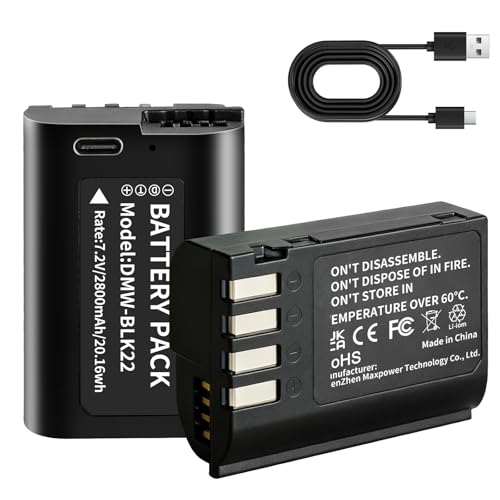
| Third-party BLK22-compatible packs (Wasabi Power, Patona, Newmowa, Neewer-style brands) | Affordable spares | Makers list compatible capacity, often with dual chargers | Capacity claims vary; some may not report charge accurately or may show warnings |
| USB-C power bank with PD | Long video, time-lapse, travel days | Powers and charges camera via USB-C per Panasonic | Cable and charger quality matter; extra bulk on a rig |
| Dummy battery / DC coupler | Studio and long-duration recording | Powers camera from an adapter instead of a pack | Needs compatible model for the S5 II; cable management |
| Battery grip (if supported by the maker) | Extra capacity and vertical shooting | Maker lists grip compatibility on its accessories page | Confirm S5 II support on the maker’s page before buying |
| Dual or multi-bay charger | Charging spares quickly | Charges two BLK22-type packs together | Check compatibility with your pack brand |
Genuine Panasonic DMW-BLK22
If you buy only one battery, the genuine pack is the safest. Panasonic cameras use a communication chip in the battery to report remaining charge and health, and genuine packs work flawlessly with that system. They also come with the maker’s quality control and warranty. Counterfeits exist, so buy from authorised sellers and check the labelling and weight against the maker’s description. Genuine packs cost more than third-party versions, but if you are shooting a paid event, reliability matters more than saving at the margin.
Third-Party BLK22-Compatible Packs
Brands such as Wasabi Power, Patona, Newmowa, Neewer and Vello sell BLK22-compatible batteries, often in bundles that include a dual charger. Reviewers who test these packs commonly report that the best are close to the genuine one in runtime, while others fall short of their claimed capacity. Some third-party packs do not display exact remaining charge in the camera, or give a message about an unsupported battery. A well-reviewed third-party spare is a sensible budget-tier choice, but avoid unknown brands with suspiciously high capacity figures. A battery that claims far more capacity than the genuine one in the same size should raise suspicion.
Safety matters with lithium-ion packs. Buy from brands with a clear safety track record, avoid packs that swell, overheat or have damaged casing, and stop using any pack that behaves oddly. Charge only with a charger designed for the pack and follow the instructions.
USB Power: The Practical Upgrade
Because the S5 II supports USB-C power, a compact USB power bank can extend a day of shooting. Panasonic’s manual lists supported charging and power-supply behaviour, and not every power bank or cable will work. Choose a bank that supports USB power delivery, use a good-quality cable, and test the setup before an important shoot. Many video shooters attach the power bank to a cage with a cable clip, which reduces strain on the camera’s USB-C port. Note that heat and port strain are the main practical concerns with long USB-powered sessions.
Dummy Batteries and DC Couplers
For studio interviews, streaming and time-lapse, a dummy battery with an AC adapter keeps the camera powered for hours. Panasonic offers a DC coupler system for compatible bodies, and third-party makers produce similar adapters. Because model compatibility varies, confirm that the adapter is listed for the S5 II (or for the BLK22 battery shape) on the maker’s page before you buy. Poorly made adapters can cause camera errors, so favour makers with solid reviews.
How Many Batteries Do You Need?
- Casual stills shooter: One spare plus USB top-ups is usually enough for a day.
- Travel and landscape: Two spares and a power bank for charging overnight.
- Event or wedding shooter: At least three genuine batteries, plus a fast charger.
- Video shooter: One or two spares plus USB power or a dummy battery for long takes.
Stay conservative about runtime. Real-world battery life depends on the video mode, screen use, stabilisation settings, Wi-Fi and Bluetooth, and ambient temperature. Cold weather reduces capacity for all lithium-ion packs.
Care and Safety Notes
- Store spare batteries in a protective case so the contacts do not touch metal objects.
- Do not leave batteries in a hot car or in direct sun.
- Do not use a damaged, swollen or leaking battery. Dispose of it at a battery recycling point.
- When flying, follow airline rules for spare lithium-ion batteries, which generally require them in carry-on luggage with protected terminals.
- Use the charger intended for the pack. Avoid unknown chargers.
- Update the camera firmware per Panasonic’s notes, as updates can change how the camera handles third-party accessories.
Pick X If… Decision Table
| Pick this | If you |
|---|---|
| Genuine DMW-BLK22 | shoot paid jobs and need dependable charge reporting |
| Third-party BLK22-compatible pack from a known brand | want affordable spares for travel and hobby use |
| USB power bank | shoot long video takes or time-lapse and want fewer swaps |
| Dummy battery with AC adapter | work in a studio or stream for hours |
| Dual-bay charger | carry several spares and want to top them up fast |
| Battery grip (if listed for your camera) | want extra capacity and a vertical shooting position |
Alternatives and Related Accessories
Lumix S5 IIX power options. The S5 IIX uses the same battery family, so the advice here largely applies; check the maker’s page for any differences.
A second camera body. Some professionals carry a second body rather than more batteries, which also adds redundancy.
Battery cases and pouches. Inexpensive cases keep spares organised and protect contacts, which is useful if you mix charged and uncharged packs.
Final Considerations
A simple routine keeps a battery kit dependable. Label spares with numbers or coloured tape, rotate them so each pack gets similar use, and charge the night before a shoot rather than leaving them on the charger for days. Record which packs seem to lose charge faster, since an ageing lithium-ion pack gradually holds less energy and may need replacing after several years of regular use. If you shoot in cold weather, keep spares in an inside pocket close to your body so they stay warm until needed. Panasonic’s manual and support pages are the final word on accessory compatibility.
Frequently Asked Questions
Which battery does the Lumix S5 II use?
It uses the DMW-BLK22 lithium-ion battery, which Panasonic lists at 7.2V and about 2,200 mAh. The same battery type fits some other Lumix bodies. Check the manual for the full compatibility list.
Can I charge the S5 II over USB?
Yes, Panasonic states that the camera can charge and be powered over USB-C. Use a power-delivery charger or power bank and a quality cable. The manual lists supported behaviour.
Are third-party batteries safe to use?
Reputable third-party brands are widely used, but quality varies. Buy from known brands, avoid unusually high capacity claims, and stop using a pack that swells or overheats. A genuine pack is the safest choice for critical work.
How many batteries should I carry?
One spare is enough for casual shooting, while event and video shooters often carry three or more, plus a power bank. Battery life depends on video use and screen settings. Cold weather shortens runtime.
Will third-party batteries show correct charge levels?
Some do, and some show approximate levels or a warning message. This varies by brand and firmware. Reading reviews that mention the S5 II specifically helps.
Can I run the camera for hours without swapping batteries?
Yes, with a USB power bank or a dummy battery with an AC adapter. Make sure the adapter is listed as compatible with the S5 II. Watch camera temperature during long recordings.






