Our Top Picks
 RK ROYAL KLUDGE R65 Wired Gaming Keyboard withHot-Swappable 60% Keyboard12.6 x 4.6 x 1.6 Inches1.4 poundsCheck on Amazon
 Keychron K8 Tenkeyless Wireless Mechanical Keyboard for MacWhite Backlight25.2 x 25.2 x 7.6 inches2.2 PoundsCheck on Amazon
The best mechanical keyboard for programming is the one whose layout keeps your most-used shortcuts one keypress away, and for most developers that means a tenkeyless or 75 percent board with a switch type they can tolerate for eight hours. Of the eight listings here, the Keychron K8 is the strongest fit for people who move between macOS and Windows, the Logitech MX Mechanical suits quiet office work, and the RK Royal Kludge R65 and Newmen GM326 give hot-swappable, compact layouts at a lower price. One listing, the Redragon K521, is described as “mechanical feeling” and needs a closer look.
Programming asks different things of a keyboard than gaming or general typing. You hit Escape, the bracket keys, the backtick and the arrow cluster constantly. You reach for F5, F10, F11 and F12 in debuggers, and you use Home, End, Page Up and Page Down to move through code. A compact layout that hides those keys behind a modifier can slow you down unless you configure it carefully.
Run this shortcut-reach test before you choose a layout

Redragon Mechanical Gaming Keyboard Wired, 11 Programmable Backlit Modes, Hot-Swappable Red Switch, Anti-Ghosting, Double-Shot PBT Keycaps, Light Up Keyboard for PC Mac


As an Amazon Associate we earn from qualifying purchases. Product prices and availability are accurate as of the date/time indicated.

Redragon K521 Upgrade Rainbow LED Gaming Keyboard, 104 Keys Wired Mechanical Feeling Keyboard with Multimedia Keys, One-Touch Backlit, Anti-Ghosting, Compatible with PC, Mac, PS4/5, Xbox



As an Amazon Associate we earn from qualifying purchases. Product prices and availability are accurate as of the date/time indicated.

AULA F99 Wireless Mechanical Keyboard,Tri-Mode BT5.0/2.4GHz/USB-C Hot Swappable Custom Keyboard,Pre-lubed Linear Switches,RGB Backlit Computer Gaming Keyboards for PC/Tablet/PS/Xbox





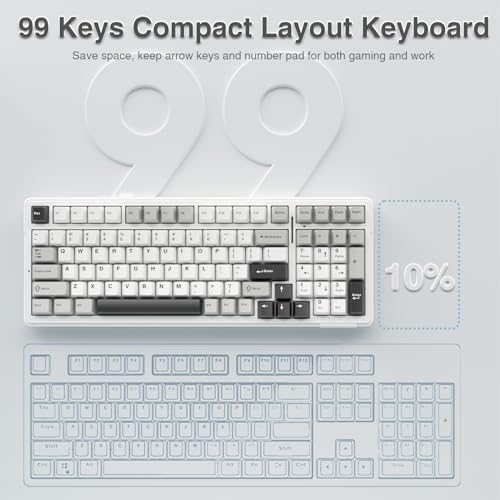
As an Amazon Associate we earn from qualifying purchases. Product prices and availability are accurate as of the date/time indicated.
RK ROYAL KLUDGE R65 Wired Gaming Keyboard with Volume Knob, 60% Percent RGB Backlit Mechanical Keyboard Gasket Mount with PBT Keycaps, MDA Profile, QMK/VIA, 66 Keys Hot Swappable Cream Switch, Black


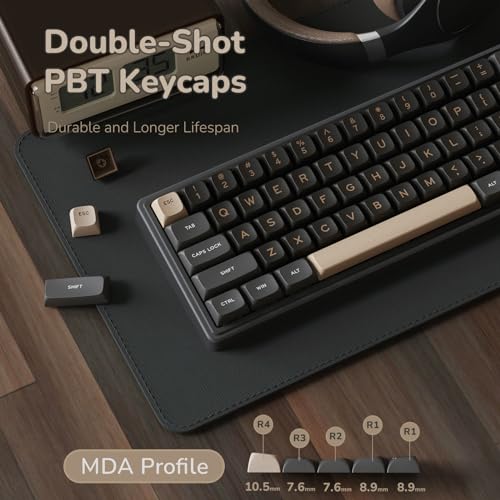


As an Amazon Associate we earn from qualifying purchases. Product prices and availability are accurate as of the date/time indicated.
Keychron K8 Tenkeyless Wireless Mechanical Keyboard for Mac, White Backlight, Bluetooth, Multitasking, Type-C Wired Gaming Keyboard for Windows with Brown Switch


As an Amazon Associate we earn from qualifying purchases. Product prices and availability are accurate as of the date/time indicated.

Redragon K552 Mechanical Keyboard, LED Gaming Keyboard with Red Switches | 87-Key TKL Compact, Anti-Ghosting, Metal Frame for PC Gaming & Typing, Beginner-Friendly, Redragon Classic Gaming Keyboard


As an Amazon Associate we earn from qualifying purchases. Product prices and availability are accurate as of the date/time indicated.

Logitech MX Mechanical Wireless Illuminated Keyboard Tactile - Graphite | Low-profile full-size, 3 device Bluetooth pairing, Smart backlight auto-adjusts, USB-C rechargeable, Up to 15 day battery


As an Amazon Associate we earn from qualifying purchases. Product prices and availability are accurate as of the date/time indicated.

Newmen GM326 Mechanical Keyboard,75% Percent Gaming Keyboard,Wired Keyboard | Mechanical Keyboard,75% Percent Gaming Keyboard,Wired,Backlit,Hot Swappable,Compact,Mini,Black,PC Keyboards,Knob,Red Switch


As an Amazon Associate we earn from qualifying purchases. Product prices and availability are accurate as of the date/time indicated.
Write down the ten key combinations you press most in your editor and terminal. For many developers the list looks like this: Escape, the arrow keys, F5 for run or continue, F10 and F11 for stepping, F12 for go to definition, Home and End, Ctrl or Cmd with brackets, the backtick for terminals, and Delete or Backspace. Now check each layout.
| Layout | What is missing | Impact for coding | Listings in this set |
|---|---|---|---|
| Full-size (104 keys) | Nothing | Numpad is rarely used; takes desk space | Redragon K521, Logitech MX Mechanical |
| Tenkeyless (87 keys) | Numpad | All coding keys in place | Keychron K8, Redragon K552 |
| 75 percent | Numpad, some gaps | Function row and arrows kept, tight spacing | Newmen GM326 |
| 65 percent | Function row | F-keys need a layer; arrows kept | RK R65 (66 keys) |
| 60 percent | Function row, arrows | Most navigation on a layer | None in this set by title |
Some titles do not state the layout. The Redragon hot-swappable listing (B0CF3VGQFL) and the AULA F99 do not name theirs in the title, so confirm the key count and arrangement on the product page. If any of your ten shortcuts lands on a hidden layer, count how many extra keypresses that adds across a day and decide if you are willing to remap.
Compared at a glance
“Price tier” is relative within this set. Budget means one of the three least expensive, Premium means the single highest-priced listing, and Mid-range covers the four between them. Check current prices on the product pages.
| Model | What the title says | Price tier | Best for |
|---|---|---|---|
| Redragon hot-swappable (B0CF3VGQFL) | Wired, red switch, hot-swappable, PBT keycaps, 11 backlight modes | Budget | First mechanical board with upgrade room |
| Redragon K521 | 104 keys, “mechanical feeling,” LED, multimedia keys | Budget | Tightest budget; not true mechanical by title |
| AULA F99 | Tri-mode wireless, hot-swappable, pre-lubed linear switches | Mid-range | Wireless typing with linear switches |
| RK Royal Kludge R65 | 66 keys, gasket mount, QMK/VIA, hot-swappable, knob, wired | Mid-range | Programmable compact board |
| Keychron K8 | Tenkeyless, Bluetooth, Mac and Windows, brown switch | Mid-range | Mixed Mac and PC use |
| Redragon K552 | 87 keys, red switches, metal frame, wired | Mid-range | Wired TKL value |
| Logitech MX Mechanical | Low-profile, full-size, tactile, 3-device Bluetooth, USB-C, backlight | Premium | Quiet office use |
| Newmen GM326 | 75 percent, wired, hot-swappable, knob, red switch | Budget | Compact wired layout at low cost |
The eight keyboards, one at a time
Redragon Mechanical Gaming Keyboard Wired, Hot-Swappable Red Switch (B0CF3VGQFL)
This Redragon listing is a wired mechanical keyboard with a hot-swappable red switch, anti-ghosting, double-shot PBT keycaps and 11 programmable backlit modes. The title does not state the layout or key count, so the first job is to open the listing and count keys. Many Redragon models share a similar name pattern, and layout differences are easy to miss.
Hot-swappable means the switches pull out of their sockets without soldering. For a programmer, that matters because switch preference is difficult to guess in advance. If you decide the red linear switches are too light, you can fit tactile switches later, provided the socket type matches the replacement. The listing should say which socket standard it uses.
Double-shot PBT keycaps are described as durable. Double-shot construction molds the legend into the keycap rather than printing it, which helps the markings last. PBT plastic is generally less prone to shine than ABS over time. These are general material properties, not measurements of this keyboard.
“Gaming” and “11 programmable backlit modes” signal that the design leans on lighting. If you code in a dim room, backlighting is useful. If you prefer a restrained desk, check whether the lights can be turned off easily.
One practical step before you commit: look at the product images for the right-hand side of the board. That is where the arrow keys, the navigation cluster and any numpad show up, and it tells you the layout faster than the title does. Then run the shortcut-reach test from the top of this page against what you see, and note any key you cannot find.
Pros
- Hot-swappable switches named in the title
- Double-shot PBT keycaps
- Budget tier within this set
Cons
- Layout and key count not stated in the title
- Gaming-style lighting may not suit a quiet workspace
- Wired only
Who it’s for: a developer who wants a cheap first mechanical keyboard with a path to switch upgrades.
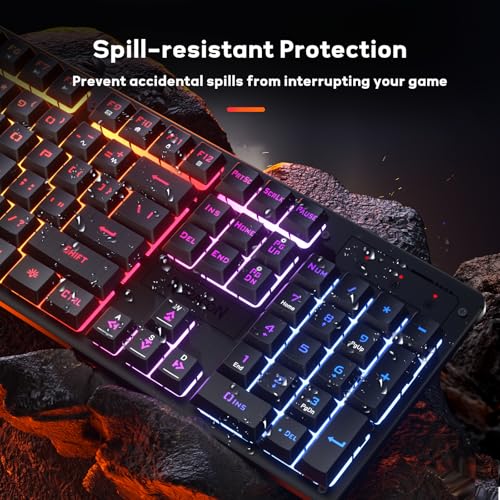
Redragon K521 Upgrade Rainbow LED Gaming Keyboard (Mechanical Feeling)
The title says “104 Keys Wired Mechanical Feeling Keyboard with Multimedia Keys, One-Touch Backlit, Anti-Ghosting,” compatible with PC, PS4, PS5 and Xbox. The phrase to notice is “mechanical feeling.” That wording usually signals a keyboard that imitates the springy feel of mechanical switches without using individual mechanical switches. The listing does not name a switch, so assume it is not a true mechanical board until the product page says otherwise.
That is not necessarily a flaw. A budget keyboard that feels firm can serve a student or a casual coder well. But if your search term was “mechanical keyboard for programming,” you should know what you are getting. True mechanical boards offer replaceable switches, a wide range of feels and long switch life ratings, none of which the title promises here.
The full-size 104-key layout includes a numpad and multimedia keys. For coding, the numpad rarely matters unless you enter many numbers. The price field makes this the cheapest listing in the set, which is also why it is here: some shoppers want the lowest spend and should understand the trade.
The rainbow lighting and gaming styling are optional features. Look for a way to turn the lights off if you work late and want a dim keyboard.
Think about cost across the full setup, too. If the keyboard feels wrong after a month, the money is better spent on a true mechanical board, so check the return window now rather than later. A cheap board is a fair way to learn whether you even want a heavier, louder keyboard, and the decision costs little if you keep the receipt and the packaging.
Pros
- Lowest price in the set by the price field
- Full-size layout with multimedia keys
- Works with PC and several consoles per the title
Cons
- “Mechanical feeling” does not mean mechanical switches
- No hot-swap or switch type in the title
- Large footprint with a numpad
Who it’s for: someone on the tightest budget who wants a firm-feeling board and knows it is not a true mechanical design.
AULA F99 Wireless Mechanical Keyboard, Tri-Mode, Pre-Lubed Linear Switches
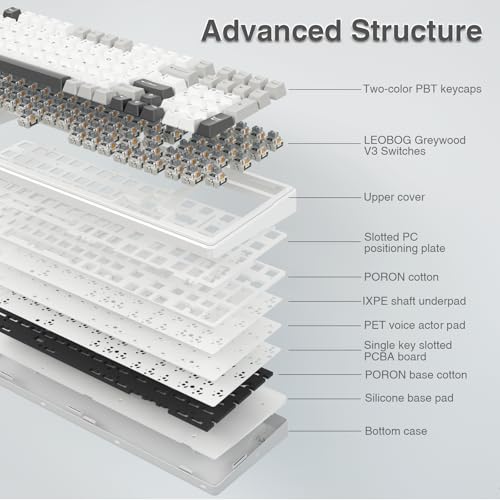
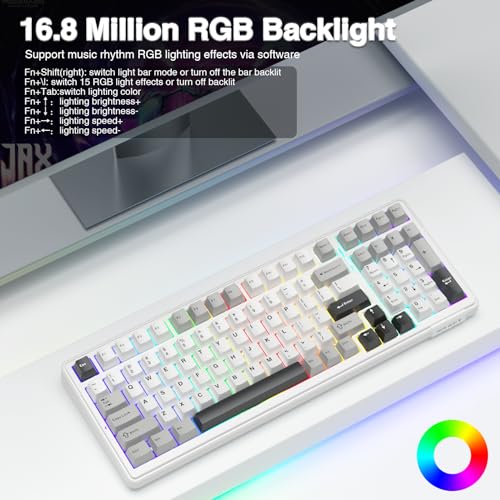
The AULA F99 listing packs in connectivity: Bluetooth 5.0, a 2.4 GHz connection and USB-C, hot-swappable switches, pre-lubed linear switches and RGB backlighting, for PC, tablet, PlayStation and Xbox. For a programmer, the useful point is tri-mode wireless, which lets you pair the keyboard to a laptop, a tablet and a desktop and switch between them.
Pre-lubed linear switches are marketed as smoother and quieter than unlubricated ones. The title gives no sound or force figures, so treat that as a feature description. Linear switches have no tactile bump, so some typists find they make more accidental keypresses at first. A short adjustment period is common when moving from a tactile or membrane board.
Wireless boards in this price band also vary in how they handle sleep and wake. If the keyboard drops its connection after a few minutes idle and takes a second to reconnect, the first keystroke after a pause can be lost, which is irritating when you type a command. Read buyer reviews for mentions of reconnect delay, and keep the 2.4 GHz receiver plugged into a port close to the keyboard.
The model number suggests a layout with many keys, but the title does not state it. Check the listing for the arrangement, particularly whether there are arrow keys and a function row, before you rely on it for debugging shortcuts.
Wireless boards bring battery questions. The title does not state battery life, so look in the listing for capacity and whether you can type while it charges over USB-C. For a desk-bound programmer, plugging in for the workday and using wireless only when moving is a practical compromise.
Pros
- Tri-mode connectivity: Bluetooth 5.0, 2.4 GHz and USB-C
- Hot-swappable with pre-lubed linear switches
- Mid-range tier for a wireless hot-swap board
Cons
- Layout and battery life not stated in the title
- Linear switches have no tactile bump
- RGB styling is gaming-oriented
Who it’s for: a developer who splits time across devices and likes smooth, linear key travel.
RK ROYAL KLUDGE R65 Wired Gaming Keyboard with Volume Knob
The R65 title reads like a feature list for tinkerers: wired, volume knob, “60% Percent” RGB layout, gasket mount, PBT keycaps, MDA profile, QMK/VIA support, 66 keys, hot-swappable cream switches. The “60 percent” in the title does not match the 66-key count, which is typical of a 65 percent layout with arrow keys. The inconsistency is a reason to check the listing images.
QMK and VIA are keyboard firmware and configuration tools that let you remap keys and create layers. For programmers, that is the main attraction. You can place arrow keys, function keys or symbol shortcuts on a layer and tune the board to your workflow. The title says QMK/VIA, but confirm on the product page which tool the board supports, since compatibility can depend on the firmware version.
Gasket mount is a construction style that aims to give a softer typing feel by isolating the plate from the case. Again, the effect is subjective. Cream switches are listed, which you can swap if you prefer a different feel because the board is hot-swappable.
Without a function row, you will use a layer for F5 and F12. If that appeals, remap it into your muscle memory early. If it does not, the Keychron K8 or Redragon K552 keep the row on the board. The price field puts it in the middle of the set.
Gasket-style boards are often sold as a tuned typing experience, and builders add foam or tape inside to change the sound. Opening a keyboard case may affect the warranty, so read the terms first, and handle the circuit board only by its edges. If you flash firmware, follow the maker’s instructions closely and keep a note of your layout so you can restore it.
Pros
- QMK/VIA, hot-swappable switches and a gasket mount per the title
- Volume knob and PBT keycaps
- Compact 66-key layout keeps arrow keys
Cons
- No function row; F-keys need a layer
- Title says 60% but lists 66 keys; verify the layout
- Wired only
Who it’s for: a developer who likes to remap and tune a compact board.
Keychron K8 Tenkeyless Wireless Mechanical Keyboard (Brown Switch)
The Keychron K8 is a tenkeyless board with Bluetooth, a Type-C wired connection, a white backlight and a brown switch, built to work with Mac and Windows. Tenkeyless means the numeric pad is removed while the function row and arrow cluster remain, which is why it suits coding so well: every key in the shortcut-reach test is present.
Brown switches are tactile, which means you feel a small bump when a key actuates. Some programmers like this for confirmation without the volume of a clicky switch. Others prefer linear. The title gives no actuation figures, so the right choice depends on how you type. If you are unsure, ask whether the listing offers other switch options.
The “multitasking” mention in the title refers to pairing with several devices over Bluetooth. That is helpful if you code on a laptop and keep a tablet nearby for documentation. Check the listing to see how many devices it stores and whether you can switch with a key combination.
If you use a Linux workstation as well, the title does not mention it, so check whether the listing or the maker’s documentation covers that case. Function-row behavior is another detail to read up on: on some keyboards the top row defaults to media controls and needs a modifier for F-keys, which is the opposite of what a debugger user wants. See whether a switch for that behavior exists.
For Mac users, the title mentions Mac, which usually means the keyboard ships with Mac modifier keycaps or a layout switch for the Command and Option keys. The listing is where to confirm that. The price field puts it in the middle of the set.
Pros
- Tenkeyless layout keeps function row and arrows
- Bluetooth and Type-C wired options
- Mac and Windows support in the title
Cons
- Hot-swap is not stated in the title
- Brown tactile switch may not suit everyone
- White backlight only
Who it’s for: a developer who switches between macOS and Windows and wants every coding key without a numpad.
Redragon K552 Mechanical Keyboard, TKL, Red Switches, Metal Frame
The K552 is a compact 87-key tenkeyless board with red switches, anti-ghosting, a metal frame and LED lighting, labeled “Beginner-Friendly” and a “Classic.” It is wired. The title says nothing about hot-swap, so the switches are probably fixed to the board. If you want to change switch feel later, you would need to desolder or replace the board.
What it does offer is a layout that suits programming without any layer: arrows, function row and navigation cluster in place. The metal frame is described in the title, which can mean a stiffer top plate. Whether that helps the typing feel is something reviews can describe better than a title can.
Red switches are linear. They are a popular starting point because they feel light and smooth, but they offer no tactile feedback. If you tend to bottom out your keystrokes, consider whether you would find a lighter switch comfortable for long sessions.
The price field puts it above the cheapest Redragon models. That raises the question of whether the metal frame and TKL layout are worth the premium over the hot-swappable Redragon at a lower price. If you value the layout and a fixed build, yes. If you value switch flexibility, no.
Metal-framed boards tend to weigh more, which keeps them from sliding on a desk but makes them less pleasant to carry between a home and an office. If you travel with your keyboard, check the listing for weight and think about a case. Also note that LED lighting on boards like this can usually be dimmed or switched off with a key combination described in the manual.
Pros
- Tenkeyless layout with function row and arrows
- Metal frame named in the title
- Wired connection with no battery to manage
Cons
- Not stated as hot-swappable
- Gaming styling and LED lighting
- Linear switches provide no tactile bump
Who it’s for: a developer who wants a no-fuss wired TKL with a sturdy build.
Logitech MX Mechanical Wireless Illuminated Keyboard, Tactile
This is the premium listing by the price field, and its title is the most office-minded: “Low-profile full-size,” “3 device Bluetooth pairing,” “Smart backlight auto-adjusts,” “USB-C rechargeable,” “Up to 15 day battery,” and a tactile switch type, in graphite. The low-profile design uses shorter switches than a standard mechanical board, which lowers the key height and may reduce wrist bend.
The three-device pairing suits a developer who uses a laptop, a desktop and a tablet. The smart backlight adjusting to ambient light is a convenience, and the battery claim of “up to 15 days” depends on backlight use; check the listing for the conditions behind the number. Rechargeable batteries should be charged per the manufacturer’s instructions.
The title does not mention hot-swap, so the switches are likely fixed. This is a keyboard you buy for its overall design, not for switch experimentation. It is full-size, so it includes a numpad. If you want a smaller desk footprint, you may prefer a TKL.
The question is value. At the highest price in the set, it costs several times more than the budget models. For an office worker who types all day and wants quiet, low-profile keys and multi-device switching, that may be justified. For someone who wants to experiment with switches, the cheaper hot-swap boards offer more flexibility.
Low-profile keyboards also change how your hands sit. Because the keys are shorter, some people find the typing angle feels flatter and may want a wrist rest. Try adjusting the feet, keep your wrists neutral and take short breaks. If you notice pain, numbness or tingling, stop and consult a doctor or ergonomics professional rather than adjusting your gear alone.
Pros
- Low-profile design with a tactile switch type
- 3-device Bluetooth pairing and USB-C rechargeable
- Smart backlight and up to 15 days battery per the title
Cons
- Highest price in the set
- No hot-swap stated; full-size with a numpad
- Battery claim has conditions the title does not state
Who it’s for: an office or hybrid developer who values quiet, low-profile typing and multi-device convenience.
Newmen GM326 75% Mechanical Keyboard, Wired, Hot-Swappable, Knob
The GM326 is a 75 percent wired keyboard with a knob, red switches, backlighting and hot-swap sockets. It is among the lowest-priced hot-swappable boards in the set by the price field. A 75 percent layout keeps the function row and arrows in a tight arrangement, which suits debugging shortcuts better than a 65 percent board.
The knob is often mapped to volume, but software or firmware may let you map it to something else, such as scrolling through a timeline. The title does not say whether the knob is programmable. If you want that, read the product page for software support.
Red linear switches in the title are the starting point. Because the board is hot-swappable, you can change to a tactile switch if you decide linear is not for you. Check that the switch socket type matches the switches you plan to buy.
The title repeats itself, which is a sign of keyword stuffing, and says little about build quality. Look at the images to see the case material and the keycap type, and read reviews for notes on stabilizers, which can rattle on budget boards. A little tuning goes a long way.
At this price, plan on spending a few minutes on setup. Check that every key registers, press the space bar and enter keys at their edges to listen for rattle, and test the knob in both directions. If anything is wrong, use the return window straight away. Also keep a spare keycap puller and a switch puller on hand, since many budget kits do not include one and you will need it if you try other switches.
Pros
- 75 percent layout keeps function row and arrows
- Hot-swappable, with a knob
- Budget tier
Cons
- Tight layout takes adjustment
- Build details are not in the title
- Wired only
Who it’s for: a developer who wants a compact, wired, hot-swappable board without paying much.
How we picked these
The Editorial team assembled this list from published specifications, manufacturer documentation and buyer reviews. Nobody on the team used or measured these units, so there are no typing-feel impressions, sound measurements or battery tests here. We read the titles, noted what they claim and flagged the gaps.
We included eight keyboards that appear in searches for mechanical keyboards for programming. They span full-size to 65 percent, wired and wireless, and two budget-level extremes. One, the Redragon K521, is not clearly a true mechanical design, and we kept it so readers know what they are looking at.
Price tiers are relative to the set. Use them as a guide to which listings cost more than others in this group, and check the current price on each product page.
What matters most for coding keyboards
Layout and key reach
Layout is the first filter. If your shortcut-reach test showed three or more combinations on a hidden layer, move to a larger board. If you rarely use function keys, a 65 percent board may be fine. Our guide to choosing an external keyboard for a laptop covers desk-fit questions in more detail.
Switch type
Linear switches are smooth, tactile switches have a bump, and clicky switches are loud. For long coding sessions in shared spaces, linear and tactile are usually the safer choices. The titles do not state actuation force, so rely on a hot-swap board if you want to change your mind.
Hot-swap and remapping
Hot-swap sockets let you change switches without soldering. QMK and VIA support lets you remap keys. If you code with a particular set of shortcuts, remapping can save time every day.
Connectivity
Wired is simple and reliable. Wireless helps if you move between devices. Check pairing methods and battery details, and consider keeping a cable handy.
Ergonomics and comfort
A keyboard cannot fix a poor posture, but the right height and a supported wrist can help. Our roundup of wrist rests for keyboard comfort is a reasonable add-on. If you experience persistent pain or numbness in your hands or wrists, consult a doctor or occupational health professional rather than relying on equipment changes alone.
A rough keystroke estimate
To see why durability and feel matter, run a quick calculation with these assumptions: you type actively for 4 hours a day at an average of 40 words per minute, and each word is about 5 keystrokes including spaces. That is 200 keystrokes a minute, 12,000 an hour and about 48,000 a day. Over 250 working days, that is about 12 million keystrokes a year, and over a three-year period, about 36 million.
These are estimates, and coding often involves more navigation and shortcuts than prose does, which pushes the count up in some days and down in others. The point is that a keyboard faces tens of millions of presses. If a listing publishes a switch life rating, compare it with this scale. If a listing publishes nothing, read the warranty terms and the return window.
Six ways shoppers choose the wrong board
- Buying a numpad they do not use. Full-size boards push your mouse farther away. A TKL or 75 percent board can reduce reach.
- Going too small too soon. A 60 percent board without arrows slows some developers down.
- Assuming “mechanical feeling” means mechanical. Read the switch description.
- Ignoring Mac or Windows support. Check modifier keys and driver support for your operating system.
- Skipping the return policy. Typing feel is personal.
- Overpaying for lighting. RGB adds cost but not coding speed.
If you work from home, you may also want to read our list of the best mechanical keyboards for remote work.
Our picks by workflow
For mixed macOS and Windows use, the Keychron K8 is the clearest match, since the title names both and the layout keeps every coding key. For a quiet office, the Logitech MX Mechanical is the premium option, with a low-profile design and three-device pairing. For tinkering on a compact board, the RK Royal Kludge R65 offers QMK/VIA and hot-swap at a mid-range price. For a wired TKL without frills, the Redragon K552 does the job. For the lowest cost with upgrade room, the Newmen GM326 and the hot-swappable Redragon are the options. The Redragon K521 is the cheapest, but it is not clearly a true mechanical board, and the AULA F99 suits those who want wireless with linear switches and are willing to confirm the layout first.
Frequently asked questions
What layout is best for programming?
Tenkeyless, 75 percent and 65 percent boards are popular with programmers because they keep arrow keys and, in the larger cases, the function row, which debuggers and editors use heavily. A 60 percent board saves desk space but hides arrows and function keys behind a layer, which some people find slow. Full-size boards add a numpad that most coding does not need. Test your own shortcut list against a layout before choosing.
Which switch type is better for coding, linear or tactile?
It is a matter of preference. Linear switches such as the red and cream switches in some listings move smoothly without a bump, and they tend to be quieter than clicky designs. Tactile switches such as the brown in the Keychron K8 give a bump at the actuation point that some typists like for accuracy. Because switch feel is personal and the titles give no force figures, a hot-swappable board lets you change switches later.
Does a mechanical keyboard need to be wireless for work?
Not necessarily. Wired boards avoid battery management and pairing steps, and they suit a fixed desk. Wireless boards help when you move between a desktop and a laptop or want a clean desk. The AULA F99, Keychron K8 and Logitech MX Mechanical listings mention wireless connections, so check each product page for the pairing method, battery details and whether a cable still works for charging.
Is the Redragon K521 a true mechanical keyboard?
The title calls it a mechanical feeling keyboard, which is different from using mechanical switches. Boards with that wording often use a membrane design with a springy feel, and the listing does not name the switch type. If you need genuine mechanical switches and hot-swap sockets, the other Redragon listings in this roundup that mention red switches or hot-swappable switches are closer. Check the product page for the switch construction before buying.
Is a quiet keyboard important for an open office?
It can be. Linear and tactile switches are typically quieter than clicky switches, and a low-profile board like the Logitech MX Mechanical is often chosen for office settings. The titles do not include sound measurements, so read buyer reviews for notes on noise, and consider adding foam or o-rings if the board supports them. Working from home, noise matters less, and the typing feel can take priority.