Key takeaways
- Check that your motherboard has a free M.2 slot and supports NVMe, not only SATA M.2.
- Look for the 2280 length unless your board states another size.
- Laptops often have limited space and may be height-restricted, so a heatsink version may not fit.
- For PS5, use a PCIe 4.0 drive within Sony’s published specifications and install a heatsink as required.
- Back up data before cloning or swapping drives, and follow the maker’s guide for firmware updates.
- Windows 11 and recent Windows 10 installs support NVMe natively; older operating systems may need drivers.
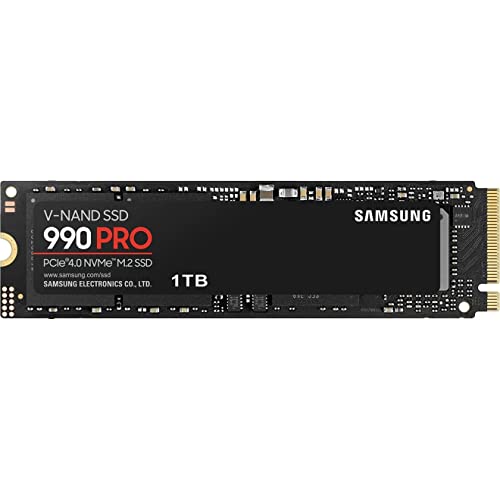
For most gamers, a PCIe 4.0 NVMe drive such as the Samsung 990 Pro, WD_BLACK SN850X or Crucial T500 is the right balance; budget builders can look at the Samsung 990 EVO Plus or Lexar NM790; and only those on a PCIe 5.0 platform who want maximum sequential speed need a drive like the Crucial T705. For load times in current games, reviewers generally report that differences between good PCIe 4.0 drives and faster PCIe 5.0 drives are small, so capacity and reliability matter as much as headline speed.
This guide compares widely sold NVMe drives using the speeds and warranties makers state. Quoted speeds are best-case sequential figures at specific capacities, and real-world results vary with the system.
Our top picks



As an Amazon Associate we earn from qualifying purchases at no extra cost to you.
NVMe SSDs for Gaming at a Glance
| Model | Best for | Key stated specs | Limits |
|---|---|---|---|
| Samsung 990 Pro | High-end PCIe 4.0 gaming PCs and PS5 | Up to about 7,450 MB/s sequential read, M.2 2280, heatsink version available | Premium tier; runs warm without cooling |
| WD_BLACK SN850X | Gamers wanting top PCIe 4.0 performance, PS5 option | Up to about 7,300 MB/s sequential read, heatsink version available | Premium tier; Game Mode software is Windows-based |
| Crucial T500 | Fast, efficient PCIe 4.0 option | Up to about 7,400 MB/s sequential read, heatsink version available | Check endurance rating by capacity |
| Samsung 990 EVO Plus | Mid-range builds and upgrades | Up to about 7,250 MB/s sequential read, PCIe 4.0 x4 or 5.0 x2 as the maker lists | Lower sustained write performance than top-tier drives |
| Lexar NM790 | Value-oriented PCIe 4.0 builds | Up to about 7,400 MB/s sequential read, capacities up to 4 TB | Brand firmware and support less established |
| Seagate FireCuda 530 or 540 | Performance buyers wanting long warranty | PCIe 4.0 (530) or PCIe 5.0 (540) with high endurance ratings | Runs hot; check heatsink needs |
| Crucial T705 | PCIe 5.0 platforms | Up to about 14,500 MB/s sequential read, heatsink version available | Premium tier; needs good cooling and a PCIe 5.0 slot |
Do Games Need a Fast NVMe Drive?
Any NVMe drive loads games much faster than a hard drive and noticeably faster than many SATA SSDs. Between mainstream PCIe 3.0, PCIe 4.0 and PCIe 5.0 drives, reviewers who time level loads usually report small gaps in most titles. Technologies like Microsoft DirectStorage aim to use fast drives to load assets more directly, but game support is still limited and the gains depend on the game. For most people, a solid PCIe 4.0 drive is the sweet spot.
Specs That Matter
Interface and Generation
NVMe drives use M.2 slots, mainly in the 2280 length. PCIe 3.0 drives are older and slower, PCIe 4.0 is the current mainstream, and PCIe 5.0 is faster but hotter and more expensive. Check your motherboard manual to see which slots run at which speeds, since some slots share bandwidth with other ports.
Capacity
Modern games are large, and many occupy tens of gigabytes each. A 1 TB drive fills quickly; 2 TB is a comfortable size for a gaming library, and 4 TB is for large collections. SSDs also tend to slow when nearly full, so leave some free space.
DRAM Cache and Controller
Drives with onboard DRAM tend to keep performance stable under heavy writes. DRAM-less drives that use a host memory buffer can be fine for gaming, and the best of them are praised by reviewers for value. Controllers and NAND type matter for sustained writes, which affect large game installs.
Endurance and Warranty
Makers list endurance in terabytes written (TBW) and a warranty period, typically five years. Gamers rarely hit these limits, but the figures are a useful comparison point.
Heat and Heatsinks
Fast drives can throttle if they overheat. Many motherboards include M.2 heatsinks. For PS5 use, Sony’s guidance calls for a drive with a heatsink that meets its size limits, so check the maker’s PS5-compatible version.
Budget, Mid-Range and Premium Tiers
Budget
The Lexar NM790, Samsung 990 EVO Plus and similar drives offer PCIe 4.0 performance in the value bracket. They are fine for game libraries and general use. Trade-offs may include lower sustained writes and less software support.
Mid-Range
The Crucial T500, WD_BLACK SN850X and Samsung 990 Pro lead the PCIe 4.0 group. They bring fast, stable performance, strong software and long warranties.
Premium
PCIe 5.0 drives such as the Crucial T705 and the Seagate FireCuda 540 deliver top sequential speeds. They are best for creators who also move large files; gamers see little benefit today. Plan for strong cooling.
Pick X If… Decision Table
| Pick this | If |
|---|---|
| Samsung 990 Pro | You want a proven high-end PCIe 4.0 drive with a long track record |
| WD_BLACK SN850X | You want top PCIe 4.0 speeds and a PS5-ready variant |
| Crucial T500 | You want fast speeds with efficient power use |
| Samsung 990 EVO Plus | You want a good drive without paying for the top tier |
| Lexar NM790 | You need large capacity at a lower level |
| Crucial T705 or FireCuda 540 | You have a PCIe 5.0 board and do heavy file work as well |
Compatibility Notes
- Check that your motherboard has a free M.2 slot and supports NVMe, not only SATA M.2.
- Look for the 2280 length unless your board states another size.
- Laptops often have limited space and may be height-restricted, so a heatsink version may not fit.
- For PS5, use a PCIe 4.0 drive within Sony’s published specifications and install a heatsink as required.
- Back up data before cloning or swapping drives, and follow the maker’s guide for firmware updates.
- Windows 11 and recent Windows 10 installs support NVMe natively; older operating systems may need drivers.
Reading Spec Sheets Without Being Misled
Headline speeds are usually sequential read figures from the largest capacity of a line, measured under ideal conditions. Smaller capacities in the same family often list lower numbers, particularly for writes, because fewer NAND chips work in parallel. Gaming workloads lean on random reads and small file access, where the gap between drives is narrower than the box suggests. Reviewers who run game-load and file-copy timings generally report that mainstream PCIe 4.0 drives cluster closely together.
Sustained write behavior is worth a look if you install many large games. Some drives use a fast cache that fills up and then slows; larger capacities and drives with DRAM tend to hold speed longer. Endurance figures in terabytes written matter less for gaming than for video work, but a longer warranty and a higher rating are reassuring if you plan to keep the drive for years.
Power draw and heat also vary. Efficient controllers keep laptops and handhelds cooler and extend battery life, which is why some PCIe 4.0 drives are favored for portable devices. If you plan to use a drive in a handheld PC or compact laptop, check the maker’s size listing, since many devices accept only the shorter 2230 or 2242 lengths rather than 2280.
Finally, think about how you will use the drive over time. Many players keep the operating system and favorite games on one fast NVMe drive, then add a second drive when the library grows. Cloning tools from the maker, such as migration software, simplify the first move. Keep your key saves backed up to cloud storage or a second drive, since any SSD can fail without warning.
Alternatives to Consider
- SATA SSDs: a decent step up from hard drives for older systems with no M.2 slot.
- External NVMe enclosures: useful for extra game storage on a console or laptop, with speeds limited by the USB connection.
- Hard drives for archives: still the cheapest per terabyte for rarely played games.
One more practical point is warranty handling. Makers state warranty periods and sometimes cap coverage by terabytes written, so keep the purchase record and register the drive if the maker offers it. Monitoring tools from the maker can show health and temperature, which helps you spot a drive that is running hot or wearing faster than expected.
Frequently Asked Questions
Is PCIe 5.0 worth it for gaming?
Mostly not yet. Reviewers generally find that PCIe 5.0 drives load games only slightly faster than good PCIe 4.0 drives. They also run hotter and cost more. They make more sense for people who also edit video or transfer large files.
How much storage do I need for games?
A 1 TB drive holds a handful of large games along with the operating system. For a bigger library, 2 TB is a more comfortable size. Keep some free space free to maintain performance.
Do I need a heatsink?
Many motherboards include one for the main M.2 slot. Fast drives can throttle without airflow or cooling, so use the board’s heatsink or one included with the drive. PS5 drives need a heatsink that fits Sony’s limits.
Will an NVMe drive work in my PC?
You need an M.2 slot that supports NVMe. Most boards from the past several years do. Check your motherboard manual for supported lengths and PCIe generations.
Is DRAM-less okay for gaming?
Often yes. Many DRAM-less drives that use a host memory buffer handle gaming well. Drives with DRAM tend to hold steadier speeds under long, heavy writes.
Can I use an NVMe SSD in a PS5?
Yes, within Sony’s published requirements, including PCIe 4.0 speed, capacity range and size limits, and with a heatsink. Always read the maker’s PS5 compatibility notes before purchase.