
Key takeaways
- Budget: Generic spring-loaded desk arms. Suitable for lightweight USB microphones, with some creaking or sagging over time.
- Mid-range: Rode PSA1+ and Elgato arms, plus On-Stage and Gator floor stands. Smoother motion, better finish, and clearer weight ratings.
- Premium: Heavy-duty broadcast arms and K&M stands. Greater load capacity and long service life.
For a desk-based podcaster or streamer, a spring-loaded studio boom arm such as the Rode PSA1+ or the Elgato Wave Mic Arm is the usual pick, while a floor-standing tripod boom stand from makers like K&M or On-Stage suits singers, instrument miking and live stages. “Boom mic stand” covers two quite different products, and choosing the wrong type is the most common mistake. This guide separates them, lists what matters, and shows who should buy which.
Our top picks


As an Amazon Associate we earn from qualifying purchases at no extra cost to you.
Two kinds of boom stand
Desk or studio boom arms
These clamp to the edge of a desk and hold a microphone on an articulating arm, so the mic can swing in front of your mouth and away again. Spring-balanced arms hide cables inside or along the arm. They keep the mic off the desk, which reduces keyboard thump and table vibration.
Floor tripod boom stands
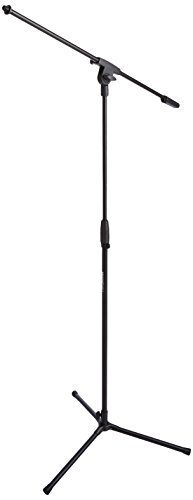
These have a tripod base, a vertical tube and a horizontal boom arm with a counterweight. They are used for vocals, guitar amps, drum overheads and live music, where the mic must sit at an angle or reach over an instrument.
At a glance
| Option | Type | Best for | Key points and limits |
|---|---|---|---|
| Rode PSA1+ | Desk boom arm | Podcasts, voice-over, YouTube | The maker describes a smooth, spring-balanced studio arm with a desk clamp and cable management; check the maker’s stated load range for heavier microphones |
| Elgato Wave Mic Arm / Low Profile | Desk boom arm | Streamers, tight desk setups | Designed around the maker’s Wave microphones but usable with others; the low-profile version is meant for monitors and cameras close to the mic |
| Neewer and InnoGear-style arms | Desk boom arm | Budget buyers | Spring-loaded arms at a lower tier; reviewers often note more arm sag with heavier mics and a less polished finish |
| K&M tripod boom stands | Floor | Singers, instruments, studios | Established professional brand; sturdy but heavier |
| On-Stage tripod boom stands | Floor | Bands, schools, houses of worship | Value-oriented tripod stands with a counterweight boom |
| Gator Frameworks boom stands | Floor | Mobile performers | Wide range from basic to heavy-duty |
What to check before buying
Microphone weight
This is the single most important specification. Large-diaphragm condenser microphones and broadcast dynamics such as the heavy Shure SM7B-class microphones can overwhelm a light arm and cause it to droop. Compare your mic’s weight to the stand maker’s rated load. If the weight is near the maximum, choose a sturdier arm or one that allows spring tension adjustment.
Reach and height
Desk arms have a stated maximum reach; a longer reach lets you sit back from the desk with the mic still positioned at your mouth. Floor stands list minimum and maximum height and boom length. A drummer or choir-director needs a longer boom than a seated vocalist.
Mounting and stability
A desk clamp needs a desk edge thick enough and flat enough to grip; glass or curved desktops may need a different mount. Some arms offer a grommet-hole option. For tripods, a wide base and a counterweight on the rear of the boom are what keep the stand from tipping when the mic extends outward. Never extend the boom beyond the manufacturer’s guidelines.
Cable management
Internal cable channels or clips keep wires tidy and reduce noise from cable movement. Some arms include clips; others expect you to use tape or velcro. A cable that swings can transmit noise into the microphone.
Thread size and adapters
Microphone clips and shock mounts use either a 5/8-inch or 3/8-inch thread, depending on region and product. Most stands include an adapter, but confirm before purchase if you have a specific shock mount.
Budget tiers
- Budget: Generic spring-loaded desk arms. Suitable for lightweight USB microphones, with some creaking or sagging over time.
- Mid-range: Rode PSA1+ and Elgato arms, plus On-Stage and Gator floor stands. Smoother motion, better finish, and clearer weight ratings.
- Premium: Heavy-duty broadcast arms and K&M stands. Greater load capacity and long service life.
Pick X if …
| If you … | Pick | Why |
|---|---|---|
| Record podcasts at a desk with a standard dynamic or condenser mic | Rode PSA1+ | Smooth arm movement and cable management |
| Stream with monitors and cameras near the mic | Elgato Wave Mic Arm Low Profile | Designed to stay out of the camera frame |
| Use a light USB microphone on a tight budget | Neewer or InnoGear-style arm | Adequate for light loads at a low tier |
| Sing or mic instruments standing up | K&M or On-Stage tripod boom | Stable base, adjustable height and boom angle |
| Take gear to venues often | Gator Frameworks boom stand | Range of options including transport-friendly models |
Setup and safety notes
Tighten all knobs and clamp screws, then test the arm with your actual microphone before leaving it unattended. Keep the boom over the base of a tripod stand and position the counterweight as the manual describes. On a desk, keep the arm clear of cups and electronics in case it falls. Do not hang a heavy microphone from an arm designed for lighter units; a falling microphone can injure a person or damage equipment. Teach children and pets to stay away from tripod stands at shows and rehearsals.
Reducing noise
Pair the stand with a shock mount to isolate the mic from vibration, and a pop filter to reduce plosives. A desk arm that is clamped to a surface still transmits vibration through the desk, so avoid banging the desk or resting the keyboard directly against the clamp.
Alternatives
- Straight round-base stand: Cheap and stable for a seated user, though less flexible than a boom.
- Desktop tripod stand: Good for portable recordings, with no clamping needed.
- Ceiling or wall-mounted boom: Used in fixed studios and classrooms where the floor must stay clear.
Choosing by recording situation
Podcasting and voice-over
Spoken-word recording rewards a mic positioned close to the mouth, slightly off-axis to reduce plosives. A desk arm lets you place it consistently from session to session. Because many podcasters use heavy dynamic broadcast microphones, compare the load figure and consider an arm with tension adjustment. A shock mount and pop filter complete the setup.
Streaming and video calls
Streamers care about what the camera sees. A low-profile arm tucks the microphone below the sightline of the screen, while a standard boom swings it out of frame when not needed. Make sure the arm’s clamp does not interfere with monitor arms or camera mounts on the same desk edge.
Singing and instruments
Floor tripod boom stands give singers the freedom to stand and move, and instrumentalists the ability to place a microphone at the grille of a guitar amp or above a drum. The boom angle can be adjusted, and the counterweight keeps the stand balanced. For choirs and classrooms, a taller stand with a long boom reaches over seated players.
Weight, balance and stability in practice
A tripod stand tips when the center of mass of the boom and microphone moves outside the legs. Align one leg under the boom, extend the legs fully, and add the counterweight if the design calls for it. On carpet, wider bases hold better; on slippery floors, rubber feet are essential. Desk arms rely on clamp friction, so a thin or veneer desk edge may need a reinforcing plate. Avoid clamping onto a surface that flexes, because it will wobble and transfer vibration.
For a spring-loaded arm, the springs are tuned for a specific weight range. Too light a microphone makes the arm shoot upward, while too heavy a one makes it sag. Many models let you tighten or loosen the spring tension with a hex key. Take a moment to set this at the start, and re-adjust when you swap microphones.
Longevity
Metal joints last longer than plastic ones. Look for rubber cable clips that can be replaced, and for springs that are covered rather than exposed, since exposed springs can pinch fingers and snag sleeves. Routine care is simple: wipe down joints, keep clamps tight, and store tripod stands collapsed to protect the boom thread. Replace any stand with a cracked joint or a boom that no longer holds its position.
Frequently Asked Questions
Will a boom arm hold my heavy microphone?
Only if the arm’s rated load covers it. Look up your microphone’s weight and the stand maker’s stated limit. If they are close, pick an arm with adjustable spring tension or a heavy-duty model.
Do boom arms reduce desk noise?
They help by lifting the microphone off the desk, which reduces keyboard and table-thump pickup. A shock mount further isolates vibration. They do not remove noise from the clamp point entirely.
Why does my arm droop?
A drooping arm usually means the microphone is heavier than the springs are set for, or the arm is a lighter-duty model. Adjust the tension, if available, or move to a stronger arm.
What thread size do I need?
Most professional microphone clips use a 5/8-inch thread and many consumer products include a 3/8-inch adapter. Check the stand and mic documentation, and buy a thread adapter if the sizes differ.
Can I use a floor boom stand at a desk?
You can, but it takes up floor space and may tip in a cramped area. A desk clamp arm is usually neater for sit-down work.
Are cheap boom arms worth it?
For a lightweight USB microphone, a budget arm can be enough. For heavier broadcast microphones, reviewers generally suggest a sturdier arm from a recognized maker to avoid slipping and sagging.






