Key takeaways
- A wall-mounted TV looks sleek until the cords hang down the wall like vines. Cable management kits solve that in two very different ways: in-wall.
A wall-mounted TV looks sleek until the cords hang down the wall like vines. Cable management kits solve that in two very different ways: in-wall kits that run power and low-voltage cables behind the drywall and finish with recessed plates, and surface kits that tuck wires into raceways, sleeves and clips. The choice depends on whether cutting a hole in the wall is acceptable, how many cables need to travel and whether the setup is permanent or rented.
This guide serves homeowners mounting a first TV, renters who cannot cut drywall and anyone tidying a media corner in 2026. Seven kits are compared using the facts in each listing title. Electrical work deserves care: any in-wall power installation should follow local building and electrical codes, and a licensed electrician is a sensible choice when in doubt. Certification marks and exact kit dimensions should be confirmed on the listing, since not every title states them.
Quick Picks
Our top picks


As an Amazon Associate we earn from qualifying purchases at no extra cost to you.
| Product | Best for | Key spec from the title |
|---|---|---|
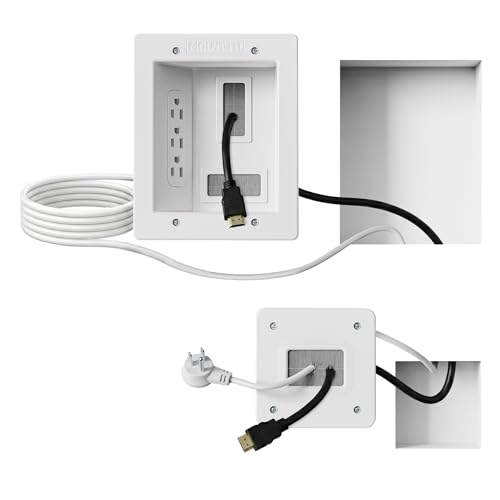
| Mount-It! In-Wall Kit | Complete in-wall install with a saw | Recessed power, triple outlet, 9ft cord, hand saw |
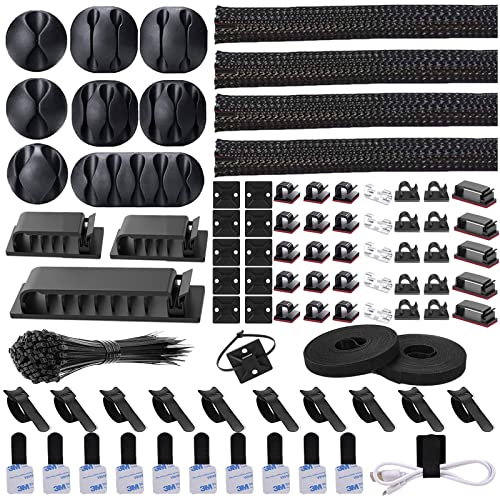
| NOROCME 192 PCS Kit | Renters and desk setups | 192 pieces, wire sleeves, cord clips, straps, ties |
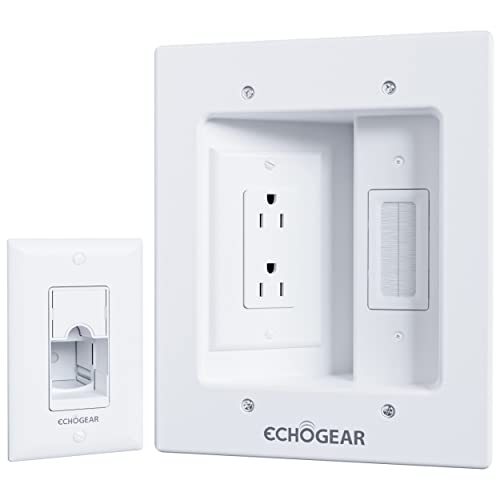
| ECHOGEAR In-Wall Kit | Power plus low-voltage cables | Dual outlet, in-wall, power and low voltage |
| Delamu Cord Hider | No-cut, surface solution | 157in wire covers, cable raceway |
| Recessed Outlet Kit with USB and Type C | Charging near the TV | Recessed outlet box, USB and Type C ports |
| Naerza In-Wall Kit | Guided cutting | Recessed outlet, hole saw, drill template |
| Brush Wall Plate Kit | Home theater with extra devices | Brush wall plate, 9.8FT cord, 2 AC outlets |
How to Choose
In-wall or on-wall
In-wall kits give the cleanest finish because the cables disappear completely, but they need a hole above and below the TV and a path between them, which is not always possible with fire blocks or brick. On-wall raceways take minutes to apply and can be painted, making them the default for rentals. Measure the distance between the TV and the outlet or media console, then add extra length for corners, since runs rarely follow a straight line.
Power, low voltage and separation
A good in-wall kit lets power and low-voltage cables such as HDMI travel separately, which is part of what the ECHOGEAR title highlights. Look for the number of outlets, whether a power cord is included, and whether the kit is designed for pass-through power rather than a permanent wiring change. Always keep within the rated load stated on the listing and never bury an extension cord inside a wall.
Included tools and accessories
Some kits bundle a hand saw, a hole saw or a drill template, and these extras decide whether the job is a one-hour project or a trip to the hardware store. Look for a stud finder in the plan and check the listing for cutout size so the plates fit. Brush plates allow cables to pass through for devices like game consoles, while USB and Type C ports add charging convenience.
Cable counts and where budget kits cut corners
Count the cables that need to reach the TV: power, HDMI, soundbar, streaming stick and sometimes an antenna. Cheap kits use thin plastic or sticky strips that fail in summer heat, and some clip sets are bulky for the number of wires. Ignore piece counts as a quality signal, since 192 pieces may be mostly small ties. Look for flame-retardant wording and certifications on the listing rather than assuming them.
It also helps to plan the order of work. Mount the TV first, mark where the cables exit, then place the upper and lower plates so the cord path stays short. Test the fit of the plate against the wall before cutting, and cover the work area to catch dust. A short checklist saves time and avoids patching mistakes later.
Take a moment to inspect the wall as well. Drywall over wood studs is the easiest case, while plaster, tile and masonry need different tools and often a professional. A stud finder, a small flashlight and a cutout template can reveal pipes, wires and fire blocks before any cutting starts. When the wall looks complicated, a surface raceway is a safe fallback that still removes most of the visual clutter.
Think about future changes too. Soundbars, game consoles and streaming sticks tend to appear over time, and every new device adds a cable. A kit with an extra outlet or a brush plate gives room to grow, whereas a minimal kit may force a second install. It is also wise to label both ends of each cable so that later swaps do not turn into guesswork behind a wall plate.
Finally, keep heat and airflow in mind. Power strips, adapters and bundled cables can warm up, so avoid wrapping them tightly or covering them with soft materials. Follow the rated load stated in each listing and avoid daisy-chaining power strips.
The 7 Best Options
Mount-It! In-Wall Kit
This kit includes a recessed power setup with a triple outlet, a 9ft cord and a hand saw, which makes it a fairly complete bundle.
- Strength: bundled saw means no extra tool purchase for the cutout.
- Strength: a triple outlet serves a TV, soundbar and streaming device.
- Trade-off: it requires cutting the wall, so it suits owners rather than renters.
Skip it if the wall is brick, concrete or rented.
NOROCME 192 PCS Kit
A surface-based kit of 192 pieces that includes four wire organizer sleeves, cable holders, cord clips, roll cable organizer straps and fastening ties.
- Strength: no wall cutting, which suits rentals.
- Strength: the variety of sleeves, clips and straps tames the cable mess behind a desk or media console.
- Trade-off: it does not hide cords inside the wall, so wires remain visible on the surface.
Skip it if the goal is a fully hidden wall-mounted look.
ECHOGEAR In-Wall Kit
This TV cord hider is a dual outlet in-wall kit that handles power and low-voltage cables. The title lists dimensions of 6.25 inches long by 8 inches high by 3.95 inches deep.
- Strength: designed for both power and low-voltage cables, which suits typical TV connections.
- Strength: clear dimensions in the title make planning the cutout easier.
- Trade-off: two outlets may be tight for a larger home theater.
Skip it if more than two powered devices share the same spot.
Delamu Cord Hider
Delamu supplies 157 inches of wire covers in a raceway style for cords on the wall.
- Strength: a long 157 inch length covers long vertical or horizontal runs.
- Strength: surface installation avoids cutting drywall.
- Trade-off: the raceway stays visible, and adhesive quality should be checked for painted or textured walls.
Skip it if a completely invisible result is required.
Recessed Outlet Kit with USB and Type C
This kit is described as an in-wall cable management kit with a recessed TV outlet box and USB and Type C ports.
- Strength: built-in USB and Type C ports charge devices near the TV.
- Strength: a recessed outlet keeps the plug flat against the wall behind the TV.
- Trade-off: the visible title does not list the cord length, so check the listing.
Skip it if charging ports are unnecessary and a simpler plate will do.
Naerza In-Wall Kit
Naerza combines a recessed TV outlet with a hole saw and a drill template for power and low-voltage cables.
- Strength: the template and hole saw guide the cut for first-time installers.
- Strength: handles power and low-voltage wires in one kit.
- Trade-off: it still needs a drill and some patience around studs.
Skip it if no power drill is available.
Brush Wall Plate Kit
This kit has a brush wall plate, a 9.8FT cord and two AC outlets in a recessed box for wall-mounted TVs and home theaters.
- Strength: the brush plate lets extra cables pass through neatly.
- Strength: two outlets and a longer cord suit a media setup.
- Trade-off: only two AC outlets, which may limit expansion.
Skip it if the wall box would need more than two powered devices.
Which One Fits Your Situation
First-time homeowner mounting a TV on drywall
The Naerza kit and its drill template are the most beginner-friendly, while the Mount-It kit adds a saw for those with no tools.
Renter who cannot cut walls
The Delamu raceway and the NOROCME 192 piece set solve visible cords without damage, and both can be removed later.
Home theater with a console and soundbar
The Brush Wall Plate kit passes extra cables through, and the ECHOGEAR kit handles power and low-voltage lines separately.
Living room needing a charging spot
The Recessed Outlet Kit with USB and Type C adds ports near the TV, useful for phones and tablets.
A simple decision path helps when options blur together. Start with the wall: drywall that can be cut points toward an in-wall kit, while rented or unusual walls point toward raceways and sleeves. Next, count the powered devices and choose the outlet count that covers them with one spare. Finally, check what tools come with the kit so that the project is finished in one afternoon rather than stalled for a missing saw.
Anyone still undecided between a full in-wall project and a surface kit can start small. A raceway or sleeve kit can be installed in an evening, and if the result is not tidy enough, an in-wall kit can be added later behind the same TV. Nothing about the surface route blocks the upgrade, and it gives a chance to learn how many cables really need to reach the screen.
Common Mistakes
- Running an extension cord inside a wall instead of using a purpose-made in-wall kit.
- Cutting without checking for studs, pipes or wiring behind the drywall.
- Forgetting to leave slack for moving the TV on an articulating mount.
- Choosing a raceway color that does not match the wall, so it stands out.
- Ignoring local electrical codes or skipping help from a licensed electrician when needed.
Whichever route is chosen, finish the project by tidying the lower cables too. A neat wall is undercut by a tangle behind the media console, so a few sleeves, clips or straps from a surface kit like the NOROCME set pair well with an in-wall install. Keep power cables and signal cables apart where they cross, and leave small service loops so devices can be pulled out for maintenance without disturbing the wall plate.
Related guides
- Electrical Testing Tools For Diy Projects
- Wireless Chargers For Iphone And Airpods
- Bookshelf Speakers Under 300 Dollars
Frequently Asked Questions
Can an in-wall power kit be installed without an electrician?
Many homeowners handle it, but local electrical codes apply and a licensed electrician is a good choice for anyone unsure. Follow the manufacturer instructions and confirm certifications on the listing.
Do in-wall kits work with any TV?
They work with most wall-mounted TVs because the kit sits between the plug and the outlet. Check cable lengths and the TV mount position before cutting.
Can surface raceways be painted?
Many can be painted to match the wall, but check the listing for material information and use a suitable paint.
How many cables fit in a raceway?
It depends on the channel size, which should be listed. Count the cables first and leave a little room for later additions.
More from Amazon
Programs that pair well with the guide above. Offers and eligibility are set by Amazon and may change.
Free shipping on eligible items, Prime Video and more. Eligible new members can start with a free trial.
Start a Prime free trialAd-free music streaming. Eligible new subscribers can start with a free trial.
Try Music Unlimited freeA Prime membership for ages 18-24 with a trial period. Eligibility is set by Amazon.
See Prime for Young AdultsAudiobooks and podcasts to listen to on the go. Eligible new members can start with a free trial.
Try Audible freeAs an Amazon Associate we earn from qualifying purchases.