Key takeaways
- A budget of under 1000 dollars sounds generous for a television until the size question arrives.
A budget of under 1000 dollars sounds generous for a television until the size question arrives. At that ceiling, a buyer can pick a modest 43-inch panel with advanced backlighting, a mid-sized 50 to 65 inch screen on a no-frills LED panel, or push toward a very large screen where the extras thin out. The real decision is therefore a three-way trade between screen size, panel technology, and the smart platform that runs the apps, rather than a simple hunt for the cheapest 4K label.
This guide is written for shoppers replacing a living-room or bedroom set who want a 4K smart TV without spending flagship money. Every spec below comes from the listed product titles, such as size classes, Mini LED or QLED panels, HDR formats, refresh rates, and operating systems. Street cost moves constantly, so no figures are quoted here; confirm that a chosen size still sits within the cap when checking the listing. For 2026, the sensible approach is to rank by room size and platform first, then by panel features.
Two practical notes frame everything that follows. First, “4K” describes resolution only, and says nothing about brightness or contrast. Second, a Full HD set, even a good one, is a different category, so listings that say 1080P or FHD fall outside this comparison.
Room lighting deserves a mention as well. A bright living room with large windows rewards higher peak brightness and an anti-glare finish, while a dim den or bedroom lets even a modest panel look good. Where the TV will sit relative to windows often matters more than any single line on a spec sheet, so note the room before comparing models.
Quick Picks
Our top picks

 Samsung 65-Inch Class M70H Series
- Our advanced processor delivers brighter highlights and deeper…
- delivers one billion true-to-life colors, powered by advanced…
- Experience HDR picture quality with brighter highlights and…

 TCL 85 Inch QM6K Series QLED Mini
- AFFORDABLE PREMIUM PERFORMANCE FOR SPORTS, GAMING & STREAMING
- QD-MINI LED
- BETTER BLACKS

As an Amazon Associate we earn from qualifying purchases at no extra cost to you.
| Product | Best for | Key spec from the title |
|---|---|---|
| Samsung 65-Inch M70H Series | Living room upgrade | Mini LED, 4K, Vision AI Companion |
| Samsung 43-Inch M70H Series | Bedrooms and small rooms | Mini LED, 4K, Pure Spectrum Color |
| Insignia F50 Series (50, 55, 65 inch) | Simple, budget-minded setups | LED 4K UHD, Fire TV, Alexa voice remote |
| TCL 85-Inch QM6K Series | Big-screen movie nights | QLED Mini LED, 144Hz, Dolby Vision |
| Roku 43-Inch Select Series | Easy streaming in a small space | 4K HDR, voice remote, Bluetooth headphone mode |
How to Choose
Match the size to the viewing distance
A common rule of thumb is to sit about one and a half times the diagonal away for a 4K set, which works out to roughly five and a half feet for a 43-inch screen and more than ten feet for an 85-inch one. Measure the wall, the stand, and the sofa distance before ordering. A very large screen in a small room can feel overwhelming, while a small screen in a big room wastes the resolution. Confirm the stand width or mounting pattern on the listing.
Panel type: LED, QLED, and Mini LED
A standard LED panel keeps cost down and works well in a lit room. QLED adds a quantum dot layer aimed at richer color, and Mini LED backlights use many small zones that can improve contrast and brightness when paired with local dimming. The titles name these technologies but do not give brightness or zone counts, so check the listing for those numbers. Do not assume that a Mini LED label alone guarantees a premium picture.
HDR formats, refresh rate, and gaming features
HDR10 is the baseline for high dynamic range, and Dolby Vision adds scene-by-scene metadata when the TCL listing supports it. A 144Hz label matters mainly to gamers with a compatible console or PC, since most video content runs at far lower rates. If gaming is a priority, check the listing for HDMI 2.1 and variable refresh support. Budget-tier models often cut corners on HDR brightness, so treat the HDR label as a compatibility tag, not a performance guarantee.
Smart platform and remote
The listed platforms include Fire TV with an Alexa voice remote, Roku, Samsung’s own Vision AI platform, and Google TV. Pick the interface the household will enjoy using daily, since the apps and menus matter more over years than a minor spec difference. Check app support for the streaming services in use, and note that a platform tied to one retailer’s ecosystem may push its own content. Bluetooth headphone support, as in the Roku listing, is handy for late-night viewing.
What to ignore: marketing names for picture processors and color technologies vary by brand and are hard to compare directly. Words such as “latest model” or “high brightness” do not come with measured numbers in the titles. Look for the panel type, HDR formats, refresh rate, size, and platform, and treat the rest as branding. Budget-tier sets also tend to cut corners on speaker quality and on the number of HDMI ports, so check those details if a console, soundbar, or streaming stick will share the inputs.
The 5 Best Options
Samsung 65-Inch M70H Series
This 65-inch Mini LED 4K smart TV comes with Samsung Vision AI Companion, a Mini LED processor, and Pure Spectrum Color, according to the title. It is the strongest all-around panel in the group for a main living room. A set like this is aimed at a household that watches a mix of sports, streaming, and the occasional movie, where contrast and color matter but a flagship panel is not required. It also makes sense for a shopper who wants a mainstream brand with a broad app catalog and a familiar interface.
- Strength: Mini LED backlighting paired with a dedicated 4K processor targets better contrast than a plain LED panel.
- Strength: a 65-inch size suits most living rooms viewed from a sofa a few feet away.
- Trade-off: the title does not state a refresh rate or HDMI specification, so gamers should check the listing.
Skip it if the room is small or the budget does not stretch to a larger-size tier.
Samsung 43-Inch M70H Series
The same M70H line in a 43-inch size keeps the Mini LED panel and Vision AI features in a smaller package. It works for a bedroom, a home office, or a kitchen counter. Anyone who sits close, within a few feet, benefits from a sharper 4K image on a screen this size, and a wall arm can free up desk space. Confirm the mounting pattern and the stand footprint before buying a mount.
- Strength: the Mini LED label in a small screen is unusual and appealing for close viewing.
- Strength: a smaller size generally leaves more of the budget free for a soundbar or wall mount.
- Trade-off: a 43-inch screen looks small from a distant sofa, so measure the room first.
Skip it if the TV will be the centerpiece of a large living room.
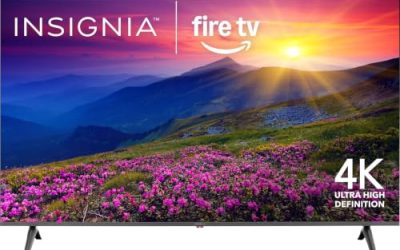
Insignia F50 Series
The F50 line appears in 50, 55, and 65-inch sizes as an LED 4K UHD smart Fire TV with an Alexa voice remote, and the larger sizes mention streaming live TV without cable. It is the simple, no-frills choice. A household already using Fire TV sticks or Alexa devices will find the menu familiar, and the range of sizes makes it a practical pick for a guest room, a kids’ room, or a second living space where the picture does not need to impress.
- Strength: three size options let a buyer match the room without changing the platform.
- Strength: an Alexa voice remote on a Fire TV interface is easy for a household already using voice assistants.
- Trade-off: a plain LED panel lacks the backlight technology of the Mini LED models, so contrast may be modest.
Skip it if picture quality in a dark room is the top priority.
TCL 85-Inch QM6K Series
TCL’s QM6K is a QLED Mini LED 4K HDR smart Google TV with 144Hz, high brightness, IMAX Enhanced, HDR10, and Dolby Vision. At 85 inches it is the biggest screen on the list. A set this wide wants a sturdy stand or a properly rated wall mount, and two people for setup, so plan the logistics before the box arrives. The Google TV platform listed in the title also organizes streaming apps on one home screen.
- Strength: an 85-inch screen delivers a theater feel at a size few budget lines reach.
- Strength: a 144Hz panel and Dolby Vision cover both gaming and film fans.
- Trade-off: an 85-inch screen may stretch the cap depending on current offers, so confirm that it fits the budget on the listing.
Skip it if the room cannot handle a screen that wide or if the viewing distance is short.
Roku 43-Inch Select Series
The Roku Select is a 43-inch 4K HDR LED smart TV with a voice remote, Wi-Fi, and Bluetooth headphone mode, built around the Roku platform. It suits a small room where simplicity wins. A home office, a guest bedroom, or a dorm-style space gets a straightforward interface and a remote that handles voice search, without extra menus to learn. The title also points to a recent model year, which helps with app support.
- Strength: a familiar Roku interface is easy for guests and older family members.
- Strength: headphone mode helps with late-night viewing without disturbing others.
- Trade-off: a plain LED panel at this size does not offer Mini LED or QLED features.
Skip it if panel technology and brightness matter more than simplicity.
Which One Fits Your Situation
A main living room with a sofa about nine feet away
Samsung 65-Inch M70H Series balances size and panel quality. It is the all-rounder for everyday viewing and movie nights alike.
A small bedroom or office
Samsung 43-Inch M70H Series or Roku 43-Inch Select Series both fit. Choose Samsung for the panel and Roku for a simpler interface and Bluetooth headphone mode.
A budget-focused household that wants a big screen
Insignia F50 Series in a 55 or 65-inch size is a straightforward option on a Fire TV platform. Check the listing to confirm the exact model and size.
A dedicated movie room
TCL 85-Inch QM6K Series gives the largest picture and HDR format coverage in the group, with a 144Hz label for gaming. Verify that the cost fits under the 1000 dollar cap when ordering.
Common Mistakes
- Assuming every 4K label means equal picture quality, when brightness and contrast vary widely.
- Buying a 40-inch Full HD model by mistake, since some listings in this budget bracket are 1080p rather than 4K.
- Choosing a giant screen without measuring the wall, stand, and seating distance.
- Ignoring the smart platform, which affects daily use more than a small spec gap.
- Forgetting extras such as a wall mount or soundbar when setting the total budget under 1000 dollars.
Related guides
- Electrical Testing Tools For Diy Projects
- Wireless Chargers For Iphone And Airpods
- Bookshelf Speakers Under 300 Dollars
Frequently Asked Questions
Is a Mini LED TV worth it on a budget?
Mini LED backlighting is designed to improve contrast and brightness, but details like zone counts are not in the titles. Check the listing before paying for the label alone.
Which smart platform is best?
It depends on habits. Fire TV pairs with Alexa, Roku emphasizes simplicity, Google TV leans on suggested titles, and Samsung uses its own system. Check that the apps in use are supported.
Is 144Hz necessary?
Only for gaming on a compatible console or PC. Movies and streaming do not require it. Check the listing for HDMI features if gaming matters.
Can a TV in this range work with a soundbar?
Most 4K smart TVs offer an HDMI or optical output for external audio. Check the listing for the specific audio ports before buying a soundbar.
More from Amazon
Programs that pair well with the guide above. Offers and eligibility are set by Amazon and may change.
Free shipping on eligible items, Prime Video and more. Eligible new members can start with a free trial.
Start a Prime free trialAd-free music streaming. Eligible new subscribers can start with a free trial.
Try Music Unlimited freeA Prime membership for ages 18-24 with a trial period. Eligibility is set by Amazon.
See Prime for Young AdultsAudiobooks and podcasts to listen to on the go. Eligible new members can start with a free trial.
Try Audible freeAs an Amazon Associate we earn from qualifying purchases.