Key takeaways
- Best Overall: MOUNTUP Triple Monitor Stand Mount, for 27 inch and smaller screens at 4.4 to 19.8 lbs per arm
- Best Value Freestanding: PUTORSEN Triple Monitor Stand, freestanding for screens up to 27 inches at 22 lbs per arm
- Best for Heavy Gas-Spring Use: PUTORSEN Triple Monitor Mount up to 49 inches, gas spring, listed at 44 lbs
- Best for 32 Inch Screens: VIVO Triple Pneumatic Monitor Mount STAND-V300G
- Best Classic Freestanding: VIVO STAND-V003E, for screens up to 30 inches
- Best Compact Footprint: WALI Triple Monitor Stand MF003, freestanding for 13 to 27 inch screens
- Best for Large Screens at 19.8 lbs: ErgoFocus Triple Monitor Desk Mount, up to 32 inches
The best triple monitor stand for most desks is the MOUNTUP Triple Monitor Stand Mount if your screens are 27 inches or smaller, and the VIVO Triple Pneumatic Mount if you run 32 inch panels. The first is listed at 4.4 to 19.8 lbs per arm and the second is gas-spring driven, up to 32 inches, with a C-clamp. Both put three screens on one pole and keep your desk clear underneath.
Three monitors are a different problem from two. The total width of the screens, the weight on a single pole and the number of video outputs on your PC all matter. Many triple stands that look similar differ in which part carries the weight: a freestanding base, a clamp or a gas-spring column. This guide compares seven triple mounts, explains how wide three monitors really are, and shows how to pick between a freestanding stand and a clamp mount.
We did not personally use these products, so this is research based on listing details and general ergonomics guidance. Any spec a listing leaves out is marked not listed, and prices appear as tiers.
Our top picks



As an Amazon Associate we earn from qualifying purchases at no extra cost to you.
Top Picks at a Glance
- Best Overall: MOUNTUP Triple Monitor Stand Mount, for 27 inch and smaller screens at 4.4 to 19.8 lbs per arm
- Best Value Freestanding: PUTORSEN Triple Monitor Stand, freestanding for screens up to 27 inches at 22 lbs per arm
- Best for Heavy Gas-Spring Use: PUTORSEN Triple Monitor Mount up to 49 inches, gas spring, listed at 44 lbs
- Best for 32 Inch Screens: VIVO Triple Pneumatic Monitor Mount STAND-V300G
- Best Classic Freestanding: VIVO STAND-V003E, for screens up to 30 inches
- Best Compact Footprint: WALI Triple Monitor Stand MF003, freestanding for 13 to 27 inch screens
- Best for Large Screens at 19.8 lbs: ErgoFocus Triple Monitor Desk Mount, up to 32 inches
Quick Comparison
| Product | Best for | Key specs | Watch for | Price tier |
|---|---|---|---|---|
| MOUNTUP Triple Stand | Everyday 27 in setups | Up to 27 in, 4.4-19.8 lbs per arm | Weight floor | Mid-range |
| PUTORSEN Triple Freestanding | No clamp desks | Up to 27 in, 22 lbs per arm, cable management | Takes desk space | Mid-range |
| PUTORSEN Triple Gas Spring | Heavy, large setups | Up to 49 in, gas spring, 44 lbs listed | Load figure per arm or total not clear | Premium |
| VIVO STAND-V300G | 32 in screens | Pneumatic, up to 32 in, C-clamp | Clamp only | Premium |
| VIVO STAND-V003E | Classic freestanding | Up to 30 in, free standing | Older design | Mid-range |
| WALI MF003 | Smaller screens | 13-27 in, up to 22 lbs, free standing, VESA 75 and 100 | 27 in cap | Mid-range |
| ErgoFocus Triple | Large screens | Up to 32 in, 19.8 lbs each, VESA 75×75 and 100×100 | Smaller brand | Mid-range |
1. MOUNTUP Triple Monitor Stand Mount: Best Overall Triple Stand
Key specs
- Screen size: up to 27 inches
- Load: 4.4 to 19.8 lbs per arm
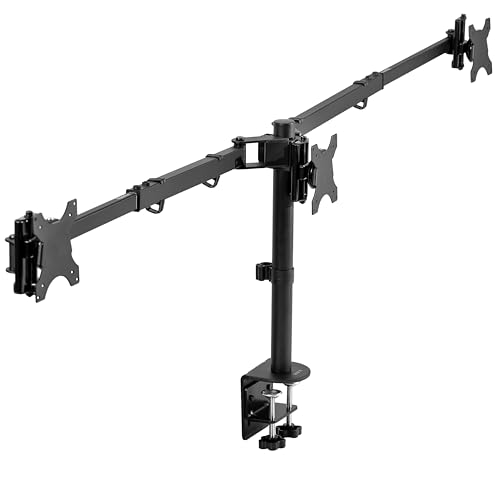
- Layout: three arms on one pole
- Build: heavy-duty (per listing)
- Base type: not listed in title
Best for: Three 24 to 27 inch monitors for work, trading or coding at a standard desk.
Skip if: you run 32 inch monitors or ultrawides.
The MOUNTUP gets our top spot because it covers the screen size most people actually use for a triple setup. Three 27 inch monitors are a lot of glass, but they stay inside the 19.8 lbs per arm limit when they weigh under about 15 lbs each without their stands.
The 4.4 lbs minimum is worth noting. Arms are built to balance within a range, and a very light monitor may not hold its tilt. With three similar screens, this is rarely a problem.
Unlike a basic two-arm mount, a triple stand loads the pole and the clamp more heavily, because three screens apply leverage. Keep the outer arms folded in close to the pole and avoid extending them fully if the desk edge feels thin.
Pros
- Fits the common 27 inch triple setup
- 19.8 lbs per arm
- Heavy-duty build
- Good starting price tier
Cons
- 27 inch limit
- Base type not listed in title
2. PUTORSEN Triple Monitor Stand (Freestanding): Best Value Freestanding Stand
Key specs
- Screen size: up to 27 inches
- Load: 22 lbs per arm
- VESA: 75 and 100 mm
- Type: free standing
- Cable management included
- Motion: full motion
Best for: Glass desks, thin desks or any surface you cannot clamp.
Skip if: your desk is shallow, because the base needs room.
A freestanding triple stand rests a heavy base on the desk and holds the arms with a central pole. There is nothing to clamp, which spares thin and glass tops. PUTORSEN lists 22 lbs per arm and cable management, a strong set for the tier.
The base is the main tradeoff. It takes up part of the desk surface behind the monitors, so measure the depth before you buy. If your desk is 24 inches deep and you want a keyboard and mouse in front, a deep base could push the screens too far from your eyes.
Compared with a clamp, a freestanding stand can move slightly if you bump the desk. If you use a standing desk that moves up and down, make sure the base cannot slide.
Pros
- No clamp needed
- 22 lbs per arm
- Cable management
- Full motion
Cons
- Base uses desk space
- May shift on smooth desks
3. PUTORSEN Triple Monitor Mount up to 49 Inches (Gas Spring): Best for Large, Heavy Setups
Key specs
- Screen size: up to 49 inches
- Type: gas spring, heavy duty
- Listed capacity: 44 lbs (per-arm or total not stated)
- Base: C-clamp and grommet
Best for: Larger screens and owners who adjust height often.
Skip if: you want a clear per-arm figure before buying.
This PUTORSEN is the high-end gas-spring option. The 49 inch limit suggests it can handle larger or ultrawide screens, and the gas spring lets you move each one with a light push.
The listing says holds 44 lbs, but does not make clear whether that is per arm or in total. Check the maker page: if it is per arm, it is a heavy-duty rating; if it is total, it is fine for three medium screens.
Gas-spring arms need their tension set once, usually with a hex key. Do it before you hang all three screens, so you do not fight an arm that rises or falls.
Pros
- Gas-spring movement
- Very large size range
- C-clamp and grommet
- Premium build
Cons
- Capacity wording unclear
- Premium tier
4. VIVO Triple Pneumatic Monitor Mount (STAND-V300G): Best for 32 Inch Screens
Key specs
- Screen size: up to 32 inches
- Type: pneumatic (gas spring)
- Base: C-clamp
- Build: heavy-duty
Best for: Three 27 to 32 inch monitors where you adjust height during the day.
Skip if: you cannot clamp to your desk.
VIVO’s pneumatic triple mount is built for bigger screens. With a 32 inch ceiling, it is the stand to consider if you own, or want to buy, 32 inch monitors.
The pneumatic (gas) design lets each screen move easily. On a sit-stand desk, that is helpful: raise the desk, raise the screens, no wrench needed.
Only a C-clamp base is listed, so the desk edge has to be solid and free of a rear lip. Consider a reinforcement plate for MDF or hollow-core desks.
Pros
- Up to 32 inch screens
- Gas-spring movement
- Heavy-duty build
- Well-known brand
Cons
- Clamp only
- Higher price tier
5. VIVO Triple Monitor Desk Stand (STAND-V003E): Best Classic Freestanding Option
Key specs
- Screen size: up to 30 inches
- Type: free standing
- Build: heavy duty, fully adjustable
- Model code: STAND-V003E
Best for: Three 24 to 27 inch screens on a stable desk.
Skip if: you need a gas spring.
VIVO’s STAND-V003E is a long-running design with a freestanding base. It lists screens up to 30 inches, which leaves room for 27 inch monitors and some 29 inch ultrawides.
The listing does not state a weight per arm, so verify it on the maker page. The classic mechanical layout holds position with friction.
It is a good choice for a fixed desk where you set the layout and leave it.
Pros
- Freestanding base
- Up to 30 inch screens
- Fully adjustable
- Established design
Cons
- Weight limit not in title
- Mechanical joints
6. WALI Triple Monitor Stand (MF003): Best Compact Freestanding Stand
Key specs
- Screen size: 13 to 27 inches
- Load: up to 22 lbs
- Type: free standing, grommet base
- VESA: 75 and 100 mm
- Motion: full motion with tilt, swivel and rotation
Best for: Smaller screens and desks where you want a standard, well-documented stand.
Skip if: your screens are 28 inches or larger.
WALI lists 13 to 27 inches, 22 lbs and a VESA 75 and 100 mm pattern, with full-motion arms. It is a straightforward freestanding triple mount.
The 27 inch cap is the limit. If you may upgrade to larger screens later, the 32 inch models above are safer.
Check the base size against your desk, and make sure the grommet option fits if you intend to use it.
Pros
- 22 lbs listed capacity
- Freestanding design
- Full motion
- Standard VESA
Cons
- 27 inch limit
- Base takes desk room
7. ErgoFocus Triple Monitor Desk Mount: Best for Larger Screens at a Mid-Range Price
Key specs
- Screen size: up to 32 inches
- Load: up to 19.8 lbs each
- VESA: 75×75 and 100×100
- Build: heavy duty
Best for: Three 27 to 32 inch monitors where the weight stays under 19.8 lbs.
Skip if: you want a well-known brand.
ErgoFocus covers 32 inch screens at 19.8 lbs each, which is the same capacity as many 27 inch-class stands. That makes it a good fit for lighter 32 inch panels.
As a lesser-known brand, check the maker page for clamp details and support before buying.
Weigh your monitors first. Many 32 inch 4K monitors weigh near the limit once stands are removed.
Pros
- 32 inch support
- 19.8 lbs each
- Standard VESA
- Mid-range price tier
Cons
- Smaller brand
- Base details not listed
Also Consider
- HUANUO Triple Monitor Mount (17-32 in): Adjustable gaming triple stand for 17 to 32 inch screens with clamp and grommet kit; weight per arm not listed.
- WALI Triple Monitor Mount (GSDM003): Clamped mount for 13 to 32 inch screens at 19.8 lbs per arm.
- WALI Stacked Triple Monitor Mount (GSDM003XL): Stacked layout for 13 to 34 inch screens at 19.8 lbs per arm.
- ErGear Triple Monitor Mount: 13 to 32 inch screens, 19.8 lbs per arm, dual C-clamp and two setup options.
How We Chose
We looked at triple mounts that state their screen size, weight and base type, and divided them into freestanding stands and clamp-on mounts. We cross-referenced stated limits against the VESA standard and ergonomic guidance.
We did not personally use these products. Where a listing does not state a number, we say not listed.
Buying Guide
Freestanding or clamp
F
r
e
e
s
t
a
n
d
i
n
g
s
t
a
n
d
s
r
e
s
t
o
n
t
h
e
d
e
s
k
a
n
d
a
v
o
i
d
a
c
l
a
m
p
,
w
h
i
c
h
h
e
l
p
s
w
i
t
h
g
l
a
s
s
o
r
t
h
i
n
t
o
p
s
b
u
t
t
a
k
e
s
d
e
s
k
s
p
a
c
e
.
C
l
a
m
p
m
o
u
n
t
s
f
r
e
e
u
p
t
h
e
s
u
r
f
a
c
e
b
u
t
n
e
e
d
a
s
t
u
r
d
y
e
d
g
e
.
Weight per arm
A
t
r
i
p
l
e
m
o
u
n
t
s
p
r
e
a
d
s
w
e
i
g
h
t
o
v
e
r
t
h
r
e
e
a
r
m
s
b
u
t
a
l
l
o
f
i
t
e
n
d
s
o
n
o
n
e
p
o
l
e
.
C
h
e
c
k
t
h
e
p
e
r
–
a
r
m
r
a
t
i
n
g
a
n
d
m
a
k
e
s
u
r
e
t
h
e
c
l
a
m
p
o
r
b
a
s
e
c
a
n
h
a
n
d
l
e
t
h
e
c
o
m
b
i
n
e
d
l
o
a
d
.
Desk width and depth
T
h
r
e
e
2
7
i
n
c
h
s
c
r
e
e
n
s
a
r
e
a
b
o
u
t
7
0
i
n
c
h
e
s
w
i
d
e
b
e
f
o
r
e
b
e
z
e
l
s
.
A
7
2
i
n
c
h
d
e
s
k
i
s
i
d
e
a
l
;
o
n
a
6
0
i
n
c
h
d
e
s
k
,
a
n
g
l
e
t
h
e
o
u
t
e
r
s
c
r
e
e
n
s
i
n
w
a
r
d
.
F
r
e
e
s
t
a
n
d
i
n
g
s
t
a
n
d
s
n
e
e
d
a
t
l
e
a
s
t
8
t
o
1
0
i
n
c
h
e
s
o
f
d
e
p
t
h
b
e
h
i
n
d
t
h
e
k
e
y
b
o
a
r
d
z
o
n
e
f
o
r
t
h
e
b
a
s
e
.
GPU and cables
C
h
e
c
k
t
h
a
t
y
o
u
r
c
o
m
p
u
t
e
r
h
a
s
t
h
r
e
e
v
i
d
e
o
o
u
t
p
u
t
s
.
M
a
n
y
g
r
a
p
h
i
c
s
c
a
r
d
s
o
f
f
e
r
t
h
r
e
e
o
r
f
o
u
r
D
i
s
p
l
a
y
P
o
r
t
o
r
H
D
M
I
p
o
r
t
s
,
b
u
t
s
o
m
e
l
a
p
t
o
p
s
n
e
e
d
a
d
o
c
k
.
P
l
a
n
c
a
b
l
e
l
e
n
g
t
h
w
i
t
h
s
l
a
c
k
f
o
r
a
r
m
m
o
v
e
m
e
n
t
.
Screen sizes
T
h
r
e
e
2
4
i
n
c
h
s
c
r
e
e
n
s
a
r
e
a
b
o
u
t
6
3
i
n
c
h
e
s
w
i
d
e
;
t
h
r
e
e
2
7
i
n
c
h
a
b
o
u
t
7
0
i
n
c
h
e
s
;
t
h
r
e
e
3
2
i
n
c
h
a
b
o
u
t
8
4
i
n
c
h
e
s
.
M
a
t
c
h
t
h
e
s
t
a
n
d
t
o
t
h
e
d
e
s
k
,
n
o
t
t
h
e
o
t
h
e
r
w
a
y
r
o
u
n
d
.
How Wide Are Three Monitors?
| Screen size (16:9) | Width of one screen | Three side by side | Minimum desk width to avoid angling |
|---|---|---|---|
| 24 inch | about 20.9 inches | about 63 inches | 66 inches |
| 27 inch | about 23.5 inches | about 70.5 inches | 72 inches |
| 32 inch | about 27.9 inches | about 84 inches | 84 inches or angled in |
These numbers ignore bezels and gaps, so add a few inches. If your desk is narrower, angle the outer screens inward so you turn your head less. A shallow curve also keeps the edges at the same distance from your eyes.
Step-by-Step Setup and Common Pitfalls
- Weigh each monitor. Remove the stand if you can and check the weight in the spec sheet. Write down the three numbers and compare them with the per-arm rating.
- Fix the base first. Clamp or place the base, then tighten it until the pole does not twist when you push on it. Check again after the first day because clamps settle.
- Hang the centre screen first. It carries the most use and sets your eye height. The top edge should sit at or just below eye level when you are seated, roughly an arm’s length away.
- Add the side screens. Angle them inward so that all three edges are about the same distance from your eyes. Leave only a small gap between bezels.
- Route the cables. Use the clips on the arms and leave a loop of slack at each joint so rotating a screen does not pull on a plug.
- Re-check the tension. On gas-spring models, adjust each arm until the screen stays at any height you leave it. On mechanical arms, tighten the joints a little at a time.
The usual pitfalls are predictable. People hang heavy screens on the outside arms of a lightly built pole and then watch the pole lean. They clamp to a desk with a rear lip that stops the clamp from seating. They forget that a laptop plus three monitors needs a dock. And they place the side screens too far apart, so the eye travel becomes tiring. Solve those four issues and a triple stand will feel solid for years.
It also helps to decide which screen is your main one. If most of your work happens on the centre monitor, set it straight ahead and treat the side screens as reference space for chat, charts or documents. If you rotate between all three equally, bring the outer screens in at a gentle curve so that each is the same distance from your seat.
Frequently Asked Questions
What is the best triple monitor stand?
For most desks, the MOUNTUP Triple Monitor Stand Mount is a good all-round pick for screens up to 27 inches. The VIVO Triple Pneumatic mount suits 32 inch screens.
Can a triple monitor stand hold 27 inch monitors?
Yes, as long as each monitor weighs less than the arm’s rating. Most 27 inch monitors weigh well under 20 lbs without a stand.
Is a freestanding triple stand better than a clamp mount?
It is better for thin or glass desks. A clamp mount saves desk space but needs a sturdy edge.
Do I need a special graphics card for three monitors?
You need three video outputs. Many modern GPUs offer them, and a dock can help on a laptop.
Will the stand wobble?
Heavier screens and fully extended arms can cause some movement. Keep arms close to the pole and make sure the base or clamp is firm.
Can I mount ultrawides?
Check weight and width. A 49 inch capacity gas-spring stand suits ultrawides better than a mount rated for 27 inch screens.
Are gas-spring triple mounts worth it?
If you adjust height often, yes. If you set the layout once, a mechanical arm is cheaper.
Which One Should You Buy?
Choose the MOUNTUP if you want a straightforward triple stand for 27 inch screens. Choose the PUTORSEN freestanding model if you cannot clamp. Choose the VIVO pneumatic or the ErgoFocus for 32 inch screens. Choose the PUTORSEN gas spring for large setups with frequent adjustments.
Whichever you pick, measure desk width and depth and weigh each monitor before ordering.
Sources
- Manufacturer product pages for MOUNTUP, PUTORSEN, VIVO, WALI and ErgoFocus
- VESA Flat Display Mounting Interface (FDMI) standard overview
- OSHA Computer Workstations eTool, monitor positioning
- Cornell University Ergonomics Web, multiple monitor guidance
Last updated: October 2026