Key takeaways
- Best Overall: WALI Quad Monitor Desk Mount (M004), 13 to 32 inch and 22 lbs per arm.
- Best Value: HUANUO Quad Monitor Mount, stacked design with a larger base and cable management.
- Best Phone-Slot Base: PUTORSEN Quad Monitor Stand, 17 to 32 inch and 19.8 lbs each with a larger base.
- Best for Lighter Screens: MOUNTUP Quad Monitor Stand, 17 to 32 inch and up to 17.6 lbs per arm.
- Best Height Adjustment: monTEK Quad Monitor Stand, four 17 to 32 inch screens at 22 lbs each.
- Best Free-Standing: VIVO Quad Free-Standing Mount (STAND-V004F), 13 to 30 inch flat or curved screens.
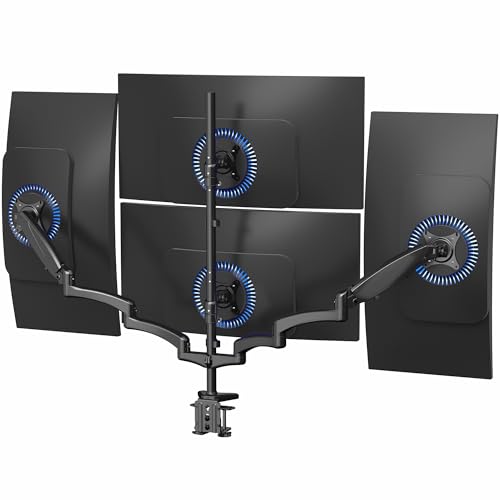
The best multi monitor stand for four screens is the WALI Quad Monitor Desk Mount: it holds four 13 to 32 inch monitors at 22 lbs per arm with full tilt, swivel and rotation, and it clamps or grommets to the desk. The runner-up is the HUANUO Quad Monitor Mount, which adds a larger base and cable management at a similar cost. If you only need to stack two rows of smaller screens, the MOUNTUP Quad is the lighter-duty option, and for the cleanest free-standing look the VIVO Quad Free-Standing Mount avoids the desk edge entirely.
Most “multi monitor stand” guides stop at three screens. This one covers the next step: four-monitor stacked and grid mounts, which are popular for coding, trading dashboards, streaming and monitoring rooms. Four screens on one pole put serious load on the desk and the stand, so the numbers matter far more than they do for a single arm. We cover six main picks, four alternates, and the specs that decide fit: weight per arm, screen size range, VESA pattern and how the stand attaches. All specs come from the maker’s listing text, and anything not stated is marked “not listed”. We did not personally use these products, so this is a research-based buying guide.
Our top picks



As an Amazon Associate we earn from qualifying purchases at no extra cost to you.
Top Picks at a Glance
- Best Overall: WALI Quad Monitor Desk Mount (M004), 13 to 32 inch and 22 lbs per arm.
- Best Value: HUANUO Quad Monitor Mount, stacked design with a larger base and cable management.
- Best Phone-Slot Base: PUTORSEN Quad Monitor Stand, 17 to 32 inch and 19.8 lbs each with a larger base.
- Best for Lighter Screens: MOUNTUP Quad Monitor Stand, 17 to 32 inch and up to 17.6 lbs per arm.
- Best Height Adjustment: monTEK Quad Monitor Stand, four 17 to 32 inch screens at 22 lbs each.
- Best Free-Standing: VIVO Quad Free-Standing Mount (STAND-V004F), 13 to 30 inch flat or curved screens.
Quick Comparison Table
| Product | Best for | Key specs (from listing) | Watch for | Price tier |
|---|---|---|---|---|
| WALI Quad (M004) | Most four-screen desks | 13-32 in; 22 lbs per arm; tilt, swivel, rotation; C-clamp/grommet; VESA 75/100 | Pole height not listed | Mid-range |
| HUANUO Quad | Cable-heavy setups | 13-32 in; 22 lbs per arm; stacked; larger base; cable management; VESA 75×75/100×100 | Base footprint not listed | Mid-range |
| PUTORSEN Quad | Desk organization | 17-32 in; 19.8 lbs each; stacked; larger base with phone slot; VESA 75/100 | 17 in minimum | Mid-range |
| MOUNTUP Quad | Lighter 22-27 in screens | 17-32 in; stacked; up to 17.6 lbs per arm; tilt and swivel | Lowest weight limit | Mid-range |
| monTEK Quad | Height tuning | Four 17-32 in screens; 22 lbs each; height adjustment, tilt, swivel, rotation; clamp/grommet | Pole height and base size not listed | Mid-range |
| VIVO Quad Free-Standing (V004F) | No clamp, no drilling | 13-30 in; four flat or curved screens; free-standing | Weight per arm not in the title | Mid-range |
1. WALI Quad Monitor Desk Mount (M004): Best Overall
- Screens: four, 13 to 32 inches
- Weight capacity: 22 lbs per arm
- Motion: full motion with tilt, swivel and rotation
- Desk attachment: C-clamp and grommet base
- VESA: 75 and 100 mm
Best for: a 2×2 grid of 24 to 27 inch monitors on a solid desk. Skip if: your desk top is thin or hollow; four arms on one pole create heavy leverage at the clamp.
The headline is the 22 lb per arm rating across four arms, which means a theoretical 88 lbs of screens on one pole. That sounds like a lot, but with four typical 24 inch monitors at 8 to 10 lbs each, the total is only about 32 to 40 lbs, so the stand has real margin. The 13 inch lower bound also lets you slip in a portable monitor for a status display.
The main thing to respect is the desk clamp. All that weight sits on a single point at the desk edge, and the leverage from four extended arms is substantial. A solid wood or thick laminate desk handles that; a hollow-core or thin particleboard top may not, and a grommet base with a backing plate is the better route if your desk allows a hole.
Pros: 22 lb per arm; full motion; clamp and grommet; wide size window; cost lower than premium pneumatic mounts. Cons: pole height and clamp thickness range not in the title; leverage on the desk edge; assembly takes time.
2. HUANUO Quad Monitor Mount: Best Value
- Screens: four, 13 to 32 inches
- Weight capacity: 22 lbs per arm
- Design: fully adjustable stacked mount with a larger base
- Motion: tilt, swivel and rotation
- VESA: 75×75 and 100×100 mm, with cable management
Best for: desks that are crowded with cables and gadgets. Skip if: you want a free-standing stand, since this is a desk-mounted design.
HUANUO’s listing stresses a larger base, which in practice spreads the clamping force across a wider plate than a bare clamp bracket. That matters with four screens, where stress on the desk edge is the biggest risk. The cable management channels are the other practical advantage; four monitors mean at least eight cables, and cable clips on the poles stop them from dangling behind the desk.
The listed specs are almost identical to the WALI, so the choice often comes down to the base design, cable management and how each arm assembles. The title does not give the pole height or the arm reach, so confirm both on the maker’s page and compare them to your desk and wall distance.
Pros: larger base; cable management; 22 lb per arm; both VESA patterns. Cons: pole height and base size not in the title; stacked design needs ceiling clearance; assembly is long.
3. PUTORSEN Quad Monitor Stand: Best Phone-Slot Base
- Screens: four, 17 to 32 inches
- Weight capacity: 19.8 lbs each
- Design: stacked four-screen desk mount with full-motion arms
- VESA: 75/100, with tilt, swivel and rotation
- Extra: larger base with a phone slot
Best for: people who want the base to double as a small organizer. Skip if: you use a portable display under 17 inches.
The phone slot in the base is a small detail with daily value: it keeps a phone upright and visible beside the screens. The 19.8 lb per arm limit is slightly lower than the WALI and HUANUO but still above the weight of most 24 and 27 inch monitors. The 17 inch minimum is the only size catch.
As with the other stacked designs, the base is the structural heart, and a larger base spreads the load. Check the maker’s page for clamp thickness and for the minimum desk depth, since the base takes up space behind the screens.
Pros: larger base with phone slot; 19.8 lb per arm; full-motion arms; mid-range cost. Cons: 17 inch minimum; lower limit than the 22 lb picks; clamp range not in the title.
4. MOUNTUP Quad Monitor Stand: Best for Lighter Screens
- Screens: four, 17 to 32 inches
- Weight capacity: up to 17.6 lbs per arm
- Design: fully adjustable stacked mount
- Motion: tilt and swivel
- VESA and clamp details: on the maker page, not in the title
Best for: four office-weight 22 to 27 inch screens. Skip if: you have heavy 32 inch curved monitors.
At 17.6 lbs per arm this is the lowest limit in the guide, but that figure is still above the weight of most standard 24 inch monitors and many 27 inch panels. For a monitoring wall of identical office monitors, the lower limit is not a problem and the lower cost of the stand is the draw.
The key risk is the margin. A 27 inch panel at around 14 lbs uses about 80 percent of the limit, and a stacked arm extended to its full reach is the weakest case. If you plan to upgrade the screens later, choose a 22 lb mount instead.
Pros: lowest cost among the main picks; four-screen stacked design; suited to lighter screens. Cons: lowest weight limit; details missing in the title; 17 inch minimum.
5. monTEK Quad Monitor Stand: Best Height Adjustment
- Screens: four, 17 to 32 inches
- Weight capacity: 22 lbs each
- Adjustments: height, tilt, swivel and rotation
- Desk attachment: clamp and grommet bases
- VESA: 75 and 100
Best for: people who rearrange screens often and want vertical adjustment as well as tilt and swivel. Skip if: you cannot confirm pole height and base size on the maker’s page first.
Height adjustment on each arm is the standout feature in the listing. In a 2×2 grid, the top row needs to sit high enough to clear the bottom row, and the bottom row needs to be low enough to be comfortable. Being able to move individual screens up and down helps you fine-tune that stack, rather than accepting a fixed spacing.
The 22 lbs per arm limit puts it on a par with the WALI and HUANUO. The title lists both clamp and grommet bases, which allows an install on different desk types. The lack of detail on pole height and base size is the main gap, so confirm both before you order.
Pros: height, tilt, swivel and rotation; 22 lb each; clamp and grommet; wide screen range. Cons: fewer listing details; pole height not listed; base size not listed.
6. VIVO Quad Free-Standing Mount (STAND-V004F): Best Free-Standing
- Screens: four flat or curved displays, 13 to 30 inches
- Design: free-standing desk stand
- Motion: fully adjustable
- Attachment: none to the desk edge
- Weight per arm: not listed in the title
Best for: rented or glass desks where clamps and holes are off limits. Skip if: your desk is shallow, because the free-standing base takes surface depth.
Free-standing quad stands are less common than clamp mounts. A base that sits on the desk means no clamp, no drilling and no marks on the desk edge, which suits glass, hollow or rented desks. The mount names curved screens, which helps if your displays are curved.
The trade-offs are the base footprint and stability. Four screens on a free-standing base put the center of gravity high, so keep the heaviest screens on the lower arms and avoid extending the top arms fully to one side. The title does not give a per-arm limit, so confirm it on the maker’s page.
Pros: no clamp or drilling; flat and curved screens named. Cons: weight limit not in the title; 30 inch ceiling; base uses desk surface.
Also Consider
- WALI Freestanding Quad Monitor Mount: 17 to 27 inch screens, glass base, 22 lbs per arm, with swivel, tilt and rotation. A second free-standing choice.
- VIVO Quad Pneumatic Monitor Mount: four screens up to 32 inches, pneumatic arms, C-clamp, heavy-duty desk stand. Premium cost.
- ErgoFocus Triple Monitor Desk Mount: three screens up to 32 inches at up to 19.8 lbs each, VESA 75×75 and 100×100. A better fit if three screens are enough.
How We Chose
We started from real four-screen mounts currently sold in the product store and narrowed to six main picks and three alternates. We compared stated screen size range, weight per arm, VESA support, base type and extras from the maker’s listing text. We used one model per brand in the main list and covered a spread of mid-range options with one free-standing choice. Premium pneumatic and ultrawide quad mounts are noted as alternates.
We did not personally use these products, and we do not quote star ratings, review counts or sales ranks. Where the listing does not state a spec such as pole height, we write “not listed” and recommend confirming it on the maker’s page. Prices appear only as tier words because they change often. For ergonomic guidance we drew on general public workstation guidance.
Buying Guide
Do you really need four screens?
Three screens cover most multi-monitor needs, and the third one sits in a comfortable eye line to the left or right. A fourth screen above or below is typically for reference material, status dashboards, chat or logs rather than primary work. If the fourth screen will be glanced at less than a few times an hour, consider a stacked pair on one side rather than a full 2×2 grid.
Measure the grid
A 2×2 grid is two screens wide and two high. Width is the same as a dual setup: about 43 inches for two 24 inch screens, 48 inches for two 27s and 57 inches for two 32s, including bezels. Height is the new factor. A 24 inch screen is about 11.8 inches tall and a 27 inch about 13.2 inches, so two rows stack to roughly 24 to 27 inches before gaps. If the bottom row sits about 6 inches above the desk, the top row’s upper edge can reach 33 inches or more, which is well above seated eye level and can hit a shelf or window.
| Screens (2×2) | Grid width | Grid height (approx.) | Typical total screen weight* |
|---|---|---|---|
| Four 24 in | about 43 in | about 24 in | about 24 to 40 lbs |
| Four 27 in | about 48 in | about 27 in | about 36 to 56 lbs |
| Four 32 in | about 57 in | about 31 in | about 48 to 88 lbs |
*Rough bare-weight ranges from typical monitors; check each model’s spec sheet.
Weight, leverage and the desk
The total weight is not the whole story. With arms extended, the load acts at a distance from the pole, and that creates a twisting force at the clamp. A thick, solid desk top copes, but a hollow or thin one can crush. A grommet base with a plate spreads force better, and a free-standing base relies on its own mass. Keep the heavier screens on the lower arms, and keep arms short rather than fully extended.
VESA and screen compatibility
Five of the six mounts list VESA 75 and 100 mm support in the title (MOUNTUP and VIVO leave the pattern for the maker page). If your monitor has no VESA holes or uses a larger pattern, you need an adapter plate or a different mount. Also note the size limits: some stands start at 17 inches, so a small portable monitor may not fit.
Graphics outputs and cables
Four screens need four video outputs. Many graphics cards offer three or four ports, but many laptops and small desktops offer fewer, and a USB dock or a display adapter may be needed. Check the maximum number of displays your computer supports on its spec sheet before you buy four monitors. Use clips on the poles and leave slack at each joint.
Ergonomics of a big grid
General workstation guidance puts the main screen at or just below eye level about an arm’s length away. Put the most-used screen in front of you, the secondary screens to the sides and the least-used screens in the upper row. Screens set far above eye level or far to the side cause neck movement, so avoid using them for long tasks. This is general advice, not medical guidance; if you have ongoing neck or eye discomfort, ask a doctor or an occupational therapist.
Step-by-Step Setup and Common Pitfalls
- Plan the layout on paper. Sketch the grid with the real screen widths and mark the pole position.
- Prepare the desk. Clear the clamp area and check the edge for a lip or a cable tray.
- Assemble the pole and base first. Tighten the clamp and check for wobble before adding any arm.
- Attach the VESA plates. Fit plates to the monitors lying face down on a soft surface.
- Add the bottom arms first. Heavier weight low keeps the stack balanced; then add the upper arms.
- Route cables with slack. Use the clips and leave a loop at every joint.
- Re-check after a week. Clamps and pivots can settle, so tighten gently.
Which Four-Screen Setup Fits Which Job
Four monitors are used very differently by a developer, a streamer and someone who watches dashboards all day. The matrix below maps common uses to a choice from this guide.
| Use | What matters | Good fit |
|---|---|---|
| Coding with docs, terminal, browser and chat | Even grid, easy tilt | WALI Quad or monTEK Quad |
| Streaming with chat, alerts and game on separate screens | Cable management, portrait rotation on one screen | HUANUO Quad |
| Monitoring wall of identical office monitors | Low cost, uniform weight | MOUNTUP Quad |
| Rented or glass desk | No clamp | VIVO Quad Free-Standing |
| Desk shared with a phone, tablet and notes | Organizing base | PUTORSEN Quad |
How to avoid the common regrets
The most common regret with a four-screen stack is the upper row sitting too high. Treat the top row as a reference zone and keep your main work on the lower row and the side screens. The second regret is cable clutter; four screens bring four power cables and four video cables, so plan one power strip and a cable sleeve before you start. The third is desk wobble. Four screens turn a slightly unstable desk into a distraction, so tighten the desk’s own legs and consider a heavier desk or a floor stabilizer before you add the stand.
It is also worth checking your room. A grid close to a window can reflect daylight, and a grid on a desk against a wall needs a few inches of space behind the screens for the arms to rotate. If you are unsure, start with three screens and add the fourth later, since you can leave one arm empty at first.
Frequently Asked Questions
What is the best multi monitor stand for four monitors?
The WALI Quad Monitor Desk Mount is the best all-round choice because it lists 22 lbs per arm for 13 to 32 inch screens with a clamp and grommet. The HUANUO Quad is a close alternative.
Can a desk support four monitors on one pole?
A solid, thick desk usually can, but a hollow, glass or thin particleboard desk may not. Use a grommet base with a plate, or a free-standing stand, if you are unsure.
Do I need a special graphics card for four monitors?
You need four video outputs. Some graphics cards have enough ports; many laptops need a dock or adapter. Check your computer’s maximum supported displays on its spec sheet.
Is a free-standing quad stand stable?
It can be, within its limits. Keep the heavy screens low, avoid extending the top arms to one side and place it on a stable desk. Confirm the weight limit on the maker’s page.
How high will a 2×2 grid of monitors be?
About 24 inches high for four 24 inch screens and about 27 inches for four 27 inch screens, plus the gap above the desk. The top row may sit well above eye level.
Should I choose three screens instead of four?
If most of your work happens on two or three screens, yes. A third screen is easy to use, while a fourth in the upper row is best for reference material you glance at occasionally.
Do all monitors fit these stands?
Only monitors with VESA holes of 75 or 100 mm, within the stand’s size and weight limits. Others need an adapter plate or a different stand.
Which One Should You Buy?
If you want one answer, buy the WALI Quad Monitor Desk Mount. If cable management and a larger base are your priorities, take the HUANUO Quad. The PUTORSEN adds a phone slot, the MOUNTUP suits lighter office screens, and the monTEK adds height adjustment. For desks that cannot take a clamp, the VIVO free-standing quad is the match. Before you order, measure the grid, add up the screen weights, check your computer’s display outputs and make sure the desk can take the load.
Sources
- WALI manufacturer product pages
- HUANUO manufacturer product pages
- PUTORSEN and MOUNTUP manufacturer product pages
- monTEK and VIVO manufacturer product pages
- VESA Flat Display Mounting Interface standard (public summary)
- OSHA computer workstation ergonomics guidance
Last updated: October 2026