
Key takeaways
- Best Overall: Marsail Ergonomic Office Chair: high-back mesh with adjustable lumbar support and a rolling swivel base
- Best Budget: NEO CHAIR Office Computer Chair (mid-back mesh): breathable back with lumbar support at the lowest tier here
- Best for Heavier Users: Nexthro Ergonomic Office Chair: mesh, high back, flip-up arms and a 400 lb rating listed
- Best for Long Sessions: CAPOT Ergonomic Mesh Office Chair: adjustable lumbar, 4D flip-up arms, 3-level tilt backrest and a 400 lb rating
- Best With Headrest: GABRYLLY Ergonomic Office Chair: headrest, flip-up arms, 90 to 120 degree tilt lock and a wide cushion
- Best Value High Back: Synorla Ergonomic Office Chair: high back, 330 lb capacity and a design aimed at long hours
The best computer chair for home use is the Marsail Ergonomic Office Chair if you want a high-back mesh chair with adjustable lumbar support at a sensible price, and the NEO CHAIR Mid-Back Mesh Computer Chair if you want the lowest-cost option that still lists lumbar support. For larger frames or long days at a desk, the Nexthro and CAPOT mesh chairs both list a 400 pound rating and flip-up arms, which is unusual at their price tier.
Home use is different from office use. A home computer chair has to share a room with a bed, a dining table or a sofa, it needs to look reasonable and it often has to suit more than one person: a parent working in the day, a teen gaming at night. That makes weight rating, adjustability, tilt and arm style more important than the brand badge on the back. In this guide we compare six mesh computer chairs and four alternatives, and we explain what the numbers in the listings mean in daily use.
This guide is research-based. We did not personally use these products. We read listing details, manufacturer information and independent seating advice, and wrote not listed whenever a spec was missing. Prices are shown as tiers only.
Our top picks
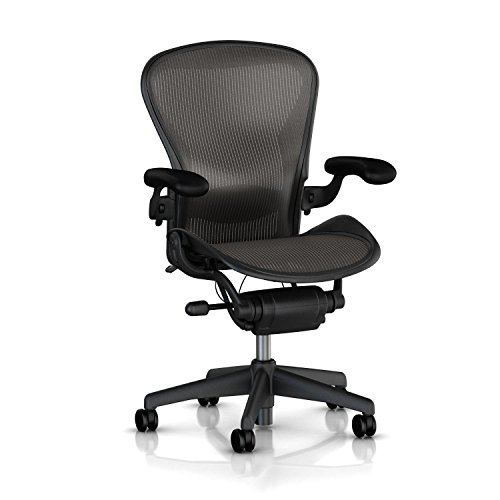


As an Amazon Associate we earn from qualifying purchases at no extra cost to you.
Top Picks at a Glance
- Best Overall: Marsail Ergonomic Office Chair: high-back mesh with adjustable lumbar support and a rolling swivel base
- Best Budget: NEO CHAIR Office Computer Chair (mid-back mesh): breathable back with lumbar support at the lowest tier here
- Best for Heavier Users: Nexthro Ergonomic Office Chair: mesh, high back, flip-up arms and a 400 lb rating listed
- Best for Long Sessions: CAPOT Ergonomic Mesh Office Chair: adjustable lumbar, 4D flip-up arms, 3-level tilt backrest and a 400 lb rating
- Best With Headrest: GABRYLLY Ergonomic Office Chair: headrest, flip-up arms, 90 to 120 degree tilt lock and a wide cushion
- Best Value High Back: Synorla Ergonomic Office Chair: high back, 330 lb capacity and a design aimed at long hours
Comparison Table: Back Height, Rating and Tilt
| Product | Best for | Key specs (from listing) | Watch for | Price tier |
|---|---|---|---|---|
| Marsail Ergonomic Office Chair | All-round home use | High-back mesh; adjustable lumbar support; rolling swivel base | Weight rating not shown in the short title | Mid-range |
| NEO CHAIR Mid-Back Mesh Computer Chair | Kids, teens and light use | Mid-back; breathable mesh; lumbar support; height adjustable | Fewer adjustments than full ergonomic chairs | Budget |
| Nexthro Ergonomic Office Chair | Heavier users, long days | Mesh; high back; lumbar support; flip-up arms; 400 lb rating | Newer brand, parts support not listed | Mid-range |
| CAPOT Ergonomic Mesh Office Chair | Fine-tuning fit | High back; adjustable lumbar; 4D flip-up arms; 3-level tilt; 400 lb | Many adjustments take time to set up | Mid-range to Premium |
| GABRYLLY Ergonomic Office Chair | Leaning back and resting | High back; headrest; flip-up arms; 90 to 120 degree tilt lock; wide cushion | Headrest height range not listed | Mid-range to Premium |
| Synorla Ergonomic Office Chair | Long hours at a good price | High back; 330 lb capacity; rolling swivel | Arm and tilt details not in the short title | Mid-range |
Two notes before you scroll. First, a weight rating is a safety number, not a comfort number: it tells you the load the base and gas lift are rated to carry. Second, a high back is not always better than a mid back. In a small room or for a short user, a mid-back chair can fit the body better.
Home chairs also share space with floors. Most casters are made for hard surfaces, and a chair mat is a cheap way to protect wood or tile and to help rolling on carpet.
Which chair for which household: a single adult who works from a spare bedroom for six hours a day should look at the Marsail or CAPOT, because adjustable lumbar and arms make a real difference over a long day. A family with a shared study corner should prefer a chair with quick height and arm adjustments, such as the Nexthro, so each person can reset it in under a minute. A teen who games for two hours after school is well served by the NEO CHAIR mid-back, and a parent who takes long video calls will appreciate the GABRYLLY headrest.
Fit numbers worth knowing: a seat height range of roughly 17 to 21 inches covers most adults on a desk of 29 to 30 inches. Seat depth of 17 to 20 inches suits most people, and you want about two to three finger widths between the seat front and the back of your knees. Arm height should leave your shoulders level when the forearms rest on the arms. If a listing does not show these numbers, the product photos and the questions section often do.
Ownership realities: mesh backs can sag slightly over several years if the frame is thin, gas lifts are consumable parts and can lose height over time, and casters collect hair on carpet. Plan to tighten the bolts after the first month, wipe the mesh with a damp cloth and keep the manual so that you know the warranty terms. A chair that is easy to service will outlast a chair that is slightly nicer on day one.
Budget planning: if you are choosing between one mid-range chair and two budget chairs, the single mid-range chair is usually the better buy for a person who sits daily, while two budget chairs make sense for a household with two light users. Whichever you choose, keep the box and packing until you have used the chair for a week, so that a return is possible if the seat height or the lumbar position does not suit you.
1. Marsail Ergonomic Office Chair: Best Overall Computer Chair for Home
Key specs
- High-back mesh design
- Adjustable lumbar support
- Rolling swivel base
- Height adjustable
- Weight rating, tilt range and seat size: not listed in the short title
Best for: most people who work or study at a computer for a few hours a day at home.
Skip if: you need a documented weight rating above 300 pounds, since it is not shown in the short title.
Marsail is a good middle path for a home computer chair. A high-back mesh chair supports the shoulder blades as well as the lower back, and mesh lets heat escape in a warm room. Adjustable lumbar support is the most important feature in this price tier, because a fixed lumbar bump will fit some people and miss others.
The rolling swivel base is the standard design, and the height adjustment covers most desks. Before you buy, check the seat depth and the maximum height in the full listing. A tall person needs a long seat; a short person needs a low minimum seat height so the feet reach the floor.
For a household where two adults share a desk, an adjustable chair is more valuable than a fixed-shape chair. Look for easy-to-reach levers and make sure each user takes a minute to set the height before sitting for long.
Pros
- High-back mesh for airflow and support
- Adjustable lumbar support listed
- Balanced price for the feature set
- Suits shared desks
Cons
- Weight rating not in the short title
- Tilt and arm details limited
- Mesh can feel firm
2. NEO CHAIR Office Computer Chair, Mid-Back Mesh: Best Budget Option
Key specs
- Mid-back mesh design
- Breathable back with lumbar support
- Height adjustable
- Described as a gaming and office chair
- Weight rating, tilt and arm details: not listed in the short title
Best for: a kid’s or teen’s desk, a guest room or a second computer where you want something comfortable enough and easy to replace.
Skip if: you plan to sit for more than five hours a day or need a documented high weight capacity.
At this tier, you should expect the basics: a padded seat, a mesh back with some lumbar shape, a height lever and a base on wheels. NEO CHAIR delivers those and keeps the cost low. For short sessions, it will do what a better chair does, with fewer adjustments.
Mid-back chairs are lighter and smaller than high-back models, which is a plus in a bedroom. They also look less like office furniture. The trade-off is that the head and upper shoulders have no support, so people who lean back to read or watch videos may want a headrest.
Check the arm design. Many chairs in this tier have fixed arms that block tucking under a desk. If your desk has a low edge or a drawer, look at the product photos to see how the arms sit.
Pros
- Very low cost
- Breathable mesh back
- Compact and light
- Lumbar support listed
Cons
- Fewer adjustments
- Limited head and neck support
- Weight rating not shown in the short title
3. Nexthro Ergonomic Office Chair: Best for Heavier Users and Long Days
Key specs
- Mesh high-back design
- Lumbar support
- Flip-up arms
- 400 lb rating listed
- Tilt range and seat size: not listed in the short title
Best for: larger frames, long sessions and shared use, where a documented capacity matters.
Skip if: you want a well-known brand with a long parts-support history.
A 400 pound rating is a strong number for a chair at this tier. It signals a more robust base and gas lift than the typical 250 to 300 pound rated chairs. For heavier users, a higher rating is a safety margin and a sign the seat and frame are built to last.
Flip-up arms make it easier to slide under a desk and to sit sideways, which is handy for gaming or video calls. They also help if you share the chair with a smaller person who needs the arms out of the way.
Nexthro is a newer name, so check the warranty and the return process on the listing page. For any chair rated at 400 pounds, confirm that the casters, the gas lift and the base are all covered in the manual.
Pros
- 400 lb rating listed
- Mesh high back
- Flip-up arms
- Lumbar support
Cons
- Newer brand
- Tilt and seat size not in the short title
- Larger footprint
4. CAPOT Ergonomic Mesh Office Chair: Best for Fine-Tuning Fit
Key specs
- High-back mesh
- Adjustable lumbar
- 4D flip-up arms listed
- 3-level tilt backrest
- 400 lb rating listed
Best for: people who want to dial in the chair to their body, such as those who are short, tall or between sizes.
Skip if: you want a chair that you can use out of the box with no setup.
Four-dimensional arms move up and down, forward and back, in and out, and rotate. That range lets you place the forearms at desk height even when you switch between a keyboard and a mouse. It is a useful feature for people with narrow or wide shoulders.
A three-level tilt backrest lets you set how far the chair reclines and how firmly it resists. A locked upright position suits typing, while a reclined position suits reading or a break. If the chair has a lock, you can pick a level and keep it for the day.
With so many controls, the learning curve is real. Set the seat height first, then the lumbar, then the arms, and the tilt last. Take 10 minutes on day one and a short check after a week.
Pros
- Many adjustments
- 400 lb rating listed
- Breathable mesh
- Good for fit tuning
Cons
- More controls to learn
- Higher tier than basic chairs
- Brand support details not in the short title
5. GABRYLLY Ergonomic Office Chair: Best With a Headrest and Tilt Lock
Key specs
- High back with headrest
- Flip-up arms
- 90 to 120 degree tilt lock
- Wide cushion listed
- Weight rating and lumbar details: not listed in the short title
Best for: people who lean back during calls or reading and want the head supported.
Skip if: your desk is low or you are short, since a headrest changes the way the chair meets the desk.
A headrest is a comfort feature for leaning back. In an upright working position it is just behind your head and does little. When you tilt to 110 or 120 degrees, it supports the neck. That makes this chair better for mixed use: typing, calls, video and a bit of rest.
The 90 to 120 degree tilt lock lets you hold the chair at a chosen angle instead of rocking freely. A lock is useful because a free-rocking chair can feel unstable during typing, while a locked chair gives you a steady base.
A wide cushion is mentioned in the listing, which helps larger users and those who sit cross-legged. Check the seat width and depth and compare them with the width of the desk opening.
Pros
- Headrest
- Tilt lock with a wide range
- Flip-up arms
- Wide cushion
Cons
- Higher tier
- Takes more space
- Weight rating not in the short title
6. Synorla Ergonomic Office Chair: Best Value High Back for Long Hours
Key specs
- High-back computer chair
- 330 lb capacity listed
- Rolling swivel base
- Designed for long hours per listing
- Arm style, lumbar and tilt: not listed in the short title
Best for: home users who want a high-back chair with a documented weight rating at a modest price.
Skip if: you need a rating of 400 pounds or more.
Synorla is a straightforward high-back option with a clearly stated 330 pound rating. For many adults, that margin is plenty, and it helps prove the chair is built for daily use.
The listing frames the chair around long hours, which tends to mean a wider seat and a padded cushion. Without details on the arms and tilt in the short title, read the full page and look at the photos for arm shape and adjustment points.
It is a sensible pick when you want more than a budget chair but do not need a long list of adjustments.
Pros
- 330 lb capacity listed
- High back
- Good value tier
- Simple, familiar layout
Cons
- Arm and tilt details limited
- Fewer adjustments than CAPOT
- Seat size not listed
Also Consider
BestOffice Ergonomic Mid-Back Swivel Chair: A very low-cost mid-back chair with lumbar support and a breathable back; a fit for light daily use.
TRALT Office Chair With Headrest: A chair with a headrest and a 330 lb capacity listed; similar to the Synorla in concept.
GTPOFFICE Executive Office Chair With Flip-Up Armrests: An executive-style chair with flip-up arms and a zoned cushion; look at it if you prefer a padded look.
ELABEST X100 Big and Tall Mesh Chair With Footrest: A premium-tier option for larger users with 5D flip-up arms and a footrest.
How We Chose
We began with chairs aimed at home computer use, then filtered for mesh backs, listed lumbar support and clear descriptions of arms, tilt or capacity. We compared the listing details, read manufacturer information and used independent guidance on chair fit and ergonomics.
We did not personally use these products. Where the short listing did not give seat size, tilt range or weight rating, we marked it as not listed and recommend you read the full page. We did not use star ratings or review counts.
We placed adjustability and documented capacity ahead of looks, then considered footprint and value.
Buying Guide
Understand weight ratings
Most mid-priced office chairs are rated for 250 to 300 pounds. A 330 or 400 pound rating suggests a stronger base and gas lift. Choose a rating at least 50 pounds above the heaviest user, and check that it covers the whole chair and not just the seat.
Choose the right back height
Mid-back chairs reach the mid-back and suit smaller rooms and shorter users. High-back chairs reach the shoulders and offer more support for long sessions. Headrest chairs add neck support for leaning back. If your desk has a low shelf above, a high back or headrest can hit it.
Adjustability that matters
The most useful adjustments are seat height, lumbar support, arm height and tilt tension. Seat height should let your feet rest flat with knees at about 90 degrees. Lumbar support should sit at the curve of your lower back. Arms should let your shoulders relax, with elbows at about 90 degrees.
Mesh, foam and leather
Mesh breathes and stays cool but can feel firm. Foam cushions are softer but can flatten in a few years. Faux leather is easy to wipe but can feel warm. For home use in a warm climate, mesh with a padded seat is usually the best mix.
Floors and noise
Hard casters can scratch wood and tile. Use a chair mat or soft-wheel casters. A squeaky gas lift or wheel can be fixed with a small amount of silicone spray. If you share a room, check that the chair does not creak when you lean back.
Mistakes to Avoid When Buying a Home Computer Chair
Buying a gaming-style chair for looks and not for fit is common. Racing-style chairs often have fixed shapes that suit some bodies and not others. Look for adjustable lumbar and arms.
Another mistake is forgetting to adjust the chair. Set seat height so your feet are flat, then move the monitor to eye level. A great chair set too low is no better than a basic one.
The third is ignoring breaks. No chair replaces movement. Stand up and walk every 30 to 60 minutes, and ask a doctor or physical therapist if you have back pain.
Frequently Asked Questions
What is the best computer chair for home use?
For most people, a high-back mesh chair with adjustable lumbar support, such as the Marsail, is the best balance of comfort and price. For heavier users, the Nexthro and CAPOT list a 400 pound rating.
Are mesh computer chairs better than leather?
Mesh is better for airflow and long sessions. Leather or faux leather is easier to wipe and can look more formal, but it can feel warm.
How much should I spend on a home computer chair?
A budget tier works for light use. For daily use of four hours or more, a mid-range chair with adjustable lumbar and arms is a better long-term choice.
Do I need a headrest?
Only if you lean back often. A headrest helps when reclined, but it does little when you sit upright.
What does a 400 lb rating mean?
It is the maximum load the manufacturer says the chair is built to carry. It is a safety figure, so choose a rating comfortably above your weight.
Will a computer chair hurt my floor?
Hard casters can scratch wood. Use a chair mat or soft casters.
Can a chair fix back pain?
A chair can support comfortable sitting, but it is not a treatment. If you have pain, talk to a doctor or physical therapist.
Which One Should You Buy?
If you want one chair that fits most people, buy the Marsail. If you are on a tight budget, the NEO CHAIR mid-back mesh chair is enough for light use. For heavier users and long days, choose the Nexthro or the CAPOT, depending on whether you value simplicity or adjustability.
If you often lean back, take the GABRYLLY with its headrest and tilt lock. If you want a documented rating at a modest price, take the Synorla.
Sources
- Marsail product listing for the Ergonomic Office Chair
- NEO CHAIR product listing for the Mid-Back Mesh Computer Chair
- Nexthro and CAPOT product listings for mesh office chairs with flip-up arms
- GABRYLLY and Synorla product listings for high-back office chairs
- Workplace ergonomics guidance on chair adjustment from OSHA and university ergonomics programs
Last updated: October 2026


