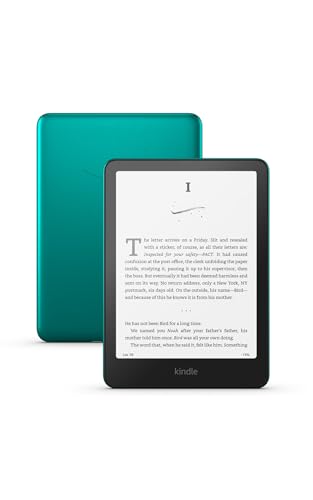
The best e-reader for most people in 2026 is the Kindle Paperwhite: a 7-inch, 300 ppi screen, IPX8 water resistance, a warm frontlight and up to 12 weeks of battery per Kindle’s spec sheet. If you would rather read EPUB files and borrow library books without the Kindle store, the Kobo Clara BW is the lower-cost alternative, and the Kobo Libra Colour is the pick for color and page-turn buttons. The sections below sort the main options by screen, battery, ecosystem and budget so you can match a device to how you read.
Our top picks



As an Amazon Associate we earn from qualifying purchases at no extra cost to you.
Quick comparison of the best e-readers
| Pick | Best for | Screen | Storage | Battery (maker claim) | Waterproof | Price range |
|---|---|---|---|---|---|---|
| Kindle Paperwhite (2024) | Best overall | 7 in, 300 ppi, mono | 16 GB (32 GB Signature) | Up to 12 weeks | IPX8 | Mid-range |
| Kindle (2024) | Best budget Kindle | 6 in, 300 ppi, mono | 16 GB | Up to 6 weeks | No | Budget |
| Kobo Clara BW | Best non-Kindle value | 6 in, 300 ppi, mono | 16 GB | Up to 53 days | IPX8 | Budget to mid-range |
| Kobo Clara Colour | Budget color | 6 in, Kaleido 3, 300/150 ppi | 16 GB | Up to 42 days | IPX8 | Mid-range |
| Kobo Libra Colour | Color plus buttons | 7 in, Kaleido 3, 300/150 ppi | 32 GB | Up to 40 days | IPX8 | Upper-mid |
| Kindle Scribe | Reading plus handwriting | 10 in or larger, mono | 16 GB or more | Weeks, varies with writing | No | Premium |
| Boox Go 7 class | Android apps on E Ink | 7 in, mono | Varies by model | Shorter than Kindle or Kobo | Check model | Upper-mid |
Battery figures come from each manufacturer and use different test conditions (reading time per day, brightness, wireless on or off), so treat them as a rough ranking rather than an exact comparison. Color E Ink figures show two numbers because black-and-white text renders at 300 ppi while color content renders at 150 ppi.
Best overall: Kindle Paperwhite (2024)
The Paperwhite combines a 7-inch Carta display, 300 ppi sharpness, adjustable warm light, IPX8 water resistance and a weight near 211 g. Page turns are faster than on the earlier model, and the larger screen means fewer page flips in a typical paperback. The Signature Edition adds 32 GB, a light sensor and wireless charging, which is only worth it if you keep a lot of audiobooks or comics on the device.
Who it suits: anyone buying books through the Kindle store, using Kindle Unlimited, or sending files through the Send to Kindle feature. Main trade-off: there are no physical page buttons, and the device favors Kindle formats. EPUB files need conversion, and library borrowing through Libby depends on region and supported titles.
Best budget Kindle: Kindle (2024)
The base Kindle drops to a 6-inch, 300 ppi screen, 16 GB and a lighter 158 g body, which makes it the easiest to hold in one hand and to pack in a coat pocket. Its frontlight is cool white only, and the maker rates battery at up to 6 weeks. For plain novels and commutes it gives up very little in sharpness.
Who it suits: first-time buyers, gift buyers and kids. Main trade-off: no waterproofing, so beach and bath reading carry more risk, and the cooler light is less comfortable late at night than the Paperwhite warm light.
Best non-Kindle value: Kobo Clara BW
Kobo lists the Clara BW with a 6-inch E Ink Carta 1300 screen at 1448 x 1072 (300 ppi), 16 GB of storage that it says holds roughly 12,000 eBooks, an IPX8 rating and up to 53 days of battery. It reads EPUB and PDF natively, supports OverDrive library borrowing in supported regions, and can be repaired with official spare parts.
Who it suits: readers who borrow from libraries, buy DRM-free books or want to avoid one retailer. Main trade-off: the design is plain plastic and there are no page-turn buttons. Books bought from the Kindle store cannot be moved onto it.
Best budget color: Kobo Clara Colour
Same 6-inch footprint and 16 GB as the Clara BW, but with a Kaleido 3 color layer. Kobo rates it at up to 42 days of battery with light reading, and it keeps IPX8 protection. Color suits cookbooks, comics, children’s books and highlights in different hues.
Who it suits: mixed readers who open illustrated content. Main trade-off: the color filter slightly lowers contrast for plain text compared with a monochrome panel, and color pages refresh slower.
Best color with buttons: Kobo Libra Colour
The Libra Colour has a 7-inch Kaleido 3 display (1264 x 1680 at 300 ppi in black and white, 150 ppi in color), 32 GB, physical page-turn buttons, a 2,050 mAh battery, about 200 g weight and IPX8 water resistance. It also supports an optional stylus for notes and markup.
Who it suits: one-handed readers, commuters and anyone who wants color without moving to a tablet. Main trade-off: it is the priciest regular Kobo, and color E Ink still looks muted compared with an LCD.
Best for notes: Kindle Scribe
The Scribe is Kindle’s large-format model with a pen for handwritten notes, journaling and marking up documents. The large E Ink screen shows PDFs and textbooks closer to real page size, which matters for papers that become unreadable on 6 or 7 inches. Storage tiers and exact screen size vary by generation, so confirm the current model on the maker’s page before buying.
Who it suits: students, professionals and people who annotate. Main trade-off: a premium price, a heavier body, and no waterproofing.
Best for Android apps: Boox Go 7 class
Boox devices run Android on an E Ink panel, so you can install Kindle, Kobo, Libby and other reading apps side by side. That flexibility comes with setup, and battery life is noticeably shorter than a dedicated Kindle or Kobo because the device runs a full operating system.
Who it suits: tinkerers who use several stores and library apps. Main trade-off: more configuration and shorter battery life; check the exact model’s specs because Boox lineups change quickly.
How to choose an e-reader
1. Pick the ecosystem before the hardware
Books bought from one store do not move to another. If you already own a large Kindle library, a Kindle avoids friction. If you borrow from a public library or buy DRM-free EPUB files, Kobo is the easier fit.
2. Match screen size to what you read
A 6-inch screen weighs roughly 160 to 175 g and fits a jacket pocket. A 7-inch screen weighs about 200 to 215 g and shows around 15 percent more text per page, which helps with larger fonts. Choose 10 inches or more only if PDFs and handwriting matter.
3. Check the lighting and water rating
A warm frontlight shifts from white toward amber at night. IPX8 means survival in up to 2 meters of fresh water for a stated time, usually 60 minutes, but it does not cover salt water, soap or hot tubs.
4. Decide whether color is worth it
Color E Ink reduces contrast for black text and halves color resolution to about 150 ppi. If most of your reading is novels, a monochrome model reads sharper and lasts longer per charge.
5. Compare battery by use, not claim
If you read 30 minutes a day, a 6-week claim is about 21 hours of reading. At an hour a day with the light on, expect that to roughly halve. Any model in the table above will go several weeks between charges.
Which e-reader fits your situation
| If you… | Choose |
|---|---|
| buy from the Kindle store and want one device that just works | Kindle Paperwhite |
| want the cheapest way to start reading | Kindle (2024) or Kobo Clara BW |
| borrow library books and use EPUB files | Kobo Clara BW or Libra Colour |
| read comics, cookbooks or kids’ books | Kobo Clara Colour or Libra Colour |
| read in bed with one hand | Kobo Libra Colour (page buttons) |
| annotate PDFs or write notes | Kindle Scribe |
| want Android apps on an E Ink screen | Boox Go 7 class |
Frequently Asked Questions
Is a Kindle or a Kobo better?
Neither wins for everyone. Kindle has the largest store and the most polished software, while Kobo handles EPUB files, library borrowing and repair more openly. Pick based on where your books come from.
Do e-readers hurt your eyes less than tablets?
E Ink reflects ambient light like paper and has no flicker, which many readers find more comfortable for long sessions. This is general information, not medical advice, so see an eye-care professional if you have persistent discomfort.
Is a color e-reader worth it?
Only if you read illustrated content. Color panels show about 150 ppi in color and usually give slightly lower text contrast, so novel readers are often happier with monochrome.
How much storage do I need?
16 GB is enough for thousands of text books because an average novel is a few megabytes. Choose 32 GB or more if you plan to store many audiobooks, comics or large PDFs.
Can I borrow library books on an e-reader?
Yes, in supported regions. Kobo devices integrate OverDrive directly, while Kindle library lending works through Libby and depends on country and title availability.
Do I need a waterproof model?
It is not essential, but IPX8 gives peace of mind at a pool, in a bath or in a rainy bag. The Paperwhite, Clara BW, Clara Colour and Libra Colour all carry the rating.