The best business laptops for 2026 are the Lenovo ThinkPad T14 Gen 6 for most office professionals, the Apple MacBook Air with M4 for frequent travelers who prefer macOS, the Dell Latitude 7450 for manageability, and the HP EliteBook 840 G11 for a comfortable Windows work setup.
Choosing among them is less about maximum processor speed than about sustained typing comfort, a readable screen, reliable battery life during real office workloads, useful ports, repair and warranty options, and security controls that fit your organization.
Our top picks
 Lenovo 15.6" FHD Essential Laptop
- Practical Performance for Everyday Computing: The Intel processor…
- Spacious 15.6-Inch Full HD Display: The 1920x1080 anti-glare…
- Lightweight Design with Tested Durability: Starting at only…
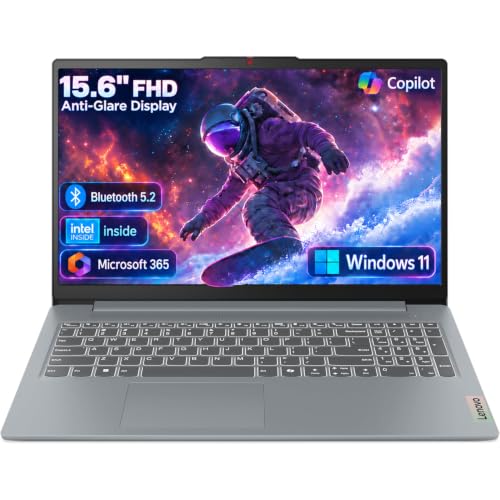 Lenovo Business 15.6" FHD Laptop
- Efficient Performance for Everyday Tasks: Powered by Intel…
- Immersive 15.6" Full HD Display: Experience crisp, clear…
- Complete Connectivity & Expansion Options: Stay connected with…
 HP 17 inch Business Laptop Computer •
- All In The Detail: The HP laptop has…
- Immersive Full HD Display: Experience high performance with…
- Windows 11 & Office 365 for Web: Preloaded…
| Product | Key specs | |
|---|---|---|
| Lenovo 15.6" FHD Essential Laptop | Practical Performance for Everyday Computing: The Intel processor… Spacious 15.6-Inch Full HD Display: The 1920x1080 anti-glare… Lightweight Design with Tested Durability: Starting at only… | Check price |
| Lenovo Business 15.6" FHD Laptop | Efficient Performance for Everyday Tasks: Powered by Intel… Immersive 15.6" Full HD Display: Experience crisp, clear… Complete Connectivity & Expansion Options: Stay connected with… | Check price |
| HP 17 inch Business Laptop Computer • | All In The Detail: The HP laptop has… Immersive Full HD Display: Experience high performance with… Windows 11 & Office 365 for Web: Preloaded… | Check price |
 Dell Latitude 5420 14" FHD Business Laptop | 256 GB SSD of storage. Multitasking is easy with 16GB of RAM Equipped with a blazing fast Core i5 2.00… | Check price |
As an Amazon Associate we earn from qualifying purchases at no extra cost to you.
Best business laptops at a glance
| Laptop | Best for | Typical weight | Screen options | Ports and wireless | Practical work battery |
|---|---|---|---|---|---|
| Lenovo ThinkPad T14 Gen 6 | Best overall Windows business laptop | About 1.3–1.4 kg | 14-inch, 16:10; Full HD+ to 2.8K | USB-C, USB-A, HDMI, audio; Wi-Fi 6E or newer depending on configuration | About 8–13 hours |
| Apple MacBook Air with M4 | Frequent travel and quiet operation | About 1.2–1.5 kg | 13.6-inch or 15.3-inch, 16:10 | Two Thunderbolt/USB4 ports, MagSafe, audio; Wi-Fi 6E | About 10–15 hours |
| Dell Latitude 7450 | Corporate deployment and IT control | About 1.3–1.5 kg | 14-inch, 16:10; Full HD+ configurations are common | Thunderbolt 4, USB-A, HDMI, audio; Wi-Fi 6E | About 8–12 hours |
| HP EliteBook 840 G11 | Typing comfort and office conferencing | About 1.4 kg | 14-inch, 16:10; Full HD+ or higher options | Two USB-C, two USB-A, HDMI, audio; Wi-Fi 6E | About 8–12 hours |
| Lenovo ThinkPad X1 Carbon Gen 13 | Premium portability | About 1.0–1.1 kg | 14-inch, 16:10; Full HD+ to 2.8K | Two Thunderbolt 4, two USB-A, HDMI, audio | About 8–12 hours |
Battery figures are realistic planning ranges for mixed work such as web apps, documents, messaging, video meetings, and moderate brightness. A high-resolution OLED display, heavy spreadsheet recalculation, local virtual machines, or continuous video calls can reduce them substantially. Exact weight, battery capacity, memory, and ports vary by configuration and region.
Lenovo ThinkPad T14 Gen 6: the safest all-round choice
The ThinkPad T14 Gen 6 is the strongest default recommendation for a Windows office laptop. Its keyboard has useful key travel, dedicated navigation keys, and a familiar layout that suits people who write for hours. The 14-inch 16:10 display provides more vertical space than an older 16:9 panel, which means less scrolling in documents and spreadsheets.
Choose a matte Full HD+ panel when battery life and glare reduction matter most. A higher-resolution or OLED panel looks sharper and can improve contrast, but it usually consumes more power and may introduce reflections. For long workdays, 16 GB of RAM is a sensible minimum; 32 GB is preferable for large spreadsheets, browser-heavy research, development tools, or virtual machines.
The T14 is also practical at a desk. USB-C supports docking and charging, while USB-A, HDMI, and a headphone jack reduce the need for adapters. ThinkPad business features commonly include a physical camera shutter, fingerprint reader, optional smart-card support, TPM-based security, and enterprise firmware controls. Its replaceable or serviceable components vary by generation and configuration, so check the maintenance manual before buying in bulk.
Apple MacBook Air with M4: best for mobile professionals in macOS
The M4 MacBook Air is the most travel-friendly option here when your work software runs well on macOS. It is silent because it has no cooling fan, starts quickly, and delivers excellent battery endurance for writing, browser work, presentations, and video calls. The aluminum enclosure feels rigid, and the large trackpad is especially convenient when you work without a mouse.
The keyboard is comfortable for extended typing, although it has less key travel than a ThinkPad. Its Liquid Retina display is sharp and bright enough for typical office work, and the 15-inch model gives spreadsheets more room without the weight of a conventional large business notebook.
The main compromise is connectivity. The MacBook Air has two Thunderbolt/USB4 ports, MagSafe charging, and a headphone jack, but no built-in USB-A, HDMI, or Ethernet. A USB-C hub or dock should be included in the budget. The 12-megapixel Center Stage camera is well suited to calls, while macOS provides FileVault encryption, Touch ID, Secure Enclave-backed protections, and strong permission controls.
Dell Latitude 7450: best for managed company fleets
The Latitude 7450 makes sense when a company values standardized deployment, remote administration, and support contracts over the lowest purchase price. Its 14-inch 16:10 format is a good compromise between portability and workspace. Look for a configuration with a 1,920-by-1,200 display, a backlit keyboard, 16 GB or more of RAM, and the largest available battery if employees spend much of the day away from an outlet.
Keyboard feel is generally office-friendly, though it may not satisfy users who prefer the deeper response of a ThinkPad. Video-call quality depends heavily on the selected webcam and software package, so do not assume every Latitude configuration has the same camera. A Full HD webcam, microphone noise reduction, and a privacy shutter are worth prioritizing.
Latitude systems commonly offer business-oriented BIOS controls, TPM security, fingerprint or smart-card options on selected models, and docking support through Thunderbolt 4 or USB-C. The wide selection of USB-A, USB-C, HDMI, and audio connections is useful in meeting rooms where adapters are often misplaced.
HP EliteBook 840 G11: best for typing and conference-room work
The EliteBook 840 G11 is a polished choice for employees who spend much of the day in documents, email, and video meetings. Its 14-inch 16:10 screen offers comfortable proportions for office applications, and the keyboard is better suited to prolonged typing than many thin consumer laptops. A 1,920-by-1,200 anti-glare configuration is usually the sensible balance of legibility and battery life.
HP’s business security options can include a webcam privacy shutter, fingerprint reader, TPM 2.0, BIOS protection, and hardware-based endpoint management features. The exact package depends on the model and optional services. HP also offers camera and audio features designed for conferencing, but lighting and microphone placement still matter more than software branding in a noisy room.
Two USB-C ports, two USB-A ports, HDMI, and a headphone jack make the EliteBook easy to connect in an established office. It is not the lightest laptop in this group, but the extra connectivity can save more frustration than a small weight reduction.
Lenovo ThinkPad X1 Carbon Gen 13: best when every gram matters
The ThinkPad X1 Carbon Gen 13 is the premium travel pick. At roughly 1 kg, it is considerably easier to carry than many 14-inch business laptops, yet it retains a strong keyboard, two USB-A ports, two Thunderbolt 4 ports, HDMI, and a headphone jack. That combination is unusually useful for a thin laptop.
The trade-off is price and upgrade flexibility. Premium thin designs often have memory soldered to the motherboard, so choose 32 GB at purchase if your workload may grow. A Full HD+ display is the better travel configuration for endurance; a 2.8K OLED screen is more attractive for visual work but less efficient. Security features can include a fingerprint reader, camera shutter, TPM, and enterprise authentication options depending on configuration.
More business laptops to shortlist for 2026
The picks above cover the established favorites. The five models below reflect current-generation designs, including premium ultralight, large-screen, and Apple options. Specifications come from manufacturer data and published specification sheets; verify exact configuration on the product page before ordering.
| Laptop | Weight | Battery | Key ports | Best for |
|---|---|---|---|---|
| Dell Pro 14 Premium | From about 2.5 lb | 60Wh | 2 Thunderbolt 4, USB-A, HDMI 2.1 | Managed fleets and executives |
| HP EliteBook X G1a 14 | From about 3.3 lb | 74.5Wh | 2 Thunderbolt 4, USB-C, USB-A, HDMI 2.1 | AMD workstation-style performance |
| Lenovo ThinkPad X1 Carbon Gen 14 Aura Edition | About 2.2 lb | About 58Wh | 3 Thunderbolt 4, USB-A, HDMI 2.1 | Premium ultralight travel |
| Lenovo ThinkPad E14 Gen 7 | About 3 to 3.3 lb | 48Wh or 64Wh | USB-A, USB-C, HDMI, RJ-45 on Intel versions | Value ThinkPad for small teams |
| Apple MacBook Air 15-inch (M5) | 3.3 lb | About 66.5Wh | 2 Thunderbolt 4, MagSafe 3 | Large screen on macOS |
Dell Pro 14 Premium: the managed-fleet choice
The Dell Pro 14 Premium is the successor line to the Latitude 7000 series, with an emphasis on thin construction, security, and Dell’s fleet management tools. It targets organizations that want a premium chassis with strong IT manageability.
Specs: Intel Core Ultra 7 (Lunar Lake, vPro) · 14-inch display, FHD+ 1920 by 1200 IPS, QHD+ touch, and OLED options · 16GB or 32GB LPDDR5X soldered · 512GB SSD and up · 60Wh battery · from about 2.5 lb (1.14 kg) · two Thunderbolt 4, one USB-A, HDMI 2.1, headset jack · Wi-Fi 7 · Copilot+ PC

Best for: IT-managed fleets, hybrid workers, and executives who want a light laptop with enterprise security.
Skip if: you need to upgrade memory later; it is soldered, so choose capacity at purchase.
- Pro: low weight, vPro management, and a sensible port set for a thin laptop
- Pro: several display options from efficient FHD+ to OLED
- Con: premium tier cost compared with the standard Pro 14
- Con: OLED options reduce endurance compared with the IPS panel
HP EliteBook X G1a 14: AMD power in a business chassis
The EliteBook X G1a is HP’s high-end AMD Ryzen AI PRO laptop. It is aimed at users who run demanding workloads and want a large battery, a bright OLED option, and HP’s security stack.
Specs: AMD Ryzen AI PRO 300 series (Ryzen AI 7 PRO 360 up to Ryzen AI 9 HX PRO 375, 12 cores on the top chip) · 14-inch 2880 by 1800 OLED touch, 120Hz (some models use WUXGA) · 32GB LPDDR5X-8533 on the standard HP configuration, 64GB on some · 1TB PCIe Gen 4 SSD · 74.5Wh battery · from about 3.3 lb (1.49 kg) · two Thunderbolt 4, one 10Gb/s USB-C, one 10Gb/s USB-A, HDMI 2.1 · Wi-Fi 7

Best for: analysts, engineers, and creative professionals who want strong multi-core performance and large memory in a business laptop.
Skip if: weight is your priority; at roughly 3.3 pounds it is heavier than most premium 14-inch rivals, and no SD card reader or Ethernet port is included.
- Pro: large 74.5Wh battery and fast ports
- Pro: HP security and management features aimed at corporate deployment
- Con: reviewers report widely varying battery results, depending on the display and workload
- Con: premium cost at the top configuration
Lenovo ThinkPad X1 Carbon Gen 14 Aura Edition: the featherweight flagship
The Gen 14 Aura Edition replaces the Gen 13 mentioned earlier. It is among the lightest 14-inch business laptops available, with a classic ThinkPad keyboard and an Intel Core Ultra Series 3 platform.
Specs: Intel Core Ultra Series 3 (Panther Lake) options · 14-inch WUXGA IPS or 2.8K OLED, up to 500 nits · 32GB LPDDR5X and 512GB SSD on common configurations · about 58Wh battery · about 2.2 lb (under 1 kg on the lightest configuration) · three Thunderbolt 4, one USB-A 3.2, HDMI 2.1, audio jack · optional Nano SIM

Best for: frequent travelers, executives, and anyone who values the lowest possible carry weight without giving up the ThinkPad keyboard.
Skip if: you want a low price or plan to repair parts yourself; this is a premium design with a premium cost.
- Pro: extremely light with three Thunderbolt 4 ports
- Pro: keyboard and security options that business users expect
- Con: runtime depends on display choice; OLED consumes more power than WUXGA IPS
- Con: premium tier pricing
Lenovo ThinkPad E14 Gen 7: the value ThinkPad
The ThinkPad E14 Gen 7 offers ThinkPad ergonomics and business features at a lower tier than the T and X1 lines. It suits small businesses and departments that need a dependable laptop without premium materials.
Specs: AMD Ryzen 7 250 or Intel Core Ultra options · 14-inch FHD+ 1920 by 1200 display · 16GB or 32GB DDR5 on listed configurations · 512GB to 1TB SSD · 48Wh or 64Wh battery depending on version · about 3 to 3.3 lb · fingerprint reader, backlit keyboard, USB-A and USB-C ports, HDMI · confirm Thunderbolt support, because it varies between the Intel and AMD versions
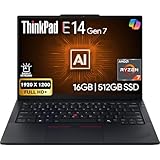
Best for: small teams, offices, and schools that need a typing-friendly Windows laptop with modest cost.
Skip if: you need the lightest weight, premium materials, or guaranteed Thunderbolt docking.
- Pro: ThinkPad keyboard and serviceable design at a lower tier
- Pro: configurations up to 32GB of memory
- Con: heavier and less refined than the T14 or X1 Carbon
- Con: the display and speakers are functional rather than premium
Apple MacBook Air 15-inch (M5): a large screen without a large footprint
The 15-inch M5 MacBook Air succeeds the M4 model described earlier and is a strong option for professionals who prefer macOS and want extra screen space for spreadsheets and documents.
Specs: Apple M5 (10-core CPU, 10-core GPU) · 15.3-inch Liquid Retina IPS, 2880 by 1864, 500 nits · 16GB unified memory or more · 512GB SSD and up · about 66.5Wh battery, up to 18 hours of video streaming per Apple · 3.3 lb (1.51 kg) · two Thunderbolt 4, MagSafe 3, headphone jack · supports two external displays

Best for: managers, consultants, and creatives on macOS who want a quiet, long-lasting laptop with a big, bright screen.
Skip if: your line-of-business software is Windows-only, or you need built-in USB-A, HDMI, or Ethernet.
- Pro: fanless, with a bright 15.3-inch display and strong battery
- Pro: FileVault and Apple’s built-in security model
- Con: a hub is needed for most accessories
- Con: memory and storage upgrades must be chosen at purchase
Choose by your actual working situation
| Your situation | Best fit | Why | Configuration to target |
|---|---|---|---|
| Mostly desk work, occasional travel | ThinkPad T14 Gen 6 | Strong keyboard, broad ports, serviceable business design | 16–32 GB RAM, 512 GB SSD, matte 1,920-by-1,200 display |
| Daily commuting and no Windows-only software | MacBook Air with M4 | Low weight, quiet operation, long mixed-use endurance | 16 GB RAM, 512 GB SSD, USB-C hub |
| Large company with centralized IT | Dell Latitude 7450 | Fleet management, docking, security, and support options | 16 GB RAM, Full HD+ screen, business warranty |
| Heavy typing and frequent meeting rooms | HP EliteBook 840 G11 | Comfortable keyboard and versatile physical connectivity | Backlit keyboard, Full HD webcam, 16 GB RAM |
| Air travel several times each month | ThinkPad X1 Carbon Gen 13 | Very low carry weight without sacrificing common ports | 32 GB RAM if memory is not upgradeable |
How to choose a business laptop: a buyer’s checklist with numbers
Business laptops are bought on reliability, manageability, and total cost of ownership rather than benchmark scores. Work through the checklist below before you compare models.
- Define the user. A road warrior, a call-center employee, an accountant, and a developer need different machines. Write down the heaviest task for each role and size the laptop to it.
- Weight target. Under 2.5 pounds (about 1.1 kg) is ideal for frequent flyers. Between 2.5 and 3.2 pounds is a good balance for hybrid workers. Above 3.3 pounds is acceptable for desk-bound staff who value larger batteries and more ports.
- Memory. 16GB is the practical minimum for current Windows or macOS workloads with video calls, browsers, and office suites. Choose 32GB for analysts, developers, or anyone who runs virtual machines. If memory is soldered, you cannot expand it later.
- Storage. 512GB handles most office use. Use 1TB for large local files, data work, or creative content.
- Battery. Look for 55Wh or more if staff will work through a full day away from outlets. Business laptops with Full HD+ screens usually last longer than those with 2.8K OLED panels.
- Security features. Look for TPM 2.0, a fingerprint reader or IR camera, a webcam privacy shutter, and firmware protection. Intel vPro or AMD PRO platforms add remote-management features that IT teams value.
- Management and support. Check for zero-touch deployment, driver packs, and imaging support from your vendor. A mismatch with your IT tools can cost more than a hardware difference.
- Warranty and service. For laptops that earn money every day, next-business-day or on-site service is often worth more than a faster processor.
- Connectivity. Count your daily accessories: monitor, dock, mouse, and headset. Thunderbolt or USB4 with DisplayPort makes docking straightforward, and built-in HDMI helps in meeting rooms.
Intel, AMD, Apple, or Arm for business use
| Platform | Strengths | Watch for |
|---|---|---|
| Intel with vPro | Widest enterprise management support, Thunderbolt 4 on most designs | Battery life varies by chip generation |
| AMD Ryzen PRO | Strong multi-core performance and integrated graphics, value-oriented | Thunderbolt availability varies by model |
| Apple silicon | Quiet, efficient, long battery life, strong built-in security | Fewer ports, macOS-only line-of-business tools may be missing |
| Qualcomm Snapdragon (Arm) | Excellent endurance and always-connected options | Confirm that VPNs, drivers, and legacy apps run on Arm |
Budget tiers in plain terms
- Entry-level: 16GB of memory, a Full HD+ display, plastic or mixed construction, and standard warranty; suitable for office staff.
- Mid-range: aluminum or magnesium chassis, better keyboard, vPro or PRO options, and better ports; the usual fleet pick.
- Premium: carbon fiber or magnesium bodies under 2.5 pounds, OLED options, and extended support; best for executives and frequent travelers.
Buying in volume? Ask your vendor about configure-to-order options, since memory and storage choices at purchase affect the laptop for its whole life.
What to check before ordering
- Keyboard: Confirm that the layout includes the keys you use daily. A compact keyboard can omit Home, End, or dedicated navigation keys.
- Screen: Prefer 16:10, matte, and at least 1,920 by 1,200 for general business work. Check brightness if you work near windows.
- Webcam: Specify Full HD or better, then check whether the camera has a physical shutter. A high-resolution camera cannot fix poor room lighting.
- Battery: Treat manufacturer claims as laboratory ceilings. For a full day away from a charger, choose a moderate-resolution screen and a larger battery.
- Security: Look for TPM 2.0, biometric login, Secure Boot, camera privacy controls, and business BIOS or device-management support.
- Warranty: A longer on-site or next-business-day service plan may be more valuable than a faster processor for a laptop that earns money every day.
Durability and ownership realities
The parts most likely to wear first are the keyboard shine and key legends, trackpad surface, hinge, USB-C ports, and battery capacity. Keep food and dust away from the keyboard, clean with a dry microfiber cloth, and use compressed air sparingly rather than forcing debris deeper into the switches. Do not carry a laptop by its display or leave it charging in a hot car.
After two or three years, a battery may provide noticeably less runtime even if the laptop still works perfectly. Business models with accessible batteries, SSDs, or wireless cards can be cheaper to keep than ultra-thin designs with soldered components. Before buying, review the exact service documentation and confirm that replacement parts and authorized repair are available in your country.
For most Windows buyers, the ThinkPad T14 Gen 6 offers the best balance of comfort, ports, security, and long-term practicality. Choose the MacBook Air with M4 for light, quiet travel; the Latitude 7450 for managed fleets; the EliteBook 840 G11 for typing and meetings; and the X1 Carbon Gen 13 when minimal carry weight justifies a premium.
Business laptop FAQ
What makes a laptop a business laptop?
Business laptops are built around durability, security, serviceability, and manageability. Typical features include a TPM chip, biometric login, a webcam shutter, firmware protection, vPro or PRO management options, docking support, and longer warranty choices.
How much RAM does a business laptop need?
16GB is the practical minimum for office suites, browsers, and video calls. Choose 32GB for large spreadsheets, development tools, virtual machines, or data work, especially when memory is soldered and cannot be upgraded later.
Intel, AMD, Apple, or Snapdragon for business?
Intel with vPro has the broadest enterprise management support. AMD Ryzen PRO offers strong multi-core performance and good value. Apple silicon is quiet and efficient for macOS environments. Snapdragon laptops offer long battery life, but you should confirm that your VPN, drivers, and legacy apps run on Arm.
Is a MacBook good for business use?
Yes, when your tools run on macOS. MacBooks have long battery life, strong built-in encryption, and simple device management through Apple’s business tools. The trade-offs are fewer ports and no support for Windows-only applications.
Which business laptop has the longest battery life?
Runtime depends on the screen and workload more than the brand. Efficient processors, a large battery of 60Wh or more, and a Full HD+ matte display usually outlast OLED configurations. Treat manufacturer claims as best-case numbers.
Do I need vPro or AMD PRO?
If an IT team manages the laptops remotely, yes. These platforms add out-of-band management, stronger firmware protection, and hardware-level security features. For a single user, they are not essential.
How long should a business laptop last?
Plan for three to five years of service. Battery capacity usually falls first, followed by keyboard wear and ports. Models with serviceable batteries and solid warranty options are cheaper to keep running.
What size is best for a business laptop?
A 14-inch screen balances portability and workspace for most people. Choose a 13-inch model if weight matters above all else, and 15 or 16 inches if you work with spreadsheets or design files at a desk.
Should I buy a refurbished business laptop?
Refurbished ThinkPads, Latitudes, and EliteBooks can be a sound value if they come from a reputable seller with a warranty and a battery in good health. Check the processor generation, because older chips may lose operating system support sooner.
What accessories should I budget for?
A USB-C or Thunderbolt dock, a good webcam if the built-in one is weak, a padded sleeve, and a second charger for the office are the most useful additions. A privacy screen can help when you work on trains and planes.
More from Amazon
Programs that pair well with the guide above. Offers and eligibility are set by Amazon and may change.
Free shipping on eligible items, Prime Video and more. Eligible new members can start with a free trial.
Start a Prime free trialAd-free music streaming. Eligible new subscribers can start with a free trial.
Try Music Unlimited freeA Prime membership for ages 18-24 with a trial period. Eligibility is set by Amazon.
See Prime for Young AdultsAudiobooks and podcasts to listen to on the go. Eligible new members can start with a free trial.
Try Audible freeAs an Amazon Associate we earn from qualifying purchases.