Our Top Picks

Matter is the shared language that lets a smart plug, a door lock, and a thermostat from different brands show up in the same app. Instead of juggling five brand apps, you pair each device once with a setup code and control it from Apple Home, Google Home, Alexa, SmartThings, or Home Assistant. That freedom only helps if the device genuinely speaks Matter, so every pick below was chosen because its own Amazon listing names Matter support directly.
This roundup spreads across the house rather than stacking one category. You get one plug, one lock, one contact sensor, one in-wall switch, and one thermostat, so the list works as a starter kit or a gap-filling checklist. Three picks run on Wi-Fi. Two run on Thread and need a border router you may already own.
As an Amazon Associate, we earn from qualifying purchases.
Quick Answer
Start with the TP-Link Tapo P125M plug for the easiest first Matter device, add the Aqara Door and Window Sensor P2 for entry alerts, and choose the Aqara Smart Lock U200 when you want native Matter over Thread at the front door. The Leviton Decora Smart Switch covers hardwired lighting, and the Meross MTS300 thermostat brings heating and cooling into the same Matter setup.
How to Choose
First, confirm your platform has a Matter controller. Recent Echo, HomePod, Apple TV, Nest, and SmartThings hubs can act as controllers, and the phone app you already use is usually where pairing happens. Keep the setup code somewhere safe, because you need it again if you move the device to a second platform.
Second, match the radio to the device. Wi-Fi devices like the Tapo plug and the Meross thermostat join your router directly, but each one adds load to your wireless network. Thread devices like the Aqara lock and sensor form a low-power mesh and sip battery power, yet they cannot reach your phone without a Thread border router. Many homes already have one in a speaker or streaming box, so check before buying extra hardware.
Third, read the fine print on each listing instead of trusting the badge on the box. Some products speak Matter natively, while others reach Matter through a brand hub, and that difference changes what you must own before setup day. All five picks below name Matter in their own listings, and the Aqara pair is native Matter over Thread.
Fourth, check the physical fit before the smart fit. The Leviton switch needs a neutral wire in the wall box, which older homes sometimes lack. The Meross thermostat suits most low-voltage systems but not line-voltage baseboard heaters, millivolt systems, or two-wire setups. The Aqara lock is a retrofit design that works with your existing deadbolt rather than replacing the whole lock, which matters for renters.
Finally, think about what each device should trigger. A contact sensor earns its keep when it starts a routine, such as pausing the thermostat when a window opens. Buy for the routine you will actually run.
TP-Link Tapo Matter Smart Plug Mini P125M 3-Pack

The Tapo P125M is the gentlest way to start with Matter because a plug asks for no wiring, no tools, and no permanent change to the home. Push it into an outlet, pair it with a setup code, and the lamp or fan plugged into it becomes app and voice controlled. The listing rates this mini plug for a 15 amp, 1800 watt maximum load, which covers lamps, fans, and most small appliances, and its compact body leaves the second outlet usable.
Because the P125M speaks Matter over Wi-Fi, it works with Apple Home, Alexa, Google Home, and SmartThings for basic control, and the Tapo app remains available for extras such as schedules and timers. The listing notes that it connects on 2.4 GHz Wi-Fi only. This three-pack suits a first project: one plug for a living room lamp, one for a bedroom fan, and one spare for a seasonal load.
Honest limits are simple. A smart plug can only switch power, so an appliance with electronic controls that wakes in standby mode will not start working just because the plug turned on. Test each target by unplugging it and plugging it back in; if it resumes on its own, the plug can automate it.
Specs
| Feature | Detail |
|---|---|
| Model | Tapo P125M, 3-pack |
| Protocol | Matter over Wi-Fi, 2.4 GHz only |
| Load rating | 15 amp, 1800 watt maximum |
| Platforms | Apple Home, Alexa, Google Home, SmartThings |
| Control | Tapo app and voice assistants |
| Certification | UL certified, per the listing |
Aqara Smart Lock U200

The Aqara Smart Lock U200 is a retrofit lock: the motor unit fits over your existing deadbolt inside the door while the included fingerprint keypad mounts outside. Your current keys keep working, and renters avoid swapping lock cylinders. The listing describes native Matter support over Thread, with compatibility across Apple Home, Google Home, Alexa, SmartThings, and the Aqara Home app.
Entry options are broad for a single device. The keypad accepts fingerprints and codes, Apple Home Key lets an iPhone or Apple Watch tap to unlock, and NFC and the app round out the choices. Power comes from a rechargeable battery pack, and the listing gives a battery life figure of up to six months, helped by Thread being a low-power radio.
The requirement to plan around is the Thread border router, so confirm that a HomePod, Apple TV, Echo, Nest device, SmartThings hub, or Aqara hub on your network fills that role before ordering. Also confirm your deadbolt type against the listing’s compatibility notes. One stock note: a marketplace reproduction recently showed the black finish unavailable, so check the finish and seller before planning an install date.
Specs
| Feature | Detail |
|---|---|
| Model | EL-D02E, fingerprint keypad included |
| Protocol | Matter over Thread, Bluetooth, NFC |
| Entry methods | Fingerprint, code, Apple Home Key, NFC, app |
| Power | Rechargeable battery, up to six months per the listing |
| Platforms | Apple Home, Google Home, Alexa, SmartThings, Aqara Home |
| Fit | Retrofit over existing deadbolt |
Aqara Door and Window Sensor P2
The Aqara Door and Window Sensor P2 is a two-part contact sensor: a main unit for the frame and a smaller accessory unit or flat magnet for the moving door or window. A built-in high-precision Hall sensor reports open and closed status, and the listing asks you to keep the two parts within 22 mm of each other. That generous gap helps on doors with trim, where slimmer sensors struggle to align.
The P2 supports Matter natively over Thread, so it pairs directly with Apple Home, Google Home, Alexa, and SmartThings, with local automations that keep running without an internet connection. Real-time alerts go to your phone when a door opens, and the sensor can trigger routines such as adjusting a thermostat when an entry point opens. Power comes from a CR123A battery, which the listing describes as long lasting, while noting that battery life varies with the border router and app in use.
Be clear about the setup chain before buying a box of these. The sensor needs both a Matter controller and a Thread border router, sold separately, not included. Adhesive mounting is quick on smooth frames, and this is an indoor sensor, not a weatherproof gate monitor.
Specs
| Feature | Detail |
|---|---|
| Model | DW-S02E |
| Protocol | Matter over Thread, Bluetooth for setup |
| Sensor | Hall-effect contact sensor, 22 mm maximum gap |
| Power | CR123A battery, included |
| Size | 3.03 x 1.32 x 0.87 inches for the main unit |
| Requirements | Matter controller and Thread border router, sold separately |
Leviton Decora Smart Switch D215S-2RW

A plug cannot help a ceiling light on a wall circuit, which is where the Leviton Decora Smart Switch earns its place. This second-generation Wi-Fi switch replaces a standard single-pole switch and adds Matter support, so the lights on that circuit join Apple Home, Alexa, Google Assistant, and the My Leviton app with schedules, scenes, and voice control. It supports wired or wire-free three-way setups when paired with Leviton’s companion devices, which suits hallways and staircases.
The paddle design looks like an ordinary Decora switch, so guests can use the light normally while automations run in the background. Control in the wall also works for fixtures with bulbs you would never replace, such as integrated LED fittings.
The hard requirement is in the listing title itself: a neutral wire is required. Open your switch box before ordering and confirm a neutral bundle is present, or budget for an electrician. If your home lacks neutrals throughout, a plug and lamp strategy will fit better than forcing this one.
Specs
| Feature | Detail |
|---|---|
| Model | D215S-2RW, white |
| Protocol | Matter over Wi-Fi |
| Wiring | Neutral wire required, single pole |
| Three-way | Wired or wire-free three-way with companions |
| Platforms | My Leviton, Alexa, Google Assistant, Apple Home and Siri |
| Control | App, voice, and the wall paddle |
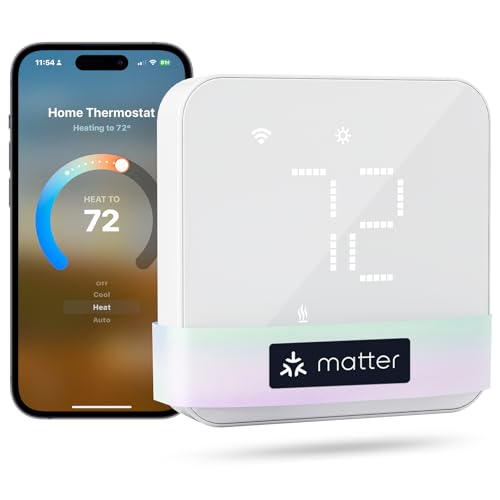
Meross Smart Thermostat MTS300
The Meross MTS300 brings heating and cooling into the same Matter setup as your plugs and sensors. Its listing describes seamless Matter integration with Apple Home, Alexa, Google Home, Home Assistant, and SmartThings, plus app and voice control through Meross. A glass touch panel handles at-the-wall changes, and the maker describes seven-day scheduling, usage tracking, and filter alerts in its app.
Compatibility is the first check. Meross rates the thermostat for most heating and cooling systems, including heat pumps, air conditioners, furnaces, and boilers. It is not suitable for line-voltage electric baseboard heaters, millivolt systems, or two-wire systems. The listing title flags that a common wire is required, while the body text softens that to say a common wire is required for some wiring configurations, so treat a common wire as part of the plan and verify your wiring before ordering. That title-versus-body difference is worth knowing rather than discovering mid-install.
One buying note from the listing itself: recent captures showed a no featured offers summary line alongside strong recent sales activity and other sellers, so confirm the seller and availability on the page rather than assuming it is out of stock. Once installed, the payoff is coordination: an open window, reported by the sensor above, can pause heating instead of fighting the weather.
Specs
| Feature | Detail |
|---|---|
| Model | MTS300, white |
| Protocol | Matter over Wi-Fi |
| Systems | Heat pump, air conditioner, furnace, boiler, humidifier, dehumidifier |
| Exclusions | Line-voltage baseboard, millivolt, and two-wire systems |
| Wiring | Common wire required for some configurations, per the listing |
| Control | Meross app, voice, and glass touch panel |
Who Should Skip It
Skip this category for now if your home has no Matter controller and no plan to add one, because the Thread picks cannot be set up without a controller and border router. Renters who cannot touch wiring should skip the Leviton switch and the Meross thermostat and lean on the plug, lock, and sensor instead. Anyone whose heating runs on line-voltage baseboard heaters should skip the MTS300 outright, since its listing excludes those systems. Also skip picks that duplicate gear you already love.
FAQ
Do Matter devices from different brands really work in one app?
Yes, that is the point of the standard. A Matter plug, lock, sensor, switch, and thermostat can all appear in one app, and multi-admin sharing lets the same device appear in more than one platform at once using additional setup codes.
Do I need a hub to use these Matter devices?
The Wi-Fi picks, the Tapo plug, Leviton switch, and Meross thermostat, join your router directly, though you still pair them through a platform app. The Thread picks, the Aqara lock and sensor, need a Thread border router plus a Matter controller, which many speakers, streaming boxes, and hubs already provide.
Will Matter devices keep working if the internet goes down?
Local control is a core Matter design goal, so automations between devices on your home network generally keep running during an outage. Remote access, voice assistants, and cloud extras still need an internet connection.
Can I move a Matter device to a different platform later?
Yes. Keep the original setup code, share the device from the first platform, and pair it with the new one. Multi-admin sharing often lets both platforms hold the device at the same time, which makes a gradual switch easier than starting over.
Final Verdict
For most homes, the buying order writes itself. Begin with the Tapo P125M three-pack, because plugs teach you Matter pairing with zero risk. Add the Aqara P2 sensor where an entry alert matters, then the Aqara U200 for keyless entry that keeps your existing deadbolt. Choose the Leviton D215S-2RW for the one lighting circuit everyone uses, provided a neutral wire is waiting in the box. Finish with the Meross MTS300 once you have confirmed your wiring, including the common wire question its own listing raises. Together, these 5 of 5 picks are genuinely connected, app-controlled, or sensor-driven devices, each with Matter named in its own listing, and each covering a different job in the home.
Product and ASIN Reference
| Product | ASIN |
|---|---|
| TP-Link Tapo Matter Smart Plug Mini P125M 3-Pack | B0BXMNJDW3 |
| Aqara Smart Lock U200 | B0D1C75J4F |
| Aqara Door and Window Sensor P2 | B0BTL8B72D |
| Leviton Decora Smart Switch D215S-2RW | B08RSM1KYN |
| Meross Smart Thermostat MTS300 | B0D8SW5B2G |
More from Amazon
Programs that pair well with the guide above. Offers and eligibility are set by Amazon and may change.
Free shipping on eligible items, Prime Video and more. Eligible new members can start with a free trial.
Start a Prime free trialAd-free music streaming. Eligible new subscribers can start with a free trial.
Try Music Unlimited freeA Prime membership for ages 18-24 with a trial period. Eligibility is set by Amazon.
See Prime for Young AdultsAudiobooks and podcasts to listen to on the go. Eligible new members can start with a free trial.
Try Audible freeAs an Amazon Associate we earn from qualifying purchases.