Key takeaways
- A student Chromebook has to survive a backpack, a locker, a dorm desk and a long day of tabs, documents and video classes.
A student Chromebook has to survive a backpack, a locker, a dorm desk and a long day of tabs, documents and video classes. Unlike a general-purpose laptop, it is judged by how long it lasts between charges, how well the keyboard and screen handle hours of writing and how much storage it has once offline files and apps pile up. The right pick for a middle schooler carrying a laptop between classes is not the same as the right pick for a college sophomore writing papers at a library table.
This guide is for parents, students and school-year shoppers planning for 2026 who want a Chrome OS laptop without paying for features that classwork does not use. Eight models are compared using only the details in the listing titles: processor family, memory, storage, screen size and some battery claims. Screen brightness, keyboard quality, update support dates and weight are rarely in titles, so the article flags them as items to check on the listing before ordering.
Quick Picks
Our top picks





As an Amazon Associate we earn from qualifying purchases at no extra cost to you.
| Product | Best for | Key spec from the title |
|---|---|---|
| HP 14-Inch HD Chromebook (N4120) | Everyday homework at 14 inches | Intel Celeron N4120, 4GB RAM, 64GB eMMC, 14 hours battery claim |
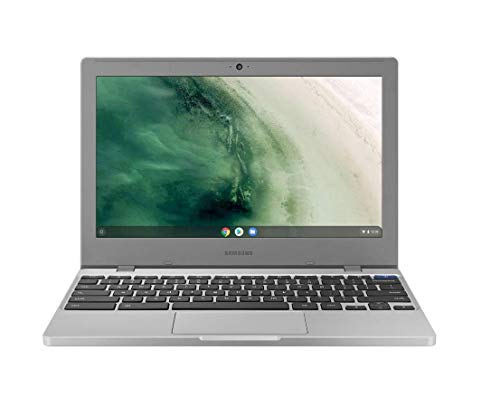
| Samsung Chromebook 4 | Small bag, younger students | 11.6 inch HD, Celeron N4000, 4GB RAM, 32GB eMMC |
| Lenovo 14-Inch Touchscreen | Touch and stylus-style work | Touchscreen, MediaTek Kompanio 520, 4GB RAM, 128GB total storage, WiFi 6 |
| ASUS 14-Inch FHD | Privacy and rugged use | FHD, MediaTek 8-core, webcam shutter, 4GB RAM, 64GB flash |
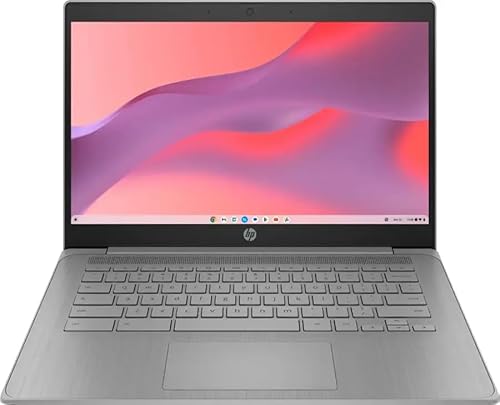
| HP Chromebook 14 (N4500) | Newer entry processor | Celeron N4500, 4GB RAM, 64GB eMMC, fast charge |
| Acer Chromebook 315 (N4500) | Large screen with extra storage | 15.6 inch FHD, Celeron N4500, 4GB RAM, 128GB (eMMC plus SD card) |
| Acer Chromebook 315 (N4020) | Big-screen basics | 15.6 inch HD, Celeron N4020, 4GB RAM, 64GB eMMC, 12.5H battery claim |
| Acer Chromebook Plus 514 | Heavier multitasking | 14 inch FHD+ touchscreen, Intel i3-N355, 8GB RAM, 512GB |
How to Choose
Screen size and carrying weight
An 11.6 inch screen is light and easy to carry but cramped for two windows side by side. A 14 inch screen is the common middle ground, with enough room for split-screen note taking, and a 15.6 inch screen suits desk use and spreadsheets but adds bulk. Look for FHD (1920 by 1080) if the screen will be used for hours, because HD panels can look soft for text. Check the listing for weight when the laptop travels daily.
Memory and storage: 4GB is the floor, 8GB is the buffer
Most Chromebooks in this group have 4GB of RAM, which suits web apps and a few tabs, but heavy tab loads, video calls and Android apps can feel slow. An 8GB model gives headroom for older students who juggle a lot of windows. For storage, 32GB fills quickly with Android apps and offline files, so 64GB is a practical minimum. Titles that mention an SD card slot, such as the Lenovo and the Acer 315 with a card, can add space cheaply, though cloud storage is the main path.
Processor families and battery claims
Intel Celeron N4000, N4020 and N4120 are older entry chips, N4500 is a step newer and the Core i3-N355 in the Chromebook Plus belongs to a higher tier. MediaTek 8-core chips tend to focus on efficiency. Battery hours in titles are manufacturer claims and drop under video calls and bright screens. Use them to compare, not as promises. Also check the automatic update expiration date for the model on the listing or the maker’s page, because it decides how many school years the device stays secure.
Durability, privacy and where budget models cut corners
School laptops take abuse, so look for terms like rugged reliability, spill-resistant keyboards and reinforced corners, but confirm them on the listing since they are not in every title. A webcam shutter, as the ASUS title lists, is a useful privacy feature. Budget models cut corners on screen brightness, keyboard feel, speaker volume and port count. Ignore long processor names in the title and focus on RAM, storage, screen and update support instead.
Finally, ask the school. Some districts manage devices through their own accounts and may require a specific model or enrollment steps. Others allow any Chromebook, and a quick message to the teacher or IT office can avoid a purchase that cannot be enrolled. Cases and sleeves are worth adding, since a protective cover costs far less than a repair.
Software matters as much as hardware. Chrome OS runs web apps, Android apps and sometimes Linux tools, so check which tools the school expects, such as a specific testing browser or a drawing app, and confirm they run on the model. Offline access is also worth testing: Google Docs and several note apps can be set to work without a connection, which helps on a bus or in a dorm with weak Wi-Fi. Parental controls and managed accounts are available for younger students and can be set up in a few minutes.
Think about charging too. A USB-C charger that also works on a phone is easy to replace if lost, while a proprietary barrel plug is harder to find. Fast charge, as the HP N4500 title mentions, is handy for a quick top-up between classes. Pack a short extension cord for classrooms with limited outlets.
Lastly, look at accessories that protect the investment: a padded sleeve, a screen cover for the webcam if there is no shutter, and a wireless mouse for long sessions at a desk. These small additions make a budget machine more comfortable and extend its life through a few school years.
The 8 Best Options
HP 14-Inch HD Chromebook (N4120)
This HP is a 14 inch HD Chromebook for students with an Intel Celeron N4120, 4GB RAM and 64GB eMMC. The title lists Wi-Fi, a webcam, HDMI, USB-A and USB-C and a 14 hour battery claim.
- Strength: a broad port selection covers HDMI displays and USB-C chargers.
- Strength: a long battery claim suits a school day.
- Trade-off: HD resolution makes text softer than FHD.
Skip it if a sharper screen is a priority.
Samsung Chromebook 4
The Samsung Chromebook 4 is an 11.6 inch HD model with a Celeron N4000, 4GB RAM, 32GB eMMC and gigabit Wi-Fi.
- Strength: compact size suits small backpacks and younger students.
- Strength: gigabit Wi-Fi helps in crowded classrooms.
- Trade-off: 32GB of storage fills quickly.
Skip it if long writing sessions need a larger screen.
Lenovo 14-Inch Touchscreen
This Lenovo has a 14 inch touchscreen, an 8-core MediaTek Kompanio 520, 4GB RAM and 128GB total storage from 64GB eMMC plus a 64GB card, along with WiFi 6.
- Strength: touch support helps with drawing apps and simple tablet-style use.
- Strength: the extra card storage adds working space.
- Trade-off: only 4GB of RAM, so heavy multitasking may slow it down.
Skip it if the student needs lots of Android or Linux apps.
ASUS 14-Inch FHD
The ASUS is a 14 inch FHD Chromebook with an 8-core MediaTek CPU, a webcam shutter, 4GB RAM, 64GB flash and rugged reliability wording.
- Strength: FHD screen is easier on the eyes for reading.
- Strength: webcam shutter adds privacy during remote classes.
- Trade-off: 4GB RAM limits heavy tab use.
Skip it if a bigger memory pool is needed.
HP Chromebook 14 (N4500)
This HP uses a Celeron N4500, 4GB RAM and 64GB eMMC in a gray 14 inch HD design with fast charge.
- Strength: a newer entry chip than the N4120 models.
- Strength: fast charge reduces waiting between classes.
- Trade-off: HD display and 4GB RAM.
Skip it if an FHD screen is needed.
Acer Chromebook 315 (N4500)
This Acer has a 15.6 inch FHD display, a Celeron N4500, 4GB RAM and 128GB made of 64GB eMMC and a 64GB SD card, with a numeric keypad noted in the title.
- Strength: large FHD screen suits spreadsheets and split windows.
- Strength: numeric keypad helps math and accounting tasks.
- Trade-off: a 15.6 inch body is bulkier to carry.
Skip it if the laptop will be carried all day.
Acer Chromebook 315 (N4020)
This Acer is a 15.6 inch HD model with a Celeron N4020 up to 2.8GHz, 4GB RAM, 64GB eMMC and a 12.5 hour battery claim.
- Strength: large screen at an entry configuration.
- Strength: long battery claim.
- Trade-off: the N4020 is the oldest chip in this group.
Skip it if the laptop must last through several school years of updates and heavier tasks.
Acer Chromebook Plus 514
The Chromebook Plus 514 has a 14 inch FHD+ touchscreen, an Intel i3-N355, 8GB RAM and 512GB storage, aimed at education and K12 students.
- Strength: 8GB RAM and a stronger chip handle multitasking.
- Strength: 512GB gives room for offline files.
- Trade-off: it is the most capable and likely the biggest spend in the group.
Skip it if the student only needs web browsing and documents.
Which One Fits Your Situation
Middle schooler carrying a bag all day
The Samsung Chromebook 4 is the lightest and smallest of the group, and the HP 14-Inch with a 14 hour claim is a strong alternative for a larger screen.
High schooler writing long essays
The ASUS 14-Inch FHD has a sharper screen, and the Acer Chromebook 315 (N4500) adds a large display and numeric keypad.
College student juggling many tabs
The Acer Chromebook Plus 514 offers 8GB RAM and a larger drive, which is the cleanest fit for heavy multitasking.
Student who likes touch and drawing
The Lenovo 14-Inch Touchscreen and the Chromebook Plus 514 both list touch support.
To finish the decision, rank the priorities: screen size, memory, storage, then touch. A younger student usually ranks size and weight first, while an older student ranks memory and storage first. Whichever model gets closest on the top two priorities is usually the right one, and the rest can be handled with accessories and cloud storage.
Common Mistakes
- Choosing 32GB of storage and running out by midyear.
- Ignoring the update expiration date for the model.
- Buying a 15.6 inch laptop for a student who walks long distances.
- Reading the battery claim as a guarantee under video calls.
- Skipping a school IT check on required models or enrollment.
Families with two or more students can also consider buying the same model for each child. Identical machines share chargers, sleeves and troubleshooting steps, which keeps the household simple, and a spare charger left at school or in the car saves many a morning scramble.
Related guides
- Electrical Testing Tools For Diy Projects
- Wireless Chargers For Iphone And Airpods
- Bookshelf Speakers Under 300 Dollars
Frequently Asked Questions
Is 4GB of RAM enough for school?
It handles web apps and documents for many students, but heavy tab use may slow it down. An 8GB model is more comfortable for older students.
Do Chromebooks work without internet?
Some apps and offline files work without a connection, but most tasks need Wi-Fi. Saving documents for offline use before leaving home helps.
Is a touchscreen worth it?
It helps for drawing and tablet-style use. For typing-focused classwork, a good non-touch screen and keyboard matter more.
How long does a Chromebook last?
That depends on the automatic update schedule and how the device is handled. Check the update date for the model before buying.
More from Amazon
Programs that pair well with the guide above. Offers and eligibility are set by Amazon and may change.
Free shipping on eligible items, Prime Video and more. Eligible new members can start with a free trial.
Start a Prime free trialAd-free music streaming. Eligible new subscribers can start with a free trial.
Try Music Unlimited freeA Prime membership for ages 18-24 with a trial period. Eligibility is set by Amazon.
See Prime for Young AdultsAudiobooks and podcasts to listen to on the go. Eligible new members can start with a free trial.
Try Audible freeAs an Amazon Associate we earn from qualifying purchases.