Our Top Picks
 Logitech K480 Wireless Multi-Device Keyboard for Windows12.2 x 1.61 x 7.9 inches1.81 poundsCheck on Amazon


The best tablet keyboard for most iPad owners is the Apple Magic Keyboard for iPad Pro if you own an M4 or M5 iPad Pro, and the Logitech Combo Touch if you want a protective, detachable case with a trackpad for an iPad, iPad Air or iPad Pro. Galaxy Tab S11 owners should start with Samsung’s own Book Cover Keyboard Slim, and anyone who just wants a light typing accessory should look at the Logitech Flip Folio. The right pick depends far more on your exact tablet model than on brand, because most tablet keyboards are cut to a specific body size and connector position.
Quick answer: which tablet keyboard fits which buyer
- Typing-first iPad Pro owner: Apple Magic Keyboard for iPad Pro (11-inch and 13-inch, M4 and M5 generations).
- Best protective case-plus-keyboard for an iPad: Logitech Combo Touch, sold in versions for iPad (A16 and 10th generation), iPad Air and iPad Pro.
- Entry-level iPad (A16 or 10th generation): Apple Magic Keyboard Folio, a two-piece design with a function row.
- Backlit, flexible-angle value pick: ESR Rebound 360 for iPad Air and iPad Pro.
- Older iPad Air owners: Logitech Folio Touch (iPad Air M2, M3, 4th and 5th generation) or the Apple Magic Keyboard for iPad Air.
- Long battery life, no charging: Logitech Flip Folio, which runs on replaceable coin cells.
- Android flagship tablet: Samsung Galaxy Tab S11 Book Cover Keyboard Slim.
How we chose
This guide is research-based. We compared manufacturer specification sheets, compatibility lists and published expert roundups, then checked which models are still sold for current tablets in 2026. We did not run our own lab sessions, and we have not rated anything on personal experience. Each pick is judged on six criteria buyers actually weigh: exact model fit, connection type, trackpad presence and size, function row, backlight, and how the keyboard protects and supports the tablet. Where a spec could not be confirmed against a published source, we describe the product by class instead of quoting a number.
The criteria that decide a tablet keyboard purchase
1. Exact model fit comes first
A keyboard for the 11-inch iPad Pro does not fit the 13-inch model, and a keyboard for the iPad Air does not necessarily fit an iPad Pro of the same screen size. Camera bump position, thickness and Smart Connector location all differ. Apple sells separate Magic Keyboards for the iPad Pro, the iPad Air and the base iPad (A16 and 10th generation), and Samsung’s Book Cover Keyboard Slim is designed for the Galaxy Tab S11 family, not for Galaxy Tabs in general. Confirm the generation, the screen size and the model name printed on the back of your tablet before comparing anything else.
2. Connection: Smart Connector, magnetic pogo pins or Bluetooth
Smart Connector and magnetic keyboards draw power from the tablet and need no pairing, no charging and no battery of their own. The trade-off is that they drain a little of the tablet’s battery and only work on the tablets they were built for. Bluetooth keyboards need pairing and a battery, but they work across several devices and survive a tablet upgrade. If you replace tablets every few years, a Bluetooth model such as the Logitech Flip Folio can be a longer-lived purchase than a case locked to one iPad generation.
3. Trackpad: a threshold, not a luxury
If you plan to use the tablet for spreadsheets, document editing or multi-window work, a trackpad removes most of the reaching-for-the-screen friction. Treat a trackpad as required once you type for more than about an hour a day. For travel emails and note-taking, a keyboard without one is fine and saves weight and money.
4. Function row
A dedicated row for brightness, volume, media control and the Home shortcut saves a lot of swiping. Apple’s Magic Keyboard for iPad Pro has a 14-key function row, whereas the Magic Keyboard for iPad Air omits one entirely. This is one of the clearest differences between otherwise similar-looking keyboards.
5. Weight and thickness
Weight is where the case-style keyboards differ most. The Logitech Combo Touch ranges from roughly 474 g to 686 g depending on the iPad it is built for, the Apple Magic Keyboard for iPad Pro weighs about 658 g, and the ESR Rebound 360 weighs in near 1 kg. Adding a heavy keyboard to a light tablet erases the reason you chose a tablet over a laptop in the first place.
6. Protection and angles
A keyboard that doubles as a case with edge coverage protects against bumps during commutes. A floating-style keyboard that only covers the front and back leaves the edges exposed. Adjustable viewing angles matter if you use the tablet on a desk, a couch or a plane tray table.
Comparison table
| Model | Fits | Connection | Trackpad | Function row | Backlight | Weight |
|---|---|---|---|---|---|---|
| Apple Magic Keyboard for iPad Pro | 11-inch and 13-inch iPad Pro (M4, M5) | Smart Connector | Large haptic glass | Yes, 14 keys | Yes | About 658 g |
| Logitech Combo Touch | iPad (A16, 10th gen), iPad Air, iPad Pro (version specific) | Smart Connector | Yes | Yes | Yes | About 474 to 686 g by model |
| Apple Magic Keyboard Folio | iPad (A16, 10th gen) | Magnetic, two-piece | Yes | Yes | Not confirmed | Not confirmed |
| ESR Rebound 360 | iPad Air and iPad Pro (11-inch, 13-inch) | Magnetic | Yes, compact | Yes | Yes, adjustable colors | About 1 kg |
| Apple Magic Keyboard for iPad Air | iPad Air (M2, M3, 4th, 5th gen); older 12.9-inch iPad Pro | Smart Connector | Yes, multi-touch | No | Not confirmed | Not confirmed |
| Logitech Folio Touch | iPad Air (M2, M3, 4th, 5th gen) | Smart Connector | Yes | Yes | Not confirmed | Not confirmed |
| Logitech Flip Folio | iPad Air, iPad Pro (11-inch, 13-inch) | Bluetooth | No | Not confirmed | No | Not confirmed |
| Samsung Galaxy Tab S11 Book Cover Keyboard Slim | Galaxy Tab S11 family | Pogo-pin magnetic | Yes | Yes | Not confirmed | Not confirmed |
“Not confirmed” means we could not verify the figure against a published source and chose not to guess. Check the current listing for your exact tablet before buying.
The best tablet keyboards, in detail
Apple Magic Keyboard for iPad Pro
Spec line: iPad Pro 11-inch and 13-inch (M4, M5) · Smart Connector · 14-key function row · large haptic glass trackpad · about 658 g · USB-C pass-through charging
Best for: iPad Pro owners who type daily and want the closest thing to a laptop deck. The larger trackpad and function row are noticeably more laptop-like than any lighter case.
Skip if: you want edge protection, a detachable keyboard you can leave at home, or you do not own a current iPad Pro. Roundups also point out that the cover attracts dust and that it sits in the premium tier.
- Pros: no pairing or charging, function row, large trackpad, strong typing feel.
- Cons: premium tier, only covers front and back, tied to specific Pro models.
Logitech Combo Touch
Spec line: iPad (A16 and 10th generation), iPad Air and iPad Pro versions · Smart Connector · trackpad · redesigned function keys · detachable keyboard · about 474 to 686 g depending on model
Best for: buyers who want the best balance of protection, trackpad and price in the mid-range to upper-mid tier. The kickstand and detachable keyboard let you use it as a tablet case, a laptop or a standing screen.
Skip if: you want the very best key feel. Reviewers consistently rate it a step below Apple’s own Magic Keyboard on typing quality, and the kickstand-style design is deeper than a floating cover.
- Pros: wraps the tablet sides, detachable, large trackpad, many iPad fits.
- Cons: firmer key feel than Apple’s, thicker than a bare keyboard, version-specific fit.
As an Amazon Associate we earn from qualifying purchases at no extra cost to you.

Apple Magic Keyboard Folio
Spec line: iPad (A16 and 10th generation only) · magnetic two-piece design · trackpad · function row · charges through the tablet connection
Best for: owners of the standard iPad who want Apple-made hardware with a function row and a detachable keyboard.
Skip if: you plan to upgrade to an Air or Pro soon, since it does not carry over, or you type for long sessions, where one roundup judged it less suited than larger Apple keyboards.
- Pros: function row, two-piece detachable design, Apple build quality.
- Cons: limited compatibility, premium for the tier of iPad it serves.
ESR Rebound 360
Spec line: iPad Air and iPad Pro (11-inch and 13-inch) · magnetic connection · compact trackpad · function row · adjustable-color backlight · about 1 kg · battery rated 2 to 3 months depending on backlight use
Best for: shoppers who want a backlit keyboard with flexible portrait and landscape angles at a more modest tier than Apple’s.
Skip if: weight matters. At roughly a kilogram it is the heaviest keyboard in this guide, and the trackpad is smaller than Apple’s or Logitech’s.
- Pros: backlight with color options, portrait and landscape modes, function row, competitive pricing.
- Cons: heavy, small trackpad.
Apple Magic Keyboard for iPad Air
Spec line: iPad Air (M2, M3, 4th and 5th generation) and older 12.9-inch iPad Pro · Smart Connector · multi-touch trackpad · no function row
Best for: iPad Air owners who prefer the Apple floating design and are happy without a function row.
Skip if: function keys matter to you, because the iPad Pro version adds them and this one does not.
- Pros: folds to protect the screen, multi-touch trackpad, Apple fit and finish.
- Cons: no function row, priced similarly to newer Apple models.

Logitech Folio Touch
Spec line: iPad Air (M2, M3, 4th and 5th generation) · Smart Connector · trackpad · iPad-specific function keys · Apple Pencil loop
Best for: iPad Air users who want a sturdy case with a keyboard and a place to park the Pencil.
Skip if: you own something other than the supported Air generations, or you want a detachable keyboard.
- Pros: function keys, Pencil loop, no pairing.
- Cons: narrow compatibility, not detachable.

Logitech Flip Folio
Spec line: iPad Air and iPad Pro (11-inch and 13-inch) · Bluetooth · four CR2016 coin cells rated about 2 years · no trackpad · no backlight · adjustable integrated stand · removable keyboard
Best for: people who want a keyboard that never needs charging and can lift off when they only want the tablet.
Skip if: you want a trackpad or a backlight. It also sits in the premium tier for what it offers.
- Pros: very long battery life, removable keyboard, adjustable stand.
- Cons: no trackpad, no backlight, pricey.

Samsung Galaxy Tab S11 Book Cover Keyboard Slim
Spec line: Galaxy Tab S11 family · magnetic attachment · trackpad · slim book-cover design · dedicated Samsung shortcuts
Best for: Galaxy Tab S11 owners who want a first-party keyboard that works with Samsung DeX out of the box.
Skip if: you own a different Galaxy Tab generation. The Slim cover is model-specific, and earlier Tab S10 owners have a separate Book Cover Keyboard with its own fit.
- Pros: first-party fit, DeX support, slim profile.
- Cons: model-specific, light protection compared with a rugged case.

Fit and decision matrix
| If you own | Start with | Alternative |
|---|---|---|
| iPad Pro 11-inch or 13-inch (M4, M5) | Apple Magic Keyboard for iPad Pro | Logitech Combo Touch, ESR Rebound 360 |
| iPad Air (M2, M3) | Logitech Combo Touch | Apple Magic Keyboard for iPad Air, Logitech Folio Touch |
| iPad (A16 or 10th generation) | Apple Magic Keyboard Folio | Logitech Combo Touch |
| Any iPad Air or Pro, no cable fuss | Logitech Flip Folio | ESR Rebound 360 |
| Galaxy Tab S11 family | Samsung Book Cover Keyboard Slim | Universal Bluetooth keyboard |
Step-by-step elimination logic
If you cannot decide between two or three finalists, run this four-step filter. It usually leaves one clear answer.
- Confirm the fit. Match the model name on the back of the tablet to the compatibility list. Anything that fails is out, no matter how good the reviews are.
- Decide how much you type. More than an hour a day means you need a trackpad and a function row, which removes the Flip Folio and the iPad Air Magic Keyboard from the shortlist.
- Set a weight ceiling. If the tablet must stay under about 1.1 kg in total with its keyboard, remove the ESR Rebound 360 and be skeptical of the heaviest Combo Touch versions. A 460 g tablet plus a 658 g keyboard already lands near 1.1 kg.
- Decide on protection. If the tablet travels in a bag without a separate sleeve, choose a wrap-around case design such as the Combo Touch or ESR Rebound 360 over a front-and-back cover.
Work through your own numbers in that order and you will normally land on a single pick in a few minutes.
Common mistakes to avoid
- Buying by screen size alone. An 11-inch iPad Air keyboard and an 11-inch iPad Pro keyboard are not interchangeable.
- Ignoring the function row. Missing brightness and volume keys feel minor until you use them dozens of times a day.
- Forgetting the Pencil. If you draw or annotate, check Pencil storage and charging clearance before buying.
- Assuming Bluetooth keyboards are always lighter. Case-style Bluetooth models carry the same stand and shell weight as other cases.
Logitech Pebble Keys 2 K380s
Spec line: slim compact Bluetooth keyboard · multi-device pairing · battery-powered, no charging port to remember · works with iPadOS, Android, Windows and macOS · no trackpad.
Best for: Anyone who owns more than one device, or who may replace the tablet within a couple of years, and wants a thin keyboard that moves between them. Skip if: You want a case that protects the tablet or a built-in trackpad.
Pros: Light and slim; not tied to one tablet generation; entry-level cost. Cons: Tablet needs a separate stand or case; no function-row shortcuts tuned to every OS; compact layout takes a short adjustment.

Logitech POP Icon Keys
Spec line: compact Bluetooth keyboard · quiet keys · four extra customizable shortcut keys · multi-device switching · colorful finishes.
Best for: Students and home users who want a quiet, compact keyboard that pairs with a tablet and a laptop and adds shortcut keys for emoji or apps. Skip if: You need a trackpad or a keyboard that attaches to the tablet.
Pros: Quiet typing; customizable keys; works across operating systems. Cons: Needs a separate tablet stand; slightly larger than the thinnest portable options; shortcut keys need the companion software to customize.
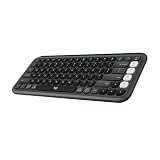
Logitech K480 Multi-Device Keyboard
Spec line: Bluetooth · built-in cradle slot for a tablet or phone · easy-switch dial for several devices · runs on replaceable AAA batteries · full-size layout with number keys.
Best for: Desk and couch typists who want a tablet held at a readable angle without buying a case. Skip if: You travel light or need a trackpad; the keyboard is a flat slab that is bulkier than folio designs.
Pros: Integrated tablet cradle; long-running replaceable batteries; entry-level cost. Cons: Heavy for its size; no backlight or trackpad; cradle fits only a limited thickness, so thick cases may not seat.

Logitech Keys-To-Go (iPad, iPhone and Mac version)
Spec line: ultra-slim Bluetooth keyboard · built-in cover · compact portable design · version labeled for Apple devices · no trackpad.
Best for: Travelers who want a very thin keyboard that stays under a tablet in a bag and works with several Apple devices. Skip if: You need a trackpad, a stand, or full-size keys; the low-travel keys suit short notes more than long documents.
Pros: Very thin and light; works across Apple devices; mid-range cost. Cons: Needs a separate tablet stand; shallow key travel; Android and Windows users need a different version.

Nillkin Keyboard Case for iPad Air 11-inch
Spec line: detachable keyboard case · precision trackpad · seven-color backlight · protective shell with military-grade drop claim · fits iPad Air 4th and 5th generation.
Best for: Owners of an older iPad Air who want a protective case with a trackpad and backlight at an entry-level to mid-range cost. Skip if: Your iPad Air is a later generation; the listing names 4th and 5th generation, so confirm the fit.
Pros: Detachable keyboard; trackpad and backlight; added drop protection. Cons: Adds bulk and weight; third-party fit and finish vary; no Smart Connector power.

Nillkin Keyboard Case for Galaxy Tab S10 FE+
Spec line: detachable keyboard case · seven-color backlight · kickstand · trackpad · S Pen holder.
Best for: Galaxy Tab S10 FE+ owners who want a third-party keyboard case with a pen holder and stand. Skip if: You own a different Galaxy Tab; fit is model-specific, so this is not a universal Android keyboard.
Pros: Trackpad and backlight; kickstand; pen storage. Cons: Model-specific; heavier than a standalone keyboard; Samsung-made covers may fit tighter.

Microsoft Surface Pro Keyboard
Spec line: Alcantara fabric finish · attaches magnetically to a Surface Pro · keyboard-only version for the 12-inch Surface Pro · no case protection.
Best for: Windows tablet users who want the first-party keyboard, since the Surface family needs a matching connector. Skip if: You use an iPad or Android tablet; this keyboard does not work with them.
Pros: Matches the Surface design; fabric finish; designed for the tablet hinge and kickstand. Cons: Premium tier; the keyboard must match the exact Surface generation; no protection for the screen beyond the cover closing over it.

All 15 tablet keyboards compared by tablet and style
| Keyboard | Works with | Style | Trackpad | Cost tier |
|---|---|---|---|---|
| Apple Magic Keyboard for iPad Pro | iPad Pro M4 and M5 | Floating case | Yes | Premium |
| Logitech Combo Touch | iPad, iPad Air, iPad Pro (by version) | Detachable case | Yes | Mid-range to premium |
| Apple Magic Keyboard Folio | iPad A16 and 10th gen | Two-piece folio | Yes | Mid-range |
| ESR Rebound 360 | iPad Air and iPad Pro | Magnetic case | Yes | Mid-range |
| Apple Magic Keyboard for iPad Air | iPad Air | Floating case | Yes | Premium |
| Logitech Folio Touch | iPad Air | Folio case | Yes | Mid-range |
| Logitech Flip Folio | iPad Air and iPad Pro | Flip folio | No | Mid-range |
| Samsung Book Cover Keyboard Slim | Galaxy Tab S11 | Book cover | Yes | Mid-range |
| Logitech Pebble Keys 2 K380s | Any Bluetooth tablet | Standalone | No | Entry-level |
| Logitech POP Icon Keys | Any Bluetooth tablet | Standalone | No | Entry-level |
| Logitech K480 | Any Bluetooth tablet | Standalone with cradle | No | Entry-level |
| Logitech Keys-To-Go | iPad, iPhone, Mac | Ultra-slim standalone | No | Mid-range |
| Nillkin Keyboard Case for iPad Air 11-inch | iPad Air 4th and 5th gen | Detachable case | Yes | Entry-level to mid-range |
| Nillkin Keyboard Case for Galaxy Tab S10 FE+ | Galaxy Tab S10 FE+ | Detachable case | Yes | Mid-range |
| Microsoft Surface Pro Keyboard | Surface Pro | Magnetic attach | Model dependent | Premium |
Quick thresholds for choosing a tablet keyboard
- Typing time: under 30 minutes a day, a standalone Bluetooth keyboard is enough. Over an hour a day, pick a model with a trackpad and a stand.
- Weight: if the keyboard weighs more than the tablet, you have built a laptop; keep the combined weight below about 1.2 kg for commuting.
- Device count: with three or more devices to pair, choose a multi-device keyboard such as the K380s, POP Icon Keys or K480 over a case locked to one tablet.
- Protection: if the tablet rides in a loose bag, choose a case-style keyboard with edge coverage over a floating or standalone design.
- Budget: entry-level standalone keyboards cover note-taking, mid-range cases add trackpads and protection, premium first-party keyboards add haptic trackpads and tight fit.
Frequently asked questions
Are third-party tablet keyboards as good as Apple’s?
Third-party keyboards can match Apple’s on function and protection but usually trail on key feel and trackpad quality. The Logitech Combo Touch is the most common alternative and gives up little for everyday work.
Do I need a keyboard with a trackpad?
Choose a trackpad if you type for more than about an hour a day or work in documents and spreadsheets. For short notes and emails a keyboard without one is enough.
Will a Bluetooth keyboard work with any tablet?
Yes, any Bluetooth keyboard pairs with iPadOS, Android and Windows tablets. You lose features such as Smart Connector power and model-specific function shortcuts.
Does a Smart Connector keyboard need charging?
No. Smart Connector keyboards draw power from the tablet and need no pairing, so they are always ready when attached.
Which keyboard is best for an iPad Air?
The Logitech Combo Touch is the safest all-round pick for current iPad Air models. Apple’s Magic Keyboard for iPad Air suits those who want the floating design and do not need function keys.
Which keyboard works with a Galaxy Tab S11?
Samsung’s Book Cover Keyboard Slim is built for the Tab S11 family and supports DeX. Verify the exact tablet size before ordering, since fit is model-specific.
Can I use an iPad Pro keyboard on an iPad Air?
No. The two models have different thickness and connector placement, and Apple sells separate keyboards for each. Always buy the version listed for your exact generation.
Is a keyboard case worth it over a standalone keyboard?
A keyboard case gives you protection, a stand and no pairing in a single piece. A standalone keyboard is lighter and cheaper, but you need to prop the tablet up separately.
Bottom line
Start with your tablet’s exact model, then use the criteria above. Apple’s Magic Keyboard for iPad Pro is the top typing experience, the Logitech Combo Touch is the sensible all-round choice, and the Galaxy Tab S11 Book Cover Keyboard Slim is the natural answer for Samsung’s flagship. Check the compatibility list one last time before you order, because fit is where most returns happen.
More from Amazon
Programs that pair well with the guide above. Offers and eligibility are set by Amazon and may change.
Free shipping on eligible items, Prime Video and more. Eligible new members can start with a free trial.
Start a Prime free trialAd-free music streaming. Eligible new subscribers can start with a free trial.
Try Music Unlimited freeA Prime membership for ages 18-24 with a trial period. Eligibility is set by Amazon.
See Prime for Young AdultsAudiobooks and podcasts to listen to on the go. Eligible new members can start with a free trial.
Try Audible freeAs an Amazon Associate we earn from qualifying purchases.