Key takeaways
- Compare the best smart document cameras for classrooms, offices, and streaming, with Wi-Fi, auto-focus, and software picks for every desk setup today.
A document camera turns paper, textbooks, artwork, and small objects into a live image a whole class, meeting, or stream audience can see. The smart end of this category adds something extra: a wireless connection, an auto-focus system that keeps a moving hand sharp, or a software suite that flips the image, annotates over it, records the lesson, or converts printed text through optical character recognition.
This guide separates the genuinely connected and software-driven cameras from plain USB models that simply send a picture to a computer. Each pick is a true document camera or visual presenter, not a webcam and not a flatbed scanner, judged on what its own listing states about connectivity, focus, capture area, and software.
As an Amazon Associate, we earn from qualifying purchases.
Quick Answer
Start with the IPEVO VZ-X if you need true wireless freedom, since it connects over Wi-Fi, HDMI, and USB from a built-in battery. Choose the INSWAN INS-2 for large A3 pages, dual auto-focus, and Documate software with OCR, or the INSWAN INS-1 for a smaller desk. The OKIOCAM S-4K adds an AI-tracked pointer, while the IPEVO V4K is an honest plain USB option.
How to Choose
Decide first how the camera will reach the screen. A Wi-Fi model can send its image to a tablet, phone, or display across the room, suiting teachers who move while they talk. An HDMI output lets a camera feed a projector or television directly, with no computer in the chain. A USB-only camera is simpler and lighter, but the computer becomes mandatory, and every smart feature then lives in software on that computer.
Next, look at focus. Auto-focus matters whenever hands, models, or objects move under the lens, because the image re-sharpens on its own. Some listings describe a single-shot auto-focus button, while others describe dual modes that keep tracking. For flat, still pages focus matters less; for live science, art, or product demos it is one of the clearest dividing lines between a basic camera and a smarter one.
Capture area is the third check. A letter-size page fits most compact models, but a two-page spread, ledger sheet, or large artwork needs an A3-class area and an arm tall enough to frame it. Check the stated maximum shooting area rather than resolution alone, because megapixels cannot recover a page edge that never entered the frame.
Then read the software description carefully. Bundled suites such as Documate, IPEVO Visualizer, and OKIOCAM Live can add image flip, digital zoom, annotation, recording, time-lapse, and in some cases OCR that converts a photographed page into editable text. Those tools only work on supported operating systems, though, and some features exist in the app rather than in video calls. If your school or office locks down installation, confirm the camera still works as a standard video source in your meeting apps.
Finally, weigh the practical details: a built-in LED helps under dim lighting, a built-in microphone saves a separate audio setup, and a folding arm makes a camera easier to carry between rooms.
IPEVO VZ-X Wireless Document Camera
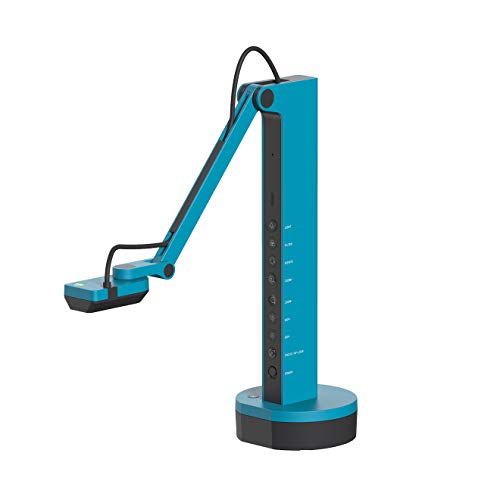
The VZ-X is the one genuinely wireless camera in this group, with three modes of connectivity in its listing: Wi-Fi, HDMI, and USB. In Wi-Fi mode it works wirelessly with iOS, tvOS, and Android devices, so a teacher can place it beside a student project and send the image to the room display with no cable crossing the floor. In HDMI mode it feeds a projector or television directly. A built-in battery rated at nine to twelve hours covers a full day, and the stated wireless range reaches up to thirty-three feet.
Its eight megapixel Sony sensor captures up to 3264 by 2448 in USB mode, while Wi-Fi and HDMI modes run at 1920 by 1080, so the sharpest stills come through the wired connection: wireless convenience costs some resolution. A swiveling head, multi-jointed stand, and built-in LED round out the hardware. For classrooms, training rooms, and streamers who rearrange their desks often, this is the most flexible pick here, and the only one that is smart in the wireless sense rather than only in software.
Specs
| Feature | Detail |
|---|---|
| Sensor | 8 MP Sony CMOS |
| Connectivity | Wi-Fi, HDMI, and USB |
| Capture | Up to 3264 x 2448 in USB mode; 1920 x 1080 over Wi-Fi and HDMI |
| Battery | Built-in, rated 9 to 12 hours |
| Wireless range | Up to 33 feet |
| Lighting | Built-in LED |
INSWAN INS-2 UHD 4K Document Camera

The INS-2 is the large-format pick. Its thirteen megapixel Sony sensor captures 4K Ultra HD images at 3840 by 2160, and the multi-jointed arm frames documents up to A3 size, covering two-page spreads and artwork that smaller cameras crop. Macro capability reaching as close as 3.9 inches helps with fine detail, and a built-in LED and anti-glare sheet support work under uneven lighting.
What makes the INS-2 smart rather than just sharp is dual auto-focus plus the bundled Documate software. The listing describes dual-mode auto-focus, a built-in microphone, and plug-and-play use across Windows, Mac, iPad, and Chromebook. Documate adds digital zoom, annotation, recording, scanning, whiteboard tools, and OCR, so a photographed worksheet can become editable text. Honesty note: it is still a USB camera, with no Wi-Fi and no direct HDMI path in its listing; every smart feature runs through the connected computer. At about 2.3 pounds it is also the heaviest pick here, suiting a fixed desk better than daily travel.
Specs
| Feature | Detail |
|---|---|
| Sensor | 13 MP Sony CMOS |
| Capture | 3840 x 2160 at 30 fps; A3 maximum area |
| Focus | Dual-mode auto-focus, macro to 3.9 inches |
| Connectivity | USB, plug and play |
| Software | Documate with annotation, recording, and OCR |
| Extras | Built-in LED, built-in microphone, anti-glare sheet |
INSWAN INS-1 USB Document Camera

The INS-1 is the smaller sibling for a single desk. Its eight megapixel Sony sensor captures up to 3264 by 2448, and the listing states auto-focus, a built-in LED light, and a built-in microphone in a folding body. Microscope adapters and an anti-glare sheet are included, making it a natural fit for science classes as well as worksheet work.
Like the INS-2, the INS-1 pairs with Documate software, which the manual describes as required for full operation on PC, Mac, and Chromebook. Through it the camera gains annotation, snapshots, recording, and image adjustment that a plain video feed lacks, and its auto-focus button re-sharpens the image on demand. It remains USB-only with no wireless mode, so it counts as smart through auto-focus and software rather than connectivity. For remote teaching and live demos from one workstation, it covers the essentials in a compact frame.
Specs
| Feature | Detail |
|---|---|
| Sensor | 8 MP Sony CMOS |
| Capture | Up to 3264 x 2448 |
| Focus | Auto-focus |
| Connectivity | USB |
| Software | Documate application for PC, Mac, and Chromebook |
| Extras | Built-in LED, built-in microphone, microscope adapters |
OKIOLABS OKIOCAM S-4K Document Camera

The OKIOCAM S-4K is a compact two-in-one design that also serves as a webcam, with an eight megapixel Sony Exmor R sensor capturing up to 3264 by 2448. Its standout smart feature is OKIOPoint, a software-driven visual pointer that tracks and highlights where you point, holding attention during a live explanation far better than a waving hand. It connects over USB and is listed as compatible with PC, Mac, and Chromebooks.
The supporting software adds annotation, recording, snapshots, and picture-in-picture presentation options, and the back-illuminated sensor aims at cleaner images in dimmer rooms. The capture area suits letter-size material rather than full A3 spreads, so this is a personal-desk and small-classroom camera. It earns its place through its pointer software: if your lessons depend on guiding eyes to one line, formula, or component at a time, that tracking feature is the reason to choose it.
Specs
| Feature | Detail |
|---|---|
| Sensor | 8 MP Sony Exmor R CMOS |
| Capture | Up to 3264 x 2448 |
| Connectivity | USB; PC, Mac, and Chromebook compatible |
| Smart feature | OKIOPoint software visual pointer |
| Design | Compact 2-in-1 document camera and webcam |
| Model | OKIOCAM S-4K, model OKL-S1 |
IPEVO V4K USB Document Camera

The V4K is included with a clear honesty note: by its own listing it is a plain USB document camera, not a genuinely smart one. It has no Wi-Fi, no HDMI output, and no auto-focus system. What it offers is a proven eight megapixel camera with a multi-jointed stand, a built-in LED, and compatibility with Mac, Windows, and Chromebooks for live demos, web conferencing, and remote teaching.
Its software connection is IPEVO Visualizer, which handles image adjustment and presentation display on the connected computer, and the camera also appears as a standard video source in conferencing apps. There is real value in a camera with almost nothing to configure, charge, or pair. Buy it for the right reason: simple, dependable page capture at a desk where the computer is always present. If wireless freedom, focus tracking, or OCR are on your list, choose a model above instead.
Specs
| Feature | Detail |
|---|---|
| Sensor | 8 MP |
| Capture | Up to 3264 x 2448; Full HD video up to 30 fps |
| Connectivity | USB only; Mac, Windows, and Chromebook compatible |
| Software | IPEVO Visualizer on the connected computer |
| Design | Multi-jointed stand, built-in LED |
| Model | CDVU-08IP |
Who Should Skip It
Skip this category if a phone on a stand already covers occasional page-sharing, because a dedicated camera only pays off with regular lessons, demos, or streams. Skip the VZ-X if your network restricts new devices or your desk is fixed, since you would pay for freedom you never use. Skip the USB-only models if you need to feed a projector or television with no computer involved. Skip the compact models if you present A3 spreads daily, and skip the INS-2 if you carry your camera between rooms all day. Finally, skip any pick whose smart features depend on software your school or employer will not let you install.
FAQ
Do smart document cameras work with Zoom, Teams, and Google Meet?
Yes, in USB mode these cameras appear as standard video sources, so conferencing apps can select them like any other camera. The VZ-X listing notes compatibility with web conferencing software in USB mode, and the INSWAN listings name common meeting platforms as well. Extras such as annotation or OCR live in the bundled software rather than inside the meeting app.
Is Wi-Fi worth it on a document camera?
Wi-Fi is worth it when the camera moves, the display sits across the room, or a cable would cross a walkway, and the VZ-X adds a battery for untethered sessions. On a fixed desk, Wi-Fi adds cost and setup without changing the picture much, and wired USB still delivers the highest stated resolution on the VZ-X.
What does OCR do in a document camera bundle?
OCR, or optical character recognition, converts a photographed page into editable, searchable text instead of a flat image. The INSWAN Documate suite bundled with the INS-2 includes OCR alongside annotation, recording, and scanning tools, which suits teachers digitizing worksheets and offices archiving printed forms. Accuracy still depends on print quality and lighting, so check converted text before relying on it.
Can a document camera replace a scanner?
For live presentation and quick single-page capture, yes, but a document camera is not a flatbed scanner. It photographs pages one view at a time, so bulk archiving and automatic page feeding remain scanner jobs. Choose the camera for showing and teaching, and keep a scanner for high-volume digitizing.
Final Verdict
For most buyers who want a genuinely smart document camera, the IPEVO VZ-X is the first choice, because wireless Wi-Fi, direct HDMI, and battery power change how and where you can present. The INSWAN INS-2 is the better pick for large A3 material and weekly Documate annotation and OCR, while the INS-1 delivers the same software idea in a smaller format. The OKIOCAM S-4K earns its place through OKIOPoint pointer tracking. The IPEVO V4K remains a sound, simple USB camera, as long as you buy it knowing it is the plain option here.
Product and ASIN Reference
| Product | ASIN |
|---|---|
| IPEVO VZ-X Wireless Document Camera | B08WWH5SCN |
| INSWAN INS-2 UHD 4K Document Camera | B091CWP2JG |
| INSWAN INS-1 USB Document Camera | B07PQJZK66 |
| OKIOLABS OKIOCAM S-4K Document Camera | B0827LLG8P |
| IPEVO V4K USB Document Camera | B079DLTG9F |
More from Amazon
Programs that pair well with the guide above. Offers and eligibility are set by Amazon and may change.
Free shipping on eligible items, Prime Video and more. Eligible new members can start with a free trial.
Start a Prime free trialAd-free music streaming. Eligible new subscribers can start with a free trial.
Try Music Unlimited freeA Prime membership for ages 18-24 with a trial period. Eligibility is set by Amazon.
See Prime for Young AdultsAudiobooks and podcasts to listen to on the go. Eligible new members can start with a free trial.
Try Audible freeAs an Amazon Associate we earn from qualifying purchases.