Key takeaways
- Dust is the quiet enemy of keyboards, graphics card fans, console vents and laptop intakes.
Dust is the quiet enemy of keyboards, graphics card fans, console vents and laptop intakes. Anyone searching “best compressed air dusters for electronics” has already decided to blow the dust out instead of poking at it, and now faces a real fork: disposable pressurized cans, or the newer rechargeable electric blowers that advertise themselves as replacements for canned air.
This guide is for PC owners, console players, office managers and anyone who cleans a keyboard once in a while. Cans are cheap to start and need no charging, but they run out and chill as they spray. Electric units cost more up front and keep going until the battery dies. The sections below cover what to check, then walk through eight listings as of 2026.
Quick Picks
Our top picks



As an Amazon Associate we earn from qualifying purchases at no extra cost to you.
| Product | Best for | Key feature from the title |
|---|---|---|
| Anoiiv 130,000 RPM Electric Duster | All-round desk and car use | 3-gear adjustable, 5 nozzles, brushless motor |
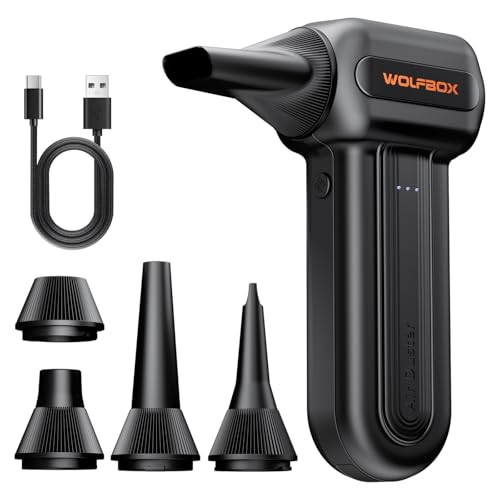
| WOLFBOX MF60 Electric Duster | Light, portable cleaning | 110,000 RPM, rechargeable, 0.5 lb |
| WOLFBOX MegaFlow 50 | Keyboard and PC upkeep | 110,000 RPM, 0.45 lb, 4 nozzles |
| SKTFFR 150,000 RPM Electric Duster | Buyers who want finer speed control | 6 gears, rechargeable, cordless |
| HHJ 340,000 RPM Electric Duster | Maximum power and extras | 20W PD fast charge, LED and SOS light |
| Staples Air Duster, 2-Pack | Occasional cleaning, no charging | Two 10 oz cans |
| Office Depot Cleaning Duster, 6-Pack | Shared offices and repair benches | Six 10 oz cans, moisture-free |
| 310,000 RPM Type-C Electric Duster | Charging with a common cable | Type-C charging, 4-gear turbo fan |
How to Choose
Can or Electric Blower
Cans give a cold, directed burst and stay useful in a drawer for years if unused. Electric blowers deliver steady airflow, need charging and often include several nozzles. If you clean monthly, electric usually saves refills; if you clean twice a year, a can pack is simpler.
Power Numbers and What They Mean
Listings quote RPM, gear counts and wind speed. Higher RPM suggests a stronger fan, but those numbers come from the seller and vary in meaning across brands. Treat them as a rough tier, and prefer adjustable speed so you can use a gentle setting around delicate parts such as keyboard switches or laptop fans.
Nozzles, Charging and Weight
Narrow nozzles reach between keycaps and into heatsinks; wider ones suit cases and car vents. Check whether the product charges over USB-C, since a cable you already own is convenient. Lighter units feel easier to hold while you work through a full PC case.
Where Budget Models Cut Corners
Weak batteries, short runtimes and flimsy nozzles are the usual compromises. With cans, the compromise is volume per can and the fact that the contents are gone fast. Ignore dramatic airflow claims; instead, read how many nozzles are included and how the device charges.
The 8 Best Options
Anoiiv 130,000 RPM Electric Duster
A cordless blower with three speed gears and five nozzles, built around a brushless motor. It reads as a general-purpose tool for a keyboard, a car interior or a workshop shelf.
- Strength: three adjustable gears allow gentler cleaning.
- Strength: five nozzles cover many tight spaces.
- Trade-off: 130,000 RPM is mid-range among the electric listings.
Skip it if you want the most powerful unit or a disposable can. For buyers who like a middle path, the brushless motor and the full nozzle set make it a sensible first electric blower to learn on, with room to step the airflow up or down.
WOLFBOX MF60 Electric Duster
This one is aimed at light, rechargeable cleaning, with fast charging and a listed weight of 0.5 lb. It suits desk workers who clean a keyboard and monitor regularly.
- Strength: lightweight body is easy to carry.
- Strength: three adjustable speeds and fast charging.
- Trade-off: 110,000 RPM sits below the stronger models.
Skip it if you need extra nozzles or more than a gentle blower. The charging speed matters here: a short top-up between cleanings is easier to live with than a unit that sits flat in a drawer.
WOLFBOX MegaFlow 50
A slightly lighter sibling, listed at 0.45 lb with four nozzles. It aims at computer, keyboard, house and car cleaning, so it works as a single tool for several rooms.
- Strength: lightest weight listed in this group.
- Strength: four nozzles included.
- Trade-off: same 110,000 RPM tier as the MF60, with fewer nozzles than the Anoiiv.
Skip it if you want a higher-powered motor. Think of it as the grab-and-go option for a quick pass over a keyboard, monitor vents and a car dashboard, where weight matters more than raw airflow.
SKTFFR 150,000 RPM Electric Duster
A cordless blower with six adjustable gears. It is the one to look at when you want finer control, from a light puff over a keyboard to a stronger blast for a case filter.
- Strength: six gears give the widest speed choice among the mid-range models.
- Strength: 150,000 RPM is a step above the 110,000 and 130,000 listings.
- Trade-off: more gears means more settings to learn.
Skip it if you prefer a simple on-off experience. Owners who clean several devices, from a tower to a printer, may enjoy matching the gear to the job instead of using one force for everything.
HHJ 340,000 RPM Electric Duster
The feature-heavy option, with 82 m/s wind speed, 20W PD fast charging, a 30W power bank output, LED and SOS light and five nozzles. It targets owners who want one gadget for the PC, the car and outdoor use.
- Strength: highest listed RPM and wind speed.
- Strength: power bank output and LED light add flexibility.
- Trade-off: strong airflow needs care near lightweight parts.
Skip it if you only want a basic keyboard cleaner. The extra output and lights add features that a desk-only user may never touch, and a stronger fan calls for slower, more careful passes.
Staples Air Duster, 2-Pack
Two 10 oz cans for cleaning electronics, keyboards and office devices. They are a low-effort answer for someone who dusts a keyboard a few times a year.
- Strength: no charging or setup.
- Strength: familiar format for office cleaning.
- Trade-off: cans empty quickly and cannot be refilled.
Skip it if you clean often or want a reusable tool. The two-pack format makes sense for occasional use, such as clearing a keyboard before a move or wiping a console vent before a long gaming weekend.
Office Depot Cleaning Duster, 6-Pack
Six 10 oz moisture-free cans aimed at computers, laptops, printers and office equipment. It suits a shared office or repair bench where cans get used quickly.
- Strength: six cans in one pack cover many cleanings.
- Strength: moisture-free wording suits electronics.
- Trade-off: bulky pack takes storage space.
Skip it if you have a small home setup and little space. The pack makes the most sense where several devices need regular dusting and someone keeps the cans stocked so nobody runs dry mid-job.
310,000 RPM Type-C Electric Duster
An unbranded-looking listing with Type-C charging, a four-gear turbo fan and multiple accessories for keyboards, cars and the house. It suits buyers who want to recharge using a cable they already own.
- Strength: Type-C charging is convenient.
- Strength: four gears and accessories included.
- Trade-off: less brand information in the title.
Skip it if brand reputation and clear specs matter most to you. The listing offers less manufacturer detail than the named brands, so buyers who want a clear support path may prefer a branded model.
Which One Fits Your Situation
Cleaning a Gaming PC Every Month
Pick the SKTFFR 150,000 RPM Electric Duster for its six speed gears, or the Anoiiv 130,000 RPM unit if you prefer a simpler three-gear control. Both are rechargeable, so you skip the monthly can purchase.
Occasional Keyboard and Laptop Dusting
The Staples Air Duster, 2-Pack covers a few cleanings with no charging. If you would like to avoid a recurring cost, the lightweight WOLFBOX MegaFlow 50 is the reusable alternative.
A Shared Office or Repair Desk
Go with the Office Depot Cleaning Duster, 6-Pack, because several people can use cans without worrying about whose turn it is to charge a device. For a single technician wanting one multi-purpose tool, the HHJ 340,000 RPM stands out.
Common Mistakes
- Spinning a PC fan freely with strong airflow; hold the blades still first.
- Tilting or shaking a can, which can release cold liquid propellant.
- Blowing dust deeper into a case instead of pointing it out through an opening.
- Cleaning with the device powered on and plugged in.
- Assuming higher RPM always means better cleaning for delicate parts.
Related guides
- Deep Heat Projectors For Reptile Enclosures
- Electrical Testing Tools For Diy Projects
- Wireless Chargers For Iphone And Airpods
Frequently Asked Questions
Are electric dusters as good as canned air?
They serve the same purpose with steady airflow rather than a cold blast. Many buyers prefer them for repeated use, while cans stay handy for occasional jobs.
Can an electric duster damage a computer?
Careless use can, as with cans. Use a low gear around fans and keyboards, hold fan blades still, and follow the device maker’s cleaning guidance.
How often should I dust a PC?
It depends on the room, pets and carpets. Many owners look inside every few months and clean when dust is visible on filters and heatsinks.
Is canned air safe to use indoors?
Use cans in a ventilated room, hold them upright and follow the printed warnings. If you have breathing concerns, ask a professional.
More from Amazon
Programs that pair well with the guide above. Offers and eligibility are set by Amazon and may change.
Free shipping on eligible items, Prime Video and more. Eligible new members can start with a free trial.
Start a Prime free trialAd-free music streaming. Eligible new subscribers can start with a free trial.
Try Music Unlimited freeA Prime membership for ages 18-24 with a trial period. Eligibility is set by Amazon.
See Prime for Young AdultsAudiobooks and podcasts to listen to on the go. Eligible new members can start with a free trial.
Try Audible freeAs an Amazon Associate we earn from qualifying purchases.