Key takeaways
- A 10 inch tablet under 200 dollars is a purchase with a clear ceiling and a clear risk. The ceiling means you will not get a flagship panel or fast storage.
A 10 inch tablet under 200 dollars is a purchase with a clear ceiling and a clear risk. The ceiling means you will not get a flagship panel or fast storage. The risk is that the listings in this tier shout big numbers, such as 24GB of RAM or 2TB of expansion, that tell you little about how the tablet feels when you scroll, stream and switch apps. This guide cuts through those numbers to the specs a buyer can actually weigh: screen resolution, real storage, processor class, wireless standard and battery.
The audience is practical: a student who needs a reading and note-taking slate, a parent looking for a shared living-room streaming screen, or someone who wants a travel tablet for video and light browsing. Eight distinct models are compared below, using only the facts in each listing title as of 2026. Duplicate listings of the same models were merged, so each tablet appears once.
Quick Picks
Our top picks




As an Amazon Associate we earn from qualifying purchases at no extra cost to you.
| Product | Best for | Key spec from the title |
|---|---|---|
| Android 16 Tablet (24GB RAM, 64GB) | Newest Android on paper | Android 16, WiFi 6, BT 5.4, 6000mAh |
| COOPERS 10 inch Tablet | Plain, balanced spec | 1280×800 IPS, 6000mAh, 2+8MP cameras |
| Android 15 Tablet with Case and Stylus | Note-taking out of the box | Case and stylus, 10.1″ IPS HD |
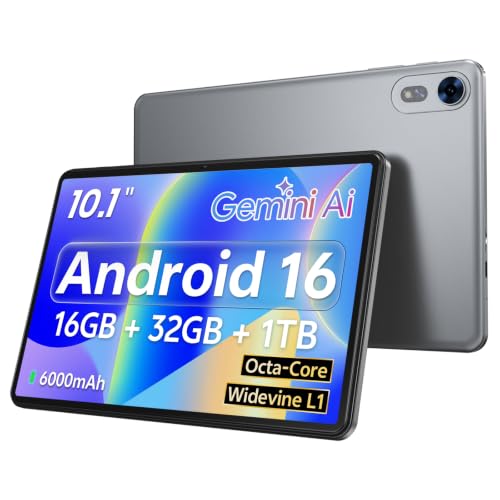
| Android 16 Octa-Core Tablet (Gray) | Streaming | Widevine L1, WiFi 6, octa-core |
| aiprotablet 10 inch | Light use | 12GB RAM, 64GB ROM, WiFi 5 |
| CUPEISI Android 16 Tablet | Most storage | 128GB ROM, 2TB expandable, octa-core |
| IWEGGO Android 15 Tablet | Large storage, quad-core | 128GB ROM, 2TB expandable, WiFi 6 |
| ZZB 10 inch Tablet | Basic everyday tablet | 10.1″ IPS, 5G WiFi-6, dual camera |
How to Choose
Resolution is the screen spec to check
Most of these tablets list a 1280×800 panel, which is the entry level for a 10 inch screen. It is fine for video and e-books but a little soft for small text. Panels labeled IPS give wider viewing angles than basic LCD, so prefer them if the tablet will be shared on a couch. A full HD panel would be a clear step up, but it is rare under 200 dollars, so do not expect it.
Storage is real, RAM may be partly borrowed
Treat the physical ROM figure as the number that counts: 32GB fills up quickly after a few apps and downloaded shows, while 64GB or 128GB gives breathing room. The expansion figures of 1TB or 2TB refer to what a microSD card could add, not what is inside. Big RAM claims on budget tablets can include storage used as virtual memory, so a figure such as 24GB is not the same as 24GB of fast memory.
Processor, Wi-Fi and battery
An octa-core chip generally handles app switching better than a quad-core, though both are entry-level in this tier. WiFi 6 helps in crowded homes and offers better streaming stability than WiFi 5, so prefer it if your router supports it. A 6000mAh battery is the common figure here, which typically suits a day of mixed use, but the title rarely proves the hours, so look for stated runtime on the product page.
Video streaming support and what to ignore
If you stream Netflix or similar services in high definition, look for Widevine L1, which only one listing here names. Without it, many apps fall back to lower resolution. Ignore the Android version as a quality signal: a tablet running Android 16 with a weak chip is still a weak tablet. Budget models usually cut corners on camera quality, speakers and software update support.
One more point sets this tier apart from pricier tablets: the labels are generous and the support is thin. Plan for a tablet that you will use for two or three years at most, and pick the one whose weakest point is the one you care about least. If storage is your pain point, spend the savings on a memory card; if screen quality is, accept that this class will not satisfy you and keep expectations at reading and video. Also set a realistic budget for extras: a microSD card, a case and a screen protector together can matter as much as a small step up in tablet tier, so count them before you decide which listing is the better deal.
The 8 Best Options
Android 16 Tablet (24GB RAM, 64GB)
This listing leads with big numbers and recent software. The title lists Android 16, 24GB RAM, 64GB ROM, 1TB expansion, an HD IPS touchscreen, WiFi 6, BT 5.4, a 6000mAh battery and two cameras.
- Strength: 64GB of storage is more comfortable than the 32GB models.
- Strength: WiFi 6 and BT 5.4 are the newest wireless standards in the group.
- Trade-off: the 24GB RAM figure should be read with caution, since it likely includes virtual memory.
Skip it if you want a stated processor class, which the visible title does not give. Buyers drawn to this model should confirm the processor on the product page, since a recent Android version and a large RAM number do not settle how smooth everyday scrolling will be. Treat it as a storage-and-wireless pick first.
COOPERS 10 inch Tablet
The COOPERS is a middle-of-the-road pick with a clear spec list. The title lists Android 15, 32GB ROM, 1TB expansion, a quad-core processor, a 6000mAh battery, a 1280×800 IPS screen and 2+8MP cameras.
- Strength: IPS panel with a stated resolution.
- Strength: a 6000mAh battery with an 8MP rear camera for document scans.
- Trade-off: 32GB of storage fills up fast without a memory card.
Skip it if you plan to store many downloaded videos or large apps. It fits a household that mainly streams, since downloads are the main thing that would strain the space. Pairing it with a memory card would solve most of that.
Android 15 Tablet with Case and Stylus
This one bundles accessories, which is useful for students. The title lists a 10.1 inch IPS HD screen, Android 15, 8GB RAM, 32GB ROM, 1TB expansion, a 6000mah battery, a case, a screen protector and a stylus.
- Strength: the case, screen protector and stylus are included.
- Strength: a 10.1 inch IPS HD panel suits reading and sketching.
- Trade-off: 32GB of storage and unstated processor details.
Skip it if you already own a case and stylus and would rather pay for storage. Because the bundle includes a screen protector too, it also suits a gift for a student who will carry the tablet in a backpack and needs it protected from day one.
Android 16 Octa-Core Tablet (Gray)
This is the streaming-oriented option. The title lists Android 16, an octa-core chip, 16GB+32GB memory, 1TB expansion, a 6000mAh battery, Widevine L1, WiFi 6, BT 5.0 and dual cameras.
- Strength: Widevine L1 is named, which matters for HD streaming.
- Strength: an octa-core chip with WiFi 6.
- Trade-off: only 32GB of physical storage.
Skip it if you want a lot of onboard space for offline files. It is the most targeted model here for evening video on the couch, where playback quality matters more than how many files the tablet can hold.
aiprotablet 10 inch
A plain Android 15 tablet for casual use. The title lists 12GB RAM, 64GB ROM, 1TB expansion, a quad-core processor, a 1280×800 LCD touchscreen, WiFi 5, dual cameras and BT5.
- Strength: 64GB of storage at a modest tier.
- Strength: Bluetooth 5 works with current headphones.
- Trade-off: WiFi 5 and an LCD panel are older choices than the IPS and WiFi 6 rivals.
Skip it if your home network is crowded and you want WiFi 6. It is a sensible choice for a child’s reading and video tablet, where the newest wireless standard adds little and a lower tier is acceptable.
CUPEISI Android 16 Tablet
The CUPEISI offers the largest storage and a faster-sounding processor. The title lists Android 16, 20GB RAM plus 128GB ROM, 2TB expansion, a 2.0GHz octa-core processor, a 1280*800 HD screen, 5G WiFi 6, BT 5.0 and a 2 in 1 design.
- Strength: 128GB of onboard storage is the most in the group.
- Strength: a 2.0GHz octa-core chip with WiFi 6.
- Trade-off: the resolution is still 1280*800.
Skip it if you want a sharper display than entry-level HD. Its spec list suits someone who keeps many apps, comics or offline videos on the device and wants the roomiest base storage before adding a card.
IWEGGO Android 15 Tablet
The IWEGGO matches the CUPEISI on storage but uses a quad-core chip. The title lists Android 15, 18GB RAM plus 128GB ROM, 2TB expansion, a 2.0GHz quad-core processor, a 1280*800 HD touch screen, 5G WiFi 6 and BT 5.0.
- Strength: 128GB of onboard storage.
- Strength: WiFi 6 and Bluetooth 5.0.
- Trade-off: a quad-core chip instead of octa-core.
Skip it if multitasking speed matters more to you than storage. It works well as a media shelf for trips, where a library of downloaded shows matters more than raw speed numbers.
ZZB 10 inch Tablet
A basic, no-surprises tablet. The title lists a 10.1 inch IPS screen, Android 15, DDR4 8GB RAM, 32GB ROM, 2MP plus 8MP cameras, 5G WiFi 6 and 1TB expansion.
- Strength: WiFi 6 in a low-cost tablet.
- Strength: IPS panel with a rear 8MP camera.
- Trade-off: 32GB of storage.
Skip it if you want the largest storage or a named streaming certification. It is a fit for a spare tablet kept in the kitchen or workshop for recipes, videos and calls, where a modest spec list is perfectly acceptable.
Which One Fits Your Situation
You stream a lot of video
Pick the Android 16 Octa-Core Tablet (Gray). Widevine L1 and WiFi 6 are the two items that matter for HD streams.
You need space for files and downloads
Choose the CUPEISI Android 16 Tablet, which offers 128GB of onboard storage and an octa-core chip.
You want to take notes right away
The Android 15 Tablet with Case and Stylus saves you from buying accessories separately.
You want a no-frills second tablet
The COOPERS 10 inch Tablet gives a clear spec list, a 1280×800 IPS display and a 6000mAh battery.
Common Mistakes
- Believing the RAM figure without checking the physical storage.
- Counting a microSD expansion limit as included storage.
- Assuming newer Android means a faster tablet.
- Skipping Widevine L1 when HD streaming is the main use.
- Paying extra for dual cameras that are only good for video calls.
Related guides
- Wireless Chargers For Iphone And Airpods
- Black Friday And Cyber Monday Deals
- Noise Cancelling Earbuds Under $100
Frequently Asked Questions
Is 32GB enough?
It works for browsing and a few apps, but it fills quickly. A microSD card helps, though some apps cannot be moved to it. Choosing 64GB or 128GB at purchase avoids that limitation entirely and keeps the tablet snappy as the library grows.
Does WiFi 6 matter on a tablet?
It does if your router supports it. You get steadier streaming when several devices share the network.
What does Widevine L1 do?
It allows HD playback in streaming apps. Without it, many services limit video to standard definition.
Are these good enough for kids and school?
For reading, video and note-taking they suit light school use. Heavy gaming or design work will expose the entry-level chips. Parents should also check which parental-control options the Android version offers, since that setup matters more than any single spec for younger children.