Key takeaways
- MacBook Pro owners face a sizing problem that most other laptop owners never notice: the same product name covers a 14 inch and a 16 inch body.
MacBook Pro owners face a sizing problem that most other laptop owners never notice: the same product name covers a 14 inch and a 16 inch body, several generations of chips, and slightly different case dimensions. A sleeve that was made for the older 13 inch Pro will not fit the current 14 inch model, and a 15 inch sleeve is too small for a 16 inch Pro. The best laptop sleeve for MacBook Pro is therefore the one that matches your exact model, not the one with the most compatibility claims.
This guide is for people who carry a MacBook Pro in a backpack, tote, or briefcase and want a sleeve that protects the finish and the corners without adding a lot of bulk. It compares seven sleeves across 13, 14, and 16 inch sizes, judging each only from the facts in its listing. Treat it as a shortlist for 2026, and confirm your model number, which is printed on the bottom of the laptop, before ordering.
Quick Picks
Our top picks



As an Amazon Associate we earn from qualifying purchases at no extra cost to you.
| Product | Best for | Key spec from the title |
|---|---|---|
| MOSISO 13.3 inch Sleeve | 13 inch laptops with a front pocket | 13 to 13.3 inch, pocket, lists MacBook Pro 14 compatibility |
| ProCase 14 inch Sleeve | MacBook Pro 14 owners | Slim travel case, lists M1 through M6 Pro 14 models |
| MOSISO 16 inch Sleeve | MacBook Pro 16 owners | 15 to 15.6 inch range, pocket, lists M1 through M5 Pro 16 |
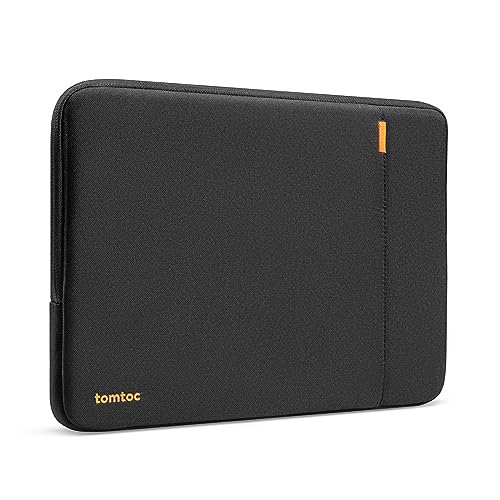
| tomtoc 360 Protective 16 inch | Full-wrap protection for the Pro 16 | Lists model numbers A3428, A3429, A3403, and more |
| CCPK 13.3 inch Sleeve | MacBook Air 13 and Pro 14 buyers | Padded, lists M1 through M5 chips |
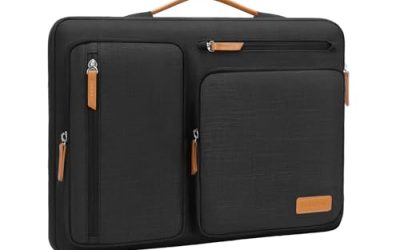
| 14 inch Shockproof Briefcase Sleeve | 14 inch laptops with an accessory pocket | Shockproof, accessory pocket |
| Comfyable 13 inch Faux Leather Sleeve | Style-focused MacBook Air and Pro owners | Faux leather, lists MacBook Air M5 and Pro |
How to Choose
Match the sleeve to the model number
Apple labels each MacBook Pro with a model number such as A2780 or A3403, and the better listings print those numbers because they map to a specific chassis. The 14 inch and 16 inch Pro bodies have stayed close in size across the M1 through M5 generations, so a sleeve listing several chips is not unusual. Check the number on the underside of your laptop against the list, and if the title does not include it, read the interior dimensions before ordering.
Thickness and protection level
A thin neoprene sleeve guards against scratches and light bumps, which is enough if you slide the laptop into a padded backpack. If the sleeve will be the only protection, look for denser foam, a raised edge around the zipper, and a base that cushions drops. A sleeve with a front pocket adds convenience for a charger but also adds bulk, so a snug fit around the laptop body matters more than the extras. Also remember that a pocket should not press against the screen; flat items such as a thin charger are fine, but bulky chargers or notebooks can leave marks.
Material and finish
Polyester is common and handles light water splashes. Faux leather looks better in an office but may scratch and can be stiffer around the corners. Water-resistant coatings help in light rain but do not seal zippers, so do not treat any sleeve as fully waterproof without the full specification saying so. Inside, a soft microfiber lining prevents scuffs on the aluminum lid. If the title does not mention the lining, assume it is basic and consider a sleeve whose listing describes a soft interior.
What to ignore, and where budget sleeves cut corners
Ignore long chip lists as a sign of quality, because they only show that the case is a similar shape to many laptops. Budget sleeves most often cut foam thickness at the corners and use light zippers that can catch. Be careful with a sleeve that claims to fit a range of sizes, since a loose fit lets the laptop shift and slap the sides when you walk.
The 7 Best Options
MOSISO Laptop Case 13.3 inch
This sleeve is listed for 13 to 13.3 inch laptops and includes a front pocket. The title also mentions compatibility with the MacBook Pro 14 inch and a list of M-series Air and Pro models, which suggests a flexible fit, though you should verify dimensions for a 14 inch Pro. A buyer who owns a 13 inch Air as well as a Pro 14 could use it as a shared case, provided the Pro 14 fits snugly enough that it does not slide around.
- Strength: the pocket holds a charger or a few cables.
- Strength: a broad compatibility list across Air and Pro models.
- Trade-off: the size labels (13.3 inch with a 14 inch Pro mention) call for a measurement check.
Skip it if you want a guaranteed snug fit on a 14 inch Pro.
ProCase 14 Inch Laptop Sleeve
The ProCase title names the MacBook Pro 14 with chips from M1 to M6, along with 14 inch laptops from HP, Acer, ASUS, Lenovo, and Dell, and describes a slim travel case. It suits owners who want a dedicated 14 inch fit and a thin profile. The mention of other 14 inch brands also means it can serve as a spare case if you switch to a Windows laptop later or share a bag with a colleague.
- Strength: the 14 inch size matches the current Pro 14 body.
- Strength: the slim design adds little bulk to a bag.
- Trade-off: a slim case leaves less padding than a thicker protective sleeve.
Skip it if you need heavy impact protection or a 16 inch fit.
MOSISO Laptop Case 16 inch
Made for 15 to 15.6 inch laptops, this sleeve lists compatibility with the MacBook Pro 16 in M1 through M5 versions and HP, Acer, Dell, Lenovo, and ASUS laptops. It includes a front pocket. This pairing of Apple and Windows brands in one listing is useful in offices where staff swap machines, since the same sleeve can follow the person rather than the laptop.
- Strength: it names the 16 inch Pro across five chip generations.
- Strength: it also fits many other brands if you switch laptops.
- Trade-off: the 15 to 15.6 inch range wording is confusing next to the 16 inch label.
Skip it if you want a guaranteed fit confirmed by a model number.
tomtoc 360 Protective Sleeve for 16 inch MacBook Pro
The tomtoc listing is the most specific about fit, naming the 16 inch MacBook Pro with a series of model numbers including A3428, A3429, A3403, A3186, A2991, and A2780. It is described as a 360 degree protective, water-resistant sleeve. This kind of precise listing is the closest thing to a guaranteed fit that a title can offer, and it reduces the odds of a return.
- Strength: model numbers remove guesswork on fit.
- Strength: 360 degree protection suits owners who move around a lot.
- Trade-off: it is built for the 16 inch Pro, so it is no use for smaller models.
Skip it if you own a 13 or 14 inch MacBook.
CCPK Laptop Case 13.3 inch
CCPK lists a padded 13.3 inch sleeve for the MacBook Air 13 inch and the Pro 14 inch, with M1 through M5 chips and several model numbers. It appeals to owners who want a padded case that handles more than one laptop in the family. It works well for households where an Air and a Pro share a bag.
- Strength: the padding is stated and model numbers are listed.
- Strength: it covers both Air 13 and Pro 14 owners.
- Trade-off: a 13.3 inch size next to a 14 inch Pro needs a dimension check.
Skip it if you want a pocket or a handle.
14 Inch Shockproof Laptop Sleeve Briefcase
This unbranded listing describes a shockproof 14 inch sleeve with an accessory pocket and a briefcase-like profile. The visible title does not name MacBook compatibility, so it is a generic 14 inch option rather than a Pro-specific one. Think of it as a budget-tier fallback that needs a quick tape-measure check before you commit.
- Strength: the accessory pocket helps with chargers and cables.
- Strength: the shockproof description signals extra padding.
- Trade-off: no MacBook model is named, so confirm the interior size.
Skip it if you want a Pro-specific listing with model numbers.
Comfyable Laptop Sleeve 13 Inch
The Comfyable sleeve is a faux leather cover in a coffee color that lists compatibility with the MacBook Air M5 and a MacBook Pro or Neo model. It focuses on looks and a clean office style. It is a good match for presentations and client meetings where a plain neoprene sleeve may look too casual.
- Strength: the faux leather finish suits a professional setting.
- Strength: the title points to a precise fit for a 13 inch laptop.
- Trade-off: leather-style material may offer less cushioning than neoprene.
Skip it if you own a 14 or 16 inch Pro.
Which One Fits Your Situation
You own a MacBook Pro 16
Choose the tomtoc 360 sleeve because its model number list removes guesswork, and its wrap-around protection matches the weight of a 16 inch laptop. Since the 16 inch Pro is the heaviest of the family, a sleeve that wraps all sides is easier to justify.
You own a MacBook Pro 14 and travel light
The ProCase 14 inch sleeve is slim and lists the Pro 14 across M1 to M6, so it fits a bag with little added bulk.
You want one sleeve for a Pro 14 and an Air 13
The CCPK sleeve lists both and gives padded protection for either laptop.
You want a sleeve that looks office-ready
The Comfyable faux leather sleeve is the style pick for a 13 inch laptop, as long as you accept less padding.
Common Mistakes
- Buying by chip generation instead of by screen size and model number.
- Choosing a 13.3 inch sleeve for a 14 inch Pro because the title mentions both.
- Expecting a thin sleeve to survive a drop without a bag around it.
- Ignoring the lining, which can scuff the aluminum lid.
- Skipping a pocket check when you plan to carry a large charger.
Specs and Terms Explained
Neoprene versus foam-padded fabric
Neoprene is a stretchy synthetic rubber that hugs the laptop and absorbs small knocks. Foam-padded fabric uses a firmer layer of cushioning inside a woven shell, which spreads pressure better when the sleeve is squeezed. Stretch forgives slight sizing error, while firm padding does not, so match the material to how precisely the sleeve fits your model.
Water-resistant versus waterproof
Water-resistant fabric sheds light rain and small splashes. Waterproof means sealed seams and closures, which sleeves almost never offer. Treat the claim as protection for a walk from the car, not for a dropped sleeve in a puddle.
Interior lining
A soft microfiber or fleece lining keeps the aluminum body of a MacBook Pro from picking up fine scratches. Rough or bare fabric inside can leave marks over months of sliding the laptop in and out.
Outer pocket
A front pocket is meant for a slim charger or a cable. A thick power brick pressing against the lid can leave a dent pattern, so use the pocket for light items only.
Setup and Care Tips
- Close the laptop fully and let it sleep before sliding it in; a hot, running laptop in a snug sleeve traps heat.
- Shake out the interior and wipe the lining occasionally, since grit trapped inside acts like sandpaper.
- Clean fabric with a damp cloth and mild soap, then air-dry completely before use; a machine wash can warp the padding.
- Do not stack heavy books on top of the sleeve inside a backpack, because a sleeve is thin protection against sustained pressure.
- Zip the closure slowly past the corners so the pull does not catch the lining.
Who Should Skip a Slim Sleeve
Anyone who carries the laptop loose, with no backpack or bag around the sleeve, should consider a case with handles and thicker walls instead. A sleeve alone offers modest drop protection, and a MacBook Pro 16 is heavy enough that a fall from waist height can still bend a corner. Frequent flyers who stuff bags into overhead bins are in the same group.
Sleeve Fit Quick Reference
| Your laptop | Sleeve size to look for | Watch out for |
|---|---|---|
| MacBook Pro 14 | Listing that names the 14 inch Pro | Older 13.3 inch sleeves that look close but run short |
| MacBook Pro 16 | Listing that names the 16 inch Pro | Sleeves sold for 15 or 15.6 inch laptops |
| Air 13 and Pro 14 shared | Stretch material with a stated range | A loose fit that lets the laptop slide in transit |
Related guides
- Wireless Chargers For Iphone And Airpods
- Black Friday And Cyber Monday Deals
- Mechanical Keyboard For Programming
Frequently Asked Questions
How do I find my MacBook Pro model number?
It is printed in small text on the underside of the laptop. You can also find it in the About This Mac window.
Will a 14 inch sleeve fit a 16 inch MacBook Pro?
No. The 16 inch Pro needs a sleeve built for 15 to 16 inch laptops.
Is a sleeve enough protection by itself?
A padded sleeve is enough for scratches and light bumps. For heavier use, place it inside a padded backpack or choose a thicker 360 degree design. Adding a hard-shell cover to the laptop itself also changes the fit, so allow a little extra room if you use one.
Does the chip generation affect which sleeve I need?
Only indirectly. The body size matters more, so check screen size and model number first. A sleeve made around a 14 inch body will fit equally well whether the chip inside is older or newer.