Our Top Picks


The choice between a GaN charger and a conventional one looks simple on a shelf: the GaN brick is smaller, the conventional brick is familiar, and both claim the same wattage. The real difference shows up over a day of use. A GaN charger packs several high-wattage ports into a pocket-sized body, while a conventional charger usually provides one port at the same wattage in a larger shell. For a single laptop, that difference may not matter; for a laptop, a tablet and a phone sharing one outlet, it changes everything.

This guide compares the two designs side by side, with two GaN chargers and two conventional chargers chosen from the product names and specifications on their Amazon pages. It is for anyone deciding whether to replace a familiar single-port brick, or whether the old charger still does the job. The wattage, port counts and dimensions below come from the listings themselves, not from a guess.
Quick Picks
As an Amazon Associate we earn from qualifying purchases
| Product | Best for | Key spec from title |
|---|---|---|
| Anker Prime 100W GaN | GaN: laptop and phone at one outlet | 100W, 2 USB-C and 1 USB-A |
| UGREEN Nexode 65W | GaN: everyday multi-device charging | 65W, 2 USB-C and 1 USB-A |
| Apple 96W USB-C Power Adapter | Conventional: one MacBook, one port | 96W, 1 USB-C port |
| Google 45W USB-C Power Charger | Conventional: one Pixel phone | 45W, 1 USB-C port |
How to Choose
Wattage and laptop charging
Start with the wattage your laptop needs from a single port, because both designs are judged the same way. A light ultrabook charges well from a 65W port, a 14-inch laptop often wants 96W to 100W, and a 16-inch machine may ask for 140W. A GaN charger and a conventional charger can both deliver 96W or 100W to one port; the difference is what else they can do at the same time. A conventional brick usually gives its full wattage to one device and nothing to a second, while a GaN brick splits its total across several ports.
Number and type of ports
Port count is where the two designs part ways most clearly. A conventional charger in this guide has a single USB-C port, which suits one laptop or one phone and nothing else. A GaN charger of similar wattage carries two or three USB-C ports plus a USB-A port, so a laptop, a tablet and a phone charge from one outlet. If you charge one device at a time, a single port is enough and the extra ports are dead weight. If the desk or the bag holds several devices, the multi-port GaN brick replaces two or three conventional bricks.
Size, weight, and travel fit
GaN circuitry wastes less energy as heat, so GaN chargers can be smaller at the same wattage. The Anker Prime 100W measures 1.7 x 1.1 x 2.7 inches at six ounces, while the Google 45W conventional charger is 2.0 x 1.1 x 2.3 inches at 3.1 ounces for less than half the wattage. Foldable prongs, found on both GaN picks here, keep the brick snag-free in a bag. A conventional charger is still fine on a desk where size does not matter, but in a carry-on the smaller GaN brick earns its place faster.
Safety protections and heat
Both designs need stated protections, and the listings differ in what they print. The Anker Prime 100W page lists ActiveShield 2.0 with over-temperature protection, and the UGREEN Nexode 65W page lists a UL specification met. The Apple 96W and Google 45W listings state no protections on the pages we read, so check the product page closely before buying either one, and buy from a seller you can identify. Heat is the other half of the question: GaN designs run cooler at the same output, which is why they can be smaller, yet any charger warms up under a heavy load and needs airflow.
The 4 Best Options
Anker Prime 100W GaN
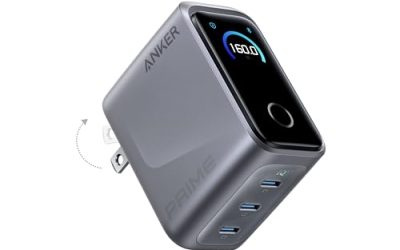
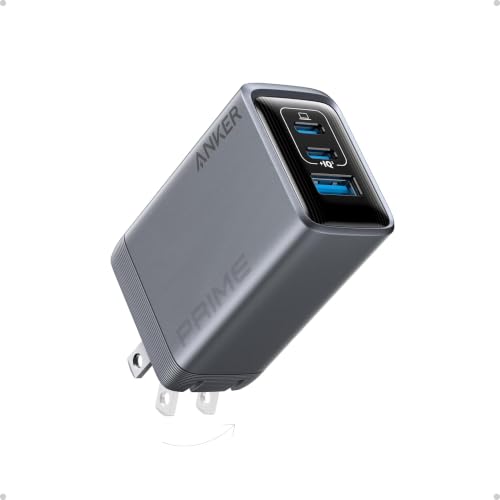
The Anker Prime 100W GaN shows what the newer design does best: three ports in a pocket-sized body. Its single USB-C port delivers up to 100W, which covers most 14-inch laptops, and the second USB-C port plus the USB-A port take a phone and earbuds without a second brick. The foldable plug and six-ounce body move easily between rooms, and the compact shape fits outlets that sit close together. Anker lists ActiveShield 2.0 with over-temperature protection, which watches for heat during long sessions. The split changes when all three ports run at once, so check the combined output before plugging in a third device.
Specs
- 100W total output; single USB-C port up to 100W
- 2 USB-C ports and 1 USB-A port
- Foldable plug; 1.7 x 1.1 x 2.7 in; 6 oz
- Input 100-240V
- ActiveShield 2.0; over-temperature protection
- 24-month warranty; cable not included
Best for: a laptop and a phone charging from one outlet, the GaN way.
Watch out for: total output drops to 89W max when all three ports are in use, and a 100W charge needs an E-Marker cable, which is not included.
UGREEN Nexode 65W
The UGREEN Nexode 65W is the everyday GaN pick for an ultrabook and a phone. Its 65W single-port output covers a MacBook Air or a light Windows laptop, and the extra USB-C and USB-A ports take a phone and earbuds. The foldable plug and 4.58-ounce body make it the lightest charger here, easy to carry between rooms or on a trip. The page lists a UL specification met, and the charger supports PD 3.0, QC 4.0 and PPS. Galaxy owners should note the listing caps Samsung Super Fast Charging at 25W on this model, so a Samsung phone will not see its fastest rate here.
Specs
- 65W total output; single USB-C port up to 65W
- 2 USB-C ports and 1 USB-A port
- Foldable plug; 2.59 x 1.57 x 1.22 in; 4.58 oz
- Input 100-240V
- GaN chip; PD 3.0; QC 4.0+; PPS
- UL specification met; cable not included
Best for: an ultrabook plus a phone, with ports to spare.
Watch out for: Samsung Galaxy phones are limited to 25W Super Fast Charging 1.0 on this model, and the listing does not support 45W Samsung Super Fast Charge 2.0.
Apple 96W USB-C Power Adapter
The Apple 96W USB-C Power Adapter is the conventional pick for a single MacBook. It delivers 96W through one USB-C port, which covers a 14-inch MacBook Pro when paired with the right cable. Apple does not market this adapter as a GaN model, and its listing makes no GaN claim, which places it on the conventional side of this comparison. The design is simple: one port, one device, no sharing decisions to make. The cable is sold separately, and the single port means a phone waits its turn or needs a second brick. For a desk where one laptop charges alone, that simplicity is enough.
Specs
- 96W total output; single USB-C port
- 1 USB-C port
- Model MX0J2AM/A
- Compatible with numerous USB-C devices and charging cables
- Cable sold separately
Best for: one MacBook charging alone from a desk outlet.
Watch out for: the listing states no protections on the page we read, so check the product page closely before buying, and remember the single port cannot charge a second device at the same time.
Google 45W USB-C Power Charger
The Google 45W USB-C Power Charger is the conventional pick for a single Pixel phone. It delivers 45W through one USB-C port with PD 3.1 and PPS, including the 21V profile that Pixel Pro XL models need for their fastest wired charging. Google does not market this charger as a GaN model, and its listing makes no GaN claim, which places it on the conventional side of this comparison. The 2.0 x 1.1 x 2.3-inch body weighs 3.1 ounces, and the housing uses recycled plastic. No cable is included. It is a one-device charger: a laptop or a second phone needs a different brick.
Specs
- 45W total output; single USB-C port
- 1 USB-C port
- USB PD 3.1 PPS; PPS up to 21V/2.25A
- 2.0 x 1.1 x 2.3 in; 3.1 oz
- Input 100-240V
- Housing made with recycled plastic; cable not included
Best for: one Pixel phone charging at its fastest wired rate.
Watch out for: the listing states no protections on the page we read, so check the product page closely before buying, and a laptop is too much for a 45W single port.
Which One Fits Your Situation
One laptop, one port, no fuss
Pick the Apple 96W USB-C Power Adapter. Its single USB-C port delivers 96W to a MacBook, and there are no sharing decisions to make. The conventional design is larger than a GaN brick of the same wattage, but on a desk that does not matter for a single laptop. Buy the cable separately, since none is included.
A laptop and a phone from one outlet
Pick the Anker Prime 100W GaN. Its single USB-C port delivers up to 100W to the laptop, while the remaining ports cover a phone and earbuds. The foldable plug and six-ounce body travel well, and ActiveShield 2.0 watches temperature during long sessions. A conventional brick would need a second charger for the phone at the same time.
An ultrabook and a phone every day
Pick the UGREEN Nexode 65W. At 4.58 ounces with foldable prongs, it is the lightest charger here and still delivers 65W to an ultrabook, with ports left for a phone and earbuds. The compact body leaves room in a slim bag for most days. Check the Galaxy charging note first if you carry a Samsung phone.
One Pixel phone, nothing else
Pick the Google 45W USB-C Power Charger. Its single USB-C port delivers 45W with the PPS profile Pixel Pro XL models need, and the 3.1-ounce body is easy to carry. It cannot charge a laptop, and it cannot charge a second device, so it suits a phone-only setup where simplicity matters more than port count.
Common Mistakes
- Assuming a conventional single-port charger can charge a laptop and a phone at the same time.
- Buying a GaN charger for its total wattage and ignoring the single-port figure the laptop needs.
- Using a cable rated below the wattage you expect, so neither design delivers full power.
- Judging a charger by size alone, when a small conventional brick may still have only one port.
- Leaving any charger buried under clothes or paper, where heat has nowhere to go.
Frequently Asked Questions
Is a GaN charger actually better than a conventional charger?
For multi-device charging, yes. A GaN charger packs several high-wattage ports into a smaller body, so one brick replaces two or three conventional ones. For a single laptop or a single phone, the difference is small, and a conventional charger does the job. The advantage is port count and size, not wattage alone.
Does GaN mean faster charging for one device?
Not on its own. A 100W GaN charger and a 96W conventional charger deliver similar power to one laptop, because the limit is the port, not the material inside. GaN wins when several devices charge at once, since it can provide more ports at high wattage from a smaller body. Check the single-port figure before buying either type.
Do conventional chargers run hotter than GaN chargers?
GaN circuitry wastes less energy as heat than older silicon designs, so GaN chargers run cooler at the same output and can be smaller. A conventional charger still works well, especially for one device, but it warms up more under a heavy load. Give either type airflow and keep it out of a closed bag while it is working.
Should I replace a working conventional charger with GaN?
Only when the old charger falls short. If one port covers your devices and the brick sits on a desk, keep it. If you carry a laptop, a tablet and a phone, or the household shares one outlet, a multi-port GaN charger replaces several bricks at once. Replace for port count and size, not because the old charger stopped working.
More from Amazon
Programs that pair well with the guide above. Offers and eligibility are set by Amazon and may change.
Free shipping on eligible items, Prime Video and more. Eligible new members can start with a free trial.
Start a Prime free trialAd-free music streaming. Eligible new subscribers can start with a free trial.
Try Music Unlimited freeA Prime membership for ages 18-24 with a trial period. Eligibility is set by Amazon.
See Prime for Young AdultsAudiobooks and podcasts to listen to on the go. Eligible new members can start with a free trial.
Try Audible freeAs an Amazon Associate we earn from qualifying purchases.