Our Top Picks


A laptop owner does not buy a charger for a phone; the laptop comes first, and everything else is secondary. The question that decides the purchase is whether one USB-C port can deliver the wattage the laptop needs while it is running, not merely while it sleeps. A charger that falls short will still top up the battery overnight, yet it will lose ground during a video call or a long compile. Matching single-port output to the laptop, then adding ports for the rest of the kit, is the order that works.

This guide covers laptop owners who carry one charger between home, office and travel, from ultrabook users to 16-inch machine owners. Every charger below was picked from the product name and specifications on its Amazon page, so wattage, port layout and size are taken from the listing rather than from a roundup. Use it to find the brick that keeps your laptop ahead of its drain.
Quick Picks
As an Amazon Associate we earn from qualifying purchases
| Product | Best for | Key spec from title |
|---|---|---|
| Anker Prime 160W | 16-inch laptop plus two devices | 160W, 3 USB-C ports |
| Anker Prime 100W GaN | 14-inch laptop and a phone | 100W, 2 USB-C and 1 USB-A |
| Anker 737 GaNPrime 120W | Laptop and tablet together | 120W, 2 USB-C and 1 USB-A |
| UGREEN Nexode 65W | Ultrabook and light laptop use | 65W, 2 USB-C and 1 USB-A |
How to Choose
Wattage and laptop charging
Find the wattage of the adapter your laptop shipped with, because that figure is the benchmark a replacement must meet. Ultrabooks and 13-inch machines usually run well on 65W, 14-inch laptops often want 96W to 100W, and 16-inch models may ask for 140W from a single port. Judge a charger by its single-port output, not the headline total, since a 120W charger can still give a laptop only 100W when a second device is connected. A charger below your laptop’s original wattage will charge more slowly under load, and may not keep up at all during heavy work.
Number and type of ports
A laptop owner rarely charges a laptop alone, so count the rest of the kit before choosing. One extra USB-C port covers a phone or a tablet, while a USB-A port takes earbuds, a watch or an older accessory. USB-C carries the high wattage a laptop needs, so the laptop should always take the strongest USB-C port, with the phone on the next one down. Three ports suit a desk where a laptop, tablet and phone sit together; two ports are enough when the bag only carries a laptop and a phone.
Size, weight, and travel fit
A laptop charger rides in the same bag as the laptop, so its size decides how much room is left for anything else. Foldable prongs keep the brick from catching on cables and sleeves, and a narrow body leaves the neighbouring outlet free on a crowded power strip. A charger near six ounces adds little to a laptop bag, while one near eight ounces is still reasonable for a desk but heavier on a commute. Check the dimensions on the listing against the pocket or pouch where the charger will live.
Safety protections and heat
A charger that runs all day beside a laptop needs stated protections, not just a compact shell. Anker lists ActiveShield on its Prime and 735 models, a system that monitors temperature and adjusts output, and the Anker 735 page also lists IEC 62368-1 compliance with FCC, CE and UL marks. UGREEN lists multi-protection against overvoltage, overcurrent, short circuits and overheating on its Nexode range. Where a listing states no protections, read the product page closely before buying, and buy from a seller you can identify.
The 4 Best Options
Anker Prime 160W
The Anker Prime 160W is the pick for a 16-inch laptop that needs serious wattage from a single port. One USB-C port reaches up to 140W, which matches what a large MacBook Pro asks for, while the other two USB-C ports take a tablet and a phone at the same time. A smart display shows the power split across ports, and touch control plus app modes let the owner change how the charger behaves. ActiveShield 4.0 monitors temperature through long sessions. At 7.76 ounces it is the heaviest charger here, so it belongs on a desk, and no cable is included.
Specs
- 160W total output; single USB-C port up to 140W
- 3 USB-C ports
- Smart display and touch control
- 2.56 x 2.05 x 1.38 in; 7.76 oz
- Input 100-240V
- GaNPrime 2.0; PowerIQ 5.0; ActiveShield 4.0
- Cable not included
Best for: a 16-inch laptop charging alongside a tablet and a phone.
Watch out for: the display and Bluetooth can draw standby power, and single-port charging without derating depends on the local voltage, so check the notes on the listing.
Anker Prime 100W GaN
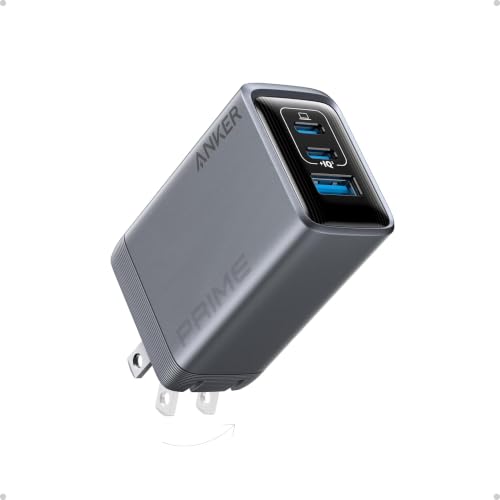
The Anker Prime 100W GaN covers the middle ground: enough power for most 14-inch machines, with ports left over for a phone. Its single USB-C port delivers up to 100W, and the second USB-C port plus the USB-A port handle a phone and earbuds without a second brick. Foldable prongs and a six-ounce body make it easy to carry between home and office, and the compact shape fits outlets that sit close together. ActiveShield 2.0 with over-temperature protection watches for heat during long work sessions. When all three ports run, total output drops to 89W max, so the laptop gets less than the headline figure.
Specs
- 100W total output; single USB-C port up to 100W
- 2 USB-C ports and 1 USB-A port
- Foldable plug; 1.7 x 1.1 x 2.7 in; 6 oz
- Input 100-240V
- ActiveShield 2.0; over-temperature protection
- 24-month warranty; cable not included
Best for: a 14-inch laptop plus a phone from one outlet.
Watch out for: a 100W charge needs an E-Marker cable, which is not included, and output falls to 89W max with all three ports in use.
Anker 737 GaNPrime 120W
The Anker 737 GaNPrime 120W suits a laptop owner who also charges a tablet every day. Its single USB-C port reaches up to 100W for the laptop, while the second USB-C port and the USB-A port cover a tablet and earbuds. PowerIQ 4.0 manages how power is shared, and ActiveShield 2.0 watches temperature as the charger works. The foldable plug and 6.6-ounce body pack neatly into a laptop bag, and a silicone stabilizer helps the brick sit flat in a loose outlet. It is a middle step up from a 65W charger for owners whose laptop needs more than an ultrabook figure.
Specs
- 120W total output; single USB-C port up to 100W
- 2 USB-C ports and 1 USB-A port
- Foldable plug; 3.1 x 1.3 x 1.7 in; 6.6 oz
- Input 100-240V
- PowerIQ 4.0; ActiveShield 2.0
- Silicone stabilizer included; cable not included
Best for: a laptop and a tablet charging together every day.
Watch out for: the USB-A port tops out at 22.5W, so keep the laptop and tablet on the USB-C ports and leave USB-A for small accessories.
UGREEN Nexode 65W
The UGREEN Nexode 65W is the light option for ultrabook owners who do not need triple-digit wattage. Its 65W single-port output covers a MacBook Air or a light Windows laptop, and the extra USB-C and USB-A ports take a phone and earbuds at the same time. The foldable plug and 4.58-ounce body make it the lightest charger in this guide, which matters when the bag already holds a laptop. The page lists a UL specification met, and the charger supports PD 3.0, QC 4.0 and PPS. Galaxy owners should note the listing caps Samsung Super Fast Charging at 25W on this model.
Specs
- 65W total output; single USB-C port up to 65W
- 2 USB-C ports and 1 USB-A port
- Foldable plug; 2.59 x 1.57 x 1.22 in; 4.58 oz
- Input 100-240V
- GaN chip; PD 3.0; QC 4.0+; PPS
- UL specification met; cable not included
Best for: an ultrabook plus a phone in a light bag.
Watch out for: Samsung Galaxy phones are limited to 25W Super Fast Charging 1.0 on this model, and the listing does not support 45W Samsung Super Fast Charge 2.0.
Which One Fits Your Situation
A 16-inch laptop as the main machine
Choose the Anker Prime 160W. Its single port reaches up to 140W, which is the figure a large laptop needs to charge at full speed while working. The other two USB-C ports take a tablet and a phone, and the display shows where the power is going. Keep it on a desk, since its weight suits a fixed setup better than a pocket.
A 14-inch laptop and a phone
Choose the Anker Prime 100W GaN. A single USB-C port delivers up to 100W to the laptop, while the remaining ports cover a phone and earbuds from the same outlet. The foldable plug and six-ounce body travel well between home and office. Put the laptop on the strongest port and let the phone take the rest.
A laptop and a tablet every day
Choose the Anker 737 GaNPrime 120W. Its single USB-C port reaches up to 100W for the laptop, and the second USB-C port is free for a tablet at the same time, with USB-A left for earbuds. The stabilizer keeps the brick steady in a loose outlet, and the 6.6-ounce body fits a laptop bag without much bulk.
An ultrabook in a light bag
Choose the UGREEN Nexode 65W. At 4.58 ounces with foldable prongs, it is the lightest charger here and still delivers 65W to an ultrabook. The extra ports cover a phone and earbuds, and the compact body leaves room in a slim sleeve on short trips. Check the Galaxy charging note first if you carry a Samsung phone.
Common Mistakes
- Judging a charger by its total wattage instead of the single-port figure your laptop needs.
- Putting the laptop on a USB-A port, which cannot carry laptop-level power.
- Buying a 65W charger for a laptop that shipped with a 140W adapter, then blaming the charger.
- Using a cable rated below the wattage you expect, so the laptop never sees full power.
- Leaving the charger buried under papers on a desk, where heat has nowhere to go.
Frequently Asked Questions
How much wattage does my laptop need from one port?
Match the adapter your laptop shipped with. Ultrabooks usually run well on 65W, 14-inch laptops often want 96W to 100W, and 16-inch models may ask for 140W from a single port. A charger below that figure still charges the battery, just more slowly, and it may lose ground while the laptop is working hard.
Can a GaN charger charge my laptop while I work?
Yes, when its single-port output matches or beats your laptop’s original adapter. A charger that meets the wattage keeps the battery level steady during video calls and heavy tasks. One that falls short will still charge, but the battery may drain slowly under load, so check the single-port figure before buying.
Is a multi-port charger slower for a laptop?
It can be, because power is shared across ports. A charger that gives a laptop 100W alone may give it only 65W once a phone is plugged in. Put the laptop on the strongest USB-C port and charge the phone from a secondary port, or unplug the phone while the laptop needs full speed.
Do I need a new cable for a GaN charger?
Often, yes. The cable must be rated for the wattage you expect, and a 100W charge needs a cable built for it. None of the chargers in this guide include a cable, and the Anker Prime 100W page notes that an E-Marker cable is needed for 100W. Check the rating printed on your cable before judging the charger.
More from Amazon
Programs that pair well with the guide above. Offers and eligibility are set by Amazon and may change.
Free shipping on eligible items, Prime Video and more. Eligible new members can start with a free trial.
Start a Prime free trialAd-free music streaming. Eligible new subscribers can start with a free trial.
Try Music Unlimited freeA Prime membership for ages 18-24 with a trial period. Eligibility is set by Amazon.
See Prime for Young AdultsAudiobooks and podcasts to listen to on the go. Eligible new members can start with a free trial.
Try Audible freeAs an Amazon Associate we earn from qualifying purchases.