Key takeaways
- Five Android tablets picked for student life: pens for handwritten notes, keyboards for essays, split-screen study, and batteries that last the school day.
Choosing a tablet for study is really a decision about how your notes get made. A student who handwrites equations and annotates lecture slides needs a proper pen in the box, while a student who mostly reads, watches recorded lectures, and types short assignments needs something different entirely. Screen size, memory, and weight in a backpack all follow from that first choice, not the other way round.
This shortlist is written for school and university students, and for parents buying on their behalf. Every model below is a genuine Android tablet chosen from its Amazon listing, with the pen, keyboard, battery, and storage details taken from what that listing actually states, so you can match a tablet to a timetable rather than to a headline.
Quick Picks
As an Amazon Associate we earn from qualifying purchases.
| Product | Best for | Key spec from title |
|---|---|---|
| Lenovo Idea Tab Pro | Big-screen note-taking with pen and folio included | 12.7-inch 3K LCD display, pen and folio case included |
| Samsung Galaxy Tab S10 FE | Handwritten notes with a water-resistant build | S Pen for note-taking, 90 Hz refresh, IP68 water resistance |
| Samsung Galaxy Tab S10 Lite | Pen notes on a lighter, simpler tablet | 10.9-inch LCD, S Pen in the box, storage expands to 2TB |
| Samsung Galaxy Tab A9+ | Reading, video lectures, and split-screen basics | 11-inch screen, quad speakers, Multi Window Display |
| Lenovo Tab M11 | A straightforward study and reading tablet with a folio | 11-inch 1920 x 1200 display, folio case included |
How to Choose
Begin With the Pen, Not the Screen Size
Handwriting is where tablets either earn their place in a bag or become expensive video screens. If you annotate slides, sketch diagrams, or work through maths by hand, the pen needs to be part of the purchase, not an afterthought. Three tablets in this list, the Lenovo Idea Tab Pro and both Samsung FE and Lite models, include a pen in the box according to their listings. The Tab A9+ and Tab M11 listings here do not include one, which makes them reading and typing devices first. Decide which student you are before comparing anything else, because adding a pen later is rarely as tidy.
Decide How You Will Type Long Work
Essays and lab reports are miserable on a glass keyboard, so think about typing before you buy. Some students pair a tablet with a separate Bluetooth keyboard only for long assignments at a desk, while others want a keyboard cover that travels everywhere. Check what the listing actually bundles: the Idea Tab Pro arrives with a folio case, and keyboard bundles exist for the Galaxy Tab S10 FE, but the tablet-only listings here leave the keyboard as a separate decision. Also consider the screen you will type beside. A larger display leaves room for a document and a source side by side, which matters once assignments get longer.
Battery Has to Survive the Whole Study Day
A study day is not one long video session. It is a lecture in the morning, notes in the library, a recorded class over lunch, and revision in the evening, often far from a free socket. Look at what the listing claims and how you will top up between classes. The Tab M11 listing states a ten hour battery, while the Samsung listings describe long battery life without turning that into a promise about your timetable. For charging, use the cable supplied in the box and a USB-C charger that matches the wattage the maker specifies for that model, and replace any cable whose connector is damaged or runs unusually hot.
Split-Screen, Storage, and Backpack Weight
Studying usually means two things open at once: slides beside notes, or a textbook beside a browser. That is memory work as much as screen work, so treat the RAM figure in the title as a study spec, not a gaming spec. The Idea Tab Pro lists eight gigabytes of memory, the Tab S10 Lite six, and the Tab M11 four, and that ordering roughly matches how comfortably each will hold two apps open. Storage fills with downloaded lectures and PDFs, so expandable storage, such as the Tab S10 Lite and its expansion figure in the title, is genuinely useful. Finally, weigh the whole kit, tablet plus case, because it rides in a backpack daily.
The 5 Best Options
Lenovo Idea Tab Pro

Students who take notes in large lecture halls and read dense documents will get the most from this one. Its listing describes a student tablet with a large 12.7-inch 3K LCD display, and it includes both a pen and a folio case, so handwritten notes and a standing cover for desk work are covered from day one. The MediaTek Dimensity 8300 and eight gigabytes of memory give split-screen study real headroom, with slides on one side and notes on the other, and the folio keeps the screen protected in a crowded backpack between classes.
Specs
- Display: 12.7-inch 3K LCD display
- Processor: MediaTek Dimensity 8300
- Memory: 8 GB
- Storage: 128 GB
- Included: pen and folio case, USB-C to USB-C cable
Best for: Students who want the biggest note-taking canvas here, with pen and folio already in the box.
Watch out for: A 12.7-inch tablet plus its folio is the bulkiest kit in this list, and no keyboard is included in this listing, so budget separately if you type long essays.
ASIN: B0F1NGFSNY
Samsung Galaxy Tab S10 FE

This is the pick for students whose notes are mostly handwritten and whose tablet travels in all weathers. The listing pairs an S Pen for note-taking with a 90 Hz refresh rate, which keeps pen strokes and scrolling through long documents feeling smooth, and the Exynos 1580 processor sits a clear step above the entry models here. Its IP68 water resistance is unusual in this group and suits a tablet that moves between lectures, libraries, and cafés daily. Storage begins at the 128 GB figure in the title, which is a sensible size for a course load of slides and readings.
Specs
- Display: large display with 90 Hz refresh rate
- Processor: Exynos 1580
- Storage: 128 GB
- Stylus: S Pen included for note-taking
- Build: IP68 water-resistant, US version
Best for: Students who handwrite most of their notes and want a durable, pen-first tablet for campus life.
Watch out for: This listing is the Wi-Fi version, so away from campus or home Wi-Fi there is no mobile data connection to fall back on.
ASIN: B0DVZSRJ8Q
Samsung Galaxy Tab S10 Lite
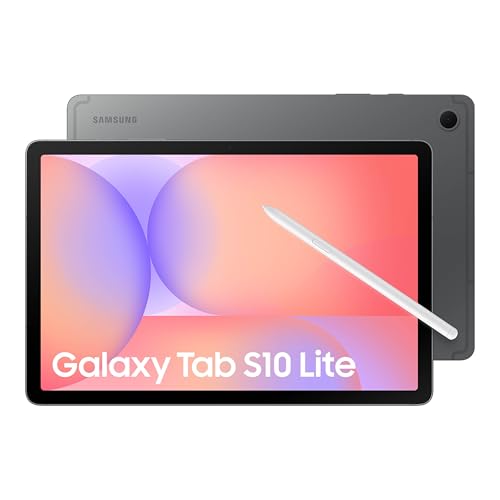
The Tab S10 Lite suits students who want proper pen notes without carrying the largest or most powerful tablet in the range. Its listing includes an S Pen in the box, confirmed by the box contents, which list the pen alongside the tablet and data cable, so handwritten notes, annotations, and quick diagrams are available immediately. The 10.9-inch LCD is big enough for split-screen reading while staying easy to carry between classes. Six gigabytes of memory and the Exynos 1380 handle notes, browsing, and video lectures comfortably, and storage can expand a long way beyond the built-in capacity as course files pile up over a degree.
Specs
- Display: 10.9-inch LCD
- Processor: Exynos 1380
- Memory: 6 GB RAM
- Storage: 128 GB, expandable up to 2TB
- Included: S Pen and data cable
Best for: Students who want an included S Pen and expandable storage in an easy-to-carry size.
Watch out for: The memory figure is fixed at the level in the title, so keep split-screen work to two apps rather than three if you want everything to stay responsive.
ASIN: B0FF5JJ3CP
Samsung Galaxy Tab A9+
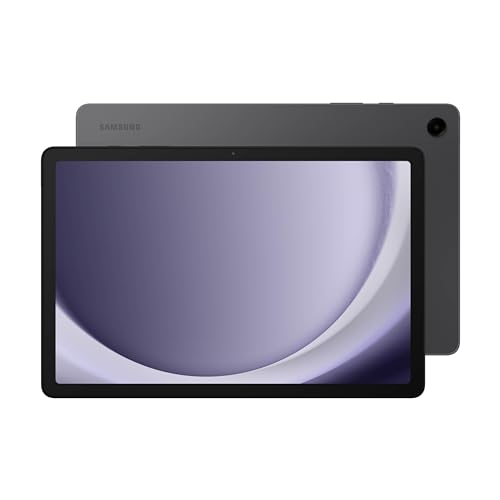
Not every student handwrites, and for those who mainly read, watch recorded lectures, and type short pieces of work, the Tab A9+ covers the essentials well. Its listing highlights an 11-inch screen, quad speakers, and a Multi Window Display, a combination that fits video lectures with notes alongside and reading in split view. Samsung describes the design as slim, light, and durable, which matters for a tablet carried in a backpack every day. There is no pen in this picture, so this is a reading and typing choice, best paired with a separate keyboard for longer assignments rather than bought for handwriting.
Specs
- Display: 11-inch screen
- Storage: 128 GB
- Audio: quad speakers
- Multitasking: Multi Window Display
- Design: slim, light, durable build, US version
Best for: Students who mostly read, stream lectures, and type, and who do not need a pen.
Watch out for: No stylus is included in this listing, so check pen support separately before assuming you can add handwriting later.
ASIN: B0CLF2DNMV
Lenovo Tab M11

The Tab M11 is the simplest study tablet in this list, aimed at reading, note apps, video lessons, and everyday coursework rather than heavy multitasking. Its listing states an 11-inch display at 1920 x 1200, a MediaTek Helio G88 octa-core processor, and a battery figure of ten hours, which maps neatly onto a school day of lessons and homework. A folio case is included, so it can stand on a desk and travel protected in a school bag straight away. With four gigabytes of memory it is happiest doing one or two things at a time, which describes a lot of ordinary homework perfectly well.
Specs
- Display: 11-inch display, 1920 x 1200 resolution
- Processor: MediaTek Helio G88 octa-core
- Memory: 4 GB RAM
- Storage: 128 GB
- Battery: 10 hour battery as listed
- Included: folio case
Best for: School students who need a clear, simple tablet for reading, lessons, and homework, with a case included.
Watch out for: This listing bundles a folio case rather than a pen, so confirm the box contents on the listing if handwritten notes are part of the plan.
ASIN: B0CQMGKBK9
Which One Fits Your Situation
You Handwrite Notes in Most Lectures
Choose between the Galaxy Tab S10 FE and the Lenovo Idea Tab Pro, because both include a pen and both are built around note-taking. Pick the Samsung if your tablet travels everywhere and the water-resistant build appeals, or the Lenovo if you read dense documents and want the larger screen for slides beside notes. Either way, the pen is in the box, so your first lecture is covered without another purchase.
You Type Essays More Than You Handwrite
Look at the Idea Tab Pro first for its larger display, which leaves more room for a document and its sources, and plan on a keyboard as a separate purchase, since none of these listings should be assumed to include one. The Tab A9+ is the lighter alternative for shorter written work, especially if most of your study time goes to reading and recorded lectures rather than long documents.
Your Backpack Is Already Heavy
The Tab S10 Lite and Tab A9+ are the easier carries here, both built around screens of roughly eleven inches that their listings describe in slim, light terms. The Lite adds an included S Pen, making it better for handwritten notes on the move. The Idea Tab Pro earns its extra bulk only if you genuinely use the bigger screen daily; otherwise it is weight carried for nothing.
You Study Away From Sockets All Day
Begin with the Tab M11 if a stated battery figure matters, since its listing puts a ten hour number on the box, and its simpler hardware suits note apps and reading. The Samsung models describe long battery life and suit mixed days of lectures and video. Whichever you choose, a short top-up at lunch will carry any of them through evening revision.
Common Mistakes
- Buying a tablet for handwriting without checking whether a pen is actually included in that specific listing.
- Assuming a keyboard is bundled because a product photo shows one, when the listing only includes a folio case.
- Choosing the largest screen without weighing the tablet and case together against an already full backpack.
- Filling internal storage with downloaded lectures in the first term and ignoring whether the model accepts expansion.
- Comparing battery claims across brands as if they were measured the same way, instead of planning a midday top-up.
Frequently Asked Questions
Do students really need a pen with an Android tablet?
Only if handwriting is part of how you study. Annotating slides, working through equations, and sketching diagrams are far easier with a pen, and the Idea Tab Pro, Tab S10 FE, and Tab S10 Lite include one. If you type everything and mainly read or watch lectures, the Tab A9+ shows a pen-free tablet can still cover a full course.
Can an Android tablet replace a laptop for schoolwork?
For notes, reading, research, and short documents, yes, especially with a keyboard for longer typing. Tablets are weaker for specialised desktop software, complex spreadsheets, or courses that require specific programs. Many students use a tablet as the everyday carry device for lectures and keep access to a computer for the heaviest assignments, which is a sensible division rather than a compromise.
How much storage does a student tablet need?
The 128 GB fitted to every tablet in this list handles apps, notes, and a term of downloaded slides and readings comfortably. Storage pressure comes from video, so students who keep whole lecture series offline should value expansion. The Tab S10 Lite lists expansion up to 2TB, which removes the worry entirely, while fixed-storage models reward deleting watched lectures each term.
Which screen size suits a backpack best?
Screens around eleven inches, like the Tab A9+, Tab S10 Lite, and Tab M11, balance readable split-screen study with easy carrying, and fit the sleeves most school bags already have. A 12.7-inch screen such as the Idea Tab Pro is better at a desk and for dense documents, but it adds bulk you will notice on a crowded commute every single day.
More from Amazon
Programs that pair well with the guide above. Offers and eligibility are set by Amazon and may change.
Free shipping on eligible items, Prime Video and more. Eligible new members can start with a free trial.
Start a Prime free trialAd-free music streaming. Eligible new subscribers can start with a free trial.
Try Music Unlimited freeA Prime membership for ages 18-24 with a trial period. Eligibility is set by Amazon.
See Prime for Young AdultsAudiobooks and podcasts to listen to on the go. Eligible new members can start with a free trial.
Try Audible freeAs an Amazon Associate we earn from qualifying purchases.