Our Top Picks
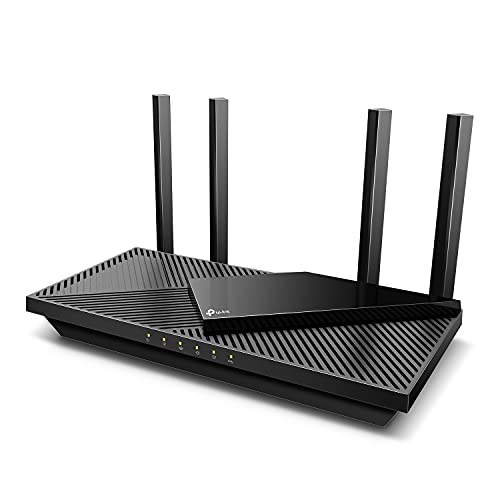 TP-Link Dual-Band AX3000 Wi-Fi 6 Wireless Gigabit InternetAX300012.99 x 9.45 x 2.87 inches1.66 poundsCheck on Amazon
 TP-Link AXE5400 Tri-Band WiFi 6E RouterWiFi 6E, Tri-Band AXE540012.91 x 10.43 x 4.72 inches1.5 poundsCheck on Amazon
- Top Pick: TP-Link Archer AX55 (AX3000)
- Runner-up: ASUS RT-AX86U Pro (AX5700)
- Also consider: TP-Link Archer AXE75 (AXE5400)
A router upgrade is the single change that improves every device in the house at once: video calls stop freezing, game downloads finish sooner, and smart home gear stays connected instead of dropping off the network. The five routers below span sensible WiFi 6 workhorses, a gaming-focused model, and two WiFi 6E options that add the wide, quiet 6 GHz band for homes crowded with neighboring networks. Every model is sold on Amazon.com.
As an Amazon Associate, we earn from qualifying purchases.
Quick Answer
The TP-Link Archer AX55 is the right default for most homes, with fast WiFi 6 speeds and mesh expansion options. Gamers should look at the ASUS RT-AX86U Pro, while the TP-Link Archer AXE75 and Linksys Hydra Pro 6E add WiFi 6E for future-proofing. The NETGEAR Nighthawk RAX54S suits buyers who want simple setup and built-in security software.
How to Choose
Start with the WiFi generation. WiFi 6 is the current mainstream standard and handles a busy home of phones, laptops, TVs and smart devices far better than older WiFi 5 gear, thanks to OFDMA and MU-MIMO, which let the router talk to many devices at once instead of queuing them. WiFi 6E adds a third band at 6 GHz. That band is wide and largely empty, so it shines in apartments and dense neighborhoods, but only newer phones, laptops and consoles can use it today.
Next, match the router to your floor plan. A single well-placed router covers most apartments and smaller houses. Larger or multi-story homes do better with a mesh-ready model, which lets you add satellite units later instead of replacing the whole system. If your home has dead zones now, put mesh expansion high on the checklist even if you start with one unit.
Then count your wired needs. Gamers and home office workers benefit from several gigabit Ethernet ports for consoles, PCs and workstations, and a faster multi-gig port helps if your internet plan or home server can use it. USB ports still matter for a few buyers who share a printer or a drive across the network.
Finally, look at software. Parental controls, guest networks, quality-of-service settings that prioritize a gaming PC or a work laptop, and automatic security updates separate routers that feel effortless from routers that need constant attention. App-based setup is now standard on all five picks here, so the real differences are in ongoing controls and update policies.
TP-Link Archer AX55 (AX3000)
The Archer AX55 is the balanced pick for most households. Its AX3000 rating splits speed across the 2.4 GHz and 5 GHz bands, and WiFi 6 features such as OFDMA, MU-MIMO and beamforming keep dozens of phones, TVs and smart devices responsive at the same time. Four external antennas and a capable processor give it steady whole-home reach for apartments and mid-size houses.
TP-Link’s OneMesh support is the quiet advantage: if a far bedroom still struggles, you can add a compatible range extender or satellite and keep a single network name instead of starting over. The Tether app handles setup and everyday controls, and the router works with Alexa for simple voice tasks like toggling the guest network.
Gamers on a budget and families streaming on several screens at once will both find enough headroom here. It skips the 6 GHz band, so WiFi 6E devices fall back to the still-fast 5 GHz band.
Specs
| Feature | Detail |
|---|---|
| WiFi standard | WiFi 6, dual band |
| Speed class | AX3000 |
| Mesh support | OneMesh ready |
| Key features | OFDMA, MU-MIMO, beamforming |
| Ports | Gigabit WAN and LAN ports |
| Assistant | Alexa compatible |
ASUS RT-AX86U Pro (AX5700)
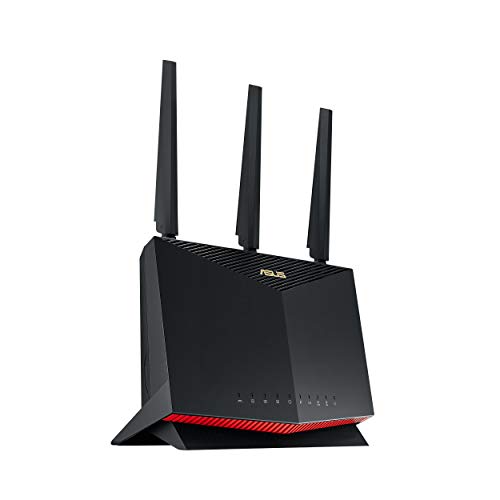
The RT-AX86U Pro is the gaming pick in this roundup. Its AX5700 dual-band WiFi 6 radio is tuned for low-latency play, with a dedicated gaming port that prioritizes a connected console or PC, plus adaptive quality of service that keeps game traffic ahead of background downloads. A multi-gig port suits fast fiber plans and wired backhaul setups.
ASUS builds in AiMesh, so the router can anchor a mesh network with other ASUS units as your home grows, and AiProtection Pro adds network security and parental controls without a subscription fee. Mobile Game Mode in the ASUS Router app reduces lag for phone gaming with a single tap.
This is the router for households where a gaming PC, a console and several streaming screens compete every evening. Buyers who never game and run few devices can save money with the Archer AX55 instead, but competitive players will feel the difference in busy hours.
Specs
| Feature | Detail |
|---|---|
| WiFi standard | WiFi 6, dual band |
| Speed class | AX5700 |
| Mesh support | AiMesh ready |
| Gaming features | Gaming port, adaptive QoS, Mobile Game Mode |
| Security | AiProtection Pro, parental controls |
| Ports | Multi-gig port plus gigabit LAN |
TP-Link Archer AXE75 (AXE5400)
The Archer AXE75 is the straightforward way into WiFi 6E. It adds the 6 GHz band to the familiar 2.4 GHz and 5 GHz pair, giving newer laptops, phones and VR headsets a wide lane with far less interference from neighbors. The AXE5400 tri-band design can also dedicate the 6 GHz band to backhaul or to your most demanding devices.
OneMesh support carries over from TP-Link’s WiFi 6 line, so expansion later is painless. The Tether app covers setup, client lists and parental controls, and the router supports Alexa voice control for basic tasks. Six antennas and a quad-core processor keep the three bands stable under load.
Choose the AXE75 if you already own WiFi 6E devices, live in a dense apartment building, or simply want the router you buy now to stay relevant the longest. Homes with no 6E devices yet can still benefit, because moving capable gear to 6 GHz frees the older bands for everything else.
Specs
| Feature | Detail |
|---|---|
| WiFi standard | WiFi 6E, tri-band |
| Speed class | AXE5400 |
| Bands | 2.4 GHz, 5 GHz and 6 GHz |
| Mesh support | OneMesh ready |
| Key features | OFDMA, MU-MIMO, six antennas |
| Assistant | Alexa compatible |
NETGEAR Nighthawk RAX54S (AX5400)

The Nighthawk RAX54S brings NETGEAR’s gaming-adjacent Nighthawk line to a mainstream AX5400 WiFi 6 router. It covers medium and large homes with six streams of WiFi 6 capacity, and the Nighthawk app walks through setup in minutes with a clear view of connected devices, speed tests and guest network controls.
NETGEAR Armor, the built-in security service, watches the whole network for threats and covers every connected device rather than only computers with antivirus installed. Smart Connect combines the bands under one network name and steers each device to the best band automatically, which keeps things simple for less technical households.
The RAX54S suits buyers who want a recognizable brand, a polished app and security handled for them. It does not join a proprietary mesh system the way the TP-Link and ASUS picks do, so very large homes should plan placement carefully or look at the mesh-ready options first.
Specs
| Feature | Detail |
|---|---|
| WiFi standard | WiFi 6, dual band |
| Speed class | AX5400 |
| Streams | Six WiFi 6 streams |
| Security | NETGEAR Armor built in |
| Setup | Nighthawk app with Smart Connect |
| Ports | Gigabit WAN and LAN ports |
Linksys Hydra Pro 6E (MR7500)

The Hydra Pro 6E is Linksys’s tri-band WiFi 6E router, built on the company’s Intelligent Mesh platform. That mesh foundation is its main draw: the unit works as a standalone router today and can become the parent node of a whole-home mesh system later by adding compatible Linksys nodes, all under one network name with seamless roaming between rooms.
The 6 GHz band gives WiFi 6E devices a clean, fast lane, while the 5 GHz and 2.4 GHz bands handle the rest of the household. The Linksys app covers setup, device prioritization, parental controls and guest access, and the router handles the device counts of a modern smart home without strain.
Pick the Hydra Pro 6E if you expect to expand into mesh coverage and want WiFi 6E at the same time. If you know a single router will always be enough, the Archer AXE75 covers similar ground in the same generation.
Specs
| Feature | Detail |
|---|---|
| WiFi standard | WiFi 6E, tri-band |
| Platform | Linksys Intelligent Mesh |
| Bands | 2.4 GHz, 5 GHz and 6 GHz |
| Expansion | Works with Linksys mesh nodes |
| Controls | Linksys app, parental controls |
| Model number | MR7500 |
Who Should Skip It
Skip a new router if your internet plan is slow and your current router already delivers that full speed to every room, because a faster router cannot exceed the plan you pay for. Skip single routers entirely if your home is large, multi-story or built with dense materials; start with a mesh system instead of fighting dead zones. Gamers playing over a wired connection with a stable older router may also see little change. Finally, skip WiFi 6E models if none of your devices support the 6 GHz band and a router replacement is not otherwise needed, since the extra band only helps compatible gear.
FAQ
Is WiFi 6E worth it over WiFi 6?
WiFi 6E is worth it when you own or plan to buy devices that support the 6 GHz band, or when you live where many neighboring networks crowd the older bands. The extra band cuts interference and lowers congestion. If your devices are all WiFi 6 or older, a strong WiFi 6 router delivers the same real-world speed today.
Can one router cover a large house?
A single router placed centrally covers most apartments and mid-size homes. Large, multi-story or long floor plans usually need help. Mesh-ready models in this guide, including the Archer AX55, Archer AXE75 and Hydra Pro 6E, let you add nodes later, which is cheaper than replacing the router when coverage falls short.
How many devices can these routers handle?
Modern WiFi 6 and 6E routers are designed for dozens of simultaneous connections, and smart home devices use very little bandwidth each. The practical limit is usually your internet plan speed, not the router. Homes with heavy streaming, gaming and video calls at once benefit most from the higher speed classes.
Should I plug my gaming PC into the router?
Yes, when you can. A wired Ethernet connection removes WiFi interference and jitter from the equation, and gaming-focused models like the RT-AX86U Pro add a prioritized gaming port and quality-of-service settings. If wiring is impossible, a router with strong 5 GHz or 6 GHz performance placed near the PC is the next best option.
Final Verdict
The Archer AX55 is the default recommendation for most homes: fast WiFi 6, painless setup and a mesh escape hatch if coverage ever falls short. The RT-AX86U Pro earns its place for gaming households, the Archer AXE75 and Hydra Pro 6E bring WiFi 6E future-proofing with different expansion paths, and the Nighthawk RAX54S fits buyers who value a polished app and built-in network security above all.
More from Amazon
Programs that pair well with the guide above. Offers and eligibility are set by Amazon and may change.
Free shipping on eligible items, Prime Video and more. Eligible new members can start with a free trial.
Start a Prime free trialAd-free music streaming. Eligible new subscribers can start with a free trial.
Try Music Unlimited freeA Prime membership for ages 18-24 with a trial period. Eligibility is set by Amazon.
See Prime for Young AdultsAudiobooks and podcasts to listen to on the go. Eligible new members can start with a free trial.
Try Audible freeAs an Amazon Associate we earn from qualifying purchases.