Key takeaways
- Compare the best smart home hubs for Zigbee, Z-Wave, Matter and Thread, with local control options that keep automations running during outages.
- Top Pick: Aeotec Smart Home Hub (V3)
- Runner-up: Hubitat Elevation C-8 Pro
- Also consider: SwitchBot Hub 2
A smart home hub is the quiet box that lets devices from different brands work together: one app, one set of automations, and sensors that can trigger lights, locks and plugs across ecosystems. The right hub also decides whether your automations run locally in your house or depend on a distant server. The five hubs below cover the main approaches, from mainstream SmartThings hardware to a fully local open-source platform, and all are sold on Amazon.com.
As an Amazon Associate, we earn from qualifying purchases.
Quick Answer
The Aeotec Smart Home Hub is the best starting point for most people, running SmartThings with Zigbee, Z-Wave and Matter in one box. The Hubitat Elevation C-8 Pro and Home Assistant Green suit anyone who wants automations stored and run locally, the Samsung SmartThings Station adds a wireless charger, and the SwitchBot Hub 2 is the budget bridge for SwitchBot and infrared gear.
How to Choose
Protocols come first. Zigbee and Z-Wave are the established radio standards behind most sensors, locks, switches and bulbs that are not Wi-Fi based. Matter is the newer shared standard, running over Wi-Fi or over Thread, a low-power mesh radio that needs a Thread border router to reach your network. A hub with more radios built in means fewer extra bridges later, so list the devices you own or plan to buy and match them against the hub’s radios.
Next, decide how much local control matters. Local hubs process automations inside your home, so routines keep running during an internet outage and respond faster, since a motion sensor does not wait on a round trip to a server. Cloud-assisted platforms are easier to set up and offer polished apps, and the better ones still run core routines locally. Be honest about your tolerance for tinkering, because the most local platforms ask more of you.
Then consider the app and ecosystem. SmartThings offers one of the broadest device catalogs and a friendly app. Hubitat exposes powerful rule building for people who like control. Home Assistant supports an enormous range of integrations and dashboards but rewards patience. SwitchBot’s hub mainly serves SwitchBot devices and infrared appliances rather than a whole-home radio network.
Finally, check the practical details: Ethernet versus Wi-Fi connection to your router, where the hub will sit for good radio coverage, and whether your voice assistants connect cleanly. A centrally placed hub on a wired connection prevents most reliability complaints.
Aeotec Smart Home Hub (V3)
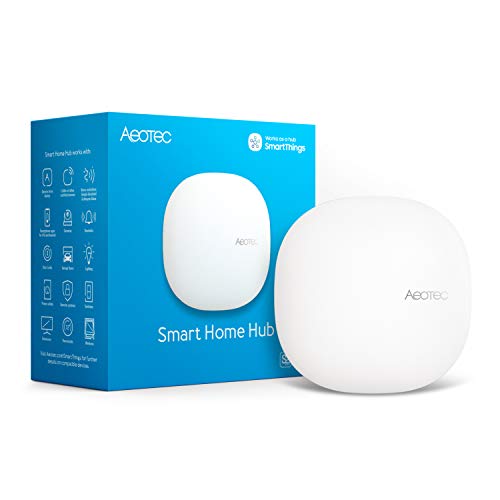
The Aeotec Smart Home Hub is the current hardware for Samsung SmartThings, and it is the easiest full-featured hub to recommend. Inside are radios for Zigbee and Z-Wave plus Wi-Fi, and the hub works as a Matter gateway, so it covers the device catalogs of the last decade and the new Matter gear arriving now. Setup happens in the SmartThings app, which remains one of the most approachable in the category.
SmartThings brings a deep list of officially supported brands, ready-made automations and clean voice control through Alexa and Google Assistant. Many automations now execute locally on the hub, so lights and sensors keep responding when the internet drops.
Choose the Aeotec hub if you want one box that speaks to the widest mix of devices with the least setup friction. It is the natural upgrade from a collection of brand-specific bridges, and the reference point against which the other hubs here are judged.
Specs
| Feature | Detail |
|---|---|
| Platform | Samsung SmartThings |
| Radios | Zigbee, Z-Wave, Wi-Fi |
| Matter role | Matter gateway and controller |
| Model number | GP-AEOHUBV3US |
| Voice assistants | Alexa, Google Assistant |
| Connection | Wi-Fi or Ethernet |
Hubitat Elevation C-8 Pro

The Hubitat Elevation C-8 Pro is built around one idea: your automations live on the hub, not in a cloud account. Rules, schedules and device control all process locally, so the system keeps working during internet outages and responds with the immediacy that motion lighting demands. There is no subscription required for the platform itself.
Hardware is strong for the category: an 800-series Z-Wave radio with Long Range support, a Zigbee 3.0 radio, external antennas for both, a Matter controller and Bluetooth for onboarding. Built-in apps include a powerful rule engine, and integrations connect the hub to Alexa, Google Home and Apple Home for voice control of the devices it manages.
The trade-off is polish. Hubitat’s interface is functional rather than beautiful, and getting the most from it rewards people who enjoy configuring their systems. For enthusiasts, and for anyone with a large Z-Wave or Zigbee network, it is the standout pick in this guide.
Specs
| Feature | Detail |
|---|---|
| Platform | Hubitat Elevation, local processing |
| Radios | Z-Wave 800 with Long Range, Zigbee 3.0 |
| Matter role | Matter controller, Bluetooth onboarding |
| Antennas | External antennas for Z-Wave and Zigbee |
| Voice assistants | Alexa, Google Home, Apple Home |
| Subscription | None required for core features |
SwitchBot Hub 2

The SwitchBot Hub 2 solves a narrower problem extremely well. It connects SwitchBot’s Bluetooth devices, such as the Bot, Lock, Curtain and Blind Tilt, to Wi-Fi and bridges them into Matter, which makes them visible to Apple Home, Google Home, SmartThings and Alexa. It is the hub to buy when your smart home starts with SwitchBot gear.
It also learns infrared remotes, so a TV, air conditioner or fan with a remote can join your voice and app routines. Built-in sensors track temperature, humidity and light, and those readings can trigger SwitchBot automations, like closing curtains when a room gets bright.
What it does not do is act as a Zigbee or Z-Wave hub for other brands. Treat it as a bridge and sensor for the SwitchBot ecosystem plus your infrared appliances, and it is excellent value in that role, especially for renters building a no-wiring smart home.
Specs
| Feature | Detail |
|---|---|
| Platform | SwitchBot app, Matter bridge |
| Connects | SwitchBot Bluetooth devices to Wi-Fi |
| Extras | Infrared remote learning, light sensor |
| Sensors | Temperature and humidity built in |
| Voice assistants | Alexa, Google Assistant, Siri via Matter |
| Connection | 2.4 GHz Wi-Fi |
Samsung SmartThings Station
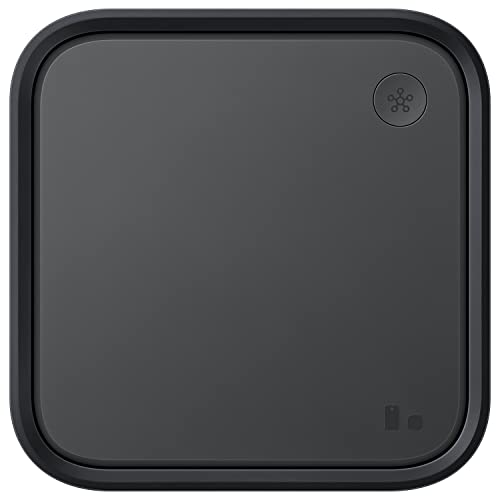
The SmartThings Station folds a SmartThings hub into a 15W wireless phone charger, which makes it the easiest hub to place on a nightstand or desk where a plain black box would be clutter. It runs the same SmartThings platform as the Aeotec hub, with the same app, automations and broad brand support, and it works as a Matter controller and Thread border router.
Its radios cover Zigbee and Thread, which handles most modern sensors, buttons and Matter devices. The notable omission is Z-Wave: households with Z-Wave locks or switches should choose the Aeotec hub instead. A button on the Station can trigger a routine or help locate a registered phone, small touches that suit its bedside role.
Pick the Station if your device list is Zigbee, Thread and Matter based and you like the idea of the hub earning its space as a charger. The listing verified for this guide is the black model with the power adapter included, model EP-P9500TBEGUS.
Specs
| Feature | Detail |
|---|---|
| Platform | Samsung SmartThings |
| Radios | Zigbee, Thread border router |
| Matter role | Matter controller |
| Extra | 15W wireless charging pad |
| Model number | EP-P9500TBEGUS |
| Voice assistants | Alexa, Google Assistant |
Home Assistant Green

Home Assistant Green is the official hardware for Home Assistant, the open-source platform that serious smart home owners graduate to. The box arrives with Home Assistant OS installed, connects by Ethernet, and runs everything locally: automations, dashboards and device control stay on your network, with no account or subscription required for the core system.
Its strength is breadth. Home Assistant integrates with thousands of devices and services across brands, including gear that the big platforms ignore, and its automation editor and dashboards go deeper than any app here.
Radios are the one planning point: the Green focuses on Ethernet and USB, and you add Zigbee or Thread with a USB radio stick, which keeps the hardware flexible as standards evolve. Choose Home Assistant Green if you want maximum control and privacy and you are comfortable spending an afternoon learning the platform.
Specs
| Feature | Detail |
|---|---|
| Platform | Home Assistant OS preinstalled |
| Processing | Fully local, no subscription |
| Memory and storage | 4 GB RAM, 32 GB storage |
| Connection | Ethernet, USB for expansion |
| Radios | Add Zigbee or Thread via USB stick |
| Maker | Nabu Casa |
Who Should Skip It
Skip a dedicated hub if your smart home is a handful of Wi-Fi devices that already behave inside one app or voice assistant, because a hub adds cost and setup without changing your daily experience. Skip the SwitchBot Hub 2 if you need Zigbee or Z-Wave support for other brands, since it bridges SwitchBot and infrared devices only. Skip the SmartThings Station if Z-Wave locks or switches are central to your setup. And skip the local enthusiast hubs, Hubitat and Home Assistant, if you know you will never open their advanced settings; the friendlier SmartThings options will serve you better.
FAQ
Do I still need a hub when Matter exists?
Often, yes. Matter standardizes how devices talk, but something still has to act as the controller and, for Thread devices, a border router. A hub fills that role, runs automations, and adds radios such as Z-Wave that Matter does not replace. Matter reduces the number of hubs you need; it rarely reduces it to zero.
What is the difference between Zigbee and Z-Wave?
Both are low-power mesh radios designed for sensors, locks and switches. Zigbee gear is widely available from many brands and price points. Z-Wave uses a different frequency with strong range and a strict certification program, and it is common in professionally installed lighting and security devices. Many homes end up with both, which is why dual-radio hubs are popular.
Will my automations keep working if the internet goes down?
That depends on the hub. Hubitat and Home Assistant process automations locally by design, and SmartThings runs many routines locally on the hub as well, so lights, sensors and switches keep working during an outage. Voice control and app access from outside the home still need the internet on every platform.
Can one hub control devices from many brands?
Yes, that is the point of a hub. A SmartThings, Hubitat or Home Assistant hub can combine bulbs, locks, sensors and plugs from dozens of brands into single automations, as long as each device uses a radio or integration the hub supports. Check your specific models against the hub’s compatibility list before buying.
Final Verdict
Start with the Aeotec Smart Home Hub if you want the broadest device support with the least effort, since it covers Zigbee, Z-Wave and Matter inside the friendly SmartThings app. Choose Hubitat or Home Assistant Green when local control and deep customization matter most, the SmartThings Station when you want the hub to double as a bedside charger without Z-Wave needs, and the SwitchBot Hub 2 when your setup revolves around SwitchBot devices and infrared appliances.
More from Amazon
Programs that pair well with the guide above. Offers and eligibility are set by Amazon and may change.
Free shipping on eligible items, Prime Video and more. Eligible new members can start with a free trial.
Start a Prime free trialAd-free music streaming. Eligible new subscribers can start with a free trial.
Try Music Unlimited freeA Prime membership for ages 18-24 with a trial period. Eligibility is set by Amazon.
See Prime for Young AdultsAudiobooks and podcasts to listen to on the go. Eligible new members can start with a free trial.
Try Audible freeAs an Amazon Associate we earn from qualifying purchases.