Our Top Picks
 Best value and multi-deviceLogitech Pebble Keys 2 K380s Wireless Bluetooth KeyboardOne Size0.9 poundsCheck on Amazon
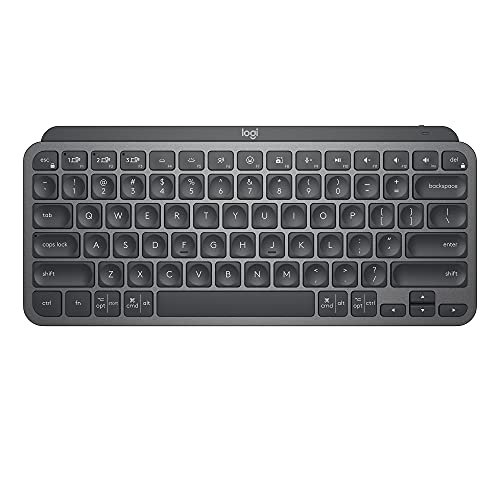 Best typing feel in a compact bodyLogitech MX Keys Mini Minimalist Wireless Illuminated KeyboardCompact1.5 poundsCheck on Amazon
 Full-size premium with number padLogitech Keys-to-Go Bluetooth Keyboard for iPhone1 Count (Pack of 1)0.5 poundsCheck on Amazon
 Built-in tablet cradle on a budgetLogitech K480 Wireless Multi-Device Keyboard for Windows12.2 x 1.61 x 7.9 inches1.81 poundsCheck on Amazon

The best Bluetooth tablet keyboard for most people is the Logitech Pebble Keys 2 K380s for its low price, quiet low-profile keys and three-device switching. The Logitech MX Keys Mini is the best choice for all-day typing, the Logitech Keys-To-Go 2 is the best ultra-portable option, and the Logitech K480 or K780 suit anyone who wants a slot or cradle that holds the tablet upright. A Bluetooth keyboard pairs with an iPad, Android tablet or Windows tablet alike, so the decision comes down to size, battery type, stand and how many devices you switch between.
Quick answer: Bluetooth keyboard picks by need
- Best value and multi-device: Logitech Pebble Keys 2 K380s.
- Best typing feel in a compact body: Logitech MX Keys Mini.
- Lightest and most packable: Logitech Keys-To-Go 2 (about 220 g, wraparound cover).
- Built-in tablet cradle on a budget: Logitech K480.
- Desk-bound, full-size with cradle: Logitech K780.
- Full-size premium with number pad: Logitech MX Keys S.
- Rugged, backlit, removable keyboard for iPad: ZAGG Pro Keys.
- Apple-only households: Apple Magic Keyboard (USB-C, rechargeable).
How we chose
This is a research-based guide. We compared manufacturer specification pages, compatibility statements and published expert roundups, and kept keyboards that are sold and supported in 2026. We did not run our own lab sessions and make no claims of personal experience. Where we could not confirm a figure such as exact battery life or weight against a published source, we say so or describe the product by class. The shortlist is judged on seven criteria: size and layout, pairing and multi-device switching, battery type, stand or cradle, key feel, backlight and operating-system compatibility.
What to compare in a Bluetooth tablet keyboard
1. Size and layout
Compact keyboards, such as the Pebble Keys 2 K380s, the MX Keys Mini and the Keys-To-Go 2, drop the number pad and sometimes trim arrow keys, so they fit a bag. Full-size boards like the MX Keys S and the K780 add a number pad, which helps with spreadsheets and accounting work but makes the keyboard a desk accessory. If you type on the move, choose compact. If the tablet lives on a desk, full-size is more comfortable.
2. Pairing and multi-device switching
Easy-Switch style buttons let you store three devices and jump between a tablet, a phone and a laptop with one press. Logitech’s Pebble Keys 2 K380s and the MX Keys Mini both offer this, and the K480 uses a dial. If you own more than one device, multi-device pairing saves repeated re-pairing. A keyboard with only one pairing slot works fine for a single tablet but becomes annoying as soon as you add a phone.
3. Battery type: replaceable or rechargeable
Replaceable-battery keyboards run for months or years and never need a cable, but you must carry or buy spares. Rechargeable models such as the MX Keys Mini and Apple’s Magic Keyboard use USB-C and last days to months depending on backlight use. If you hate remembering to charge, choose a replaceable-battery model. If you prefer one fewer disposable, choose rechargeable.
4. Stand or cradle
A Bluetooth keyboard does not hold the tablet upright, so you either need a case with a stand or a keyboard with a built-in cradle slot. The Logitech K480 and K780 have a groove along the top that holds a tablet or phone at an angle. The Keys-To-Go 2 and the compact keyboards do not, which is why they pair best with a tablet case that props itself up.
5. Key feel
Low-profile, round, quiet keys with scissor-style or shallow switches suit tablet use. Keys-To-Go 2 uses a shallow, thin keyboard design, so expect less travel than a laptop. The MX Keys Mini is the one that expert roundups most often recommend for long typing sessions, thanks to its concave keys.
6. Backlight
The Pebble Keys 2 K380s has no backlight, according to Logitech’s own listing. The MX Keys Mini adds smart backlighting that lights as your hands approach and adjusts to ambient light. If you type in a dark cabin or at a late-night desk, backlighting is a real convenience.
7. Operating-system compatibility
Check that the keyboard supports iPadOS, Android and Windows layouts. The Pebble Keys 2 K380s lists compatibility with Windows, macOS, iPadOS, iOS and Android. Apple’s Magic Keyboard is built around Apple devices and loses some functions on other platforms.
Comparison table
| Model | Size class | Multi-device | Power | Backlight | Tablet holder | Weight |
|---|---|---|---|---|---|---|
| Logitech Pebble Keys 2 K380s | Compact | 3 devices | Replaceable battery | No | No | Under 1 lb |
| Logitech MX Keys Mini | Compact, no number pad | 3 devices | Rechargeable | Yes, smart | No | Not confirmed |
| Logitech Keys-To-Go 2 | Ultra-portable | Not confirmed | Not confirmed | No | No (wraparound cover) | About 220 g |
| Logitech K480 | Mid-size | Dial switch | Replaceable battery | No | Built-in cradle | Not confirmed |
| Logitech K780 | Full-size | Yes | Replaceable battery | Not confirmed | Built-in cradle | Not confirmed |
| Logitech MX Keys S | Full-size | Yes | Rechargeable | Yes | No | Not confirmed |
| ZAGG Pro Keys | Case-style | No | Not confirmed | Yes, 7 colors | Case stand | 450 to 650 g by model |
| Apple Magic Keyboard (USB-C) | Compact, no number pad | No | Rechargeable | No | No | Not confirmed |
“Not confirmed” marks a figure we could not verify from a published source. Check the current product page for exact numbers before you order.
The best Bluetooth tablet keyboards, in detail
Logitech Pebble Keys 2 K380s
Spec line: Bluetooth · round, quiet low-profile keys · Easy-Switch for 3 devices · Windows, macOS, iPadOS, iOS and Android · no backlight · customizable function keys · under a pound
Best for: shoppers who want one inexpensive keyboard for a tablet, a phone and a laptop. A published roundup credits it with a multi-year battery life.
Skip if: you type for hours a day and want a deeper key feel or backlight. One buyer also reports that the connection can drop after the keyboard sits idle, so expect a brief wake-up delay.
- Pros: entry-level tier, thin and light, three devices, works across operating systems.
- Cons: no backlight, shallow keys, occasional idle reconnect.
As an Amazon Associate we earn from qualifying purchases at no extra cost to you.

Logitech MX Keys Mini
Spec line: Bluetooth · compact layout without a number pad · Perfect Stroke keys · smart backlight that lights as hands approach · Easy-Switch pairing across 3 devices · rechargeable
Best for: people who type on a tablet all day and want a keyboard that feels closer to a laptop.
Skip if: you want something very light and cheap, or you need a number pad. It sits in the premium tier among compact keyboards.
- Pros: best typing feel in this guide, smart backlight, compact, multi-device.
- Cons: pricier, no number pad, no built-in tablet holder.
Logitech Keys-To-Go 2
Spec line: Bluetooth · about 220 g · scissor-mechanism keys · built-in protective wraparound cover · no backlight · no stand · no trackpad
Best for: iPad Pro users and travelers who want the slimmest keyboard that slides into a bag next to the tablet.
Skip if: you want a backlight, a stand or deep keys. A roundup flags the shallow travel as its main compromise.
- Pros: lightest option, protective cover, sturdy build.
- Cons: shallow keys, no backlight, no stand, mid-range to premium tier for its size.

Logitech K480
Spec line: Bluetooth · Easy-Switch dial · integrated cradle for a tablet or phone · replaceable batteries
Best for: buyers who want a tablet holder built into the keyboard at an entry-level tier, such as for a sofa or a kitchen counter.
Skip if: you carry the keyboard daily. It is larger and heavier than the compact models above, and it has no backlight.
- Pros: built-in cradle, dial for fast switching, low cost.
- Cons: bulky, plain looks, no backlight.

Logitech K780
Spec line: Bluetooth and receiver support · full-size layout with number pad · built-in cradle · quiet keys · multi-device
Best for: a tablet that serves as a desk computer. It is one roundup’s top multi-device keyboard for a fixed desk.
Skip if: you want a bag-friendly size. It is too large to carry casually.
- Pros: full-size with cradle, quiet, solid connection.
- Cons: large, mid-range tier.
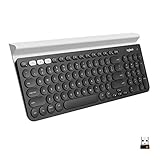
Logitech MX Keys S
Spec line: Bluetooth · full-size with number pad · backlight · rechargeable · multi-device
Best for: productivity setups where a tablet sits on a stand and typing happens all day, with a number pad for data entry.
Skip if: you need portability. It is designed for a desk and is the largest board here.
- Pros: premium feel, backlight, number pad.
- Cons: large, premium tier, no tablet holder.

ZAGG Pro Keys
Spec line: Bluetooth · iPad (A16 and 10th generation), iPad Air and iPad Pro versions · seven function keys · seven backlight colors · removable keyboard · Apple Pencil compartment · 450 to 650 g by model · no trackpad
Best for: iPad owners who want a rugged case with a backlit, removable Bluetooth keyboard.
Skip if: you want a trackpad or a universal keyboard, since the case is model-specific.
- Pros: removable, backlit, Pencil storage, protective.
- Cons: no trackpad, tied to specific iPad sizes.

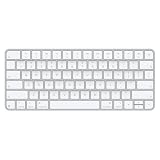
Apple Magic Keyboard (USB-C)
Spec line: Bluetooth · compact layout without a number pad · rechargeable over USB-C · designed for Mac and iPad
Best for: iPad users who live entirely inside the Apple ecosystem and want a familiar layout.
Skip if: you switch between several devices or use Android and Windows tablets, where it behaves less naturally.
- Pros: clean design, rechargeable, Apple layout.
- Cons: single-device oriented, no backlight, premium tier.
Worked example: how much weight does a Bluetooth keyboard save?
Suppose your tablet weighs about 460 g, a typical figure for an 11-inch tablet. A case-style keyboard such as the Apple Magic Keyboard for iPad Pro weighs about 658 g, and the Logitech Combo Touch ranges from about 474 g to 686 g depending on the tablet. Add the tablet and you carry roughly 1,120 g to 1,150 g with those keyboards.
Now swap to a Logitech Keys-To-Go 2 at about 220 g. The total is about 680 g. That saves roughly 440 g to 470 g, or around 40 percent less bag weight. The cost is that you lose the built-in stand and trackpad, so you pair the keyboard with a tablet case that props itself up. For a daily commuter, that trade is often worth it. For someone who works at a desk all day, it is not.
Step-by-step: pairing and keeping a Bluetooth keyboard reliable
- Put the keyboard in pairing mode. On Logitech models, hold the Easy-Switch button for a few seconds until the light blinks.
- Open the tablet’s Bluetooth settings and select the keyboard from the list. Enter any on-screen code if prompted.
- Select the right layout. On multi-OS keyboards, set the operating system mode so Command, Option and Windows keys map correctly.
- Save a second and third device on the other Easy-Switch slots, so you can jump between tablet, phone and laptop.
- If the connection drops after idling, press any key and wait a second for it to wake, then check for a firmware or battery issue if it persists.
- Replace or recharge early. Do not wait for the keyboard to die, especially before a trip.
How to choose: thresholds that settle the decision
Most buying mistakes come from a vague preference, so turn each criterion into a number you can check on the product page before you order.
- Typing time. If you type longer than about 30 minutes at a stretch, pick a board with deeper, shaped keys such as the MX Keys Mini, MX Keys S or a mechanical Keychron. Shallow travel is fine for short replies and notes.
- Carry weight. If the keyboard rides in a bag every day, stay under roughly 500 g and choose a compact or foldable body. Anything full-size belongs on a desk.
- Device count. If you also use a phone or a laptop, look for three pairing slots. One slot means re-pairing every time you switch, which gets old after about a week.
- Power. If you type under an hour a day, a replaceable-battery board can run a year or more between changes. If you type several hours a day with a backlight on, expect to recharge a rechargeable model every few weeks.
- Stand. A cradle groove is sized for tablets in the 10 to 11 inch class. A 12.9 inch tablet in a thick case needs its own stand, so check the maker’s stated width limit.
- Budget tier. Entry-level boards cover typing and switching. Pay for mid-range or premium only for a backlight, a better key feel or a number pad that you will really use.
Decision matrix
| You need | Choose |
|---|---|
| Cheapest reliable multi-device option | Logitech Pebble Keys 2 K380s |
| All-day typing in a small body | Logitech MX Keys Mini |
| Smallest and lightest | Logitech Keys-To-Go 2 |
| Tablet holder built in, entry-level tier | Logitech K480 |
| Desk setup with number pad and cradle | Logitech K780 |
| Desk setup with premium feel and backlight | Logitech MX Keys S |
| Rugged removable keyboard for iPad | ZAGG Pro Keys |
Safety and care notes
- Do not leave rechargeable keyboards on a charger for days in hot places such as a parked car, because heat shortens lithium battery life.
- Dispose of old coin cells and AAA batteries at a recycling point, and keep coin cells away from children and pets because they are a swallowing hazard.
- Wipe the keyboard with a slightly damp, lint-free cloth and never spray liquid onto the keys.
More Bluetooth tablet keyboards worth shortlisting
Competing roundups also recommend the boards below. They fill gaps in the main list: a colorful quiet board, an inexpensive backlit option, two foldables, a slim Microsoft design and a mechanical keyboard for desk setups.
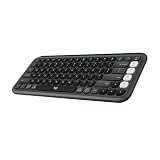
Logitech POP Icon Keys
Spec line: Bluetooth · compact quiet keys · Easy-Switch for 3 devices · customizable shortcut and emoji keys · works with Windows, macOS, iPadOS and Android
A published roundup names it a top all-round pick for Android tablets. It is a close cousin of the Pebble Keys 2 K380s with more color choices, a few programmable keys and the same low-profile feel, which makes it easy to carry between a tablet, a phone and a laptop.
Best for: buyers who want a friendly, quiet multi-device keyboard at an entry-level to mid-range tier.
Skip if: you want a backlight or a number pad. Check the battery type on the product page.
Pros: quiet typing, three-device switching, compact, extra programmable keys.
Cons: shallow keys compared with the MX Keys Mini, no tablet holder.
Arteck Universal Backlit Bluetooth Keyboard
Spec line: Bluetooth · slim backlit body · adjustable backlight colors · rechargeable · universal iPadOS, Android and Windows layouts
Arteck is a long-running budget name in tablet keyboards, and this universal model is the cheap way to get a backlight. It suits a tablet that lives on a nightstand or in a dim kitchen, where an unlit board would be hard to use.
Best for: entry-level shoppers who want backlit keys for evening typing.
Skip if: you switch between several devices. Budget boards often store a single pairing, so confirm the slot count on the listing.
Pros: backlight at a low tier, rechargeable, slim.
Cons: plasticky build, key feel is basic, limited multi-device support.

OMOTON Ultra-Slim Bluetooth Keyboard
Spec line: Bluetooth · ultra-thin body about 0.2 in per a published roundup · rechargeable · multimedia shortcut keys · iPad, iPhone and Android layouts
OMOTON shows up in several budget roundups for one reason: it is thin and light enough to disappear in a tablet sleeve. Typing is functional rather than pleasant, which is the trade for the size and the price.
Best for: commuters who send short messages and emails from a tablet and want the lightest, cheapest option.
Skip if: you write long documents or need a number pad.
Pros: very thin and light, low cost, rechargeable.
Cons: shallow keys, no backlight on this version, one device at a time on many versions.

Microsoft Designer Compact Keyboard
Spec line: Bluetooth · compact low-profile layout · matte finish · works with Bluetooth-enabled Windows, macOS, Android and iPadOS devices
Microsoft’s slim board trades a number pad for a tidy footprint and a refined look. It pairs with most tablets over Bluetooth and fits beside a laptop without crowding the desk. Check the battery type and pairing-slot count on the listing, since they vary by version.
Best for: people who want a slim, good-looking board in the entry-level to mid-range tier and mostly use one tablet.
Skip if: you need a backlight, a cradle or heavy multi-device switching.
Pros: slim, clean design, wide compatibility.
Cons: no tablet holder, no backlight.

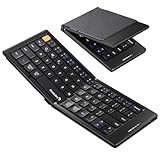
Samsers Foldable Bluetooth Keyboard with Touchpad
Spec line: Bluetooth · folds to pocket size · full-size layout when open · multi-touch trackpad · built-in phone holder
The trackpad is the draw here. On iPadOS and Android a pointer saves reaching for the screen while editing, and the fold-flat body lets you carry the whole kit in a jacket pocket. Expect some hinge flex and a lighter key feel than a rigid board.
Best for: travelers who want a pointer and a keyboard in one pocket-sized, entry-level package.
Skip if: you type for hours or need firm, deep keys.
Pros: trackpad, folds small, phone holder, low cost.
Cons: hinge flex, shallow typing feel, holder suits phones and small tablets only.

ProtoArc XK04 Foldable Keyboard
Spec line: Bluetooth · pocket-sized fold · PU leather cover · pairs with up to 3 devices · phone and tablet use
A leather-style cover protects the keys while the board rides in a bag, and three pairing slots let it follow you between a tablet and a phone. It is smaller than the Samsers when folded, but lacks a trackpad, so touch control stays on the screen.
Best for: frequent flyers who need the smallest possible footprint and switch between two or three devices.
Skip if: you want a trackpad or the firmest key feel.
Pros: very compact, three devices, protective cover.
Cons: hinge flex, shallow keys, no trackpad.
Keychron K2 Wireless Mechanical Keyboard
Spec line: Bluetooth · 75 percent layout · mechanical switches (silent red in this listing) · white backlight · Mac and Windows key layouts
A mechanical board is the answer for people who find slim keyboards unpleasant. The 75 percent layout keeps arrow keys and the function row in a smaller case than full-size, yet it is still a desk keyboard that needs a stand for the tablet and is heavy for a bag.
Best for: writers and coders who use a tablet at a desk and care about key feel.
Skip if: you travel with the keyboard, or you want a light board.
Pros: excellent key feel, backlight, compact for a mechanical board.
Cons: heavy, premium tier among tablet keyboards, no tablet holder.

All 15 Bluetooth tablet keyboards compared
This table combines the original eight picks with the seven added above. Cells marked Check listing are details that vary by version, so confirm them on the current product page.
| Model | Size class | Multi-device | Power | Backlight | Tablet holder |
|---|---|---|---|---|---|
| Logitech Pebble Keys 2 K380s | Compact | 3 devices | Replaceable battery | No | No |
| Logitech MX Keys Mini | Compact | 3 devices | Rechargeable | Yes, smart | No |
| Logitech Keys-To-Go 2 | Ultra-portable | Check listing | Check listing | No | No (wraparound cover) |
| Logitech K480 | Mid-size | Dial, 3 devices | Replaceable battery | No | Cradle |
| Logitech K780 | Full-size | Yes | Replaceable battery | Check listing | Cradle |
| Logitech MX Keys S | Full-size | 3 devices | Rechargeable | Yes | No |
| ZAGG Pro Keys | Case-style | No | Check listing | Yes | Case stand |
| Apple Magic Keyboard (USB-C) | Compact | No | Rechargeable | No | No |
| Logitech POP Icon Keys | Compact | 3 devices | Check listing | No | No |
| Arteck Universal Backlit | Slim | Check listing | Rechargeable | Yes | No |
| OMOTON Ultra-Slim | Ultra-thin | Usually 1 device | Rechargeable | Not on most versions | No |
| Microsoft Designer Compact | Compact | Check listing | Check listing | No | No |
| Samsers Foldable with Touchpad | Foldable | Check listing | Check listing | No | Phone holder |
| ProtoArc XK04 | Foldable | 3 devices | Rechargeable class | No | No |
| Keychron K2 | 75 percent mechanical | Check listing | Rechargeable | Yes, white | No |
Frequently asked questions
Will any Bluetooth keyboard work with my tablet?
Yes, any standard Bluetooth keyboard pairs with iPadOS, Android and Windows tablets. Some function keys may not map correctly unless you pick the right operating-system mode.
What is the best Bluetooth keyboard for an iPad?
The Logitech Pebble Keys 2 K380s is the best value, and the MX Keys Mini is the best for long typing. Both work with iPadOS and pair with several devices.
Do Bluetooth keyboards drain the tablet battery?
Bluetooth keyboards use very little tablet power because they rely on low-energy connections. The impact is small compared with the screen.
Is a Bluetooth keyboard better than a keyboard case?
A Bluetooth keyboard is lighter and works across devices, while a keyboard case adds protection, a stand and sometimes a trackpad. Choose by whether you value portability or an all-in-one setup.
Can one keyboard connect to a phone, tablet and laptop?
Yes, keyboards with Easy-Switch buttons or a dial, such as the Pebble Keys 2 K380s, MX Keys Mini and K480, store three devices and switch with one press.
Why does my Bluetooth keyboard disconnect?
Idle sleep is the most common cause. Press a key to wake it, replace weak batteries and keep the keyboard within a few meters of the tablet.
Do I need a backlit keyboard?
A backlight helps in dim rooms, planes and late-night work. If you type in good light, skip it and gain longer battery life at a lower tier.
Which Bluetooth keyboard has the longest battery life?
Replaceable-battery models such as the Pebble Keys 2 K380s are reported to run for years, while rechargeable backlit models last days to months depending on backlight use.
Bottom line
Start with the Logitech Pebble Keys 2 K380s if you want the best balance of price, portability and multi-device pairing. Step up to the MX Keys Mini for serious typing, choose the Keys-To-Go 2 when weight matters most, and pick the K480 or K780 when the keyboard should hold the tablet too. Confirm the operating-system mode and the battery type before you buy.
More from Amazon
Programs that pair well with the guide above. Offers and eligibility are set by Amazon and may change.
Free shipping on eligible items, Prime Video and more. Eligible new members can start with a free trial.
Start a Prime free trialAd-free music streaming. Eligible new subscribers can start with a free trial.
Try Music Unlimited freeA Prime membership for ages 18-24 with a trial period. Eligibility is set by Amazon.
See Prime for Young AdultsAudiobooks and podcasts to listen to on the go. Eligible new members can start with a free trial.
Try Audible freeAs an Amazon Associate we earn from qualifying purchases.