Key takeaways
- Compare the best smart displays for kitchens and bedrooms, with screen sizes, video calling cameras and built-in smart home hubs explained clearly.
- Top Pick: Amazon Echo Show 8 (3rd Gen)
- Runner-up: Amazon Echo Show 10 (3rd Gen)
- Also consider: Amazon Echo Show 15 (2nd Gen)
A smart display earns its counter space when it does three jobs well: it answers questions and runs timers by voice, it shows cameras, calendars and recipes at a glance, and it controls the rest of your smart home without another app hunt. The five models below cover the main sizes, from a compact bedside screen to a large kitchen display that doubles as a small television, and each one is sold on Amazon.com.
As an Amazon Associate, we earn from qualifying purchases.
Quick Answer
For most kitchens, the Amazon Echo Show 8 (3rd Gen) is the sweet spot, pairing an 8-inch screen and a strong camera with a built-in Zigbee, Matter and Thread hub. Bedrooms suit the smaller Echo Show 5 or the camera-free Google Nest Hub, while the Echo Show 15 suits big kitchens and the Echo Show 10 suits frequent video callers.
How to Choose
Start with screen size and placement. A 5-inch class display fits a nightstand without dominating it, an 8-inch model is the natural kitchen counter size for reading recipes and seeing who is at the door, and a 15-inch class screen works as a family command center or a small TV substitute. Bigger screens also make video calls feel less cramped, so frequent callers should size up.
Next, check the camera. Every Echo Show here has a camera with a physical shutter or cover for privacy, and the larger models add auto-framing that keeps you centered while you move around a kitchen. The Google Nest Hub takes the opposite approach and leaves the camera out entirely, which many people prefer for a bedroom. If the display will sit beside a bed, decide which trade-off you value more: video calling or a camera-free room.
Then look at the built-in hub. Some displays connect Zigbee, Matter and Thread devices directly, which means bulbs, locks and sensors can pair without a separate bridge. That matters if you plan to grow a smart home over time. Displays without a hub still control Wi-Fi devices and work with separate bridges, but they cannot adopt hub-based accessories on their own.
Finally, pick your assistant ecosystem. Echo Show models run Alexa and tie into Ring cameras, Amazon services and Fire TV content on the largest model. The Nest Hub runs Google Assistant, works naturally with Google Photos, YouTube and Nest cameras, and adds radar-based sleep tracking. Mixing ecosystems is possible, but routines, calling and camera feeds stay simpler when the display matches the gear you already own.
Amazon Echo Show 8 (3rd Gen)
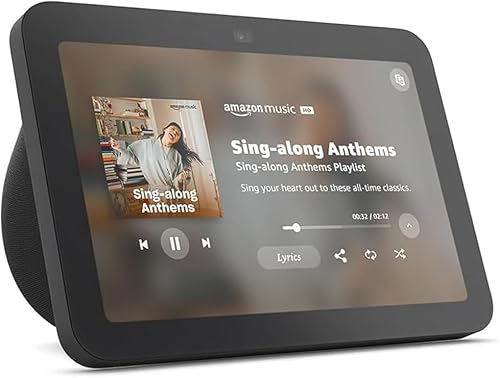
The Echo Show 8 is the most balanced display in this roundup. Its 8-inch HD touchscreen is large enough for recipes, lyrics and doorbell camera feeds, yet the footprint still fits a crowded counter. A 13 MP camera with auto-framing handles video calls well, and the centered placement keeps faces in view while you cook or tidy up.
What sets this generation apart is the hub hardware inside: Zigbee, Matter and Thread support are built in, plus Wi-Fi 6E for a faster, less congested connection to your router. That makes the Show 8 a genuine control point for a growing smart home rather than just a screen. Spatial audio gives music and podcasts more presence than the smaller models manage.
Choose it for a kitchen counter, a home office desk or a busy hallway where one device should cover entertainment, calling and device control in equal measure.
Specs
| Feature | Detail |
|---|---|
| Display | 8-inch HD touchscreen |
| Camera | 13 MP with auto-framing and shutter |
| Smart home hub | Zigbee, Matter and Thread built in |
| Connectivity | Wi-Fi 6E, Bluetooth |
| Assistant | Alexa |
| Color in listing | Charcoal |
Amazon Echo Show 10 (3rd Gen)

The Echo Show 10 is built around movement. Its 10.1-inch HD screen sits on a motorized base that rotates to face you as you move around the room, which makes it the strongest option here for video calls and for following a recipe from different spots in a large kitchen. The 13 MP camera pairs with that motion for smooth auto-framing and digital panning.
Audio is the other headline: a front-facing speaker setup with a woofer delivers the fullest sound of any model in this guide, so it doubles as a respectable kitchen speaker. A built-in Zigbee hub covers smart home control, and the camera can also work as a home monitoring camera you check from the Alexa app while away.
The trade-offs are size and placement. The rotating base needs clear space around it, so measure your counter before ordering, and it suits open kitchens better than tight galley layouts.
Specs
| Feature | Detail |
|---|---|
| Display | 10.1-inch HD touchscreen, motion base |
| Camera | 13 MP with auto-framing and shutter |
| Smart home hub | Zigbee built in |
| Audio | Two tweeters and a woofer |
| Assistant | Alexa |
| Color in listing | Charcoal |
Amazon Echo Show 15 (2nd Gen)

The Echo Show 15 is the family hub of the group. A 15.6-inch Full HD screen mounts on a wall or sits on an optional stand, and the home screen organizes widgets for calendars, shopping lists, sticky notes and smart home favorites so everyone in the house can see the day at a glance. Built-in Fire TV turns it into a small kitchen television for news, streaming apps and cooking shows.
This generation adds a 13 MP camera with auto-framing for calls, Wi-Fi 6E, and a full hub stack with Zigbee, Matter and Thread support. Photo Frame mode displays your pictures when the display is idle, and visual ID lets it show personalized calendars and reminders for each household member it recognizes.
Pick the Show 15 for a large kitchen, a mudroom wall or a family room where a shared information board matters more than a compact footprint. Small apartments may find it more screen than they need.
Specs
| Feature | Detail |
|---|---|
| Display | 15.6-inch Full HD touchscreen |
| Camera | 13 MP with auto-framing and shutter |
| Smart home hub | Zigbee, Matter and Thread built in |
| Extra | Built-in Fire TV, wall mountable |
| Connectivity | Wi-Fi 6E, Bluetooth |
| Assistant | Alexa |
Amazon Echo Show 5 (3rd Gen)
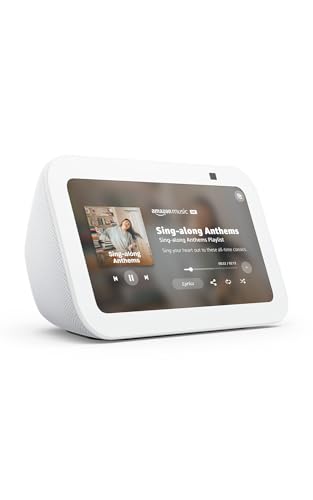
The Echo Show 5 is the bedside pick. Its 5.5-inch screen shows time, weather and alarms without lighting up a whole room, and the compact body fits nightstands and small desks where the larger models would crowd out everything else. This generation improves the speaker with a larger driver and clearer vocals, and the 2 MP camera covers quick check-in calls.
You give up the built-in device hub found in the bigger Echo models, so the Show 5 controls Wi-Fi devices and works through other bridges rather than pairing Zigbee accessories directly. For an alarm clock upgrade with music, routines and a sunrise-style wake-up light effect, that compromise rarely matters.
The listing verified for this guide is the Glacier White finish, which blends into light-colored bedrooms and shelves. A physical camera shutter and a mic off button cover privacy basics for a device that lives beside the bed.
Specs
| Feature | Detail |
|---|---|
| Display | 5.5-inch touchscreen |
| Camera | 2 MP with built-in shutter |
| Smart home hub | No built-in hub |
| Audio | 1.75-inch full-range driver |
| Assistant | Alexa |
| Color in listing | Glacier White |
Google Nest Hub (2nd Gen)

The Nest Hub is the one display here with no camera at all, and for bedrooms that is a feature rather than a gap. A 7-inch touchscreen handles photos, timers, media and smart home controls, while Google Assistant answers questions and runs routines. Without a camera there are no video calls, but also nothing to cover or worry about in a private room.
Its signature extra is Sleep Sensing, which uses a built-in radar sensor to track sleep patterns, breathing and disturbances like coughing or a snoring partner, then shows a morning summary on screen. Sunrise alarms, a low-light friendly display that dims and warms at night, and Quick Gestures for pausing media with a hand wave round out the bedside focus.
The Nest Hub also works as a Matter controller and Thread border router, so it can anchor Google Home setups. Choose it if your home already leans on Google services, Nest cameras or Google Photos.
Specs
| Feature | Detail |
|---|---|
| Display | 7-inch touchscreen |
| Camera | None |
| Sleep tracking | Sleep Sensing with radar sensor |
| Smart home hub | Matter controller, Thread border router |
| Assistant | Google Assistant |
| Color in listing | Chalk |
Who Should Skip It
Skip smart displays entirely if you only want voice answers and music, because a cheaper smart speaker does that job without a screen to clean or a camera to manage. Skip the camera-equipped models for a bedroom if a lens beside the bed bothers you even with a shutter; the camera-free Nest Hub exists for exactly that concern. Also skip the largest models if your counter or wall space is tight, since the Show 10 needs room to rotate and the Show 15 needs a wall or stand. Finally, if your home is committed to one assistant, displays from the rival ecosystem will frustrate you with partial integrations.
FAQ
Can a smart display replace a separate smart home hub?
Sometimes. Models with a built-in hub, such as the Echo Show 8, Echo Show 15 and Nest Hub, can pair and control Zigbee, Matter or Thread devices directly. Displays without a hub still control Wi-Fi devices, but hub-based accessories need their own bridge or a hub-equipped device elsewhere in the home.
Which smart display is best for a bedroom?
The Echo Show 5 and the Google Nest Hub are the natural fits. The Show 5 is compact with a gentle wake-up light and a camera shutter, while the Nest Hub removes the camera entirely and adds sleep tracking. Both dim their screens at night so they work as alarm clocks without glare.
Do smart displays work for video calls between brands?
Not directly. Echo Show models call other Alexa devices and use supported calling services inside the Alexa ecosystem, while the Nest Hub has no camera and cannot make video calls. For cross-platform calling to phones and laptops, a tablet or phone remains the simpler tool.
Do I need a subscription to use a smart display?
No subscription is required for the core features in this guide: voice assistance, timers, music from free tiers, camera feeds and smart home control all work out of the box. Optional paid services, such as music streaming upgrades or camera recording plans for connected doorbells, are separate from the display itself.
Final Verdict
Most households should start with the Echo Show 8 (3rd Gen): it combines the right screen size, a capable camera and a full smart home hub in one counter-friendly unit. Choose the Echo Show 10 if video calls anchor your routine, the Echo Show 15 for a wall-mounted family board, the Echo Show 5 for a compact bedside clock, and the Google Nest Hub if you want a camera-free display with sleep tracking inside a Google-based home.
More from Amazon
Programs that pair well with the guide above. Offers and eligibility are set by Amazon and may change.
Free shipping on eligible items, Prime Video and more. Eligible new members can start with a free trial.
Start a Prime free trialAd-free music streaming. Eligible new subscribers can start with a free trial.
Try Music Unlimited freeA Prime membership for ages 18-24 with a trial period. Eligibility is set by Amazon.
See Prime for Young AdultsAudiobooks and podcasts to listen to on the go. Eligible new members can start with a free trial.
Try Audible freeAs an Amazon Associate we earn from qualifying purchases.